Key takeaways
- A social media dashboard consolidates performance data from every platform into one view, so you can track metrics, spot trends, and report results without switching between apps.
- Different dashboard types serve different goals, from awareness and engagement tracking to competitive analysis, executive reporting, and employee advocacy. Pick the template that matches your objectives.
- The most effective dashboards focus on KPIs tied to business objectives, not vanity metrics, which makes it easier to prove social media ROI to leadership.
- You can build a basic social media dashboard for free with Google Looker Studio, or use Hootsuite Social OS for pre-built templates with cross-platform analytics and AI-powered insights.
A social media dashboard is a single interface that pulls metrics from all your social accounts into one place for tracking, analyzing, and reporting on performance.
Enterprise marketing teams, agencies managing multiple clients, and growing social teams rely on them most, because the reporting burden scales with every new account and campaign.
Instead of logging into Instagram, LinkedIn, Facebook, TikTok, and X separately to check results, a dashboard brings everything together. You get a single view of what’s working, what’s not, and how your social efforts connect to business goals.
Most dashboards include real-time or near-real-time data, customizable visualizations (charts, graphs, tables), and the ability to filter by platform, date range, campaign, or metric. They range from free tools like Google Looker Studio to connected systems like Hootsuite Social OS that combine scheduling, publishing, and cross-platform analytics in one place.
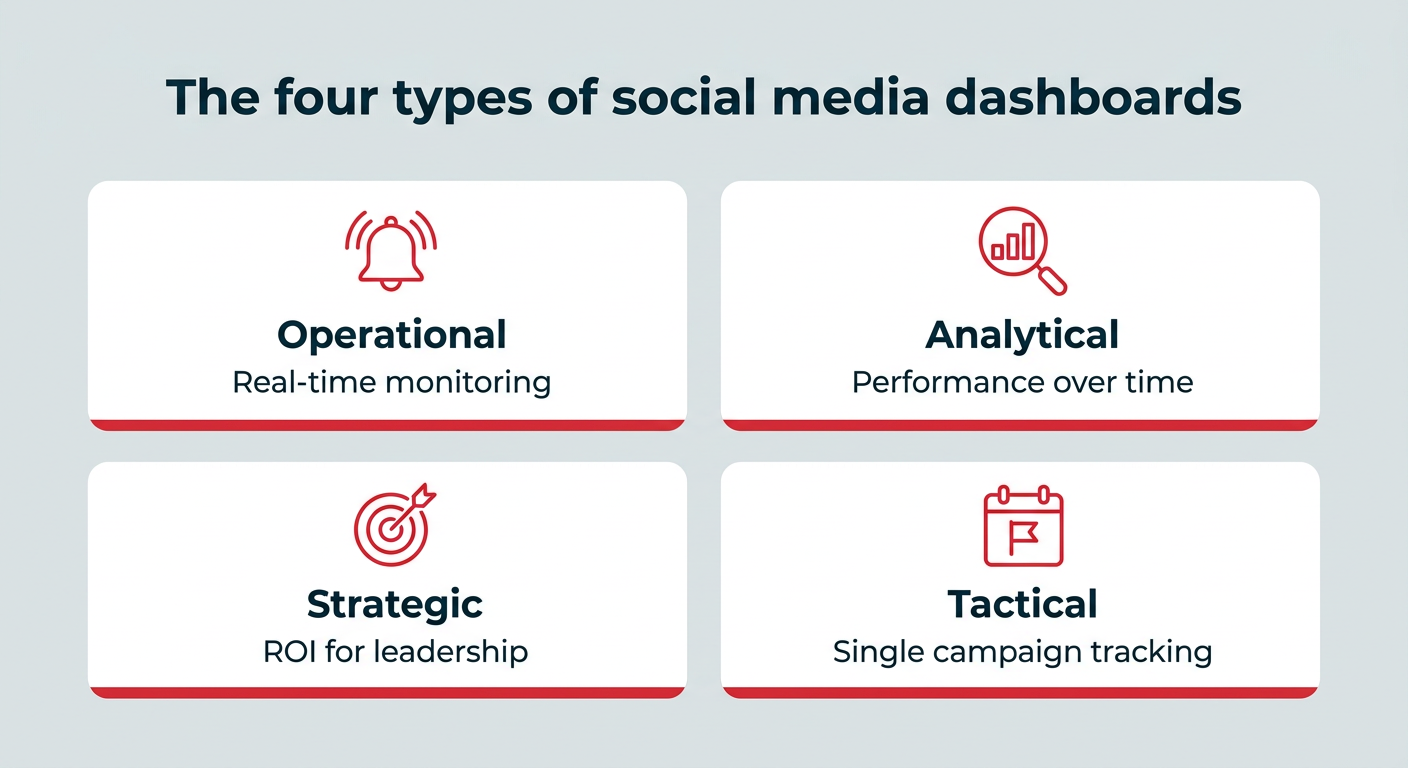
Dashboards tend to fall into four categories, and knowing which one you’re building keeps you from cramming every metric into a single view. The four types are operational, analytical, strategic, and tactical.
- Operational: Day-to-day monitoring of live activity, like incoming messages, mentions, and publishing status.
- Analytical: Deeper performance analysis across longer time ranges, used to find patterns in content, formats, and audiences.
- Strategic: High-level KPIs and ROI reporting for leadership, usually reviewed monthly or quarterly.
- Tactical: Campaign-specific tracking with a start and end date, focused on whether a single initiative hit its targets.
Dashboard type
Purpose
Who uses it
Operational
Monitor real-time activity and response needs
Social media coordinators, community and care teams
Analytical
Analyze content and audience performance over time
Social media managers, analysts
Strategic
Report ROI and progress against business goals
CMOs, VPs of marketing, directors
Tactical
Track a specific campaign from launch to wrap
Campaign managers, paid social specialists
Most of the templates later in this article map to one of these four types, so you can match the template to the job you’re actually trying to do.
The four types of social media dashboards
Dashboards solve a measurement problem that grows with your budget. With over $121 billion in US social ad spending projected for 2026, the cost of not knowing what’s working keeps rising. For enterprise teams managing multiple accounts, campaigns, and stakeholders, dashboards solve real operational problems.
Faster, easier reporting
Switching between native analytics on every platform to compile a monthly report can eat up hours. A dashboard lets you export all the data and visualizations you need for presentations and reports in minutes, not hours. That time goes back into strategy and execution.
Real-time decision-making
When performance data is scattered, you’re always reacting late. A dashboard gives you an at-a-glance view of what’s working (and what’s not), so you can pivot your social media strategy when it actually matters. AI-powered insights can surface trends and anomalies you might otherwise miss.
Proving social media ROI to leadership
One of the biggest challenges for social teams is connecting their work to business outcomes, especially when 59% of CMOs report insufficient budget to execute their strategy. Budget conversations go better when you can show the trend line, not just last month’s numbers, particularly with marketing budgets flat at 7.8% of revenue.
A dashboard lets you view performance in context with historical data, track progress toward business goals over time, and present the data leadership needs to see, including social media metrics tied to revenue, leads, and brand health. Hootsuite Social OS keeps publishing, listening, and analytics in connected systems, so the activity your team logs and the outcomes you report on come from the same place.
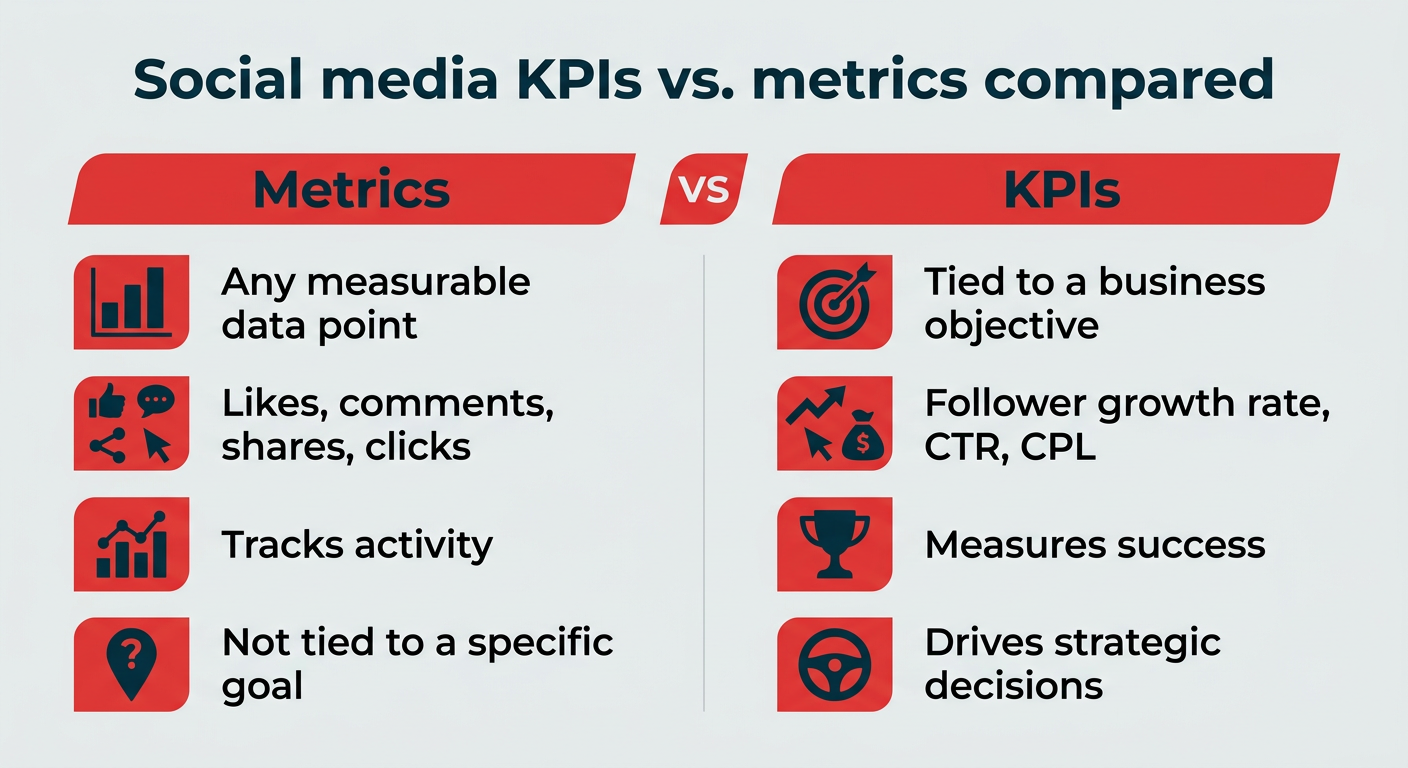
The metrics on your dashboard should map directly to your goals. Tracking everything leads to dashboard clutter. Tracking the right things leads to better decisions.
Here’s a quick reference for matching goals to metrics and the dashboard type that fits:
Match dashboard metrics to your goals
Goal
Key metrics
Dashboard type
Awareness
Reach, impressions, follower growth
Brand awareness dashboard
Engagement
Engagement rate, likes, comments, shares, saves
Content and engagement dashboard
Conversions
Link clicks, UTM-tracked traffic, conversion rate
Conversions and traffic dashboard
Customer service
CSAT score, response time, resolution rate
Social customer service dashboard
Competitive intelligence
Competitive analysis dashboard
Executive reporting
ROI, revenue impact, goal progress, sentiment
Executive summary dashboard
Paid social
CPC, CPA, ROAS, CPM
Advertising and paid social dashboard
A strong social media analytics dashboard also includes historical context, so you can compare current performance to previous periods and track progress over time. Once you know which metrics belong on your dashboard, the next question is how to lay them out.
A dashboard is only as useful as the decisions it supports. These five rules keep yours focused, and they’re worth reading before you pick a template.
- Start with a specific goal, not “track everything.” Each dashboard should answer a clear question, like “How is our Instagram engagement trending?” or “What’s the ROI of our latest campaign?” Dashboards that try to cover everything end up highlighting nothing, and 49% of marketing leaders say analytics don’t drive action.
- Match the dashboard to the audience. A dashboard for your social team should include granular, day-to-day metrics. A dashboard for your VP of Marketing should focus on high-level KPIs, trends, and business impact. Design for the person reading it.
- Set a review cadence. Decide how often to review each dashboard. Weekly check-ins work well for ongoing performance. Daily reviews make sense during active campaigns. Monthly deep-dives are best for strategic reporting to leadership.
- Use historical benchmarks for context. A number without context is just a number. Include year-over-year and previous-period comparisons so you can tell whether performance is improving, declining, or holding steady.
- Keep it visual and scannable. The best dashboards follow the 5-second rule: anyone viewing it should be able to grasp the key takeaway within five seconds. Use clear labels, consistent color coding, and limit each view to the metrics that matter most.
Brand awareness dashboard
This social media dashboard template shows how much your audience interacts with your social media posts and accounts, plus how engagement, reach, and follower count has changed over time. For enterprise teams, awareness tracking is especially valuable for measuring the impact of brand campaigns and understanding how your audience is growing across regions or segments.
Why you need it: Understand how much of your current audience interacts with your organization, and how often. Track awareness growth over time to inform social media strategy decisions.
Metrics to track:
- Follower growth
- Engagement rate
- Impressions
- Reach
- Likes
- Comments
- Shares
- Link clicks (on supported social media platforms)
- DM automations (on supported social media platforms)
Conversions and traffic dashboard
This social media dashboard tracks link clicks across platforms. Tracking is limited by each platform’s capabilities (e.g., Instagram doesn’t offer clickable links in posts), but provides a good overview of click conversions, including clicks by media format, trends, and more on Facebook, LinkedIn, and Pinterest.
For full-funnel measurement, pair your dashboard data with Google Analytics or your CRM to connect social clicks to downstream actions like signups, purchases, or pipeline.
Why you need it: Know the true ROI of your social media management efforts and speak to the business results social media is driving for your organization. Track clicks and traffic over time to show impact and justify trying new ideas and more investment in social media marketing.
Metrics to track:
- Link clicks (web traffic)
- UTM link parameters
- Hashtag, post, and profile clicks (depending on platform availability)
Content and engagement performance dashboard
This dashboard combines two views that work best together: overall engagement rate trends and individual post performance. You can track engagement rate by platform and per post, find your top performing content sorted by the metric of your choice, and see which content formats are driving the most interaction.
Engagement rate isn’t a vanity metric. It’s a direct representation of how well your content resonates with your audience. Pairing it with post-level performance data helps you tweak your strategy when necessary and understand if your experiments are working.
Why you need it: Quickly identify your best performing content and understand what’s driving results. Effectively repurpose top posts or use Hootsuite’s built-in AI tools to brainstorm related new content ideas to fill your content calendar with what’s working.
Metrics to track:
- Engagement rate for the previous 30 days (per platform)
- Engagement rate per post
- Top social media posts over the previous 30 days, sorted by highest engagement rate
- Likes, comments, saves, shares
- Impressions/views
- Performance by post format (e.g., Reels vs. Stories, carousels vs. photos)
Network-specific dashboards
This shows Hootsuite’s Instagram overview report template. Network-specific social media analytics dashboards for all supported platforms are included in all Hootsuite plans.
Overall performance dashboards are important for understanding how your entire social strategy is working and how your activity on each platform contributes to that success. But you also need to deeply understand each platform you’re on, including why you’re on it, what content people expect to find there, and trends on each platform. Even with a cross-platform view, platform-specific analysis reveals nuances that aggregate data can hide.
Why you need it: Understand how each platform contributes to your business goals. Measure which content formats and topics perform the best on each platform, so you can optimize your strategy and get results faster.
Metrics to track:
- Engagement metrics for one platform (likes, comments, shares, saves, clicks, views, etc).
- Follower growth rate and demographics.
- Top performing content: Track performance of formats (e.g. Reels, photo, text, carousel, etc) and topics (e.g. memes, educational, promotional, content about a specific topic in your industry, etc).
To easily measure content performance, create custom tags in Hootsuite Analytics to label content by goal or topic. For Hootsuite’s own Social Media Lead, Trish Riswick, tags are crucial:
We tag our posts according to which of our three pillars they belong to, then pull analytics reports for each of those tags. That allows us to track performance by pillar and goal, as well as all the overall, built-in reports in Hootsuite Analytics. Trish Riswick, Former Social Team Lead, Hootsuite
We tag our posts according to which of our three pillars they belong to, then pull analytics reports for each of those tags. That allows us to track performance by pillar and goal, as well as all the overall, built-in reports in Hootsuite Analytics. Trish Riswick, Former Social Team Lead, Hootsuite
Social listening dashboard
Social listening data improves everything from your content strategy to protecting your brand reputation, improving customer service, and proving ROI.
Lumen, the integrated insights and listening app inside Hootsuite Social OS, analyzes millions of social media conversations in real time and provides AI-powered summaries. That means you can quickly get the data you need to make decisions, uncover trends, and understand how people feel about your brand, or any topic.
Why you need it: Get the data you need to make informed decisions to improve your social media strategy. Understand your audience, what they want, and what’s working (and what isn’t) so you can get real business results from your social media channels faster, and prove it.
Metrics to track:
- Social mentions: Track mentions of your brand or product name across social media and the web, whether people tag you or just type your name in a caption.
- Brand sentiment: Spot spikes in positive or negative sentiment to identify potential crises, or opportunities to capitalize on positive publicity.
- Competitive intelligence: Know what will trend before your competitors, and track sentiment about your competitors as well as benchmarks, so you always stay ahead.
Competitive analysis dashboard
Keep your finger on the pulse of your competition with customized competitive analysis social media dashboards in Hootsuite. View your social media performance against industry benchmarks and against specific competitors, plus see follower growth, brand sentiment, and trends across your niche.
Competitive benchmarking data doesn’t just tell you where you stand. It informs content strategy, helps justify budget requests, and reveals gaps your competitors haven’t filled yet.
Why you need it: Understand how your social media performance compares to your most important competitors and industry averages.
Metrics to track:
- Net follower gain or loss over time.
- Post engagement, including average engagement rates, likes, views, comments, shares, and more.
- Your performance against industry benchmarks.
- Audience demographics and how those compare to your competitors.
Social customer service dashboard
Social media customer service is becoming an expectation for many people: 81% of customers expect faster service as technology advances. Using automated customer service chatbots, creating separate social channels for customer service, or leveraging automated DMs are a few ways to meet your customers where they are, though monitoring quality is critical, since a third of companies risk harming CX with frustrating AI self-service.
Why you need it: Evaluate the effectiveness of your social media customer service initiatives and find ways to improve. Plus, prove the ROI of your social media customer care strategy to leadership.
Metrics to track:
- Customer satisfaction score (CSAT) results over time.
- Customer service wait times.
- Brand sentiment over time.
- If you use automated customer service chatbots: escalation rate (how many times customers asked to speak to a person) and resolve rate (how many conversations the chatbot was able to resolve).
Hootsuite can measure all this while powering your entire social customer service program. Here’s a look at Nest, the customer care app in Hootsuite Social OS, where conversations across channels land in one place.
Executive summary dashboard
While you may enjoy diving deep into analytics tools, your leaders likely prefer high-level summaries. They want to know how social media is performing but they don’t need to know every detail. Having an executive summary social media dashboard means you can whip up a status report on the metrics that matter in minutes, not hours.
Hootsuite includes a built-in social performance score on all plans that shows a weekly or monthly snapshot of your social media performance across Facebook, Instagram, and LinkedIn. It’s your instant snapshot of audience growth trends, what content resonates most, average engagement, and ad campaign performance for all your profiles over the last 30 days. Use it as a starting point, or customize a more detailed executive report.
Always be ready to show ROI, speak to your team’s work, or answer the question, “Did we go viral this month?”
Why you need it: Always have a succinct report ready to show your leaders that includes key metrics and actionable insights alongside what each one means for the organization.
Metrics to track:
The exact metrics you track will depend on your goals and current social media campaigns. Want something to start from? Grab our free social media report template and customize it to suit your needs.
Example metrics include:
- Basics: Impressions, reach, views, net follower gain/loss
- Engagement: Top posts, likes, comments, shares, video views, engagement rate (per post and average)
- Brand related: Sentiment over time, social mentions
- Campaign related: Performance for current or recently completed organic and paid campaigns
- Conversion metrics: Link clicks
- Advertising metrics (optional): Ad spend, cost-per-click (CPC), reach, conversions
- Goal specific: Metrics you’re using to measure your current social media goals. For example, if your goal is to boost your engagement rate on Instagram, show average engagement rate over time alongside metrics like impressions, and a comparison of your Instagram engagement rate vs. key competitors’ engagement rates.
Employee advocacy dashboard
Employee advocacy programs help you get even more out of your most important asset, your people, by engaging them as brand ambassadors. This means having pre-approved content employees can share to their own social media profiles, organically expanding your reach and building trust.
Formal programs running on Parliament, the employee advocacy and amplification app in Hootsuite Social OS, make creating these pre-approved content libraries easy, plus analytics to measure program success and business impacts. But you can also take an informal approach by encouraging employees to share content from your company profiles.
Why you need it: Building trust with your audience is crucial for both social media success and overall business success. Besides big gains in reach, employee advocacy also keeps your employees connected to your brand and engaged as partners in achieving business goals.
Calculate your potential reach expansion with our employee advocacy calculator.
Metrics to track:
- Adoption rate: The percentage of your employees enrolled in the program.
- Top contributors: The employees sharing the most content. Reward their activity!
- Financial impact: Leads and sales resulting from employee-shared content.
- Content-related social media metrics: Reach, engagement rate, traffic from employee-shared posts.
Advertising and paid social dashboard
Besides planning and scheduling your organic and paid content together in Hootsuite, you can also view performance side-by-side. That way you get a holistic view of all your social media marketing together and can see how organic content impacts your ad performance, and vice versa.
Why you need it: With global social media ad spending on pace to reach roughly $530 billion by 2030, seeing all your paid ad performance quickly lets you uncover actionable insights in time to make real impacts on your campaigns before they end.
Metrics to track:
- Cost per click (CPC)
- Cost per acquisition (CPA)
- Cost per mille (CPM) a.k.a. cost per 1,000 impressions
- Return on ad spend (ROAS)
- Conversion rate
- Engagement rate
- Relevance and quality scores: Each platform has their own scoring system that can impact your ad reach. For example, Meta calls it “Quality Ranking.”
You have two realistic paths. In Hootsuite Social OS, you pick a pre-built report template, choose your accounts and date range, and the data populates automatically, which takes a few minutes and keeps updating as platforms change. If you’d rather build something fully custom for free, Google Looker Studio is the way to go, with the tradeoff of manual setup and ongoing maintenance.
Here’s how the Looker Studio route works in six steps:
- Log in to Google Looker Studio
- Create a data source
- Enter your business info
- Connect Google Analytics
- Create your dashboard
- Add metrics and finalize
You’ll need three things to get started:
- A Google account
- A Google Analytics 4 property connected to your website
- Ample spare time
Now here’s what to do.
Step 1: Log in to Google Looker Studio. Go to Looker Studio and sign in with your Google account.
Step 2: Create a data source. At the top left, click Create, then Data source.
Step 3: Enter your business info. Enter your country and business name. Agree to the terms and click Continue.
Step 4: Connect Google Analytics. Choose the Google Analytics connection from the list of available data sources. Then click Authorize, choose your Analytics account, and click Connect at the top right.
Step 5: Create your dashboard. After connecting your Analytics account, you’ll see a dense data view that isn’t immediately useful. To start turning this into something you can actually use, click Create report at the top right.
Instead of overwhelming data, you’ll see a blank canvas.
Step 6: Add metrics and finalize. You’ll need to add metrics to your custom social media dashboard one by one from the list of 400+ metrics on the right side. Position them, add headings, and adjust the layout as you go.
Your end result will be a perfectly customized social media dashboard that includes all the metrics you care about most, and nothing you don’t. However, getting that for free comes at a cost: your valuable time spent building this report by hand, and the lack of automatic updates as platforms evolve.
The right social media dashboard tool depends on your team size, how many platforms you manage, and whether you need publishing and engagement in the same place as reporting. Here are six worth shortlisting.
Tool
Best for
Standout feature
Starting price
Hootsuite Social OS
Teams that publish, listen, and report in one place
Pre-built cross-platform reports plus AI-powered insights
$99/user/month (Standard)
Google Looker Studio
Budget-conscious teams comfortable with manual setup
Fully custom reports built on GA4 data
Free
Klipfolio
Analysts who want granular control over visualizations
Custom metric formulas across many data sources
Paid plans
Databox
Teams tracking marketing goals across tools
Goal tracking and automated performance alerts
Paid plans (verify current free tier availability on databox.com/pricing)
DashThis
Agencies producing recurring client reports
Automated, white-labeled report delivery
Paid plans
Whatagraph
Multi-client reporting at scale
Templated visual reports across marketing channels
Paid plans
A closer look at what each one does well:
- Hootsuite Social OS: The strongest fit if you want reporting connected to the work that produces it. Every template in this article is pre-built, data updates automatically, and Lumen adds listening and sentiment alongside your owned-channel metrics. Standard starts at $99/user/month, Advanced at $249/user/month for customizable analytics and report exports, and Enterprise adds SSO, Parliament for advocacy, and advanced analytics.
- Google Looker Studio: The best free option. Connect GA4 and other sources, then build exactly the view you want. Expect to invest real time in setup and upkeep.
- Klipfolio: Built for teams who want to define their own metrics and calculations rather than accept defaults. Best suited to someone who enjoys working in data.
- Databox: Pulls metrics from marketing tools into shared scorecards with goal tracking, which makes it useful for cross-channel progress reviews.
- DashThis: Designed around recurring reporting. If you send the same report to the same stakeholders every month, automation is the draw.
- Whatagraph: Leans on templated, visual reports, which helps when you’re producing many reports for different audiences.
Whichever direction you lean, evaluate tools against the same criteria: