Key takeaways
- Social media analytics is the process of collecting, analyzing, and reporting on data from social platforms to measure performance and inform strategy across owned, earned, and paid social.
- The seven main types of social media analytics (performance, audience, competitive, sentiment, listening, paid, and influencer) each serve a distinct strategic purpose.
- Tracking the right metrics matters more than tracking all of them. Map 3-5 KPIs to each business goal to prove ROI and justify budget to leadership.
- An effective analytics strategy starts with clear goals, a unified tool, and a consistent reporting cadence that connects social performance to business outcomes.
Social media analytics means the collection, analysis, and reporting of data points that help you measure the performance of your social media accounts and guide business decisions.
These are the KPIs and metrics that help you assess and refine your social media marketing strategy on both macro and micro levels. That includes data from your own content (owned), conversations about your brand (earned), and your ad campaigns (paid).
For enterprise teams, analytics goes beyond what’s available in native platform dashboards. It often means integrating social media data with web analytics, CRM systems, and business intelligence tools to get a unified view of performance across brands, regions, and channels.
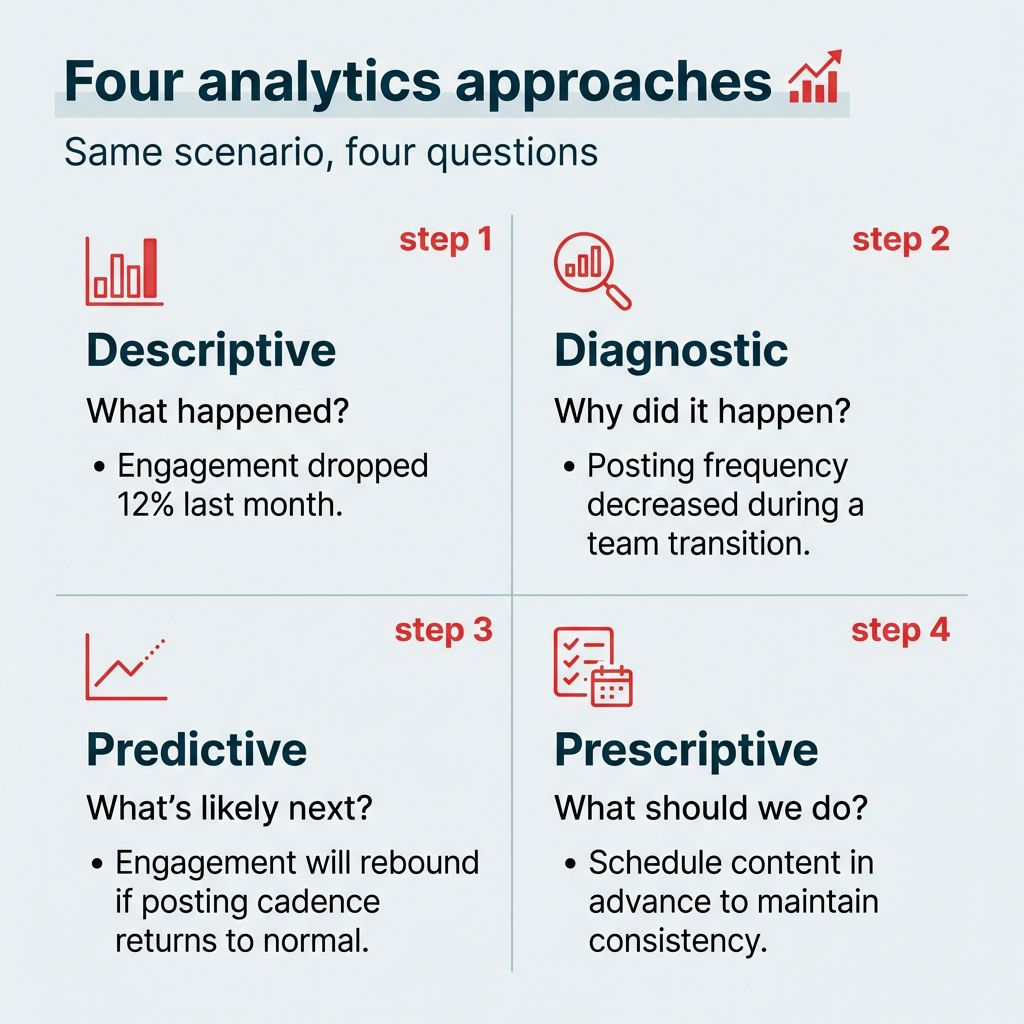
At a conceptual level, there are four analytical approaches that apply to social media data:
- Descriptive: What happened? (e.g., engagement dropped 12% last month)
- Diagnostic: Why did it happen? (e.g., posting frequency decreased during a team transition)
- Predictive: What’s likely to happen next? (e.g., engagement will rebound if posting cadence returns to normal)
- Prescriptive: What should we do about it? (e.g., schedule content in advance to maintain consistency)
Understanding these four approaches helps you move from simply reporting numbers to actually using social media data to drive decisions.
Bonus!!!
Get a free social media report template to easily and effectively present your social media performance to key stakeholders.
What is the difference between social media analytics and reporting?
The difference comes down to purpose: analytics is the work of interpreting data to find insight, while social media reporting is the work of organizing and presenting that data to other people. Teams often use the words interchangeably, which is why dashboards sometimes get mistaken for analysis.
- Analytics: Asks “why did this happen?” and “what should we do next?” It involves comparing results against benchmarks, testing theories, and recommending changes.
- Reporting: Answers “what happened?” It packages metrics into a format stakeholders can read, usually on a set schedule.
Both matter. Reporting keeps leadership informed and creates a record of performance over time. Analytics is what turns that record into decisions about budget, content, and resourcing. A dashboard full of numbers nobody interprets is reporting without analytics, and that’s where most teams lose value.
Social media analytics connects your social performance to business outcomes. Without it, you’re making content decisions based on gut instinct rather than evidence. Here’s why it matters for marketing teams at every level.
How does it help you understand performance?
Social media analytics provide a wealth of information about how your content is performing. Exactly what you track depends on what goals you’re trying to achieve, and the associated metrics that track those results.
Social media metrics generally fall into one of four categories:
- Awareness: Current and potential audience.
- Engagement: How audiences are interacting with your content.
- Conversion: How audiences convert to customers, subscribers, or leads.
- Consumer: How active customers think and feel about your brand.
If your goal is to grow your following, then engagement metrics (like follows and likes) are important. If your goal is sales, conversion-related metrics are more relevant. These might include views or click-through rates. With a dedicated tool like Hootsuite Social OS, you can even track conversion events back to specific social posts.
Enterprise teams especially benefit from cross-platform views that pull all of this data into one place, rather than toggling between native dashboards for each channel.
Social media analytics help you gauge customer sentiment, spot trends, and avoid PR crises before they happen.
How does it help you know your audience?
The best way to create content that resonates with your target audience is to develop a deep understanding of who your audience is. Social media analytics help you understand your audience demographics. This enables better decisions about your content strategy.
For example, Gen Z is much more concerned with a brand’s aesthetics and vibes than Baby Boomers. Boomers, on the other hand, are much more interested in inspirational content.
Knowing whether you’re marketing to Boomers or Gen Z gives you a better framework for content decisions.
Analytics also help you understand:
- Segmentation of your audience into meaningful groups
- Where in the world your audience lives
- The languages they speak
- Brand mentions and how customers perceive your brand
- Their top interests and online behaviors
You can even use analytics to get custom reports indicating when your audience is most likely to be active on each channel, and when is the best time to post based on your specific social media goals.
How does it improve campaigns and ad spend?
Social analytics give you a full picture of content performance on each of your social platforms, helping you refine your marketing campaigns and optimize over time. That applies to both organic content and paid ads.
You can see in real time when content performs above or below your baseline. You’ll also be able to spot upward and downward trends early.
From there, you can then work backwards from this data to figure out why you’re seeing these specific results. Look for trends or spikes correlated to different formats of content (photo, video, etc.), tone, topic, and even time of day.
Once you develop a theory based on your data from social channels, you can create an A/B test to see whether your hypothesis is correct. Again, analytics provide the data you need to understand which of your test variants is more effective.
On the paid side, look for analytics tools that let you track organic and paid social content side by side. When you see an organic post performing better than usual, you can use your social ads budget to boost it to a wider audience. And if an ad is underperforming mid-campaign, you can reallocate budget in real time rather than letting it run its course.
All of this gives you an up-to-date understanding of what works on your social channels, for your specific audience, so you can refine your strategy and campaign direction over time.
How does it prove ROI and justify budget?
Social media metrics such as likes and follows can seem a little ethereal. We’d argue this isn’t exactly fair, since 70% of people who follow brands on social media have explicit plans to purchase from them. Social media analytics help you prove the social-to-purchase pipeline to stakeholders by providing actionable insights.
Look for a powerful social media analytics tool that can track revenue, leads, and conversions driven by social media. And when you can tie value-driving events back to a specific social media post or campaign, you clearly highlight the value of every aspect of your work.
What’s the most powerful way to justify further investments in your social strategy and growing your team? Show exactly how much value your company gains from the investment it’s currently making, especially when 63% of CMOs cite budget and resource constraints as their top challenge.
Social media analytics reports, and tools like a free ROI calculator, give you this data in black and white (or in colorful visualization graphs, if that’s more your style). Help budget decision-makers understand that social marketing teams are a profit center rather than a cost center. This shift in thinking will increase willingness to give your team the resources it needs to execute your bold strategic plans.
In short, social media ROI tracking turns social from a “nice to have” into a measurable business driver.
Social media analytics isn’t one single discipline. It breaks down into seven distinct types, each answering a different strategic question about your performance, your audience, or your market.
Performance analytics
Performance analytics is the most fundamental form of social media analysis. It means tracking your own metrics, such as engagement rate, reach, impressions, and follower growth, to see how your social posts are performing.
This applies to both organic and paid social content. At the post level, you’re looking at which individual pieces of content resonate. At the profile level, you’re tracking overall account health and growth trends over time.
Audience analytics
Audience analytics focuses specifically on who your followers and engaged users are. This includes demographic and behavioral data (age, gender, location, when they’re online, what content they interact with), and psychographic data (interests, values).
Understanding your audience at this level helps you create content that resonates, choose the right platforms, and target paid campaigns more effectively. For enterprise teams managing multiple brands or regions, audience analytics can reveal important differences between segments. Pew Research found a 61-point gap in Instagram usage between 18-to-29-year-olds and those 65 and older, which should inform distinct content strategies.
Competitive analysis
Competitive analysis means looking at your results compared to specific competitors in your industry niche. This gives you the context to understand your own results better.
It typically includes comparing share of voice, content benchmarking (what formats and topics competitors use), and engagement rates. Knowing where you outperform competitors and where you fall behind helps you prioritize your efforts and sharpen your competitive intelligence.
Social listening and sentiment analysis
Social listening means monitoring mentions and discussion of your brand, relevant hashtags, and trending topics to understand what people are saying about you online. Watch for trends and spikes to identify sudden shifts you need to address.
Sentiment analysis goes a step further. It moves beyond the numbers to understand how people feel about your brand. Engagement metrics alone are worth digging into, but those numbers are far more powerful when combined with an understanding of the intent behind the conversation.
Lumen, the integrated insights and listening app inside Hootsuite Social OS, can surface these insights across social platforms, news, blogs, and forums in one place.
Together, listening and sentiment analysis give you a complete picture of your brand’s reputation.
Industry benchmarking
Industry benchmarking compares your performance against the industry as a whole, rather than specific competitors. This provides valuable context, especially for overall trends.
For enterprise teams reporting to the C-suite, benchmarking data is especially useful. It answers the question leadership always asks: “Are these results actually good?” Having industry-level context makes your reporting more credible and your recommendations more persuasive.
Looking for recent stats? Head to our breakdown of social media benchmarks for 13 major industries.
Paid social analytics
Paid social analytics tracks the performance of your advertising campaigns across social platforms, which represent over $121 billion in U.S. ad spend in 2026. Key metrics include cost per click (CPC), cost per thousand impressions (CPM), return on ad spend (ROAS), and conversion rate.
The real power comes from analyzing organic and paid performance side by side. When you can see which organic posts are already resonating, you can make smarter decisions about where to put your ad budget. And tracking paid results alongside organic gives you a complete picture of your social media ROI.
Influencer analytics
As influencer marketing budgets grow, so does the need to prove these partnerships deliver results. Influencer analytics helps you identify which creators drive real business value and which ones aren’t worth the investment.
Here’s a quick comparison of all seven types:
Type
What it measures
Key metrics
Example use case
Performance analytics
Your own content performance
Engagement rate, reach, impressions
Identifying your top-performing post formats
Audience analytics
Who your audience is
Demographics, interests, active times
Tailoring content for different age groups
Competitive analysis
Performance vs. competitors
Spotting content gaps competitors are filling
Social listening and sentiment
Brand conversations and feeling
Mention volume, sentiment score
Catching a PR issue before it escalates
Industry benchmarking
Performance vs. industry averages
Engagement rate benchmarks by platform
Proving to leadership that results are above average
Paid social analytics
Ad campaign performance
CPC, CPM, ROAS, conversion rate
Reallocating budget to top-performing ads
Influencer analytics
Influencer partnership ROI
Engagement rate, conversions, cost per engagement
Deciding which creators to renew contracts with
Your social media data comes from two main places: the native analytics built into each platform, and third-party tools that pull everything together. Most teams end up using both, though for different jobs.
Native analytics are free and sit inside the platform itself. They give you the deepest channel-specific detail, including metrics some third-party tools can’t access. The tradeoff is that you have to check each one separately, and you can’t compare across channels in a single view. We’ve created in-depth guides for how to use native analytics on the major platforms:
- Instagram analytics
- TikTok analytics
- Facebook analytics
- LinkedIn analytics
- X analytics
- YouTube analytics
- Pinterest analytics
- Snapchat analytics
A unified social media analytics dashboard solves the cross-platform problem. It connects to each channel’s API, normalizes the data so metrics are comparable, and stores history beyond the native lookback windows (many platforms only keep 90 days). That’s also where enterprise features live: role-based access, audit trails, scheduled reports, and multi-brand rollups.
Advanced teams sometimes go a step further and pull platform APIs directly into a data warehouse or BI tool. This gives you full control over how data is modeled, but it requires engineering resources and ongoing maintenance as platform APIs change.
The metrics you track should align with your business goals. Tracking everything leads to dashboard overload. Tracking the right things leads to better decisions. Here’s a framework that maps common business goals to the metrics that actually matter.
Business goal
Key metrics
Why it matters
Brand awareness
Reach, impressions, follower growth, share of voice
Shows how many people are seeing your brand and whether that audience is growing
Engagement
Engagement rate, comments, shares, saves
Reveals whether your content resonates enough for people to interact with it
Conversions
Click-through rate, conversion rate, cost per conversion, revenue attributed
Connects social activity directly to business outcomes like leads and sales
Customer experience
Response time, sentiment score, CSAT
Measures how well your social team supports and satisfies customers
Brand health
Brand mentions, sentiment trend, share of voice vs. competitors
Tracks your reputation over time and flags potential issues early
The metrics you choose will also depend on the platform. A high save rate matters on Instagram. Watch time matters on YouTube. Shares matter on LinkedIn. Tailor your tracking to each channel’s strengths rather than forcing one metric set across every account.
A good rule of thumb: choose 3-5 KPIs per goal. That’s enough to get a clear picture without drowning in data. Your engagement rate and conversion metrics will likely be the ones leadership cares about most, so make sure those are front and center in your reporting.
A social media analytics strategy is the process you use to turn data into decisions on a repeatable schedule. Having access to analytics is one thing. Using them consistently and strategically is another. Here’s a six-step framework for building an analytics process that actually drives results.
- Set clear goals tied to business outcomes
- Choose the right metrics for each goal
- Select a unified analytics tool
- Set your reporting cadence
- Analyze data and take action
- Report results to stakeholders
1. Set clear goals tied to business outcomes
Every analytics strategy starts with knowing what you’re trying to achieve. Your social media goals should ladder up to broader business objectives, whether that’s driving revenue, generating leads, building brand awareness, or improving customer satisfaction.
Be specific. “Increase engagement” is vague. “Increase Instagram engagement rate by 15% in Q2 to support our product launch” gives your team something concrete to measure against.
2. Choose the right metrics for each goal
Once your goals are clear, select the metrics that actually track progress toward them. Refer to the goal-to-metrics table above as a starting point.
The key is restraint. Tracking too many metrics dilutes your focus. Pick the 3-5 KPIs that most directly reflect whether your strategy is working, and let those guide your reporting and optimization.
3. Select a unified analytics tool
Enterprise teams managing multiple platforms, brands, or regions need a single place to view and compare performance. As covered above, toggling between native dashboards for each channel is time-consuming and makes it harder to spot cross-platform trends.
A unified tool like Hootsuite Social OS brings cross-platform reporting, competitive benchmarking, and ROI tracking into one dashboard, so your team spends less time gathering data and more time acting on it.
4. Set your reporting cadence
How often you look at your analytics, and when, depends on factors like:
- Your content planning and production workflow
- Your social media content calendar
- When your audience is most active online
Most social media managers take quick peeks at their analytics multiple times per week, or even every day. Early in the week, analytics provide data for planning the week ahead. End-of-week reporting is used to review the week’s results and look for lessons learned.
The best time really depends on your team’s reporting cadence. For example, our team reviews analytics every Monday morning so that last week’s performance is top of mind and we can adjust strategies accordingly.
The best time really depends on your team’s reporting cadence. For example, our team reviews analytics every Monday morning so that last week’s performance is top of mind and we can adjust strategies accordingly.
More in-depth reporting on a monthly basis can help you understand the bigger picture. That layered approach is common.
“Daily, we track the basic metrics (engagement, reach, and clicks) so we can spot any sudden spikes or drops,” says Tom Edwards, Founder of Bit Quirky Consulting.
Edwards adds: “Mondays are for reviewing weekend performance. But we reserve Fridays for more in-depth analysis to assess weekly trends. At the end of each month, we dive into more detailed reporting, including benchmarking against industry standards. This is when we determine whether we need to shift our content strategy or double down on tactics that worked.”
It may also make sense to time your analytics reviews to specific moments in a campaign rather than days of the week.
“I review analytics within the timelines of campaigns or content launches,” says Ashot Nanayan, CEO and Founder of DWI. “So, if I promote a special offer, I check the metrics a day after the post and repeat the process on the seventh day to understand both the immediate and long-term results.”
A consistent reporting cadence keeps your team aligned and ensures insights don’t fall through the cracks.
5. Analyze data and take action
There’s something to learn from every check of your social media analytics, but you can’t leap into action every time the numbers move a little. So when is it time to act?
Depending on how often you create new content, you might time your analytics review to align with individual posts.
“We make an effort to monitor analytics at frequent enough intervals to notice any trends as they are taking place,” says Jordan Dennison, Digital Marketing Executive at Growthlabs. “This typically involves checks of content within the hour of it being published, the following morning, and then at the end of the week.”
Mid-campaign checks like these can change outcomes. Reilly James, Marketing Manager and E-commerce Optimization Expert at William Morris Wallpaper, saw that firsthand: “During one of our seasonal sales campaigns last year, I noticed a 15% drop in engagement midway through.”
James continues: “We switched up our messaging to be more direct, highlighting exclusive time-sensitive discounts, and adjusted the creative to feature more vibrant, attention-grabbing colors. Within a few days, engagement rebounded by 10%, and we saw a subsequent uptick in conversions as well.”
In general, keep an eye out for significant spikes and drops, as well as emerging trends you can incorporate into your strategic planning.
Whether you’re looking to recreate success or to get things back on track after a dip, use your analytics to identify elements for testing. Once you’ve created your new content, cycle back into the analytics to see how your experiments fare.
6. Report results to stakeholders
Analytics only create value when they’re shared with the people who make decisions. Build reports that connect social metrics to business outcomes, not just platform vanity metrics.
Effective stakeholder reporting requires more than just sharing numbers. It means presenting data in a way that drives action. A few tips for effective stakeholder reporting:
- Lead with business impact (revenue, leads, conversions) before platform metrics
- Use visualizations to make trends easy to grasp at a glance
- Include competitive context so leadership understands how results compare
- Automate delivery so reports arrive on a consistent schedule
Hootsuite Social OS lets you create custom reports and schedule them to land in any stakeholder’s inbox automatically, so you never miss a reporting window.
The right social media analytics tool depends on your team’s size, the platforms you manage, and how deeply you need to analyze performance. Here’s a look at five options, from unified enterprise platforms to reporting-focused tools.
Hootsuite
Hootsuite Social OS helps teams track social media analytics across Facebook, Instagram, TikTok, X, Pinterest, YouTube, and LinkedIn.
You can track critical post and profile metrics like engagement, clicks, and follower growth. But you can also create custom reports that zero in on the metrics you care about.
For example, you could create different reporting templates for daily, weekly, and monthly check-ins. Or, you could create separate reports for your own social media analysis, for your team, and for stakeholders. Once you’ve set the reports up, you can schedule them to come to your inbox (or anyone else’s) automatically, so you never forget to review your data.
Turn customer conversations into your next breakthrough product
Google Analytics
Rival IQ
Sprinklr
DashThis
Tool
Best for
Free