Strategy
Not sure which content calendar tool to use? We compare 14 options for 2026, with pros, cons, and pricing, plus how to choose for your team.
- Also available in
- Español
- Deutsch
Key takeaways
- The best content calendar tools centralize scheduling, collaboration, and analytics across every channel, not just social media.
- Enterprise teams should prioritize tools with approval workflows, governance controls, and integrations with their existing tech stack.
- AI-powered features like content generation, best-time-to-post recommendations, and governed workflows save hours every week, with 81% of marketing technology leaders already piloting or having implemented AI agents.
- The right tool depends on your team size, budget, and whether you need social-only or multi-channel content planning.
What are content calendar tools?
Content calendar tools (also called content calendar software) are platforms that allow you to plan, schedule, manage, and distribute your content across multiple channels. They help you stay organized and streamline a flow of content across your blogs, social media accounts, email campaigns, and other marketing channels.
These tools range from simple planners suited to solo creators all the way up to enterprise-grade platforms with governance, approvals, and multi-brand management, serving a content marketing industry projected to reach $107 billion in 2026.
We spoke to Carolina Horna, Freelance Creative Director and Brand Strategist, to get some expert advice. She has spent over a decade in the social media trenches and knows her way around a content calendar.
“Using a dedicated tool as opposed to a Google Doc or spreadsheet adds a level of organization and clarity that is hard to achieve without it,” says Horna.
“With a content calendar tool, I’m able to see my strategy come to life, maintain my content pillar distribution, and collaborate easily with my team.”
If you need help specifically scheduling social media posts, try these social media scheduling tools.
Bonus!!!
Get ahead in 2025! Download our free social media calendar template now to plan and schedule your content like a pro — start today!
What is the difference between a content calendar and a social media calendar?
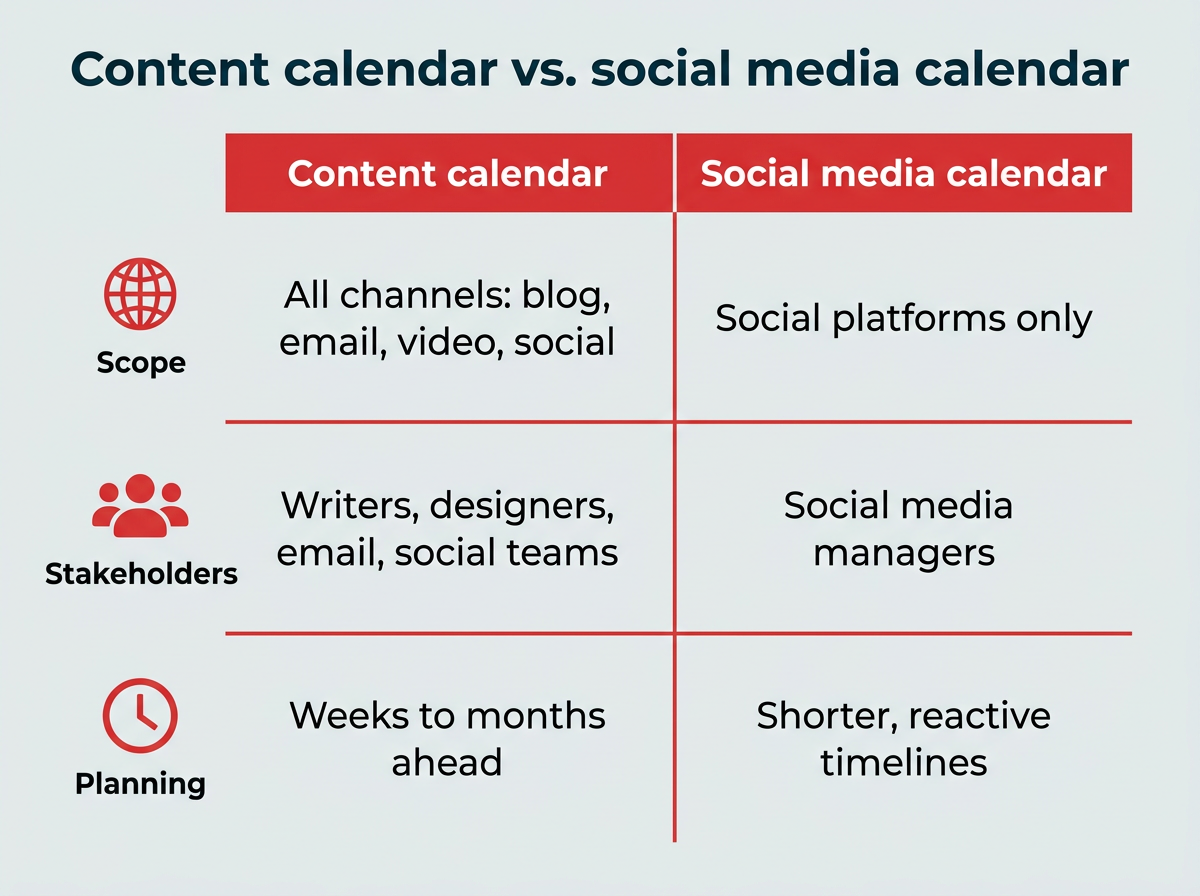
A content calendar covers all of your marketing channels, including blog posts, email newsletters, video content, podcasts, and social media. A social media calendar focuses specifically on planning and scheduling posts across social platforms like Instagram, LinkedIn, TikTok, and Facebook.
Here are the key differences:
- Scope: Content calendars map out everything your marketing team publishes. Social media calendars only cover social posts.
- Stakeholders: Content calendars typically involve writers, designers, email marketers, and social teams. Social media calendars are usually managed by social media managers alone.
- Planning horizon: Content calendars often plan weeks or months ahead across campaigns. Social media calendars tend to operate on shorter, more reactive timelines.
If your team only manages social channels, a dedicated social media calendar tool may be all you need. But if you’re coordinating content across multiple channels, a broader content calendar tool will give you the visibility and control to keep everything aligned.
Why use a content calendar tool?
A dedicated content calendar tool does more than keep you organized. It can meaningfully improve how your team plans, produces, and measures content across channels.
That matters more than ever. 58% of marketers reported feeling overwhelmed in Marketing Week’s 2025 Career & Salary Survey, and juggling multiple platforms, deadlines, and stakeholders without a centralized system is a big part of why. Meanwhile, GenAI investments are delivering ROI, with 49% of CMOs and other marketing leaders citing improved time efficiency as the most commonly cited benefit, making AI-powered content tools an increasingly practical choice.
Here are the core benefits:
- Time savings: Bulk scheduling and automation reduce the hours spent on repetitive publishing tasks
- Brand consistency: A shared calendar ensures your messaging, visuals, and tone stay aligned across every channel and team, especially when paired with clear social media guidelines
- Better collaboration: Built-in approval workflows and role-based permissions keep everyone on the same page without endless email threads, which is critical when over half of B2B marketers cite inefficient content creation and reviews as their top content operations challenge
- Data-driven decisions: Integrated analytics help you see what’s working and adjust your strategy in real time
- Governance and compliance: Enterprise teams can enforce brand guidelines and control who publishes what, reducing the risk of off-brand or unapproved content going live with the right compliance tools
For larger teams, these benefits add up to something a CMO can measure: fewer approval bottlenecks, faster campaign turnaround, and cross-channel reporting that ties content performance back to pipeline and revenue.
In short, content planning tools turn a chaotic content process into a repeatable, scalable system.
What features should you look for in a content calendar tool?
When you’re sizing up content calendar tools, it’s not just about posting on time. It’s about how much smoother they can make your whole workflow.
“Within the content calendar tool I use, you’re able to toggle between different views (such as spreadsheet, calendar, kanban, etc.),” says Horna. “This helps me manage my team’s time effectively since I can create a view that suits their involvement in my project. They never need to see or sift through content that doesn’t apply to them.”
Here are the key features to look for if you want to get the most value out of your tool of choice:
- Visual planning: Calendar, kanban, and timeline views to see your content at a glance
- Scheduling and publishing: Drag-and-drop interfaces for easy scheduling across platforms, including bulk scheduling to upload and schedule posts in batches
- Optimal timing: Suggestions for the best time to publish, send, or post
- Collaboration and approvals: Approval workflows with version history, comments, and role-based permissions to control who can draft, edit, or publish
- Multi-brand management: Centralized management of multiple brand accounts across regions or sub-brands
- Brand governance: Shared asset libraries tied to brand guidelines (logos, tone of voice, templates) with governance controls to prevent off-brand posting
- Asset management: Built-in storage for brand-approved images, logos, videos, and templates
- AI content generation and orchestration: AI-powered caption writing and content suggestions are now table stakes. The bigger shift for 2026 is AI orchestration, with 40% of enterprise apps expected to feature task-specific AI agents by year-end. That means workflows that draft, route, and queue content inside the rules your team already set. Look for governed workflows, so every AI-assisted post still passes through your approval chain and brand guidelines before it publishes.
- AI tool connectivity: Support for MCP connectors and open APIs so your calendar can exchange context with the AI tools your team already uses, instead of becoming another silo
- Performance analytics: Automated reporting dashboards that track specific KPIs
- Integrations: Connections with CRMs, design tools, and communication platforms for smooth workflows
- Mobile apps: Intuitive mobile access so you can work from anywhere
- Export and sharing: Options to share calendars or performance reports with stakeholders
When it comes to choosing a tool based on its features, think of what you and your team may need on a daily basis.
“In my content calendar tool, I’ve created sections in my content forms that correspond to copywriting and design requirements,” says Horna.
“These are then filtered into separate spreadsheets for copywriters and designers to see tasks and revisions. It’s a game-changer because team members only have to go to one place to see which content needs their expertise.”
How to choose the right content calendar tool for your team
With so many options available, how do you narrow it down? The right content calendar app for your team depends on a handful of practical factors. Here’s a framework to guide your evaluation:
- Team size and structure: Solo marketers and small teams can get by with lightweight tools like Trello. Larger teams with multiple stakeholders need platforms with role-based permissions, approval workflows, and multi-user collaboration.
- Channel coverage: If you only manage social media, a dedicated social scheduler may be enough. If you coordinate blog, email, video, and social content, look for a tool that supports multi-channel planning.
- Budget: Free tools exist, but they come with limitations. With marketing budgets holding flat at 7.8% of company revenue, every tool needs to earn its place. Enterprise platforms like Hootsuite and Sprinklr cost more but deliver governance, analytics, and scale that justify the investment.
- Integration requirements: Your content calendar should connect with the tools you already use, whether that’s a CRM like Salesforce, a design tool like Canva, or a communication platform like Slack.
- Approval and governance needs: Regulated industries and large organizations need built-in approval workflows and brand governance controls. If compliance matters, this is non-negotiable.
- Analytics depth: Basic tools offer post-level metrics. Enterprise platforms provide cross-channel reporting, custom dashboards, and ROI tracking that connect content performance to business outcomes.
How to set up and use a content calendar tool
Setting up a content calendar tool takes about an afternoon if you work through it in order. Here’s the short version:
- Define your channels and content types
- Choose a tool that fits your team
- Set up your calendar structure and views
- Add team members and assign roles
- Build your first month of content
- Review and refine your workflow
1. Define your channels and content types. List every channel you publish to and the formats you use on each, from LinkedIn carousels to monthly newsletters. This becomes the backbone of your calendar fields and tags.
2. Choose a tool that fits your team. Use the evaluation criteria above. A two-person team and a 40-person global marketing org need very different things, and paying for governance features you’ll never use is just as costly as outgrowing a tool in six months.
3. Set up your calendar structure and views. Create your content pillars, campaign tags, and status labels, then build the views your team actually works in: a monthly calendar for planning, a kanban board for production, and a filtered list for anyone who only cares about their own tasks.
4. Add team members and assign roles. Invite your writers, designers, and reviewers, then set permissions so only approved people can publish. This is also where you map your approval chain.
5. Build your first month of content. Start by blocking in recurring content and known campaign dates, then fill the gaps. Leave room for reactive posts tied to emerging social trends, because something will always come up.
6. Review and refine your workflow. After 30 days, check what slipped and why. Most teams need one or two rounds of adjustment before the calendar runs on its own.
The goal is a system your team trusts enough to work in daily, not a calendar someone has to chase people to update.
What are the best content calendar tools in 2026?
The best content calendar tools are the ones that match your workflow, team size, and channel needs.
We’ve put together a comparison table and detailed breakdowns of the top 14 content calendar tools in 2026 to help you find the right fit.
Tool
Best for
Key features
Pros
Cons
Pricing (as of 2026)
Enterprise and all-in-one social media teams
Social media calendar, scheduling, analytics, approvals, AI-powered tools
Scales for teams, integrations, powerful reporting
Higher cost than basic tools
$99–$249/user/mo; Enterprise custom pricing
Planable
Approvals and client review
Visual content calendar, multi-level approvals, in-context comments, multi-channel previews
Excellent review workflows, easy for external stakeholders
Lighter analytics; less suited to large enterprise governance
Free plan; paid plans available
Mid-to-large marketing teams
Project + workflow management, calendar view, task assignments
Great for collaboration, scalable workflows
Less specialized for content marketing
Free–$24.99/user/mo (Enterprise and Enterprise+ available with custom pricing)
Flexible individual or team setups
Customizable databases, calendar view, note-taking
Highly customizable, affordable
Requires setup, lacks automation
Free–$20/user/mo (Enterprise available with custom pricing)
Small marketing teams, creators, solopreneurs
Visual content calendar, media library, preview for grid & feed, hashtag suggestions
Intuitive visual planning, drag-and-drop calendar
Weaker analytics or advanced workflows vs full suites
$25 – $110/mo (Enterprise custom pricing)
Buffer
Solopreneurs and small marketing teams
Scheduling, basic analytics, reuse options, browser extensions, content queueing
Clean interface, easy to use, low learning curve
Limited reporting, limited collaboration in lower tiers
Free – $12/channel/mo (per-channel pricing; $5–$10 per channel when billed annually)
Mid to large marketing teams
Spreadsheets + database hybrid, multiple views, automations, linked records
Flexible data modelling, useful for content planning & asset management
Doesn’t natively publish to social
Free–$45/seat/mo (Team $20, Business $45; Enterprise Scale custom pricing)
ClickUp
Teams combining project management and content planning
Docs, calendar and board views, task management, automations, integrations
Deep customization, strong free tier, docs and tasks in one place
Can feel overwhelming; no native social publishing
Free plan; paid plans available
Enterprise-level organizations
Publishing, engagement, listening, advertising, analytics, governance, omnichannel messaging
Enterprise-grade features, strong compliance/permissions
Very expensive; steep learning curve
Not publicly listed; contact Sprinklr sales for a quote
Solopreneurs, small marketing teams, freelancers
Design templates, brand kits, content planner, team collaboration
Strong for graphics, huge template library, intuitive
Scheduling is basic; not a full social suite
Canva Pro from ~$15/month (or ~$120/year); Canva Teams from ~$10/user/month (3-user minimum). Check canva.com/pricing for current rates.
HubSpot
Mid to enterprise marketing teams, B2B orgs
Social publishing, CRM integration, email campaigns, automation, analytics
Unified marketing + sales view, strong automation
Expensive; social features sometimes secondary
Free and paid plans available
Mid to large marketing teams
Boards, automations, dependencies, integrations, dashboards, forms
Flexible for structuring content workflows; good as a central hub
Not a dedicated social scheduler; requires integrations
Free–$19/seat/mo (Enterprise available with custom pricing)
Solopreneurs and small marketing teams
Boards, lists, cards, checklists, labels, power-ups
Intuitive; great for campaign ideation and lightweight planning
Lacks native social features; can get messy with scale
Free–$17.50/user/mo (Enterprise; rate varies by seat count)
Marketing teams needing a dedicated content/marketing calendar
Marketing calendar, social scheduling, workflow automation, headline analyzer
Purpose-built for content marketing; strong calendar views
Social features less robust than dedicated social tools
Free calendar; paid plans available
Hootsuite
Hootsuite Social OS is our top pick for enterprise and all-in-one social media teams. Having every social channel and account inside one social operating system makes executing campaigns far simpler than stitching together separate tools.
Perch is the publishing and planning app inside Hootsuite Social OS, and it gives you an at-a-glance social media content calendar with all of your accounts in one place. You can drag-and-drop to organize scheduled posts, bulk schedule posts, and export your calendar. Your schedule updates in real time.
It also has automation built in, which makes it a genuinely powerful social media content planner rather than just a scheduling grid.
Wisdom, the AI orchestration layer, helps your team draft captions, surface content ideas, and move work through governed workflows instead of ad hoc requests. Paired with the content library and integrations like Canva, it takes a lot of friction out of content production. You can also see the best time to post according to data from your own followers.
You can assign approvals to certain team members and restrict other team members’ access, depending on their role. Workflows are pretty intuitive, so your team can create, schedule, approve, and publish posts without any bumps.
For enterprise teams managing multiple brands or regions, governance controls and multi-brand management keep everything consistent and on-brand. And with Lumen, the integrated insights and social listening app, you can track conversations, spot trends, and identify content gaps across your industry.
You’ve also got access to enterprise-level analytics tools that’ll help you optimize your social media strategy.
But don’t take our word on it alone. Hear from Witness Change on how switching to Hootsuite dramatically reduced their time spent scheduling and updating posts. Functionality like our all-in-one platform, where creation, scheduling, and publishing all take place on a single calendar, sure helped.
Or read how Stocksy had their best month ever using Hootsuite. “We’re using all the features of the platform,” says Christina Minshull, Head of Marketing at Stocksy.
“We’re publishing and scheduling, we use it for approval systems and crisis management, we use the content library to help with efficiency, tagging to make meaningful decisions, and use the listening platform to see what our audience is talking about and see where content gaps exist.”
Best for: Teams or midsize to enterprise brands that need a connected social operating system rather than a standalone scheduler.
Top features:
- Multi-social media platform posting and scheduling in Perch
- Unified inbox
- Lets you connect and manage dozens of brand accounts from a single system
- Analytics and custom reporting
- AI social listening through Lumen
- AI-powered drafting and orchestration with Wisdom
- Workflows, approvals, and governance controls
Pros:
- Full feature set
- Smooth integrations
- Strong analytics and custom reporting
- AI-powered social listening
Cons:
- Steep price jump for more advanced tiers
- Complexity not necessary for smaller operations
- Not the cheapest on the market
Pricing: Standard is $99/user/month, Advanced is $249/user/month, and Enterprise is custom priced. Start a free trial to test it with your own accounts.
Meet the Suite
Understand what matters, decide what to do next, and take action across every social workflow — all from one connected suite.
Planable
This tool is a collaboration-first content calendar built around review and sign-off. Content appears as it will look on each platform, so clients and stakeholders can comment and approve without needing a walkthrough.
Best for: Agencies and in-house teams that need fast approvals and client review cycles.
Top features:
- Visual content calendar with feed, grid, and list views
- Multi-level approval workflows
- In-context comments and version history
- Platform-accurate post previews
Pros:
- Approval and feedback flow is one of the smoothest available
- Easy for non-marketers and external clients to use
Cons:
- Analytics are lighter than enterprise platforms
- Less suited to large-scale governance across many business units
Asana
Asana is a project management platform that doubles as a solid content calendar for mid-to-large marketing teams. Its calendar, list, and timeline views make it easy to visualize what’s in progress and what’s coming up.
Best for: Mid-to-large marketing teams that need project and workflow management alongside content planning.
Top features:
- Project and workflow management with calendar view
- Task assignments, dependencies, and due dates
- Multiple views (list, board, timeline, calendar)
- Integrations with Slack, Google Workspace, and more
Pros:
- Great for collaboration and scalable workflows
- Flexible enough for content planning and broader project management
Cons:
- Less specialized for content marketing or social scheduling
- Can feel complex for smaller teams
Pricing: Free – $24.99/user/mo (Enterprise and Enterprise+ available with custom pricing)
Notion
Notion is a highly customizable workspace that lets you build your own content calendar from scratch using databases, templates, and calendar views. It’s a blank canvas, which is both its strength and its challenge.
Best for: Flexible individual or team setups that want full control over their content planning structure.
Top features:
- Customizable databases with calendar, board, and table views
- Note-taking and documentation alongside planning
- Templates for content calendars, editorial workflows, and more
- Real-time collaboration
Pros:
- Highly customizable and affordable
- Works well as a central knowledge base and planner
Cons:
- Requires setup time to build your calendar
- Lacks native publishing automation or social scheduling
Pricing: Free – $20/user/mo (Enterprise available with custom pricing)
Later
Later is a visual-first content calendar tool built for social media scheduling. Its drag-and-drop calendar and visual feed preview make it especially popular with Instagram-focused teams and creators.
Best for: Small marketing teams, creators, and solopreneurs focused on visual platforms.
Top features:
- Visual content calendar with drag-and-drop scheduling
- Media library for organizing images and videos
- Instagram grid and feed preview
- Hashtag suggestions and analytics
Pros:
- Intuitive visual planning
- Strong for Instagram and TikTok workflows
Cons:
- Limited analytics compared to enterprise platforms
- Primarily focused on social media, not multi-channel content
Pricing: $25 – $110/mo (Enterprise custom pricing)
Buffer
Buffer is a straightforward social media scheduling tool designed for solopreneurs and small teams. Its clean interface and low learning curve make it easy to queue and publish posts across multiple platforms.
Best for: Solopreneurs and small marketing teams looking for simple, affordable social scheduling.
Top features:
- Scheduling and content queueing
- Basic analytics and performance tracking
- Browser extensions for easy content sharing
- Post reuse options
Pros:
- User-friendly interface
- Affordable pricing for small teams
- Quick setup and minimal learning curve
Cons:
- Limited reporting capabilities
- Collaboration features restricted in lower tiers
Pricing: Free – $12/channel/mo (annual billing lowers Essentials to $5/channel and Team to $10/channel)
Airtable
Airtable combines the simplicity of spreadsheets with the power of a database, making it a flexible option for content planning and asset management. Its multiple views and automation features support complex workflows.
Best for: Mid to large marketing teams that need flexible data modeling alongside content planning.
Top features:
- Spreadsheet and database hybrid with linked records
- Multiple views including calendar, kanban, and gallery
- Workflow automations
- Custom fields and filtering
Pros:
- Highly flexible for content planning and asset tracking
- Strong collaboration features
- Customizable to fit your workflow
Cons:
- No native social media publishing
- Requires setup and configuration
Pricing: Free – $45/seat/mo (Team $20, Business $45; Enterprise Scale custom pricing)
ClickUp
ClickUp is a work management platform that can be shaped into a content calendar using its calendar, board, and docs features. Teams that already run projects in ClickUp can keep briefs, drafts, and schedules in the same place.
Best for: Teams combining project management and content planning in one workspace.
Top features:
- Docs for briefs and drafts alongside tasks
- Calendar, board, and list views
- Automations for status changes and handoffs
- Integrations with design, storage, and communication tools
Pros:
- Generous free tier
- Highly customizable views and fields
- Keeps content production and project tracking together