Key takeaways
- YouTube pays per ad view, not per video view, typically an estimated $5 to $15 per 1,000 ad views in 2026.
- Your earnings per view depend on your content niche, audience location, ad type, video length, and seasonal advertiser demand.
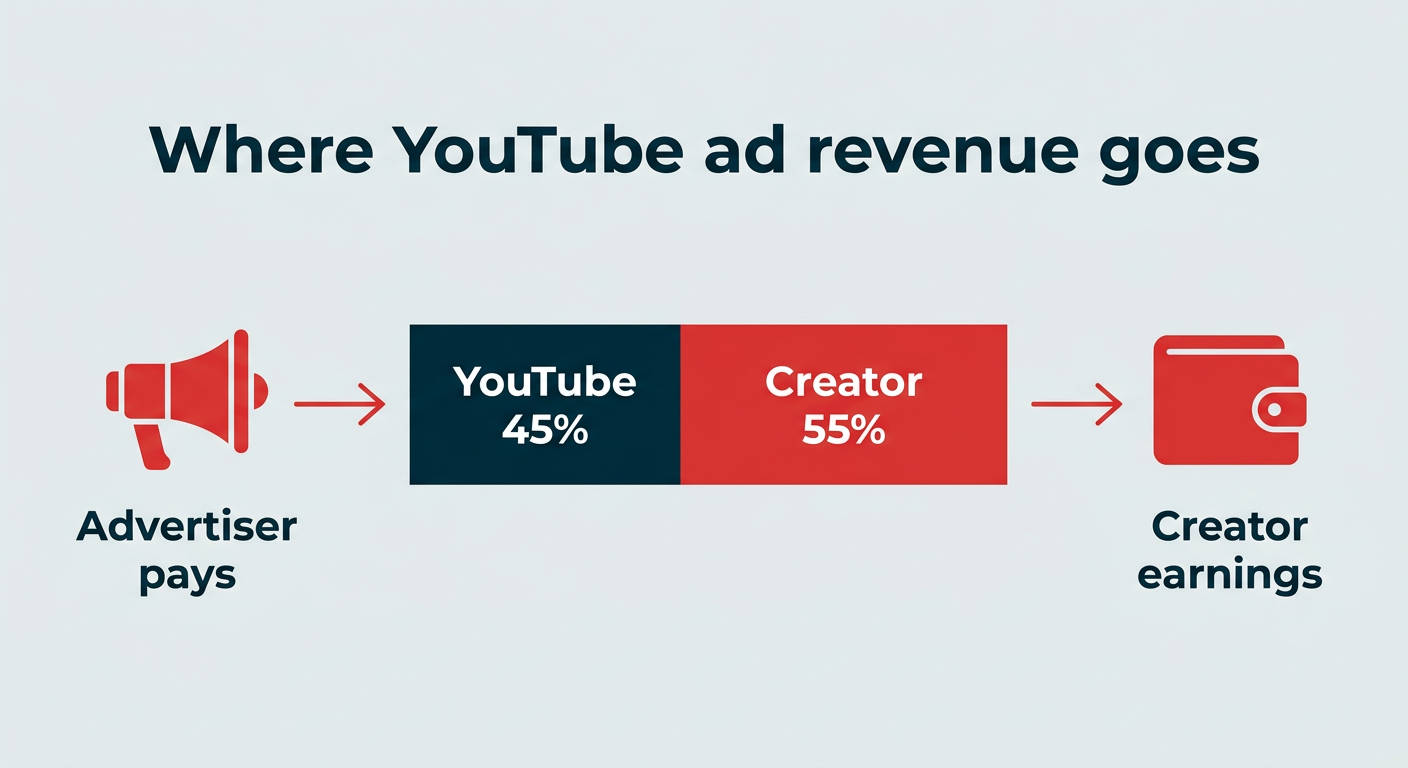
- RPM (revenue per mille) shows what you actually earn after YouTube’s 45% cut, while CPM reflects what advertisers pay.
- Ad revenue is only one income stream. Brand deals, channel memberships, affiliate marketing, and merch can meaningfully increase total YouTube earnings.
How YouTube’s pay-per-view system works
YouTube does have a pay-per-view system, but it might not be what you’d initially think. Instead of getting paid for each video view, YouTubers are paid for each ad view.
Let’s dig a little deeper into what these two types of views mean:
- Video views: The number of views your video gets.
- Ad views: The number of views that ads on your video get.
YouTube pays you for the amount of ad views your video gets. If your video has a million views but no advertising on it, you won’t be making any money. If your video has a million views but only 10,000 ad views, you’ll be making money only on the 10,000 ad views.
Similarly, you might have multiple ads run within a single YouTube video. If users actually watch those ads all the way through, you could also end up with more ad views than video views.
Essentially, YouTube makes money off the advertising space, so it will only pay based on how much exposure your video generates for that advertising space. Of that advertising money, . Through this model, YouTube has paid creators over $100 billion since 2021.
The short version: Your YouTube income is a share of ad revenue tied to ad views, not a flat rate per video view.
Bonus: Download the free 30-day plan to grow your YouTube following fast, a daily workbook of challenges that will help you kickstart your Youtube channel growth and track your success. Get real results after one month.
What are CPM, RPM, and CPC on YouTube?
CPM, RPM, and CPC are the three metrics that explain the gap between what advertisers spend and what lands in your bank account. They sound similar, but they measure very different things, and mixing them up is the fastest way to end up disappointed by your first payout.
Metric
What it measures
Who it describes
Where you see it
CPM (cost per mille)
What advertisers pay per 1,000 ad impressions
The advertiser’s cost
YouTube Studio, listed as “CPM”
RPM (revenue per mille)
What you earn per 1,000 video views, after YouTube’s cut
Your take-home revenue
YouTube Studio, listed as “RPM”
CPC (cost per click)
What advertisers pay when someone clicks an ad
The advertiser’s cost
Reflected in your estimated revenue
Revenue per mille is the one worth watching. RPM is almost always lower than CPM because it accounts for YouTube’s 45% revenue share, plus all the views that never got an ad at all. A $12 CPM does not mean $12 in your pocket per 1,000 views.
So when you compare earnings numbers with other creators, check which metric they’re quoting. CPM tells you how valuable your audience is to advertisers, and RPM tells you what your channel actually earns.
How much does YouTube pay per 1,000 views in 2026?
In 2026, a YouTuber can earn an estimated $5 to $15 per 1,000 ad views. This is an industry estimate rather than a published YouTube rate, and because not every video view triggers an ad, your earnings per 1,000 video views land lower than that range.
According to Strike Social’s downloadable 2024 YouTube Ads Benchmark Report, YouTube ads see an average view rate of 49-68%, depending on factors like video ad type or creative. Using the middle of that range, here’s what estimated earnings look like at common view milestones.
Total video views
Estimated ad views (~50-65%)
Estimated earnings ($5-$15 per 1,000 ad views)
1,000
500 – 650
$2.50 – $9.75
10,000
5,000 – 6,500
$25 – $97.50
50,000
25,000 – 32,500
$125 – $487.50
100,000
50,000 – 65,000
$250 – $975
500,000
250,000 – 325,000
$1,250 – $4,875
1,000,000
500,000 – 650,000
$2,500 – $9,750
Treat these as estimates, not promises. Your actual earnings shift with niche, audience location, ad formats, and the time of the year.
Can you make a full-time job out of being a YouTuber? Yes, but the math has to work at volume. A single 10,000-view video sitting in the middle of that estimated range brings in around $60. Publish one of those every day and you’re looking at roughly $21,900 a year, which isn’t a great salary on its own.
That assumes you stay stagnant, though. If you’re actually publishing new video content every day, or even once or twice a week, you should see compounding growth in views, subscribers, and ad revenue. And as you grow, you can layer in other monetization avenues.
How do you become eligible for ad revenue on YouTube?
You become eligible to earn ad revenue on YouTube by joining the YouTube Partner Program (YPP). The YPP is how you get YouTube money per view put into your pocket, and it has its own set of YouTube monetization requirements you’ll need to clear first.
Pro tip: Be sure to get your YouTube account verified, too.
What you need to join the YPP
Want to join the YPP and start earning your own income? Follow this checklist of all items you need:
- Be compliant with the YouTube channel monetization policies.
- Live in a country/region where the YouTube Partner Program is available.
- Follow YouTube’s Community Guidelines because strikes on your channel will disqualify you.
- Turn on 2-Step Verification for your Google Account.
- Have advanced features access on YouTube.
- Either set up or have an active AdSense account you can link to your channel.
How to become eligible for the YPP
Once you’ve checked off each item on the above list, it’s time to look into eligibility requirements. You can become eligible to start making money from the YPP through long-form videos, YouTube Shorts, or a mix, in either one of two ways.
Eligibility path
What you need
Long-form path
1,000 subscribers and 4,000 qualified public watch hours in the last 12 months
Shorts path
1,000 subscribers and 10 million qualified public Shorts views in the last 90 days
If you’re ready to apply, we walk you through the YPP application process in this post.
What factors impact YouTube earnings per view?
Not every ad view is worth the same amount of money. Nine factors do most of the work in deciding how much YouTubers get paid for each view, if at all:
- Content niche
- Audience location
- Ad type and placement
- Video length
- Watch time
- Ad clicks
- YouTube Premium viewers
- Seasonal trends
- Views that don’t count toward earnings
1. Content niche
Your content niche can have a big impact on how much you’re able to make from ad revenue. This is because different niches have different ad costs, with some ad industries having a much higher CPM (cost per mille) or CPC (cost per click) than others.
The most profitable YouTube niches by CPM were:
- Making money online: $13.52
- Digital marketing: $12.52
- Personal finance: $12.00
- Education: $9.89
- Tech, cars, & gadgets: $2.39 – $7.31 (photography tops the category at $7.31, car channels average $4.32, and general tech sits at $2.39)
- ASMR: $3.50
- Lifestyle: $3.47
- Fashion: $3.13
- Beauty: $3.00
- Motivational: $2.50 – $4.00
- Cooking: $2.50
- Travel: $2.00
- Fitness: $1.60
- Gaming: $1.40
- Comedy: $1.00
Keep in mind that this is how much the advertiser pays. Your RPM will land well below these figures once YouTube’s 45% share and un-monetized views are factored in. But as you can see, the amount you’re able to bring in per view can fluctuate greatly depending on the type of content you publish.
2. Audience location
Your audience’s location can also factor into ad revenue. This is because different countries often have different CPM for advertisers.
The countries with the highest YouTube CPM are:
- Australia: $36.21
- United States: $32.75
- Canada: $29.15
- New Zealand: $28.15
- Switzerland: $22 – $24
- United Kingdom: $22 – $24
- Germany: $22 – $24
- Ireland: $18 – $20
- Singapore: $18 – $20
- Denmark: $18 – $20
So if your primary audience is watching from Australia or the United States, you’re going to be able to make more from your ad revenue than someone from a country with lower ad costs.
3. Ad type and placement
Different ad types and placements will also net different ad revenue. For example, advertisers have to pay premium rates for a non-skippable ad. If your audience is served this type of ad, you’ll make more than you would for a skippable ad.
4. Video length
Longer videos give you more opportunities for ads to run within your videos. The more ads that run in your videos, the more you’re likely to bring in.
Keep in mind that you can tell YouTube where you want ads to run within your videos. Set up ad slots at good stopping points within your video so the platform inputs them in between sections so they don’t interfere with the viewing experience.
However, just because you set ad slots doesn’t mean that YouTube will place ads during all of those slots. This is just a good way to tell the platform the best places for your ads to run.
5. Watch time
The longer people watch your videos, the more ads they’re likely to see. So, create engaging YouTube content that keeps people interested the entire time so you can boost your ad revenue.
6. Ad clicks
If someone clicks on an ad on your video, the advertiser pays more for that click than they would for the view. You’ll get the same portion of that CPC, meaning more money in your pocket.
7. YouTube Premium viewers
YouTube Premium users pay for an ad-free experience, so they won’t be shown ads if they watch your video content. Instead, you’ll be paid based on how many Premium users watch your videos and for how long they watch.
8. Seasonal trends
Your earnings per view also move with the advertising calendar. Seasonal CPM tends to peak in Q4, when brands push holiday budgets into the market, and then drop sharply in January and February once those budgets reset.
Many creators report that their RPM climbs through October to December and falls in the new year, even when their views stay flat. It’s worth keeping in mind before you panic over a January revenue dip, and worth planning around if you have a big video you want to land during peak demand.
9. Views that don’t count toward earnings
And finally, as unfortunate as it sounds, some ad views simply don’t count, and you won’t receive any YouTube revenue for them.
Those instances include:
- Skippable ads: Skippable ads can be skipped after the first few seconds. Which is nice for the viewer, but if the ad gets skipped, you don’t get paid. Generally, you’ll only receive payment if a viewer watches enough of a skippable ad for it to count as a billable view.
- Ad blockers: If a viewer is using an ad blocker, they won’t be shown ads, so you won’t receive any revenue.
- Demonetization: If a video you publish violates YouTube’s ad guidelines, it’ll be demonetized, meaning ads won’t play on it and you won’t be able to generate any revenue from it.
How much do YouTube Shorts pay per view?
YouTube Shorts pay far less per view than long-form video, with creators commonly reporting an estimated RPM of roughly $0.01 to $0.06 per 1,000 Shorts views. Long-form content, by comparison, is commonly reported in the $2 to $10 RPM range. Both figures are creator-reported estimates rather than published YouTube rates.
The gap comes down to how Shorts monetization is built. Rather than placing ads inside individual videos, YouTube pools revenue from ads running in the Shorts feed, allocates a portion to creators based on their share of total views, and then applies the revenue share. Shorter watch times, fewer ad placements per view, and a view-counting method with no minimum duration keep the per-view figure low.
Here’s the practical difference:
- Long-form videos: A commonly reported estimate of $2 to $10 RPM per 1,000 views, with mid-roll ads adding earning potential on videos over 8 minutes.
- Shorts: A commonly reported estimate of $0.01 to $0.06 RPM per 1,000 views, drawn from a pooled ad revenue model.
That doesn’t make Shorts a waste of time. They’re cheap to produce, they generate over 200 billion daily views, and they’re one of the fastest ways to build the subscriber base that watches your higher-earning long-form content.
Meet the Suite
Understand what matters, decide what to do next, and take action across every social workflow — all from one connected suite.
How to set up YouTube monetization step by step
Want to start making money from your YouTube channel? Here are the five steps, then the detail on each:
- Meet the YPP requirements
- Apply for the YPP
- Enable monetization on eligible videos
- Set ad slots on each video
- Monitor your earnings
Step 1: Meet the YPP requirements
First things first, you need to make sure you meet all of the requirements for the YouTube Partner Program. We covered these earlier, but as a reminder, you need to:
- Create a Google AdSense account
- Turn on 2-step verification
- Follow community guidelines and monetization policies
- Verify your channel so you can get access to advanced features
- Grow your account until you reach monetization eligibility
To track your progress, head to YouTube Studio, then the Earn tab in the left sidebar. You can scroll down to see how you’re progressing along the YouTube Partner Program’s eligibility requirements.
Step 2: Apply for the YPP
Once you meet the eligibility requirements, an Apply Now button will appear in the Earn section of your YouTube Studio where you were previously tracking your progress.
Follow the instructions in the application, then link your AdSense account so you can start earning once your application is approved.
Once you submit your application, you’ll be added into a review queue, and In Progress will appear in the Earn tab. You can check back to monitor the status of your application anytime, but to hear back.
As long as your channel complies with all relevant policies, you should get a positive response so you can start monetizing your video content.
Step 3: Enable monetization on eligible videos
Not every video will be eligible for monetization. The platform is pretty strict about its ad-friendly guidelines, ensuring that videos that run ads don’t include things like profanity, violence, adult content, controversial issues, or anything of that nature.
You’ll want to wait until each of your videos have been uploaded and reviewed to see if they’re eligible for monetization. You can then go into the Content area of YouTube Studio and turn on monetization for that video.
Step 4: Set ad slots on each video
Once you’ve turned on monetization, you can set manual ad slots for mid-roll ads within videos that are 8 minutes in length or longer. You can choose to only set manual ad slots, meaning you choose the best breaks in your videos for ads to run, only set automatic ad slots, so the YouTube platform decides the best places for ads, or a combination of both.
Step 5: Monitor your earnings
Your income takes a couple of days to show up in your analytics, but you can easily monitor your earnings in your YouTube Analytics dashboard or by logging into your AdSense account. Keep an eye on how much you’re bringing in and test different ways to earn more.
How to maximize your YouTube ad revenue
Once monetization is live, a few deliberate choices can lift what you earn from the same audience. Start with these four.
1. Create long-form content over 8 minutes
The longer your videos are, the more space you have for ads. Focus on creating long-form videos longer than eight minutes so you can add in mid-roll ads throughout your content.
2. Place more mid-roll ad slots
The more mid-roll ad slots you place, the more chances you have that YouTube will place ads within your longer videos, giving you even more earning potential.
In fact, a lot of YouTubers recommend inputting manual mid-roll ad slots every minute or so in your videos. YouTube won’t play ads during every manual ad slot you add in, but it could increase your ads and in turn, increase your revenue.
3. Focus on a profitable niche
We covered how ads in some niches cost more than ads in other niches. If you’re still choosing your channel’s focus, look at topics that have a higher ad CPM so that you can bring in more money from your ad revenue.
4. Optimize video titles and descriptions for search
More views means more ad views, and search is one of the cheapest ways to get them. Put the phrase people actually type into your title, repeat it naturally in the first two lines of your description, and add relevant tags so YouTube understands what the video is about.
Videos that keep surfacing in search and suggested feeds months after upload compound your earnings in a way a single launch-week spike never will.
5 other ways to monetize your YouTube channel
Ad revenue isn’t the only way you can make money from YouTube. It’s important to diversify your revenue streams. On top of that, many content creators also make money from:
- Brand deals and sponsorships: Partner with brands to create sponsored videos, show off branded products or services, and more. Work with brands directly to come up with a rate per video.
- Channel memberships: YouTube has the option to create a paid membership for your exclusive subscribers who want to see more from your channel. Depending on the extra content you offer your members, you can charge a monthly rate of $0.99 up to $499.99. , and YouTube keeps the rest.
- Affiliate marketing: Promote products or services in your videos and include affiliate links in your YouTube description to earn a commission from anyone who purchases those products or services.
- Selling products: Create your own products, such as channel merch, digital products, a physical product line, or something else.
- Selling services: If offering a service makes more sense, this is another way you can use your YouTube channel to make money.
FAQ: How much does YouTube pay per view?
How much does YouTube pay per view?
YouTube pays per ad view rather than per video view, which in 2026 is estimated at around $5 to $15 per 1,000 ad views, or roughly $0.005 to $0.015 per ad view. Your actual rate depends on your niche, audience location, and ad formats.
How many views do I need to make money on YouTube?
There’s no minimum view count for earning, but you do need to qualify for the YouTube Partner Program first. To be eligible, you need 1,000 subscribers plus either 4,000 qualified public watch hours on long-form content in the last 12 months or 10 million qualified YouTube Shorts views in the last 90 days.
How much do you get paid per 1,000 views on YouTube?
You can typically expect to get paid an estimated $5 to $15 for each 1,000 ad views your videos get. Measured against total video views, that usually translates to a reported RPM of roughly $2 to $10, because not every view is served an ad.
How much does YouTube pay for 1 million views?
A video with 1 million views typically earns somewhere between $2,500 and $9,750 in ad revenue. That estimate assumes an ad view rate of 50-65% and an estimated payout of $5 to $15 per 1,000 ad views.
Can you earn money on YouTube without ads?
Absolutely! You can still earn money on YouTube without ever monetizing your channel through the platform. Sell products or services, work with brands, create sponsored content, and more.
How do ad blockers affect earnings?
Ad blockers reduce your earnings by preventing ads from being served to those viewers. If they’re not seeing ads, those views generate no ad revenue for you, even though they still count as video views.
Do YouTube Shorts pay well?
YouTube Shorts pay considerably less than long-form content, with creators reporting typical RPMs of around $0.01 to $0.06 per 1,000 views compared to $2 to $10 for long-form. They’re easier to make and you can publish more of them, which makes them a useful way to grow the audience that watches your higher-earning long-form videos.
How much does YouTube pay for live streaming?
YouTube pays live streamers through the same ad revenue system as regular videos, plus additional income from Super Chats, Super Stickers, and Super Thanks during live broadcasts. Longer streams create more ad opportunities, and viewer tipping features often make live content more lucrative per viewer than uploaded video.
How many views do you need to make $2,000 a month on YouTube?
To earn roughly $2,000 per month from ad revenue alone, you’d typically need around 200,000 to 400,000 monthly video views, depending on your niche and audience location. A high-CPM niche like personal finance gets there with fewer views than a low-CPM niche like comedy or gaming.
What is the difference between CPM and RPM on YouTube?
CPM (cost per mille) is what advertisers pay per 1,000 ad impressions, while RPM (revenue per mille) is what you actually earn per 1,000 video views after YouTube takes its 45% share. RPM is always lower than CPM because it also accounts for views that never received an ad. If you want a quick YouTube earnings calculator, your RPM figure in YouTube Studio is the most accurate one you’ll find.
Save time managing your social media marketing strategy with Hootsuite. Publish and schedule posts, find relevant conversions, measure results, and more â all from one dashboard. Try it free today.
The #1 social media tool
Create. Schedule. Publish. Engage. Measure. Win.
By Chloe West
Chloe West is a digital marketer and freelance writer, focusing on topics surrounding social media, content, and digital marketing. She's based in Charleston, SC, and when she's not working, you'll find her playing card games or watering her plants.
The #1 social media tool
Create. Schedule. Publish. Engage. Measure. Win.