Strategy
Social media content planning without the scramble. Use this process to build a calendar, streamline approvals, and measure what works.
- Also available in
- Deutsch
- Español
- Français
Key takeaways
- Social media content planning is the process of deciding what to post, when, and why, covering ideation, creation, scheduling, and measurement in one connected workflow.
- A structured content plan reduces last-minute pressure and gives teams more room to respond to trends without derailing their strategy.
- Clear roles, approval workflows, and governance keep content on-brand and compliant, especially for teams operating across regions.
- Tools like Hootsuite Social OS bring planning, publishing, analytics, and AI-assisted content creation together so teams can manage everything in one place.
What is social media content planning?
Content planning on social media is the process of deciding what to post, when to post it, and how it supports your overall marketing goals.
It goes beyond scheduling. It’s about planning your topics, formats, and campaigns in advance so your content stays consistent and relevant. A repeatable content planning process also means your team isn’t rebuilding the same workflow every month.
Well-planned content planning for social media is:
- Created in batches to streamline content production
- Repurposed across channels
- Connected to larger marketing goals
- Balanced between original and curated content
- Organized in a content planner or calendar
Bonus!!!
Get ahead in 2025! Download our free social media calendar template now to plan and schedule your content like a pro — start today!
Why does social media content planning matter?
Social media content planning matters because it makes your team more efficient, protects them from burnout, and ties daily posting to results leadership actually cares about.
Creating content in batches is much more efficient than building posts one at a time. It also helps teams get more value from every piece of content. A single idea can be repurposed across formats and platforms, extending its impact without added resources.
For example, one piece of content can be adapted into:
- A short-form video
- A text-based post
- A visual asset like an infographic
This approach helps teams do more with less. Organize it all in a content calendar (like the one below) to keep everyone on the same page.
A content plan also reduces the need to constantly react. By planning ahead, teams can account for key moments like campaigns, product launches, and holidays and events (hello, National Puppy Day!). It also reduces the risk of burnout and inconsistency, both of which can hurt performance in the long run.
Planning ahead doesn’t limit flexibility. It actually creates more room to respond to trending topics and headlines without disrupting your overall strategy.
Finally, your social media content plan is what connects day-to-day posting with larger marketing goals. Individual posts aren’t that important on their own. But all of your posts, working toward the same goal, will determine whether your social media strategy sinks or swims.
If you’re starting from scratch, a social media strategy template can help you map your content goals, audience, and content pillars.
How do you plan content for social media?
To plan content for social media, follow these 10 steps to build an effective social media content plan:
- Set your goals and KPIs
- Know your audience
- Define your content themes
- Choose your platforms
- Brainstorm campaign and post ideas
- Decide on your content mix
- Assign responsibilities and set approvals
- Write post captions
- Create (or source) design assets
- Schedule content in advance
Step 1: Set your goals and KPIs
Start by deciding what you want your content to accomplish. Goals give your content planning process direction, and they’re what you’ll measure performance against later.
Most social media content strategy goals fall into a few buckets:
- Awareness: Reaching new audiences and growing your follower base— 83% of marketers rank increased exposure as their top social media benefit
- Engagement: Building a community that comments, shares, and saves
- Traffic: Driving clicks to your website, landing pages, or app
- Leads: Capturing contact details or demo requests
- Conversions: Driving sales, sign-ups, or revenue
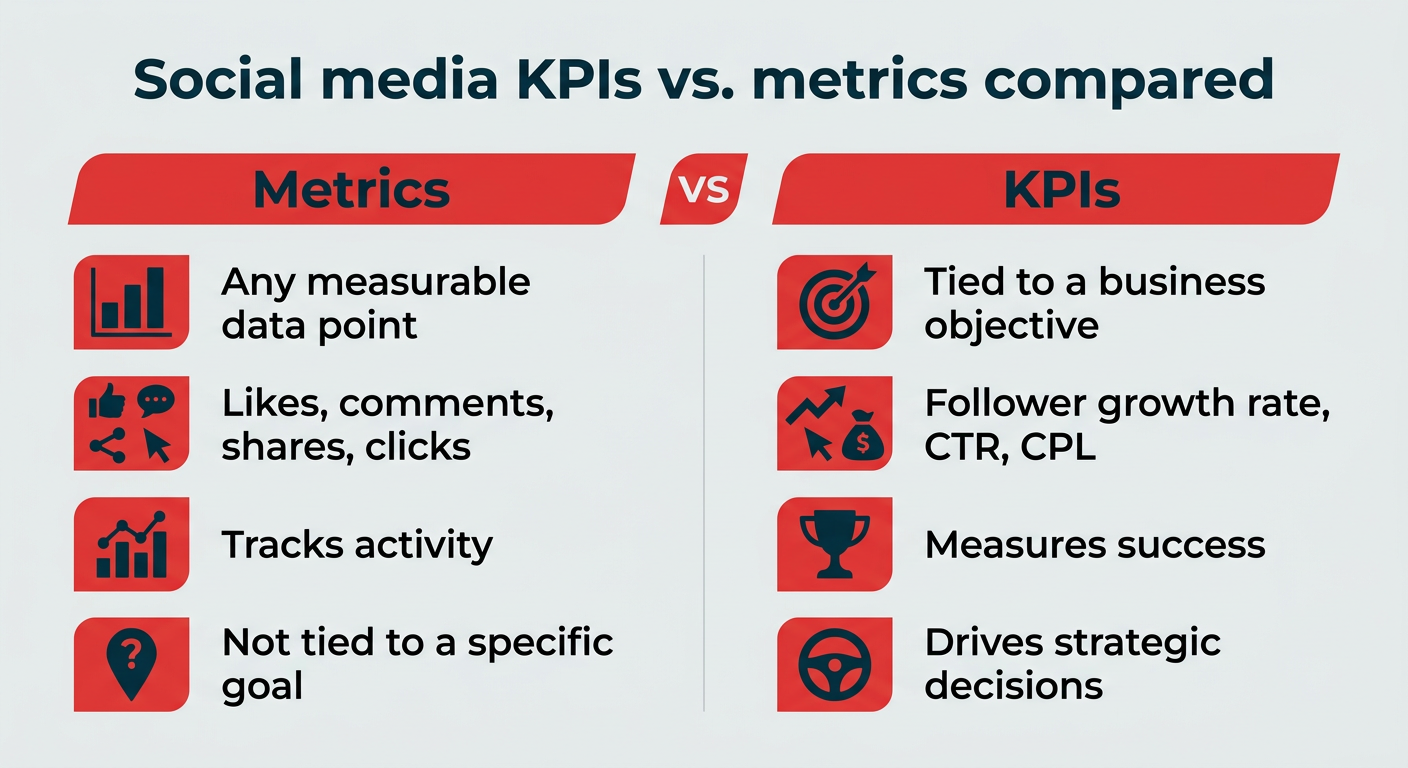
Then attach a KPI to each one so progress is measurable. “Grow awareness” is vague. “Increase monthly impressions by 20% in Q2” gives your team something to plan against. Two or three goals per quarter is usually plenty. More than that, and your content plan loses focus.
If you need a starting structure, the social media strategy template referenced above includes space to document goals, KPIs, and content pillars in one place.
Step 2: Know your audience
Next, get specific about who you’re planning content for. Audience research is what keeps your plan grounded in what people actually want, rather than what your team assumes they want.
Before you plan a single post, try to answer:
- Who are they: Role, industry, life stage, and buying motivation
- Where are they: Which platforms they use daily, and for what
- What do they want: The questions, pain points, and topics they care about
- How do they consume content: Short video, carousels, long captions, or links
Your own analytics are the fastest place to start, since audience demographics and top-performing posts tell you a lot. From there, social listening fills in the gaps. Tracking brand and industry conversations with a social listening strategy shows you the language your audience uses and the topics they bring up unprompted, which is often where the best content ideas come from.
Document what you learn somewhere your whole team can see it. Audience insight that lives in one person’s head doesn’t scale.
Step 3: Define your content themes
Now identify what you’re going to post (otherwise known as your content themes, or content pillars).
Your themes should ladder up to your broader marketing goals. Think of them as guardrails for your content.
Common themes include:
- Industry trends and insights
- Product updates and education
- Customer stories or social proof
- Company news
As an example, here’s what our content themes look like at Hootsuite:
- Social media marketing tips and industry trends
- Social network updates and best practices
- Marketing research, like our free 2026 Social Media Trend Report
- Social media marketing experiments, especially on our Hootsuite Labs YouTube channel
- Product updates and features
- Company news
- Product education (tutorials, tips)
These topics will be your content creation roadmap. If a post doesn’t fit a theme, it likely doesn’t belong in your plan. (Or, you may need to rethink your content strategy and add a new category to it.)
Step 4: Choose your platforms
Decide which platforms you’re planning for before you start building out posts. Trying to plan for every network at once is the fastest way to spread a small team thin.
Use your audience research and goals to prioritize. If your audience spends most of its time on two platforms, those get the bulk of your planning effort. The rest can run on repurposed content or sit on pause until you have capacity.
Keep in mind that planning needs vary by channel:
- TikTok and Instagram Reels: Higher volume, faster turnaround, heavier production load per post
- LinkedIn: Lower cadence, longer shelf life, more thought leadership and written content
- Facebook and X: Good fit for curated content, community replies, and campaign amplification
- YouTube: Longest lead times, so plan weeks or months ahead
Write down your target cadence per platform. That number shapes everything downstream, from how many ideas you need to how much design support to request.
Step 5: Brainstorm campaign and post ideas
With your themes in place, work with your content team to build a pipeline of potential social posts and campaigns.
Consider setting up regular brainstorming sessions, a dedicated Slack channel for idea sharing, or workflows for capturing content ideas from across your organization. The goal is to avoid starting from scratch every time.
High-performing teams ground their ideas in:
- Past performance data. What campaigns have been most successful for you before? What elements of those campaigns were most effective? How can you replicate that for your new goal or campaign?
- Competitor data. Running a competitive analysis helps you spot what types of content they’re posting and where you can put your own spin on successful ideas.
- Audience feedback and conversations. Tap into conversations around your brand and industry. What does your audience care about? What are their pain points, questions, and interests?
To know what’s worked before, you need a top-notch analytics tool. Analytics in Hootsuite Social OS gives you a full 360-degree view of your performance across all networks. Custom reports show you what you need more of (and what you can leave out) in your content plan.
When it’s time to share content performance reports, you can export your reports as a PDF to share with stakeholders.
Step 6: Decide on your content mix
A successful content marketing plan contains a mix of original and curated content.
Curated content plays an important role in keeping your channels relevant and active without burning out your team. But it should still meet the same quality standards as your original content.
Strong curated content is:
- Relevant to your target audience
- Connected to a business goal
While there’s no one-size-fits-all formula, many teams start with a mix of roughly 40% original and 60% curated content. More important than the ratio, though, is how each content type fits into your overall strategy.
It’s also worth planning for format variety inside that mix. Short-form video, carousels, Stories, text posts, and link posts all behave differently, and a plan built on a single format is fragile if a platform shifts what it rewards.
To source high-quality content consistently, teams can use social listening tools to identify relevant conversations, trends, and content worth amplifying.
For example, Lumen, the integrated insights and listening app inside Hootsuite Social OS, helps you explore posts from around the web to build a library of high-quality content to share later.
You can use Lumen to analyze things like:
- Key metrics: Are more people talking about you this week? What’s the sentiment of their posts? Lumen doesn’t just track what people are saying, it uses sentiment analysis to show you how they feel.
- Top themes: How are people talking about you? What are the most popular positive and negative posts about? Which other conversations are you showing up in?
- Results: Ready to get into specifics? Results show you a selection of popular posts related to your search terms, and you can filter by sentiment, channel, and more.
Try some of our robust social listening tools here.
Step 7: Assign responsibilities and set approvals
Clear ownership is key to keeping content planning on track.
Social teams often involve multiple people, including writers, designers, customer support, and approvers. Without defined roles, things can get messy fast.
At minimum, name an owner for each stage of the process:
- Planner: Owns the calendar, themes, and cadence
- Writer: Drafts captions and campaign copy
- Designer or video editor: Produces the creative assets
- Approver: Signs off on brand, legal, and accuracy before publishing
- Publisher: Schedules, monitors, and handles anything time-sensitive
A social media workflow outlines how the content process will move from content planning to creation to publication. Just as important are clear approval workflows, so content is on-brand, compliant, and ready for publication.
For larger teams, this is also where governance and compliance belong in the plan. Regulated industries like healthcare and finance often require legal or compliance review before anything goes live, and skipping that step can carry real legal consequences, not just brand risk.
Build review time into your timeline rather than treating it as a last-minute hurdle. Vigil, the governance layer in Hootsuite Social OS, helps enterprise teams apply consistent rules and approvals across accounts and regions so nothing bypasses review.
Bonus: As your team scales, tools like Hootsuite can keep up. You can assign permissions to different team members, so the right people have the right level of access and nothing gets published by mistake.
Step 8: Write post captions
Whenever possible, it’s best to write your social content before it moves to design (the next step).
This has a few key benefits:
- It gives context to the designer so they can work efficiently.
- They will have a better understanding of the entire campaign’s structure and goals.
- While writing the posts, you may think of more ideas to add to the campaign to fill gaps.
- It saves time by allowing copyediting and approvals to happen simultaneously with design, so you can publish it sooner.
Hootsuite Social OS includes AI-assisted writing tools that save content writers hours of work. Wisdom brings contextual intelligence into the drafting process, and Perch is where planning and creation come together. You can use AI-assisted content creation to:
- Write new social media captions in a specific tone
- Generate post ideas based on a keyword or topic (and then write posts expanding on the idea you like best)
- Write a post based on a link (for example, a blog post or a product page)
- Identify and repurpose your top-performing posts
- Create relevant captions for upcoming holidays
The workflow is straightforward. Start with a high-level topic, review the ideas it generates, then pick the direction you like best to get draft captions and hashtags.
Pick the caption you want and open it in Composer, where you can make edits, add media files and links, check the copy against your compliance guidelines, and schedule your post to go live later.
Repeat the process until your social media calendar is full. Just remember that AI drafts still need a human edit before they ship.
Step 9: Create (or source) design assets
You can think up all these amazing campaigns, but without the design assets, they may go unnoticed. However, this is where many marketing teams get bottlenecked.
Having a specific timeline for each part of the content planning process keeps things moving.
With Perch, the planning and publishing app in Hootsuite Social OS, you can collaborate with other team members on specific campaigns, view your overall content calendar, and identify opportunities and gaps to fill. Plus, approvals are a snap with the built-in approval process, so the only content that gets posted is the content that should be.
Step 10: Schedule content in advance
Scheduling your content ahead of time is important for basic efficiency. Plus, it will help bring your social media marketing strategy to life.
Posting consistently matters, but so does posting at the right time. Your team should regularly test different posting times and schedule posts based on audience activity and past performance data.
Or, if you want a faster way to get there, Hootsuite’s Best Time to Publish feature can analyze your unique audience and suggest optimal posting times across all of your social media platforms, including Facebook, Instagram, TikTok, LinkedIn, and more. It also recommends different times for different goals, for example when to post for brand awareness versus when to post to drive traffic.
When you’re creating your post, just click Schedule for later and choose from one of the suggested times.
Pro tip: Keep an eye on your posting frequency too. Here’s the latest research on how often to post on each major platform.
Cross-platform scheduling is where a unified calendar earns its keep. Seeing every channel in one view makes it obvious when two campaigns collide, when a platform has gone quiet, or where a single asset could cover three posts instead of one. Hootsuite can help save you tons of time here. You can batch content to all of your favorite platforms in advance from the same dashboard. Plus, you get:
- Easy team collaboration
- Detailed social media analytics
- Ads management
- Social listening, and more
You can create single posts in Composer or dial up your efficiency with the much-loved bulk upload tool, where you can schedule up to 350 posts at a time on the Advanced plan.
Meet the Suite
Understand what matters, decide what to do next, and take action across every social workflow — all from one connected suite.
How do you measure and improve your content plan?
Measuring your content plan means tracking performance against the KPIs you set in Step 1, then adjusting what you publish based on what the data shows. A plan you never review is just a schedule.
Start with a small set of metrics tied directly to your goals:
- Reach and impressions: How many people saw your content, useful for awareness goals
- Engagement rate: How your audience interacts relative to reach or followers
- Clicks and traffic: Whether social is sending qualified visitors to your site
- Conversions: Sign-ups, leads, or sales attributed to social
- Content-level performance: Which themes and formats consistently outperform
Our free engagement rate calculator makes that specific metric easy to work out, and this ROI guide helps you connect results to business impact when you’re reporting up.
Set a review cadence and stick to it. A light weekly check keeps you close to what’s trending and lets you swap in timely content. A monthly review is where you spot patterns across themes and formats. A quarterly review is where you revisit goals, cadence, and whether your platform mix still makes sense.
Then close the loop. If carousels outperform static images on Instagram, plan more carousels next month. If one content theme consistently underperforms, cut its share of the calendar or change the angle. Analytics in Hootsuite Social OS lets you build custom reports and export them, so the same data informs both your planning decisions and your stakeholder updates.
In short, measurement turns a content plan from a static document into something that gets better every quarter.
How does AI fit into social media content planning in 2026?
AI content planning in 2026 is less about generating posts from nothing and more about speeding up the research, drafting, and timing decisions that used to eat entire afternoons. The planning judgment stays with your team— a Gartner survey found that while 77% of marketers explore GenAI, only 44% realize significant benefits.
In practice, AI helps most at four points in the workflow:
- Ideation: Turning a theme or a URL into a list of post angles you can react to, instead of staring at a blank calendar
- Drafting: Producing first-pass captions in your tone that a writer edits rather than writes from scratch
- Timing: Recommending publish times based on your own audience activity and goals
- Trend detection: Surfacing emerging topics and sentiment shifts from listening data before they peak
Two quick examples of how that compresses the process. A quarterly campaign brief can become a draft set of post angles across four platforms in a single session, which your team then prunes and assigns. And instead of manually scanning for relevant conversations, listening data from a trend tracking tool can flag a rising topic in your category so you can slot a timely post into an existing plan rather than rebuilding it.
This is where connected systems matter more than standalone tools. In Hootsuite Social OS, Wisdom provides the contextual intelligence, Perch is where planning and publishing happen, Lumen handles insights and listening, and Vigil applies the governed workflows that keep output on-brand and compliant. MCP connectors also let Social OS share context with other systems your team already uses, so insights travel instead of sitting in a silo.
One caution worth building into your plan: AI output still needs human review. A Gartner survey found 49% of consumers say GenAI has worsened content quality, and in regulated industries an unreviewed claim can create legal exposure. Treat governance and compliance as part of your AI workflow, not an afterthought.
What are the best content planning tools and templates?
The best content planning tools remove the manual work from your process, and a few good templates can get you from zero to a working plan in an afternoon. Here’s where to start.
What free templates can help you get started?
Every resource below is free, and each one maps to a step in the process above.
- Campaign template: A structured framework for planning a single campaign, section by section.
- Social media audit template: A systematic checklist for evaluating existing accounts, ideal for onboarding a new client or taking stock of your own channels.
- Image sizes cheat sheet: Optimal image dimensions for every major platform, so your creative always looks polished.
- Social strategy guide: Comprehensive best practices for building a strategy your content plan can ladder up to.
- Content calendar template: Shows you how to organize and schedule content in advance, map campaigns, and keep your team aligned (linked earlier in this guide).
- Engagement rate calculator and ROI guide: Both linked in the measurement section above, and both worth bookmarking before your next reporting cycle.
For teams looking to take their strategy further, a social media request for proposal (RFP) is the starting place for many successful strategies, campaigns, and collaborations.
How do you choose a content planning tool?
When you’re comparing options, look at how much of the workflow a tool actually covers. A standalone scheduler solves one problem. A social media planner that connects planning, approvals, analytics, and listening removes the handoffs between them.
Capability
Basic scheduling tools
Mid-tier platforms
Hootsuite Social OS
Multi-platform scheduling
Yes
Yes
Yes
Unified content calendar
Limited
Yes
Yes
Performance analytics
Basic
Standard reports
Customizable reports and exports
AI-assisted content creation
Rare
Sometimes
Yes
Approval workflows
Limited
Yes
Social listening
Add-on
Yes, with Lumen
Governance and permissions
Basic roles
Yes, with Vigil
Hootsuite plans start at $99/user/month (billed annually) for Standard, which covers up to 10 social accounts, unlimited scheduling, best time to post, and AI assistance. The Advanced plan is $249/user/month (billed annually) and adds customizable analytics and bulk scheduling up to 350 posts. Enterprise pricing is custom and includes SSO, Talkwalker listening, employee advocacy, and advanced analytics. Check the plans page for the most current pricing.
The short version: pick the tool that matches how many steps of your plan you need to manage in one place.
FAQ: Content planning
What is content planning and how does it support social media strategy?
Content planning is the process of deciding what to post, when to post it, and how it supports your broader marketing goals. It supports your social media strategy by turning ideas into a clear, organized plan. Instead of reacting in the moment, teams can align content with campaigns, maintain consistency, and make sure everything ladders up to a specific goal.
How do businesses create an effective content planning process?
Businesses create an effective content planning process by following a repeatable set of steps rather than improvising each month. The 10-step process in this guide covers setting goals and KPIs, researching your audience, defining themes, choosing platforms, brainstorming ideas, deciding your content mix, assigning roles and approvals, writing captions, producing assets, and scheduling in advance. From there, teams test and refine their approach using performance data.