AI memory is information a conversational AI assistant saves from your past conversations and brings into new ones, so it can recall your preferences and context. The model itself doesn’t keep any of it. The assistant stores it separately and adds it back when it’s relevant, which gives the model persistent context it would otherwise lack.
This guide explains how assistants save and recall that information, what they store, why they sometimes get it wrong, and how to see, change, or switch it off.
What is AI memory?
AI memory, also called persistent memory, refers to an AI assistant feature that stores information about you, such as preferences, facts, and context from past interactions, which the assistant can use in later conversations.
An AI assistant can build that record from things you ask it to remember, details it picks up on its own, and earlier chats it can refer back to.
The AI memory layer lets AI assistants offer personalized answers without you sharing your preferences in every chat. If you’ve told an assistant you’re training for a marathon and prefer kilometers, your next pacing question will get an answer in kilometers without you restating this.
Compared with restating your situation in every chat, memory saves you typing and keeps the prompt short, which matters because long inputs make answers less accurate.
Memory isn’t a transcript of every conversation, but a collection of key facts about you. So it will remember you prefer kilometers. Finding the exact training plan it drafted last month depends on whether the assistant can also look up past chats.
Types of AI memory
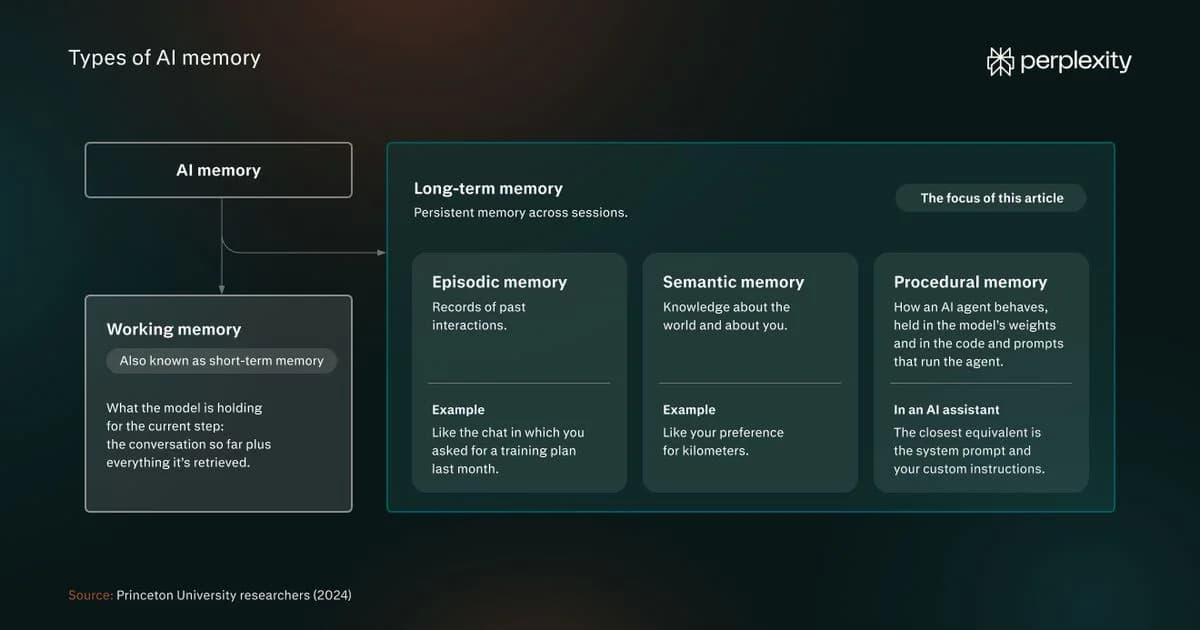
Researchers from Princeton University (2024) have borrowed terminology from human memory science to classify types of AI memory systems. Their framework separates working memory from long-term memory:
- Working memory: What the model is holding for the current step, so the conversation so far plus everything it's retrieved. Also known as short-term memory.
- Long-term memory: Persistent memory across sessions. This is the type of memory this article is about.
Long-term memory consists of three memory types:
- Episodic memory: Records of past interactions, like the chat in which you asked for a training plan last month.
- Semantic memory: Knowledge about the world and about you, like preference for kilometers.
- Procedural memory: How an AI agent behaves, baked into the model's weights and in the code and prompts that run the agent. In an AI assistant, the closest equivalent is the system prompt and your custom instructions.
AI assistant memory vs. AI agent memory
AI assistant memory and AI agent memory are both long-term memory. AI assistant memory is mostly semantic memory and stores facts about you, so answers fit you. Agent memory, like Perplexity's Brain, stores what the agent did and how it went, including what worked and what you corrected, so it starts each new task from a better position.
AI assistant memory
AI agent memory
What it remembers
You
The task and its history
What it’s for
Answers that fit you
Continuing multi-step work without starting over
Example
Remembers that you prefer kilometers
Remembers your marathon training plan, tweaks it made, and the sessions you completed so far, so it can better plan future blocks
AI memory vs. context windows, training data, and custom instructions
AI memory is easy to confuse with three other things that shape an answer: the model's context window, training data, and custom instructions. Each holds different information, lasts different lengths of time, and is controlled by a different system.
A context window is the amount of text a large language model (LLM) can read at once and covers the current conversation. It resets when you start a new chat.
Some current models have large context windows of a million tokens or more, so technically you could paste your key information into every conversation. But processing all of it adds latency and cost.
Multiple studies have also found that output accuracy declines as the input grows even when the answer is in the context.
A 2025 University of Illinois and Amazon study saw it even when models could recite every relevant detail: accuracy fell by 13.9-85% as inputs grew to 30,000 tokens, far below the models' claimed limits. NoLiMa, a 2025 benchmark from Adobe Research and LMU Munich, found that 11 of the 13 tested models underperformed significantly at just 32,000 tokens whenever the question and the answer shared no keywords. Chroma’s July 2025 report saw it across 18 models, including when they answered from a 113,000-token chat history.
Training data is the information baked into the model's weights before release. Users can't change it. Developers can fine-tune a model on new data, but that is an engineering process, not a user setting,
Custom instructions are rules saved in the assistant settings that you write and edit yourself to customize the AI assistant's behavior and outputs. For example, you could use custom instructions to define the tone and style of the answers or what sources the assistant can use.
Here's how the four compare:
Context window
AI memory
Training data
Custom instructions
What it holds
The messages in the current chat
Saved facts and preferences about you
What the model learned before release
Guidance you write yourself
How long it lasts
This chat only
Until it's updated or deleted
Fixed until a new model is released
Until you edit it
Who controls it
You, within the limit the model provider sets.
You and the assistant
The AI company
You
Example
The pacing question you asked a minute ago
That you prefer kilometers
How marathon training plans are generally structured
Instruction to format training plans in a grid where rows represent weeks and columns days of the week
What AI memory stores
Assistants keep selected details about you, such as facts, preferences, and summaries, and some also draw on your past chats.
- Facts and preferences you ask it to remember: These are details you explicitly tell the assistant to save, such as "remember that I prefer kilometers." The assistant creates the memory when you ask, and it lasts until you delete it or a later conversation updates it.
- Details it picks up from your conversations: The assistant saves these when the setting is on. Perplexity "favors the frequency of questions asked and information given by the user," so something you mention often is more likely to stick than what you mention once. The memory lasts until it's updated or you delete it.
- References to your past chats: The assistant draws on earlier conversations directly rather than on a saved list. Perplexity calls this search history: your past questions and answers, used to make a new response more relevant.
How AI memory works
The AI model doesn’t remember anything between conversations. The AI memory system does that work: it keeps a separate record about you and adds the relevant parts to each new conversation. Storage and retrieval happen behind the scenes, so the model reads them alongside your question.
That process runs in five steps:
- Saving: The assistant saves a memory when you ask it to, or when it judges a detail worth keeping.
- Storing: Memories go into a database kept separately from the model. In many systems, it's a vector database, so they can be searched by meaning. The list you see in settings is a view of that memory store.
- Retrieval: When you send a message, the assistant decides which memories apply. Many systems do this by converting your message and each memory into embeddings, numerical representations of meaning, and picking the closest matches. That's how they can recall a memory even when it shares no words with your question. Simpler systems load every saved memory into each conversation.
- Using: Recalled memories are inserted as plain text into the input, usually in a block of instructions the model reads before your message. The model processes them like any other text in that input.
- Updating and removing: The assistant extracts facts from chats, searches existing memories, and decides whether to add it as new, update an existing memory, merge with one, or delete an old memory that contradicts new findings. Some assistants timestamp each memory to tell newer information apart from older.
AI memory challenges and risks
AI memory is intended to improve the quality of answers, but benchmarks show memory retrieval doesn't always surface relevant or current information, especially from large databases. It also poses security and privacy risks.
Common reliability and security issues related to AI memory include:
- Misapplied memories: A memory can be pulled into an answer it has nothing to do with. A 2026 study tested 18 models on whether a saved memory from one area of life leaked into an answer from another. The median failure rate was 53%. The study also found that once memory held users' beliefs or claimed expertise, nearly every model echoed them even if the question required a neutral answer.
- Stale memories: The assistant keeps acting on a detail after a later conversation has made it untrue, especially when you never said so outright. In a May 2026 benchmark, which tested whether models notice such implicit changes, the best model averaged 55.2%.
- Memory overload: The more an assistant has to read back, the harder it is to pick out what matters. LongMemEval, a 2024 benchmark, found that models reading a chat history of around 115,000 tokens performed 30% to 60% worse than models given only the relevant sessions.
- Memory poisoning: False information or hidden instructions get into an assistant's memory, for example, through content you ask it to read, resulting in biased or unsafe answers or data leaks.
- Privacy risks: Memory keeps personal details beyond the chat they came from, sometimes longer than you expect. Perplexity, for example, may keep a log of deleted memories for up to 30 days for safety and debugging. Data-protection law treats stored memories as personal data, so you should be able to review and delete them.
How to view, edit, and turn off AI memory
You can see what an assistant has saved, delete it, switch memory off, or use a private chat that doesn't create memories.
Memory management comes down to a handful of controls. Here’s what each does and when to use it:
Control
What it does
When to use it
See what's saved
Opens your memory bank, where you can search, filter, and review individual entries.
When an answer includes a detail you didn't expect.
Delete a memory
Removes the entry, and the assistant stops using it in later answers (assistants may retain a log of cleared memories for a period of time).
When a memory is wrong, outdated, or sensitive.
Turn memory off
Stops the assistant referencing memory in future answers (It may not clear memories already stored - check your assistant).
When you want answers without personalization
Turn off search history
Stops the assistant using your past questions and answers. Deleting a session from your search history removes its influence on later answers.
When past conversations are steering answers, you want to start fresh.
Use an incognito chat
Memory and search history are always off, and questions asked there are never retained or used in memory.
For one-off or sensitive topics.
For a clean slate, turn memory off and clear what's stored.
How Perplexity handles memory
Perplexity memory works across every model it offers.
Perplexity personalizes answers from two sources: memories, which are the preferences and details you share, and your search history. When a memory shapes an answer, it appears among that answer's sources, so you can see which memories were used and delete any of them.
You can also personalize your answers by providing details about yourself and by providing custom instructions for Projects (each Project has its own memory layer).
Perplexity may use memory content to improve its models on consumer accounts (never on Enterprise ones) unless you turn that off (AI Data Retention in Settings → Preferences → Artificial Intelligence).
Max and Enterprise Max subscribers also get Brain, a shared memory layer, which builds on memory by tracking your projects and work. It has its own toggle and ignores incognito sessions.
Try Perplexity and check how memories shape your next answer.
AI memory FAQs
What is limited memory in AI?
IBM defines limited memory AI as AI that can recall past events and outcomes and monitor situations over time, but can't keep that data in a long-term library of past experiences. It's one of four categories in a taxonomy of AI systems, and IBM puts chatbots and virtual assistants in it.
Assistant memory is external memory those systems add on top. It persists across sessions, so an assistant can use details you shared in an earlier conversation.
Which AI assistant has the best memory?
No single assistant is best for everyone. A good memory is one you can control, so evaluate AI tools by asking four questions: Can you see what it saved? Can you delete a memory separately from the chat it came from? Is training a separate setting from memory? Is there a temporary or incognito mode that creates no memories?
Does an AI model learn from what it remembers about you?
Using memory in an answer is a different process from training. Perplexity says it retrieves relevant context from your memory store instead of treating your history as training data. Whether your content can be used to improve models is a separate setting. On consumer accounts, Perplexity may use memory content for that purpose, and AI Data Retention turns it off.
What should you keep out of AI memory?
Keep out of AI memory anything you wouldn't want stored, used to profile you, or repeated later: identity and financial details, health information, passwords, other people's information, and anything about children. Canada's Office of the Privacy Commissioner (May 2025) and the UK National Cyber Security Centre (March 2023) recommend skipping any prompt that would cause problems if it became public.
Filters reduce privacy risks, but don't guarantee your health or financial information won't be stored at all, so review your memory bank and use incognito for one-off sensitive questions.