Effort levels in the Perplexity Agent API let developers choose the balance of cost, speed, and research depth for each task. Today, every effort level now costs less per query, with research quality that is higher or unchanged. A new ultra level is available for the most wide-reaching and comprehensive research. Any request that selects the level by name, such as effort="fast", gets the updated configuration automatically.
Building a research agent means choosing the right balance of cost, speed, and depth for each task. Effort levels in the Agent API make that decision for the user. Each level is a bundled configuration that defines the model, step budget, search settings, and tools for a specific task type. Perplexity evaluates and updates each level over time to deliver the best research at, or below, its current cost.
These gains came from two kinds of change. Budgets, context handling, and extraction lowered the cost of each run, and skills, model selection, and parallel agents raised or maintained the quality of the answer.
medium performance improved from 55% to 77% on BrowseComp and DSQA, while costs decreased almost 90%. BrowseComp and DSQA are public research benchmarks; WANDR is Perplexity's benchmark of long, multi-entity research tasks. xhigh performs agentic work such as executing code in a sandbox, sustaining long tool-use loops, and working across many sources at once. xhigh held its WANDR score at 76.5% while running at about 25% of the cost of the August 2026 configuration.
The cost of research
A deep research request can run dozens of searches, read hundreds of pages, and check evidence before it answers. Every one of those actions adds tokens to the context and dollars to the bill. Without limits, an agent keeps taking actions that raise cost and crowd the context without improving the answer. Five factors drive most of that cost:
- Budget allocation. Agents with a set budget may run out of steps and end their run early before finalizing their task. Conversely, agents without a fixed budget may continue to run, incurring costs without improving the final answer.
- Context overhead. Search results and fetched pages carry the evidence, but, left unchecked, the context window can quickly fill with irrelevant information. Context windows carry costs from step to step, and overburdened windows can reduce agent performance.
- Workflow selection. Different tasks need different approaches. A single-fact lookup, a multi-hop question, and a wide survey of sources each require a different workflow. Left to choose on its own, a model often picks an inefficient one. Detailing every available strategy in the agent’s prompt doesn’t address this. The extra instructions are carried as tokens on every step, and the model follows each one less reliably over time.
- Model selection. Switching to a larger model may not deliver improved performance, commensurate with the extra cost. New models arrive with headlines and published benchmark scores. However, benchmark gains can be contaminated or reflect model overfitting. Without evaluation on real tasks, a model change can raise costs without raising quality.
- Multi-agent scaling. A single agent can search, read, and reason through a finite number of sources per run. Running multiple agents in parallel improves quality on the most demanding tasks but also increases costs and introduces complexity if not handled correctly.
Solving each of these challenges reduced costs for each effort level without reducing performance.
Controlling the research budget
Each effort level has a fixed research budget with three components:
- Step limits: the number of turns the agent can take
- Tool calls: a cap on the total number of tool calls in a request. A single step can issue multiple calls across multiple tools at once, so a step limit alone does not control how many actions occur within a step.
- Budget reminders: periodic notices of how many steps remain, so the agent can prioritize and leave room to write the answer instead of running out of budget mid-task.
Budget is the central tradeoff: more steps mean better answers, and every step incurs costs. With openai/gpt-6-luna, raising the step limit from 1 to 15 lifts accuracy on BrowseComp + DSQA from 41% to 80% while cost per query rises from $0.0017 to $0.0152, about 9x the cost for about 2x the score.
A step limit alone does not control research cost. Under the same five-step budget, openai/gpt-6.1-terra makes more tool calls than openai/gpt-6-luna, because more capable models tend to issue several calls in a single step. Effort levels cap both tool calls and steps. For these models, the tool-call cap matters as much as the step limit.
Each effort level tunes these limits, but the agent also has to know how many steps and actions it has left to fulfill the request. Without that information, it can run out of steps or actions and be forced to answer before the research is complete. The budget is stated at the beginning of the run, and reminders arrive as the agent nears its limits, so there is room to verify and deliver the results. For high, the reminders cover both the step budget and the tool-call budget.
Two agents, one with a budget reminder and one without, were tested on a BrowseComp task to identify a 1990s TV series when given three cast biographies. The agent with a reminder found the correct answer using 13 of the 40 steps in the budget. The agent without a budget reminder used all 40 steps and did not find the correct answer. That agent’s loop ended unexpectedly, and the model wasn’t aware of the remaining research budget. Reminders keep agents focused and help them prioritize remaining resources effectively.
Managing Context
Compaction
Long-running research tasks fill the model's context window with search results, fetched pages, and intermediate notes. Once full, the agent must stop working.
Compaction keeps long runs working without filling the context window. When the context exceeds a threshold, the agent replaces the work so far with a shorter summary of what it has found and what remains, then continues.
Compaction always retains three things in context: the system prompt, the original request, and any skills the agent has already loaded. After each compaction, the agent receives two short instructions. The first instruction is, ‘Continue working until the task is done.’ This stops the agent from treating the summary as a stopping point. The second instruction tells the agent how many compactions have occurred, so it can plan its remaining research tasks. Long runs keep the original goal and plan in view, and the cost of long loops decreases without a reduction in quality.
Fetching only what matters
Every page the agent reads adds to its context, and the agent carries it at every subsequent step. A web page includes information unrelated to the question, such as navigation, boilerplate, and other content.
Instead of handing the agent an entire page, fetch_url first runs an extraction pass. The page text is sent to a smaller model along with the agent's current task. The model returns only the relevant passages, quoted exactly so that the agent can cite them. During an evaluation, a 5,561-token page was reduced to 293 tokens, freeing up space for additional relevant context.
Using fetch_url with extraction at the high effort level reduced the input tokens per query by approximately 50%. Extraction also improved benchmark performance, achieving 88.0% at $0.073 per query, compared with 83.5% at $0.094 without extraction.
Focused web search
Searching the web is central to every agent research request. Three changes were made to how agents search:
- More context per search: Each search now returns up to 4K of tokens of results instead of 2K. The agent finds what it needs sooner, resulting in fewer searches and lower cost.
- A new snippet engine: Search results receive snippets that better match the query, so the agent is not overburdened with irrelevant text.
- Fast search: At $1.00 per 1K requests, Fast Search reduces both cost and latency for each search call.
The Perplexity Search team continuously improves retrieval quality across a wide range of tasks. Recent updates delivered gains across code, developer docs, reference pages, legal, and regulatory content.
Selecting the correct workflow
Some tasks require many searches to run in parallel; others need a close reading of a few long documents.
However, loading every workflow into the agent’s system prompt adds context overhead and can lead the model to underperform on simple tasks. Instead, skills are organized into a tree with progressive disclosure. The model loads relevant skills and instructions as it works, leaving unrelated information out of its context. Each skill costs only its name and description until the model decides it fits the task and loads it, at which point the full instructions are added to the context and the model follows the prescribed workflow.
To measure how individual skills contribute, each skill is removed one at a time to compare quality and cost on tasks where the baseline agent loaded that skill. These ablations show which workflows help the agent and how they affect research efficiency.
The WANDR benchmark runs below demonstrate agents choosing the correct workflows for specific tasks. Wide-search and fanout guidance were loaded for every task, reflecting the need to investigate multiple entities. People-search was loaded for only 6% of tasks, and only when the questions involved people.
When testing another WANDR task, the agent loaded the people-search skill with a fanout pattern to find inference engineers in London. It expanded 39 role terms into 117 queries, then merged the first-pass results into 43 unique profiles for further screening. The people-search skill guided the agent through this expansion without adding irrelevant context. The excerpt below is adapted from the agent’s script; helper names are illustrative.
text
Python # roles contains the 39 role variants selected by the agent. queries = [] for role in roles: queries.extend([ {"query": f"Google DeepMind {role} London"}, {"query": f"Google {role} London"}, {"query": role, "company": "Google", "location": "London"}, ]) results = pplx_sdk.search.people_many( queries, limit_per_query=50, concurrency=8 ) profiles = {} for result in results: if not result.ok: continue for profile in result.result: if "linkedin.com/in/" not in profile.url: continue url = profile.url.split("?")[0].rstrip("/") previous = profiles.get(url, {}) if url not in profiles or len(profile.summary or "") > len( previous.get("summary") or "" ): profiles[url] = { "url": url, "title": profile.title, "summary": profile.summary, }
Checkpointing is another workflow that helps agents on long-running tasks. The checkpointing pattern comes from batch programming. When a script processes a long list, it writes each result to disk as soon as it has it, rather than holding everything in memory until the end. If the script crashes or encounters errors partway through, nothing is lost: the next run reads what was already saved and continues from where it left off, retrying only the items that failed.
In another WANDRtask, the agent had to screen 188 engineers' profiles. It loaded the checkpoint pattern to record each result as it worked. The first pass extracted 160 profiles but failed on 28. When the agent ran the script again, it skipped the profiles that had already been recorded and retried only the remaining 28. Without the checkpoint, a single bad record would mean fetching all 188 again.Adapted Python excerpt; input pages, screening instruction, schema, and imports omitted; helper names are illustrative.
text
Python checkpoint = Checkpoint("research/profile-screening") config = instruction + json.dumps(schema) config_id = hashlib.md5(config.encode()).hexdigest()[:6] def checkpoint_key(page): url_id = hashlib.md5(page["url_in"].encode()).hexdigest()[:10] return config_id + url_id pending = [ page for page in pages if not checkpoint.has(checkpoint_key(page)) ] for offset in range(0, len(pending), 20): batch = pending[offset : offset + 20] inputs = [ json.dumps({ "url": page["url_in"], "content": page["content"][:30_000] }) for page in batch ] results = pplx_sdk.llm.extract_many( inputs, instruction=instruction, output_schema=schema, chunk_size=5, concurrency=4, ) for page, result in zip(batch, results): if not result.ok or result.result.error: continue checkpoint.record( checkpoint_key(page), [{"url": page["url_in"], **result.result.result}], )
The checkpoint records successful results; it does not launch retries. Including the instruction and schema in the key ensures that changed screening criteria trigger reprocessing.
Not every test resulted in gains in quality and efficiency. Preloading all skills into the agent before it began its task was evaluated. On BrowseComp and DSQA, preloading increased cost by 13%. On WANDR, where longer research trajectories make retrieved content a larger share of input tokens, preloading also reduces scores. These results supported the continued use of progressive disclosure.
Model selection
As model capabilities advance, the best model for each effort level changes as well. Perplexity employs an automated research loop that monitors new model announcements and availability. Evaluations are triggered as soon as a model becomes accessible.
When a new model is released, an automated agent puts it through the evaluation harness. It sweeps reasoning effort, step and tool-call budgets, and tool configurations, and scores every run on quality and cost against the current effort levels. Where a run regresses, the agent researches why, adjusts the settings, and runs the evaluation again. A candidate replaces the current model only when it wins on quality at the same or lower cost.
Public benchmarks are useful, but their scores do not always translate to real-world tasks. For example, the chart below shows a candidate model that scored 13.3 points above the baseline on BrowseComp but well below the corresponding baselines on internal enterprise, legal, and finance research tasks.
Multi-agent scaling
A single agent can only cover so many sources in one loop. For complex tasks, several agents work in parallel, each coordinating on a different part of the problem.
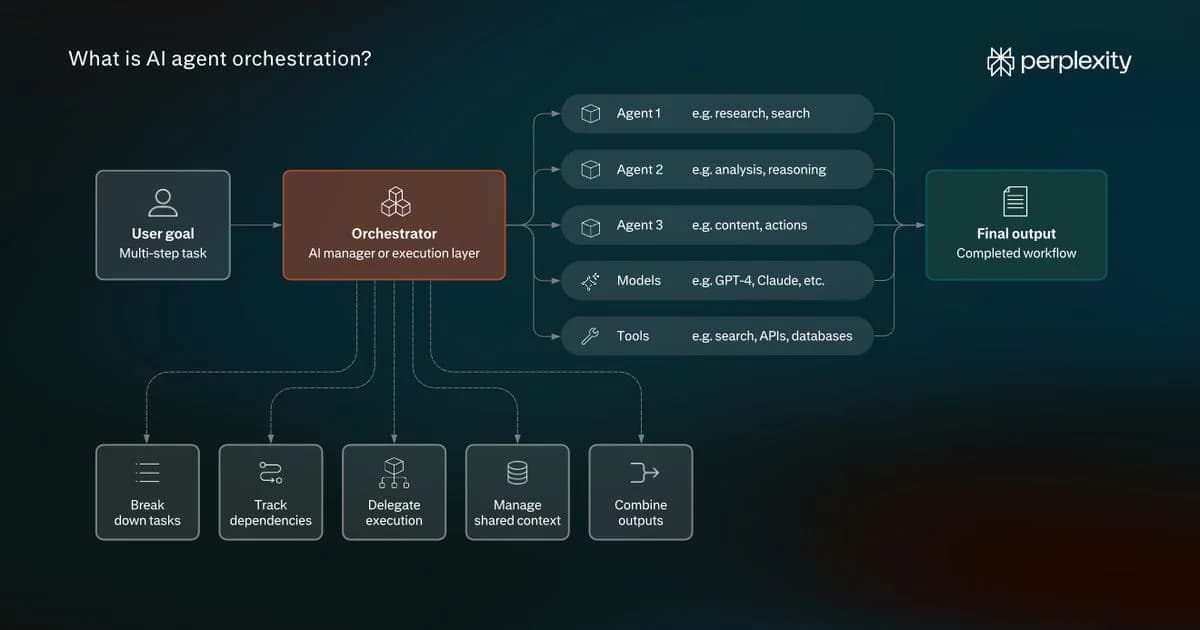
The primary agent is the orchestrator. It calls spawn_agent to create child agents and assigns each a specific, focused task. Every child runs its own research loop with a separate context, using its own model, tools, and step budget. Children report their results to the parent, which can send a child a follow-up assignment or check on its progress. The orchestrator and its children exchange messages to share evidence, flag blockers, and adjust next steps. As new information arrives, the orchestrator refines the assignments and, when the work is done, combines the results into a single answer.
Agent API supports predefined agent roles, and the orchestrator can create child agents with custom instructions.
The ultra effort level runs three agents on a task in parallel. Each agent independently researches the entire task, resulting in different evidence. A fourth agent merges their findings, deduplicates, and writes the final answer.
On WANDR, ultra scores 85.9% at $21.71 per task. It achieves the highest score among the tested configurations.
What's next
Effort levels are continuously evaluated and improved. The level users select determines how much research a task receives and how much it will cost. Step and tool-call budgets, with reminders as they run down, keep requests within budget. Compaction, extraction, and better snippets keep the context focused on evidence. Skills match the workflow to the task, and parallel agents extend what one loop can cover. An automated evaluation loop admits a new model only when it improves research quality at the same cost.
Each effort level will continue to evolve as new models and configurations prove themselves in evaluation. Calling a level by name automatically picks up those improvements; pinning a version holds a configuration fixed.
Try the Agent API and compare effort levels on your own workloads. Find effort level details in our Agent API effort documentation.