What an autonomous agent is
An autonomous agent is an AI system that works toward a goal on its own. A person describes the result they want, and the agent works out the steps and carries them out.
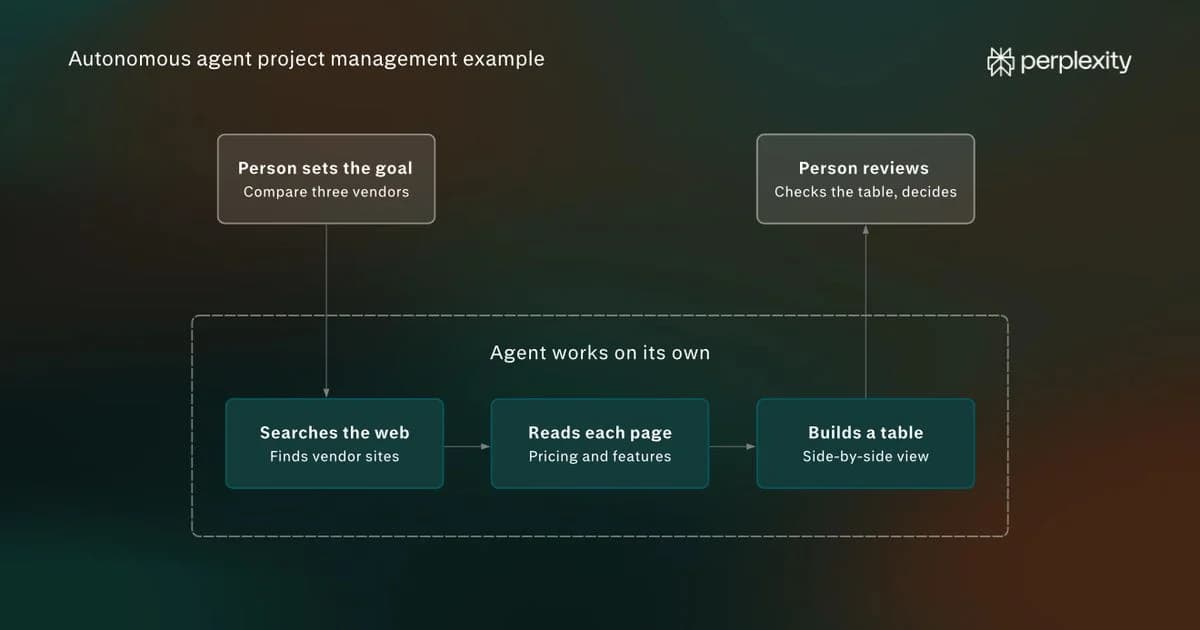
Say someone wants to choose between three project management tools. An autonomous agent can search for each tool, open its pricing page, note the differences, and return a finished comparison. The person sets the goal and reviews the result, and the agent does the work in between.
Many current software agents use a large language model to interpret instructions and decide what to do next. Some models also process images or audio. To search the web, click buttons, or send email, the agent needs software that connects the model to tools and executes its requests.
In the project management example, the LLM and agent would work like this:
- The LLM reads the goal and writes a request to search for the first tool’s pricing.
- The agent’s software runs the search and passes the results back to the LLM as text.
- The LLM reads the results, picks the next step (opening the pricing page), and writes a new request.
- The cycle repeats until the LLM decides the comparison is complete and writes the final answer.
Levels of autonomy
In an agentic AI system (AI built to take actions, not only answer questions), autonomy is a design choice. The same agent can be set up to ask before every step or to finish a whole task alone.
Researchers from the University of Washington propose a five-level framework to explain the different degrees of autonomy that an agent can have:
Level
Person’s role
How the work is split
Operator
The person directs each step and makes the decisions. The agent carries them out.
Collaborator
The person and the agent plan and do the work together, and the person can take over at any point.
Consultant
The agent leads and asks the person for preferences or expertise along the way.
Approver
The agent works independently and asks for approval only for risky or predefined steps.
Observer
The agent works with full autonomy. The person monitors it and can stop it.
At level 4, an agent might research and draft a purchase order on its own but pause before submitting it. At level 5, it would submit the order too.
Autonomous AI agents vs automation vs chatbots
Autonomous agents differ from chatbots and workflow automation in two ways: they decide their own steps, and they take actions in other apps and websites.
A chatbot answers questions in a conversation, but it doesn’t usually act outside it. Workflow automation does act, but only by following steps someone set up in advance. A common type is robotic process automation (RPA), software that repeats simple, rule-based tasks such as copying data from one system to another.
An autonomous agent does both: it acts in other software, and it chooses its own steps toward a goal, within the tools, permissions, and instructions it’s given.
A complaint about a delayed order shows the difference. A chatbot could reply with a pre-written explanation of the shipping policy. A workflow automation could send a standard “order delay” email. An autonomous agent could look up the order, find that it was lost in transit, issue a replacement, and update the customer.
Chatbot
Workflow automation
AI agent
Autonomous agent
What it does with a request
Answers in the conversation
Runs a fixed sequence of steps set up in advance
Carries out tasks using tools
Completes a multi-step goal from start to finish
Who decides the steps
The person
The person who built the workflow
Shared between the person and the agent
The agent
Acts in other software
Not usually
Yes, within the steps it was built for
Yes
Yes
When something unexpected happens
Leaves it to the person
Stops or fails
Often checks with the person
Adjusts its plan and tries another approach
How autonomous agents work
An autonomous agent relies on four capabilities to complete a task: planning its steps, using tools, remembering what it has done, and checking its own results. For larger tasks, some agents also split the work across a team of agents.
1. Breaking down goals and making plans
A goal is usually too big to act on in one step, so an agent’s first job is to break it into smaller tasks. For example, if the user asks the agent to plan a team offsite, it could split the goal into choosing dates, finding venues within budget, checking availability, and drafting an invitation.
Agents can plan up front or plan as they go, depending on how they’re built. Planning up front means writing every step before starting, which works for short, predictable tasks. Planning as they go means mapping out the next step or two, acting, and revising based on what comes back. If the first-choice venue for the offsite were booked, the agent could move to the next option without starting over.
A survey of LLM-based autonomous agents from Renmin University of China finds this second approach handles more complex tasks better, because it’s hard to write a perfect plan before seeing any results. Many agents combine the two, sketching a full plan first and revising it as they work.
2. Taking action with tools
With a plan in place, the agent works through it one task at a time, choosing a tool for each.
- To find venues, it might use web search with a query like “offsite venues for 20 people near Austin.”
- To check availability, it might open each venue’s booking page in a browser and read the calendar.
- To send the invitation, it might connect to the person’s email through an API, the connection that lets one piece of software request data or actions from another.
After each action, the agent reads what came back and decides the next move. If the search turns up five venues, it checks their availability. If a booking page won’t load, it tries the venue’s phone listing or moves on to the next option.
The tools an agent has decide which tasks it can finish on its own. Without email access, it can draft the invitation but not send it.
3. Tracking progress with memory
As the agent works, it has to keep track of what it’s done and what it’s learned. By the time it has checked three venues, it needs to know which were booked, which had space, and what each one costs. That record sits in the LLM’s context window, the amount of text the model can consider at once.
Long tasks can outgrow that context window. Agents with long-term memory handle this by saving information outside the model, usually in a database, and retrieving only what the current step needs.
Long-term memory also carries over between tasks. When it’s time to plan next year’s offsite, the agent could reuse this year’s venue list and budget, or recall that the team prefers venues within an hour’s drive.
4. Checking results and correcting course
While it works, many agents watch for signs that a step went wrong. If a booking form returns an error or a search comes back empty, it tries another approach. When it reaches a decision it shouldn’t make alone, such as whether a venue slightly over budget is acceptable, it asks the person and adjusts based on the answer.
Before handing back its work, many agents will review their results. The LLM reads back what it produced, compares it with the goal, and lists anything missing or wrong. The agent revises and checks again until the result meets the goal. If the invitation is missing the venue’s address, for example, the review catches it and the agent adds it before sending.
5. Splitting work across agents
Some tasks go faster when several agents share them. A lead agent splits the work and hands pieces to sub-agents.
Perplexity Computer works this way. A person describes the outcome they want, and Computer breaks it into tasks and subtasks, then creates sub-agents to carry them out. Sub-agents can research the web, generate documents, process data, or call connected services through APIs.
When Computer runs into a problem, it creates new sub-agents to solve it. Each sub-agent can also run on a different AI model, so each part of the work goes to the model best suited to it.
So, for the offsite example, one sub-agent might research venues while another checks team calendars and a third looks into travel options.
How people use autonomous agents
People use autonomous agents mostly for everyday knowledge work: research, writing, email, and studying. In a study by Harvard and Perplexity researchers, productivity and learning tasks made up 57% of agentic queries. The examples below show what an agent does for each kind of work.
Research and analysis
Research suits agents well because it takes many small steps. An agent can search, open sources, read them, and compare what they say. Take a query like “find three recent studies on remote work and productivity and summarize what each found.” The agent searches for studies and opens the most relevant ones. It reads each study’s findings and writes a summary with links to every source. If a study is behind a paywall, the agent moves on to the next one. In the study, summarizing and analyzing research makes up 7% of agentic queries.
Documents, email, and calendars
Agents often work in the tools people already use every day. In the Harvard and Perplexity study, Google’s document tools and email were the two most common, together making up about a quarter of agentic queries. Take a query like “go through this week’s unread email, flag anything from clients, and draft replies to the scheduling requests.” The agent opens the inbox and sorts the messages. It checks the calendar for open times and drafts a reply to each request. It can save the drafts without sending them, so the person can review each one first.
Learning and coursework
Students use agents to study. Coursework is the single largest category of agent use in the study, at 13% of agentic queries. A query like “quiz me on chapter four of my course readings” sends the agent to the course website, where it reads the chapter, writes questions on the key points, and checks the student’s answers. The same approach works for anyone learning a new subject, such as an employee getting up to speed on an unfamiliar industry.
Shopping and comparisons
Shopping makes up 10% of agentic queries, mostly searching for and comparing products. Asked to “find a standing desk under $400 with strong reviews,” an agent searches several retailers, filters by price and rating, compares the top options, and can add the best one to a cart. Having an agent comparing options across several websites can save a lot of time, since the person no longer has to open and cross-check each listing.
Seven best practices for using autonomous agents
1. Starting with easy-to-check tasks
The best first tasks are ones where a mistake is easy to spot and cheap to fix. Research summaries and product comparisons are good starting points. If the agent links its sources, checking the work takes a few minutes. As trust grows, people can hand off longer tasks with more steps.
2. Setting clear outcomes and constraints
The agent may make better calls when it knows why the task matters. A strong query reads like a brief to a contractor: the purpose, the audience, what’s already known, and what’s been ruled out. “Compare these three vendors for a board memo; the board cares most about implementation risk, and we’ve already excluded anyone without SOC 2 compliance” gives the agent what it needs to make judgment calls on its own.
3. Adding approval checkpoints
Some actions can’t be taken back, such as sending an email, making a purchase, deleting files, or submitting a form. Where an agent allows it, set it to pause and ask before these steps. The query itself can also set a stopping point. “Draft replies but don’t send them” or “add the best option to my cart but don’t check out” tells the agent exactly where to stop and hand control back.
4. Reviewing the plan before the work
For a larger task, ask the agent to outline its plan before it starts. Reviewing a plan takes a minute, and correcting a misunderstanding at that stage is much cheaper than finding it in a finished deliverable.
5. Limiting access to what the task needs
Every account an agent can reach is an account it can act in. Connecting only the apps a task requires keeps sensitive data out of reach and limits what can go wrong. An agent researching vendors doesn’t need email access. An agent drafting replies does, but it may not need permission to send them.
6. Building the checks into the query
Agents already review their own output, so the query can tell them what to check for. Stating what a good result looks like (“every figure needs a source dated 2025 or later”) makes the agent apply that standard before handing back its work. Asking it to separate confirmed facts from its own inferences, and to flag assumptions, makes the person’s review faster and more focused.
7. Reusing what works
A query that produced a strong result can become a template for the next similar task. Giving the agent an example of good output, such as last quarter’s report, often does more than describing the format in words. Recurring tasks can become standing workflows.
How Perplexity approaches autonomous agents
Perplexity offers two autonomous agents. Comet Assistant handles everyday tasks inside the browser, and Perplexity Computer takes on larger projects that can run for hours or longer.
Comet Assistant is built into Comet, Perplexity’s AI browser. It works on the websites a person already has open, so it can schedule meetings, edit documents, send email, and book flights without switching tools.
Computer runs in the cloud and splits each goal across sub-agents, as described earlier. It connects to hundreds of services, and people can choose specific AI models for specific parts of the work. Computer is available to Pro and Max
Explore Comet Assistant to try an agent in the browser, or Perplexity Computer to hand off a larger project.
Frequently asked questions
Is an autonomous agent the same as agentic AI?
No, but the terms overlap. Agentic AI usually refers to the broader category of AI systems that pursue goals by planning and taking actions. An autonomous agent is a specific system in that category that carries out its work with little step-by-step approval.
Are all AI agents autonomous?
No. Some agents carry out each step only when a person directs it, while others complete a whole task on their own. The levels of autonomy described earlier show the full range, from agents a person operates step by step to agents a person only monitors.
Can autonomous agents make purchases or payments?
Some agents can assist with purchases, depending on the website, permissions, and safeguards. Comet Assistant can compare products and help with checkout flows. Perplexity’s Instant Buy lets eligible U.S. users purchase supported products within Perplexity, with PayPal available as a checkout option.
Do autonomous agents require coding skills?
Many ready-made agents can be used without coding. Some platforms also let people build agents through natural-language instructions or a graphical interface. Coding can be useful for custom integrations, debugging, and more specialized behavior.