![How to Fine-Tune an LLM [+When to Use RAG]](/_next/image?url=%2Fapi%2Fuploads%2Farticles%2F81eada234de1cd472b351fd8e7efb0d5.webp&w=3840&q=75)
Fine-tuning a large language model (LLM) means refining a pre-trained LLM on a small, task-specific dataset so it delivers outputs you can’t get from prompting alone.
Fine-tuning involves collecting example input/output pairs that show the behavior you want, running training passes that move the model’s weights toward them, and checking the result against the original model outputs. Parameter-efficient methods like LoRA make this cheap enough to run on a single GPU.
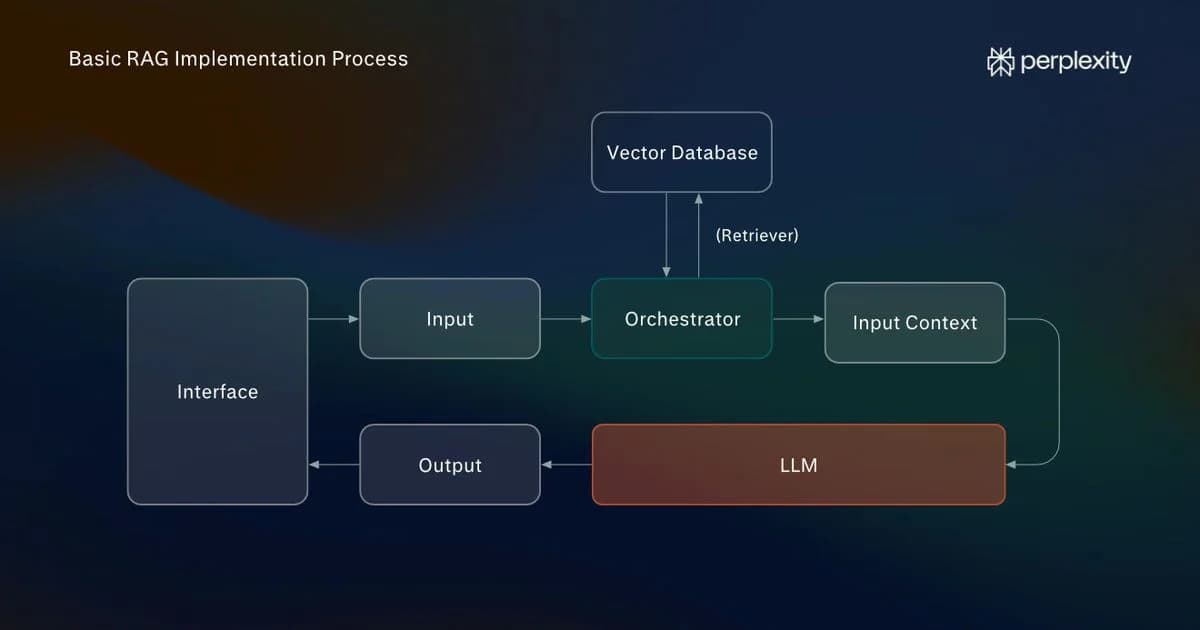
If you aren't satisfied with the LLM outputs, refine your prompts and retrieval-augmented generation (RAG) first. Fine-tuning changes how the LLM behaves. When you need it to use fresh or proprietary information, prompting and RAG are usually a better choice.
Here's how to fine-tune an LLM step by step, the main fine-tuning methods (LoRA and QLoRA), and the challenges and mistakes that can break the process.
What's LLM fine-tuning and how it's different from LLM pre-training
LLM pre-training builds a model’s general language ability from scratch on a vast corpus, while LLM fine-tuning adjusts a pre-trained model on a small dataset for one job.
LLM pre-training is the resource-heavy phase that produces a base model. It learns from a broad text corpus, which gives it general grammar, facts, and reasoning but no specialization for your task.
LLM fine-tuning continues base model training on a small, curated dataset so it produces the desired outputs for a specific task or use case. Think of a consistent format, a brand voice or tone, domain-specific patterns, or reliable tool and function calls.
When to fine-tune LLMs and when to prompt or use RAG instead
To improve LLM performance, work up the ladder: prompting -> RAG -> fine-tuning.
Refine your prompts with more detailed instructions and use RAG to give the model up-to-date information. Use fine-tuning only when prompt and retrieval improvements don't deliver.
Approach
What it changes
Use it when
Main limitation
Prompt engineering
The request you send
Behavior is close, and you want speed and reversibility
Capped by the base model’s existing abilities
RAG
What the model sees at inference time
Facts change often, and you need the LLM to access up-to-date information
Adds retrieval latency and infrastructure; doesn’t change behavior
LLM fine-tuning
The model’s weights (internal model parameters)
You need consistent behavior, format, or tone at scale, or shorter prompts on every call
Upfront cost, knowledge baked into the weights goes stale, risk of forgetting pre-trained behaviors
When better prompts beat fine-tuning and when they aren't enough
Prompting is the fastest and cheapest lever. In many cases, more accurate and detailed prompts achieve the desired behavior changes.
But longer prompts slow down work and make it more expensive, and can't overcome existing model limitations.
Signs that prompting may have reached its limits:
- New edge cases keep breaking the output: For example, the model returns prose when you need JSON or goes off-tone, and you patch the prompt for each new case.
- The system prompt keeps growing: The prompt runs to hundreds or thousands of lines and is hard to manage.
- You pay for it on every call: The prompt is re-sent and re-processed on each request, so token cost and latency grow.
- Changes stop making a difference: New instructions don't improve the outputs.
Even then, try the cheaper prompt-level fixes first. Use few-shot examples to show the model the pattern (input/output pairs), prompt chaining to split hard tasks into smaller steps, or function-calling hooks to offload exact lookups or computation.
When RAG makes more sense than fine-tuning the model
RAG changes what the LLM knows, while LLM fine-tuning changes how it behaves. If the gap is knowledge, especially knowledge that changes often or lives in your own documents, RAG is the answer. If the gap is behavioral, fine-tune.
Fine-tuning also shifts what a model knows, but any facts it absorbs are frozen at training time and quickly lose currency in fast-moving fields. And the information gets baked into the model's weights, so they carry no record of their source.
Updating the source documents that a retrieval layer uses is quicker and cheaper, and it can cite the exact sources it used. This makes it a better choice when you need defensible, up-to-date information.
The RAG downside? It's an extra layer to build and maintain, and it adds latency.
In practice, you'll often need both. Production systems pair fine-tuned models with RAG, using one for consistent behavior and the other for current facts.
Common fine-tuning pitfalls, risks, and challenges
Even when fine-tuning is the right tool, it carries costs and risks:
- Cost and time: Collating clean, representative training data and the training compute are expensive.
- Catastrophic forgetting: Trained on a narrow dataset, a model can lose general skills and pick up new failure modes, resulting in errors the base model didn't make.
- Overfitting: With too little or too repetitive data, the model memorizes your training examples instead of learning patterns, so it performs well on its training samples but poorly on real inputs.
- Staleness: Knowledge baked into the weights dates quickly, so you have to retrain on new data.
- Obsolescence: When a stronger model ships, it often beats your fine-tune out of the box, and you have to redo the work.
- Evaluation and reproduction challenges: Proving the fine-tuned model outperforms the base model is hard. Two GPU training runs with the same settings can also produce slightly different models.
- Data governance: Training on proprietary or sensitive data raises privacy and licensing questions; a model can later surface fragments of what it was trained on.
The main fine-tuning methods
The main types of LLM fine-tuning differ by how much of the model they change: full fine-tuning retrains the entire model, while parameter-efficient fine-tuning (PEFT) methods like LoRA and QLoRA update only some weights. PEFT methods cost a fraction of full fine-tuning in memory and, with the right settings, can match the results.
Full fine-tuning updates every model weight. It’s the most expensive and carries the highest risk of catastrophic forgetting. Reserve it for big behavioral change when you have the data and compute to support it.
The alternative is parameter-efficient fine-tuning, or PEFT. It's an umbrella term for methods that freeze most of the model and train only a small set of parameters. It uses far less memory and is less prone to forgetting, since the base model stays intact.
At the low ranks, PEFT learns less than a full fine-tune, but raising the rank and tuning the learning rate closes most of the gap on instruction-tuning tasks.
The PEFT methods include:
- LoRA (Low-Rank Adaptation): The usual starting point, freezes the original weights and trains a small set of added adapter parameters, often under 1% of the total, so it runs on a single consumer GPU.
- QLoRA (Quantized Low-Rank Adaptation): It compresses the base model to 4-bit precision before applying LoRA, which lets you fine-tune a large model on a single GPU.
Method
What it updates
Hardware reality
Use it when
Full fine-tuning
Every weight in the model
A multi-GPU node for 7B-class models, far more for larger ones
You need deep behavioral change and have the data and compute
LoRA (PEFT)
A small set of added adapter weights
A single consumer GPU
Your default starting point
QLoRA (PEFT)
LoRA adapters on a 4-bit compressed base
Very large models on a single GPU
You’re short on memory but want a big base model
On top of these, we use instruction-tuning and preference-tuning methods, from RLHF (Reinforcement Learning from Human Feedback) to lighter alternatives, like Direct Preference Optimization (DPO) and Odds Ratio Preference Optimization (ORPO), to shape how a model follows instructions and matches human preferences.
How to fine-tune an LLM step by step
Once you’ve decided fine-tuning an LLM is the right call, here’s the workflow.
Step 1: Define the task and how you’ll measure success
Decide what behavior you want from the LLM and how you’ll know you got it.
Name the specific job you want the fine-tuned model to complete, for example, classifying support tickets, summarizing contracts in a fixed format, or generating code in your house style.
Then define success. Common options include:
- Output validity: For example, does the result parse as valid JSON or match the Markdown structure you need?
- Automated scores: Use metrics like BLEU or ROUGE that compare generated text against reference answers, or task accuracy on a labeled set.
- Human ratings: A scored or pass/fail rubric for qualities a script scores poorly, like tone or helpfulness.
- Reliability on hard inputs: Does it handle the unusual inputs that tripped the base model?
Step 2: Prepare your dataset
Data quality determines the success of the fine-tune, so put effort into collecting the right fine-tuning dataset.
Format your data as instruction/response pairs, in JSONL, where each line holds the input (plus any context) and the exact output you want back.
For example, check out public datasets like the general-instruction Alpaca-cleaned dataset or Databricks' Dolly, or the task-specific banking77, which includes over 13,000 real support queries labeled across 77 intents.
For a focused task, a few hundred to a few thousand clean, varied examples can shift behavior. As long as the examples mirror real production inputs, including the edge cases, and are consistently formatted.
No input/output pairs yet? Build the set from the data you already have, like support tickets and their best replies, or documents and their summaries.
If you only have the outputs, use a stronger model to generate a plausible input for each, or hand-write a small seed set and expand it with a larger "teacher" model, then keep the best pairs.
Finish by splitting the data into training, validation, and test sets, so you can measure on examples the model hasn't seen.
Step 3: Pick a base model and method
Start with a small open-source model of 3 to 7 billion parameters and a parameter-efficient fine-tuning method like LoRA or QLoRA.
Open families like Llama, Mistral, and Qwen give you a strong base you can host yourself, and the PEFT methods keep the hardware bar low: QLoRA quantizes the base to 4-bit, so fine-tuning a 7B model requires only a 16-24GB consumer card. Full fine-tuning the same model needs many times that memory.
Step 4: Set your training hyperparameters
Here are the key LLM fine-tuning parameters and suggested starting ranges:
- Learning rate controls how big each update to the weights is. A 2024 study by Biderman et al. found LoRA's best rates sat roughly ten times higher than full fine-tuning's, typically 5e-5 to 5e-4 against 1e-5 to 5e-5. The study advises sweeping from 1e-5 to 5e-4 and using the highest value that trains stably.
- Batch size is how many examples the model learns from before each weight update. On a single GPU, use a small per-device batch of 1 to 8 and gradient accumulation to reach an effective batch of roughly 16 to 64.
- Number of epochs is how many times the model sees the full dataset. When training the model to perform specific tasks, 1-3 is a good rule of thumb, but LoRA runs often need more.
- LoRA rank (r) sets the adapter capacity, or how much it can learn. Start at 8 to 32 for simpler tasks and raise it for harder ones: The Biderman et al. LoRA study cited above, instruction-tuning a 7B model on code needed rank 256 to match full fine-tuning, while rank 64 came close on math.
- Maximum sequence length is the longest input the run will process. Set it to cover your longest examples, up to the model's context window, as anything longer gets truncated.
- Warmup and schedule control how the learning rate ramps up and changes across the run. A short warmup and a cosine decay are the usual defaults. However, the Pareja et al. small-model study found dropping warmup didn't hurt final scores.
Treat these as starting points for a sweep, not fixed settings.
Step 5: Train and monitor loss
As training runs, watch the training and validation loss curves to see if it's working.
Loss measures how far the model’s outputs are from your examples, and it should fall smoothly as the run proceeds. Training loss covers the data it learns from. Validation loss is on the held-out examples.
If training loss and validation loss fall together, the model is learning to generalize. If training loss keeps dropping but the validation loss flattens or climbs, the model is memorizing the training set instead of learning the pattern (overfitting).
Step 6: Evaluate, then deploy
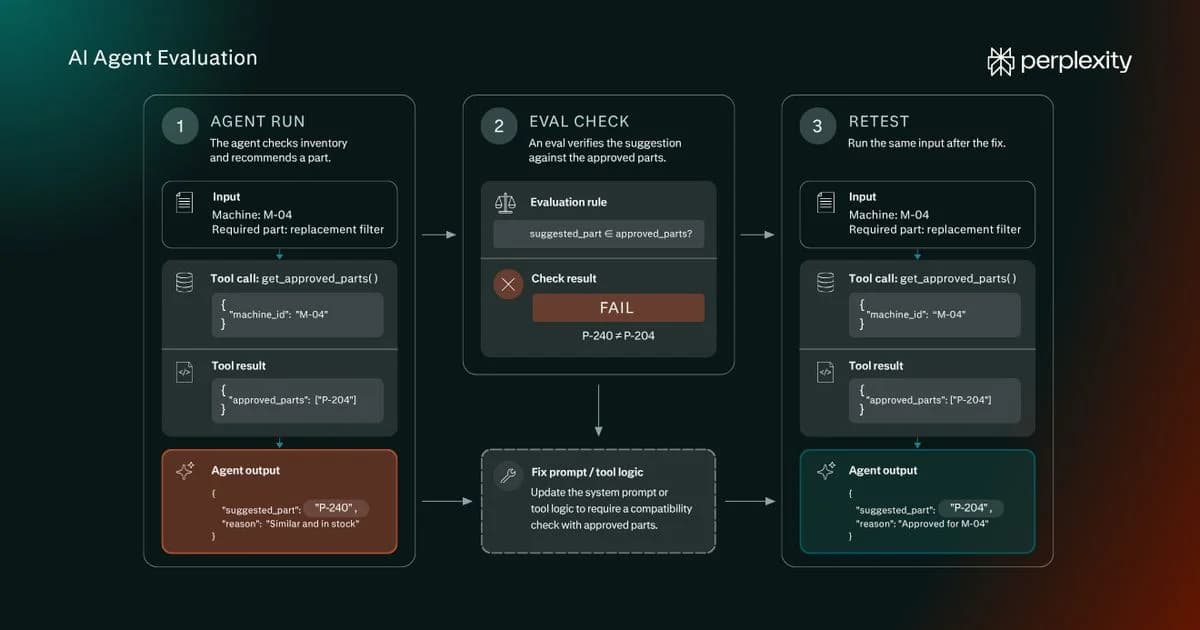
A low training loss doesn’t guarantee correct outputs, so assess the fine-tuned model on the criteria you set in Step 1.
When it passes, you have two ways to deploy:
- Serve the adapter on top of the base model and load both at runtime; this keeps the adapter swappable.
- Merge the adapter into the base weights to get a single standalone model that’s simpler to host.
Use Perplexity to give your LLM access to up-to-date information
Fine-tuning is the right call when you want to adapt model behavior to your needs.
If your model needs current information, especially information that changes quickly, you need a RAG or a reliable third-party search tool.
A custom retrieval stack works best for proprietary datasets, such as your internal wiki, customer support history, contracts, or product docs.
When the knowledge you want to use is public, there's no need to build a bespoke retrieval layer. Perplexity is an answer engine that returns responses with inline, clickable citations from a live web index. Its Agent API delivers those web-grounded, cited answers in a single call, so your app can draw on current sources.
Frequently asked questions about LLM fine-tuning
Can you fine-tune an LLM for free?
Yes, you can fine-tune a small open LLM for free. For example, Google Colab's free tier gives you enough GPU to run QLoRA on a 3B-to-8B model, which is plenty for a focused task. You start paying once you need more memory, longer runs, or a bigger base model than the free tier can hold.
Do you need your own GPU, or can you fine-tune in the cloud?
You don’t need to own a GPU to fine-tune LLMs. Managed services and GPU cloud providers rent the hardware by the hour, so a single rented GPU covers a small-model QLoRA run. Buying a GPU pays off only if you fine-tune often or have to keep all your data on your own machines.
How long does fine-tuning LLMs take?
For a small LLM, a run can finish in minutes to a few hours, depending on dataset size and hardware. Oumi, for instance, fully fine-tuned a 0.8B model in just over an hour on its hosted platform.
Larger models or tens of thousands of examples push that toward a day or more: Emburse's LoRA runs on a 7B model took 8 hours for 5,000 examples and about 30 hours for 50,000 on a single 40GB GPU.
Can you keep updating a fine-tuned model as your data changes?
You can re-fine-tune on fresh data, but each round costs compute and risks catastrophic forgetting. For knowledge that changes often, RAG is usually the better fix, since you update the source documents instead of retraining.



![Text embeddings explained: how they work [+examples]](/_next/image?url=%2Fuploads%2Farticles%2F9f7cefa7712535b5c2ce69ed7ae8d068.webp&w=3840&q=75)