RAG is an essential component of modern LLM-based infrastructure. By allowing AI models to access external data, it helps address issues like hallucinations and incomplete training data. It also means companies can use internal knowledge bases that contain sensitive or proprietary information.
RAG implementation can be very complex. However, a basic RAG system is surprisingly easy to build. For beginners, creating a simple architecture can illuminate how RAG works in the real world and provide a jumping board for further experimentation.
In this article, we’ll map out a basic RAG implementation, cover best practices, and then build a working system using Python, ChromaDB, and two Perplexity models for embedding and answer generation.
Basic RAG implementation process: A high-level overview
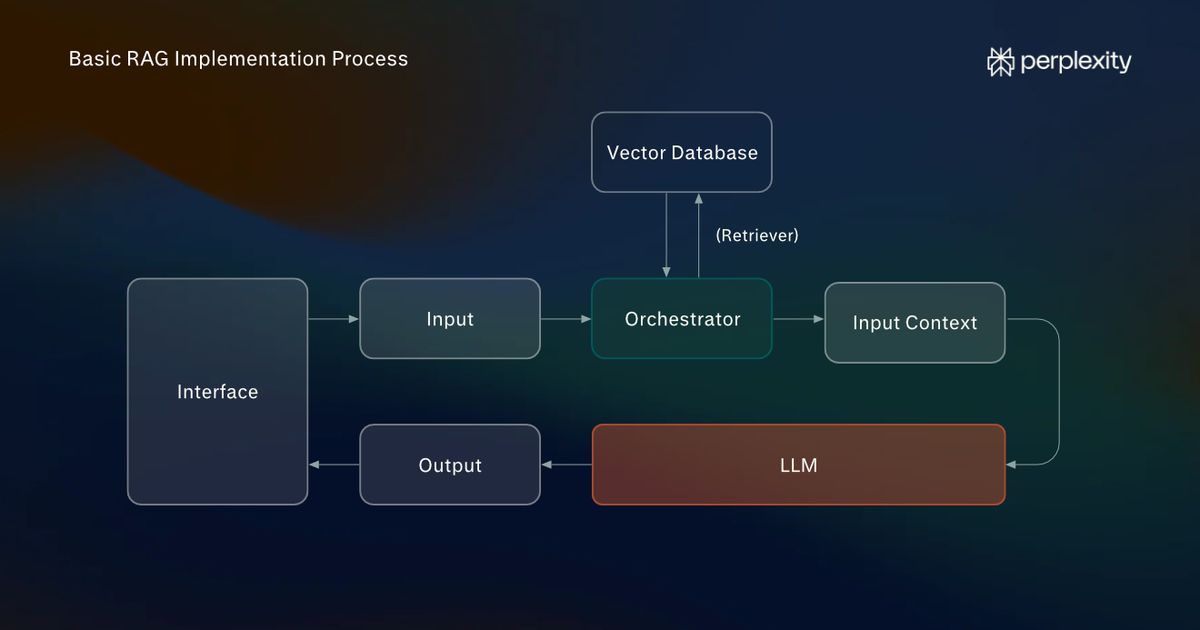
A basic RAG system has three main components: an orchestrator, an information source, and an LLM. In a typical workflow, a user enters a prompt, and the orchestrator modifies it to search any connected information sources. The retrieved information is then added to the original input context and sent to the LLM so a reply can be generated.
You will need to account for these steps when building your RAG implementation:
- Indexing and embedding: In this stage, your documents are converted into an information source that the orchestrator can search. One of the most common ways of doing this is to build a searchable vector index. We’ll use a dedicated model from Perplexity to convert your document chunks into embeddings. We’ll then store the embeddings with ChromaDB, a popular open-source vector database.
- Orchestration: This is the application that sits between the external information source (a vector database in our case) and the LLM. We’ll create a simple Python script to act as the orchestrator.
- Retrieval and generation: When a user asks a question via the chat interface, the orchestrator will take it, run a vector search, and feed the expanded input to the LLM. We’ll use the command line to prompt to communicate with our Python orchestrator rather than build a dedicated frontend.
Best practices: What makes an effective RAG implementation?
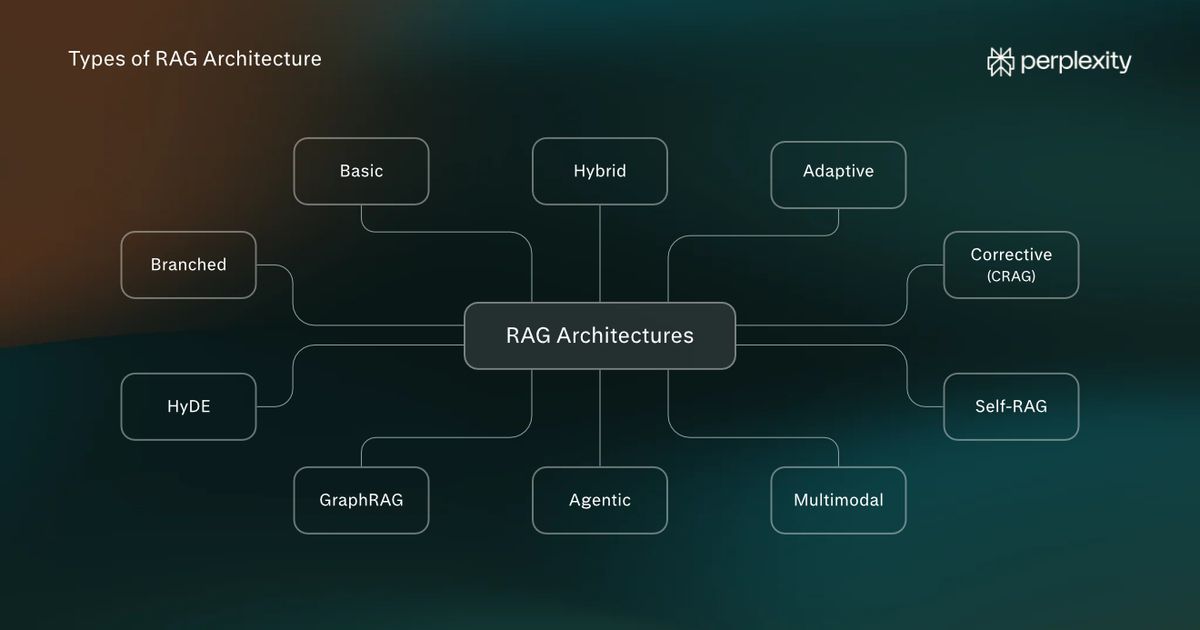
There are multiple types of RAG architecture, and individual use cases demand different approaches. That said, a number of best practices apply in all cases and ensure accurate, cost-effective, scalable, and maintainable systems.
The following best practices apply to all types of RAG implementation:
- Ensure a clean ingestion pipeline: Your source data should be as clean as possible before indexing. You should also use an embedding model suited to your content.
- Use hybrid search: The best retrieval methods, whether vector database search, API-based web search, knowledge graph traversal, keyword search, or other methods, vary by use case. Picking the right mix is important for minimizing costs.
- Evaluate your system: After implementation, you should evaluate across three core measures: accuracy, relevance, and latency. Accuracy refers to factual correctness, relevance to the applicability of retrieved information to user queries, and latency to the speed with which information is retrieved.
- Treat information securely: If your RAG system draws on private internal information, ensure that it is stored securely and access to the system interface is managed. API keys should never be shared.
Basic RAG implementation: 7-step tutorial
For this tutorial we’ll build a command-line application that answers questions about a single document. We’ll use Python, ChromaDB, and the Perplexity API.
The aim isn’t to build a production-ready RAG system. Rather, it’s a beginner-friendly tutorial that’s designed to illustrate how rudimentary RAG architecture works in practice.
Step 1: Install software
Make sure the following are installed on your computer and you have a Perplexity API account:
- Python: This is the programming language we’ll use to build the orchestrator that will coordinate the flow of data between the embedding model, ChromaDB, and Perplexity.
- Visual Studio: We’ll use Visual Studio as the code editor. Once installed, open the Extensions panel and download the Python extension.
- Perplexity API account: Perplexity will provide both the embedding model (which turns your data into vector embeddings) and the LLM that will process the expanded prompt. You don’t need a paid account to do this, though there will be a small credit cost.
Step 2: Create a project folder
Start by creating a folder titled rag-project and opening this in VS Code by selecting File > Open Folder. Then open the integrated terminal via Terminal > New Terminal.
Enter the following to create a virtual Python environment:
bash
py -3.12 -m venv .venv
You now need to install four Python libraries: perplexityai, chromadb, python-dotenv, and numpy. The Perplexity SDK will allow you to connect to Perplexity’s models via API. ChromaDB builds the vector database and will run locally. Python-dotenv loads your APIs securely from a local file, and NumPy is needed during the ingestion process.
Install these with the following command:
bash
.\.venv\Scripts\python.exe -m pip install perplexityai chromadb python-dotenv numpy
Step 3: Set up your files
Add the following files to rag-project (project root) by selecting New File… in the Explorer sidebar:
- index.py: This is the application that will index your document. You can rerun it to add further text.
- rag.py: This is the Python application that will act as the orchestrator.
- document.txt: This will contain the documentation that you will convert to a vector database.
- .env: This is where you'll keep your Perplexity API key.
In .env enter the following:
plaintext
PERPLEXITY_API_KEY=your_api_key_here
Replace your_api_key_here with your actual key. To do this, you’ll need to head to the Perplexity API Console home dashboard and select Create an API key. Keep this API key private.
We’ll be using two models: Perplexity’s pplx-embed-v1-0.6b to embed our documentation before uploading to ChromaDB and GPT-5.6-Luna (accessed through Perplexity’s API), which will process the retrieved information.
In document.txt, add the text that your RAG pipeline will retrieve. If you don’t have a document to hand, use William Blake's Songs of Innocence and of Experience from Project Gutenberg for this tutorial. It’s a short, easy-to-understand text in the public domain.
Step 4: Write the indexing program
Copy and paste the code below into index.py. Each subhead gives a brief explanation of what the following segment of code does. This is the program that will convert your source material into vector embeddings and store them in a ChromaDB database using Perplexity’s embedding model, pplx-embed-v1-0.6b, and the NumPy library.
Here’s what the program does:
- Opens document.txt.
- Splits the text into overlapping chunks.
- Sends those chunks to Perplexity's pplx-embed-v1-0.6b embedding model.
- Decodes and normalizes the returned vectors using NumPy, a Python library of computing functions.
- Stores the vectors and original chunks in a ChromaDB database (you’ll see this appear in your project directory).
It has been set up so as not to reindex your document every time you run it. If you add to the information in document.txt, it will only embed the new text.
python
from pathlib import Path from collections import defaultdict, deque from hashlib import sha256 import base64 import numpy as np import chromadb from dotenv import load_dotenv from perplexity import Perplexity # 1. Connect to Perplexity and ChromaDB load_dotenv() ai = Perplexity() db = chromadb.PersistentClient(path="./rag_database_perplexity") collection = db.get_or_create_collection( name="documents", metadata={"hnsw:space": "cosine"} ) # Convert Perplexity's encoded embeddings into numerical vectors def decode_embedding(encoded): vector = np.frombuffer(base64.b64decode(encoded), dtype=np.int8).astype(np.float32) norm = np.linalg.norm(vector) if norm == 0: raise ValueError("Received a zero-length embedding vector.") return (vector / norm).tolist() # 2. Read the document and split it into chunks text = Path("document.txt").read_text(encoding="utf-8") words = text.split() chunk_size = 180 overlap = 30 step = chunk_size - overlap chunks = [" ".join(words[i:i + chunk_size]) for i in range(0, len(words), step)] if not chunks: raise ValueError("document.txt is empty.") # 3. Retrieve the chunks already stored in ChromaDB existing = collection.get(include=["documents"]) stored_chunks = defaultdict(deque) existing_ids = set(existing["ids"]) for chunk_id, document in zip(existing["ids"], existing["documents"]): stored_chunks[document].append(chunk_id) # 4. Identify unchanged and new chunks new_chunks = [] new_ids = [] kept_ids = set() unchanged = 0 for chunk in chunks: if stored_chunks[chunk]: chunk_id = stored_chunks[chunk].popleft() kept_ids.add(chunk_id) unchanged += 1 else: chunk_hash = sha256(chunk.encode("utf-8")).hexdigest() chunk_id = f"chunk-{chunk_hash}" suffix = 1 while chunk_id in existing_ids or chunk_id in kept_ids or chunk_id in new_ids: chunk_id = f"chunk-{chunk_hash}-{suffix}" suffix += 1 new_chunks.append(chunk) new_ids.append(chunk_id) kept_ids.add(chunk_id) # 5. Generate embeddings in batches of up to 100 chunks batch_size = 100 for i in range(0, len(new_chunks), batch_size): batch_chunks = new_chunks[i:i + batch_size] batch_ids = new_ids[i:i + batch_size] embeddings = ai.embeddings.create( model="pplx-embed-v1-0.6b", input=batch_chunks, encoding_format="base64_int8" ) vectors = [decode_embedding(item.embedding) for item in embeddings.data] # 6. Store each batch in ChromaDB collection.upsert( ids=batch_ids, documents=batch_chunks, embeddings=vectors ) print(f"Indexed batch {(i // batch_size) + 1}") # 7. Remove outdated chunks old_ids = [chunk_id for chunk_id in existing["ids"] if chunk_id not in kept_ids] if old_ids: collection.delete(ids=old_ids) # 8. Display indexing results print("Indexing complete!") print("Unchanged chunks:", unchanged) print("New or modified chunks:", len(new_chunks)) print("Removed chunks:", len(old_ids)) print("Total stored chunks:", collection.count())
Step 5. Write the orchestrator for the RAG system
Copy and paste the code below into rag.py. It is a complete but minimal RAG implementation that uses the Perplexity SDK and ChromaDB's local vector database functionality.
Here’s what will happen when you run the program:
- Connects to Perplexity and your new ChromaDB database.
- Checks that the database contains indexed documents.
- Accepts a question from the user.
- Sends the question to Perplexity's embedding model.
- Decodes and normalizes the resulting embedding using NumPy.
- Searches ChromaDB for the three most similar document chunks.
- Constructs a prompt containing the retrieved chunks and the user's question.
- Sends the prompt to GPT-5.6 Luna through Perplexity's Agent API.
- Displays the answer and waits for another question.
python
import base64 import numpy as np import chromadb from dotenv import load_dotenv from perplexity import Perplexity # 1. Connect to Perplexity and the existing ChromaDB database load_dotenv() ai = Perplexity() db = chromadb.PersistentClient(path="./rag_database_perplexity") collection = db.get_collection("documents") # Convert Perplexity's encoded embeddings into numerical vectors def decode_embedding(encoded): vector = np.frombuffer(base64.b64decode(encoded), dtype=np.int8).astype(np.float32) norm = np.linalg.norm(vector) if norm == 0: raise ValueError("Received a zero-length embedding vector.") return (vector / norm).tolist() # 2. Check that the database contains indexed documents count = collection.count() if count == 0: raise ValueError("The database is empty. Run index.py first.") print("Connected to existing ChromaDB database.") print("Stored chunks:", count) # 3. Accept questions from the user while True: question = input("\nAsk a question (or type exit): ") if question.lower().strip() == "exit": break if not question.strip(): continue # 4. Convert the question into a Perplexity embedding question_response = ai.embeddings.create( model="pplx-embed-v1-0.6b", input=[question], encoding_format="base64_int8" ) question_vector = decode_embedding(question_response.data[0].embedding) # 5. Retrieve the most similar document chunks from ChromaDB results = collection.query( query_embeddings=[question_vector], n_results=min(3, count) ) context = "\n\n".join(results["documents"][0]) # 6. Construct a prompt and send it to the fixed LLM response = ai.responses.create( model="openai/gpt-5.6-luna", instructions=( "Answer using only the supplied document excerpts. " "Do not use external information. " "If the answer is not present, say you don't know." ), input=f"Document excerpts:\n{context}\n\nQuestion: {question}" ) # 7. Display the answer print("\nAnswer:\n", response.output_text)
Step 6: Run the applications
In the VS Code PowerShell terminal, enter the following to embed the content in document.txt:
bash
.\.venv\Scripts\python.exe index.py
You should see an output similar to this one if your document has been indexed successfully:
plaintext
Indexing complete! Unchanged chunks: 0 New or modified chunks: 58 Removed chunks: 0 Total stored chunks: 58
Now it’s time to run the main orchestrator application. Input this command:
bash
.\.venv\Scripts\python.exe rag.py
If it runs successfully, you will see the following:
plaintext
Connected to existing ChromaDB database. Stored chunks: 58 Ask a question (or type exit):
You can now ask questions that will draw from the vector database you’ve created, such as:
plaintext
Ask a question (or type exit): What animals does William Blake talk about? Answer: The excerpts mention sheep, lambs, birds, beasts, wolves, tigers, and a lion.
Step 7: Understand what you’ve built
The system you’ve built contains the two core pipelines contained in every RAG architecture: an indexing, or “ingestion,” pipeline and a retrieval and generation pipeline.
Your basic RAG implementation now does all of the following:
- Vector storage: Embeddings are saved in your ChromaDB database in your local environment based on your knowledge file.
- Incremental indexing: Unchanged document chunks aren't embedded again, and you can update the document whenever you wish.
- Semantic retrieval: ChromaDB retrieves chunks based on vector similarity (initiated by the orchestrator).
- Grounded answer generation: The LLM receives retrieved passages as context and incorporates them into an answer.
- Independent indexing and querying: You can ask questions without reprocessing all of the text contained in your knowledge file.
- API-based model connection: All answers are generated using GPT-5.6 Luna through Perplexity rather than a model running on your machine.
Next steps: How to take this implementation further
The aim of this tutorial is to build a straightforward, basic implementation. It covers some of the core RAG architecture components present in modern systems. If you want to go further, there are various ways you can build on it.
Here are some ideas for expanding the scope of your implementation:
- Experiment with LangChain: LangChain is one of the most popular open-source orchestration frameworks. It contains prebuilt components for building apps capable of running complex RAG pipelines.
- Expand search functionality: Combine dense vector search with lexical (keyword) search such as BM25. Adding web search via the Perplexity Search API would also allow you to ground answers in current data.
- Add a reranking model: Integrate a reranking model that ranks retrieved passages against the initial prompt and selects the most relevant ones for inclusion in the input context provided to the LLM.
- Build an adaptive RAG system: Adaptive RAG uses either an LLM or a classifier (a component within the orchestrator) to determine which retrieval method to use in a modular RAG system. Building one is a good way to explore more sophisticated RAG implementations.
While all of this may sound complex, keep in mind that mainstream AI platforms like Perplexity can provide advanced coding assistance. They’re excellent for personal projects and experimentation, and costs can be kept relatively low.
Note: This tutorial uses GPT-5.6 Luna. Model availability can change, so you may need to update the API call.