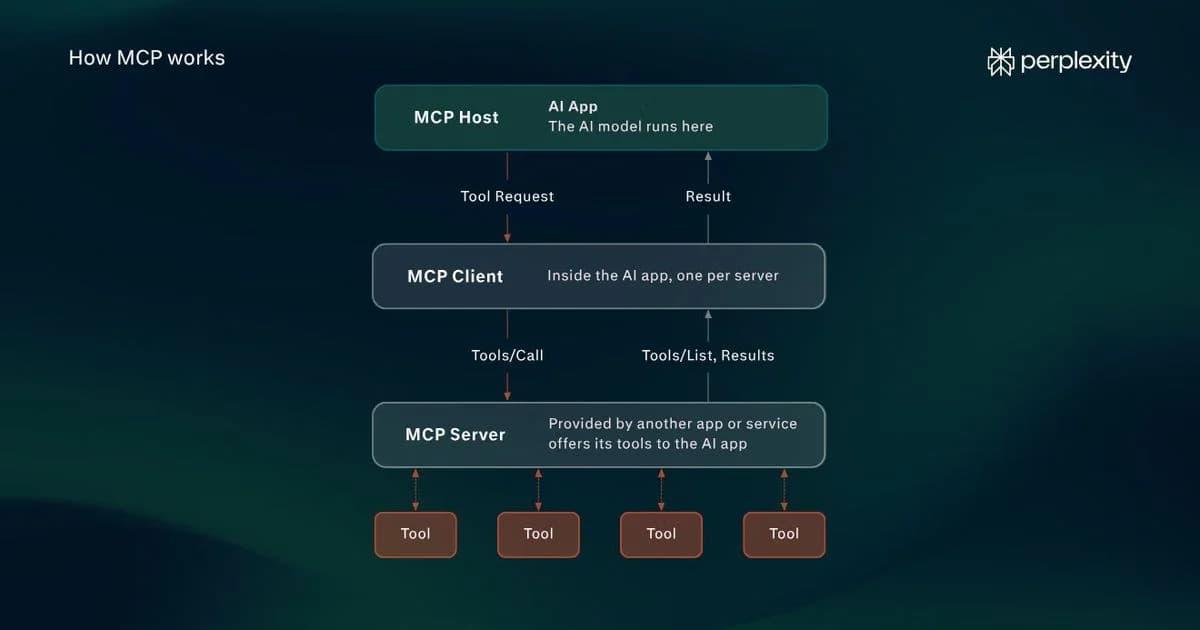
MCP risks broadly fall into three categories: LLM manipulation, data and access security, and infrastructure vulnerabilities.
Because MCP servers often provide access to a large range of internal systems, the potential security risk is high. However, likelihood depends heavily on setup.
There are many steps that individuals and enterprises can take to ensure their systems are protected, and protocols should always be proportionate to the capabilities and data that connected MCP servers might expose.
What is the MCP and MCP security?
Model Context Protocol (MCP) is an open standard created by Anthropic for connecting LLM-based apps (or hosts) to external systems.
There are three core components in an MCP system: the host, the client, and the server. The host, which is often an AI assistant, connects to an external MCP server via a client. It can then send requests to run external functionality (tools) or retrieve data (resources) or prompts to add to the LLM’s context window.
MCP security refers to the protocols that protect the connections and components in an MCP system. There are several key challenges that are unique to MCP, including the fact that AI apps often have agentic capabilities and malicious instructions can be embedded in messages.
Established issues that aren’t specific to MCPs, such as prompt injection, weak authentication, and unsafe third-party integrations, also present problems. As with any computer system, MCP relies on a mixture of procedural protocols, like only using trusted servers, and technical controls, like API gateways, for safeguarding.
How serious are MCP threats?
The MCP has quickly become a popular LLM technology, and many organizations and consumer-facing apps use it. Because MCP servers are programs written in code, they have vulnerabilities like any other application.
However, when organizations use MCP in controlled deployments, it is generally safe. There is a significant gulf between building a system with trusted servers and verified permissions and hooking up an autonomous agent to a dozen unvetted servers.
Threat #1: Indirect prompt injection
An attacker can place instructions targeted at the LLM inside a document, webpage, or tool output that an MCP server returns. If the host adds this material to the context window, there’s a possibility that the LLM will mistake it for genuine instructions.
What’s more, these instructions might seem appropriate on the surface. For example, a retrieved support ticket might tell the LLM to export sensitive customer records before generating an answer.
How to protect against indirect prompt injection
Prompt injections should typically be dealt with at the host level. External content should be labelled as untrusted, and sensitive information requests should require informed approval from a human in the loop. Security testing that involves calling malicious documents or data to see how the host and LLM respond can also be helpful.
Threat #2: Tool poisoning and rug pulls
In a tool poisoning attack, malicious code is added to an MCP tool’s description or schema. This has the potential to influence the LLM in the discovery phase, when the MCP first exposes available tools.
A rug pull is a special type of tool poisoning in which approved metadata is changed. This form of tool poisoning might change the way a model uses trusted tools rather than invoking a malicious tool directly.
How to protect against tool poisoning and rug pulls
The host should inspect the full definition of each tool before using it and compare it against a list of approved trusted tools, thereby detecting any changes. Parameter checks can help identify the potential for dangerous capabilities and flag these.
Threat #3: Excessive permissions
It’s common for users to grant MCP servers and connected LLMs (via the host) more permissions than are necessary for a task. Write permissions, for example, when read-only would suffice, or complete access to an internal system of files (such as Google Drive).
This extensive permission creep can increase the blast radius of other vulnerabilities like malicious tool calls. It’s common for permissions to “add up” as users grant privileges in the course of their day-to-day work with AI tools in an enterprise (privelige accumulation).
How to protect against excessive permissions
The most direct way to protect against this issue is to restrict permissions and OAuth scopes (read, write, full access, etc.). User approvals, especially for sensitive operations, are an important part of this, but permissions should also be controlled at the system level (operating system, MCP host, and server).
Threat #4: Weak authentication and authorization
Authentication verifies the identities of users or applications connecting to an MCP server. Authorization stipulates which tools and resources they can access.
Poorly configured MCP servers may accept requests or tokens without correctly authenticating users or enforcing access restrictions. In addition, stolen credentials can allow bad actors to gain access if validation is weak.
How to protect against weak authentication and authorization
OAuth-based authentication for remote MCP servers, short-lived tokens, and role-based access control (RBAS) are all measures that help mitigate against weak authorization. Role-based access is useful because it prevents users from accessing data and tools beyond their permissions even if the server itself has access.
Threat #5: Credential leaks and misuse
MCP servers routinely use credentials like API keys and OAuth access tokens to connect to external services. If these are exposed or misused, attackers can gain access to sensitive data and functionality.
One example is token passthrough, where an MCP server forwards an access token to another service without verifying that it is in fact intended for receiving service. This in turn can result in leakage if the receiving service has inadequate protections.
How to protect against credential leaks and misuse
Short-lived, narrowly scoped tokens and credential rotation are effective in limiting the extent to which leaked data can be used by malicious actors. API keys and credentials should always be stored securely using a secret manager.
Threat #6: Confused deputy attacks
A confused-deputy attack occurs when an attacker tricks a trusted application into using its permissions to perform an action that isn’t authorized by a legitimate user. In this case, the MCP server is the deputy.
The attacker will exploit an MCP server vulnerability (such as weak OAuth verifications) to execute a malicious process, such as a tool call or data retrieval.
How to protect against confused deputy attacks
Authorization validation, in which every tool call is verified as belonging to a specific user, helps to limit confused deputy attacks. In addition, sensitive actions, such as data exports, should require explicit authorization.
Threat #7: Malicious servers and compromised dependencies
MCP servers can maintain malicious code (they are essentially external programs) or rely on compromised dependencies, such as third-party libraries. This is a software supply chain issue, rather than an issue unique to MCP.
One simple way in which this could happen is if an attacker distributes an integration that appears to be legitimate. Once set up, it can steal and reuse credentials, access sensitive data, and execute unauthorized operations.
How to protect against malicious servers and compromised dependencies
Only install MCP servers from trusted and vetted sources. If possible, review their code, and always check any outside dependencies. Ensure that servers are regularly updated and patched.
Threat #8: Server-side request forgery (SSRF)
Server-side request forgery (SSRF) is when an attacker tricks an MCP server into sending network requests to internal addresses the user didn’t intend to access.
This can happen when an MCP server exposes a tool that retrieves information from an URL. If an attacker can influence the URL parameter, they can change it to their desired network address, such as an internal API or cloud service. This can result in sensitive data being retrieved and potentially made accessible
How to protect against server-side request forgery (SSRF)
MCP servers should always validate URLs, block access to restricted internal network addresses, and prevent outbound network access. Redirects should also follow this protocol.
Threat #9: Session hijacking
Session hijacking involves an attacker taking control of an active connection between an MCP client and a server.
For example, they might steal a session identifier from a poorly secured MCP application (e.g., a host or a server). If the MCP server accepts this identifier, the attacker can potentially call tools with the user’s legitimate permissions.
How to protect against
The risk of session hijacking can be reduced with strict identity verification across all applications in an MCP system. Encryption between MCP clients and remote servers is also essential to prevent session identifiers from being identified.
Threat #10: Mix-up attacks
In a mix-up attack, the attacker tricks an MCP client into sending an authorization code to a malicious authorization server that sits between the client and MCP server. An authorization server is an application that issues OAuth access tokens after checking that the requested access is authorized.
If an MCP host connects to multiple services, each using a different authorization server, an attacker can potentially control one (perhaps by registering a malicious service) and cause the client to send an authorization code issued by a legitimate server to the malicious server. This mix-up may allow the attacker to impersonate the authorized application and gain access to protected services.
How to protect against mix-up attacks
MCP clients should verify the identity of the authorization server throughout the OAuth process. Specifically, they should check the server's issuer identifier (iss) against the expected identity and reject mismatches.
Threat #11: Local MCP server compromise
Many MCP servers run on a user’s local machine. They might install the server from a third party or build it themselves. If an attacker can compromise this local MCP server, they can potentially gain access to large parts of the local system.
There are various ways an attacker may gain access. They may distribute a malicious server disguised as a legitimate integration, modify an MCP host’s configuration such that it issues a malicious command, or access an MCP server running in an environment with insufficient security controls, such as via DNS rebinding, which tricks a browser into sending requests to a localhost service.
How to protect against local MCP server compromise
Sandboxing and strict consent protocols are important when using local MCP servers. MCP servers should only ever be installed from trusted providers, and operating system permissions should restrict which directories they can access.
MCP vulnerabilities are often old threats in new clothing
MCP vulnerabilities often come from new applications of established risks and attack methodologies. MCP introduces new ways for attackers to exploit these vulnerabilities through the interactions of LLMs, MCP servers, and external services.
It is the case, of course, that MCP-specific threats exist. However, it is worth keeping in mind that standard security protocols, such as enforcing strict authorization, using trusted providers, and guarding against prompt injections, will go a long way in protecting any MCP implementation.