Migrating from MongoDB® to Couchbase involves 11 phases: assessment, schema mapping, query translation, index design, data migration, application refactoring, testing, benchmarking, cutover planning, rollback strategy, and post-migration validation. The data movement itself is the easy part. Query translation and application refactoring are where engineering teams lose the most time, and first-run benchmarks should be treated as a starting point because redesign is what brings performance up to expectations.
This guide is written for principal software engineers and solutions architects who have decided to evaluate or execute the migration. It’s not for readers still comparing vendors. If you’re still deciding whether Couchbase is the right choice, start with this Couchbase vs. MongoDB® comparison and return here when you’re ready to plan your move.
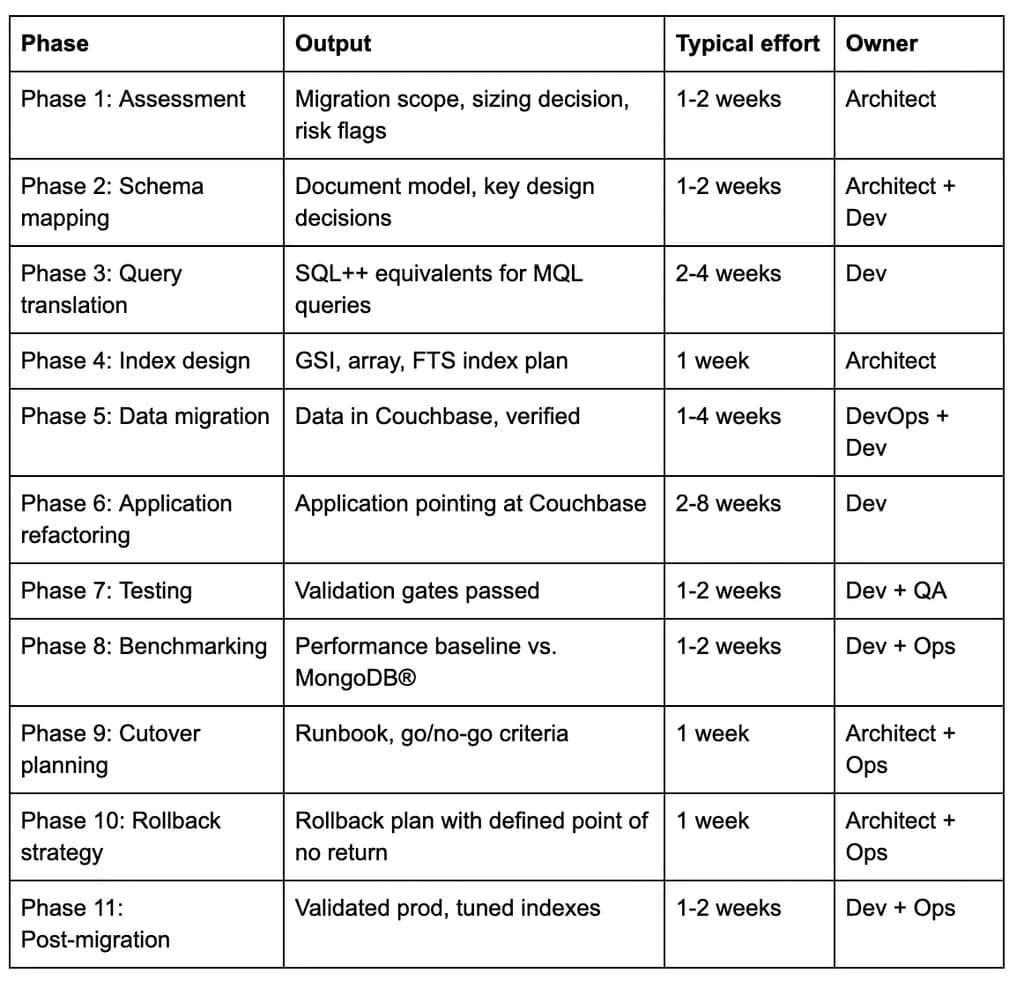
Here’s a quick rundown of what each phase produces, the typical effort involved, and who usually owns it:
Phase 1: Migration assessment
Before you write any migration code, first inventory what you’re actually moving. This output will help determine every subsequent decision, including whether to migrate directly or incrementally, what downtime window is realistic, and whether the application can tolerate interim schema changes.
Your inventory should cover collection count and document volume, index count and type, aggregation pipeline complexity, ODM or framework usage (Mongoose, Spring Data MongoDB®, Morphia), write patterns and consistency requirements, and any MongoDB® Atlas-specific services you’re using, including Atlas Search, Charts, Triggers, or Device Sync. Atlas-specific services have no direct Couchbase equivalent, so you’ll need to make the relevant architectural decisions before you begin migration.
Document volume determines your migration approach. Use the following bands as your starting point, then adjust based on your network throughput, available downtime, and hardware:
Your migration assessment will also surface three decisions that affect every later phase. It will allow you to determine your acceptable downtime window, whether the application can run in dual-read mode during the transition, and whether your team can absorb schema changes before cutover.
Phase 2: Schema and data model mapping
BSON to JSON conversion
Most MongoDB data converts cleanly from BSON to JSON, but several BSON types require explicit decisions before migration:
- ObjectId: Couchbase stores the string representation. You’ll need to decide whether to preserve the ObjectId string as the document key or derive a new key from it.
- Decimal128: Convert to a JSON number if it preserves the required precision. If not, store it as a string and update the application to convert it back to a numeric value when needed.
- BinData: Convert binary data to base64-encoded strings during migration. Update the application to decode these strings back into binary data wherever needed.
- Date: MongoDB stores dates as UTC timestamps in milliseconds, while Couchbase typically represents them as ISO 8601 strings in JSON. Make sure the application can read and write the correct format during the period when both databases are in use.
Structural mapping
MongoDB’s database/collection hierarchy maps to Couchbase’s bucket/scope/collection hierarchy. A single MongoDB database becomes a Couchbase bucket. Collections map to Couchbase collections within a scope. A common pattern is one scope per MongoDB database when a single Couchbase bucket consolidates multiple MongoDB databases.
Document key design
Couchbase supports both key-value access and document queries. Choosing the right document keys lets your application retrieve documents directly by key instead of running a query, which can be faster and more efficient. Key-value lookups typically take less than a millisecond, while SQL++ queries require additional processing, even when the relevant fields are indexed.
Three key design patterns cover most cases.
- Deriving the key from _id (for example, “user::507f1f77bcf86cd799439011”) preserves MongoDB identity and is the lowest-friction option.
- Composite keys (for example, “order::2026-09::customer-42”) encode multiple attributes and make the key self-describing and enable direct lookups without secondary indexes.
- Natural keys from business identifiers (email addresses, account numbers, product SKUs) eliminate the need for a lookup index entirely when the business identifier is always known at access time.
When to reconsider the model rather than port it
A lift-and-shift of the MongoDB schema into Couchbase will work and is the right choice for teams that need to move quickly. It leaves performance on the table, but it’s reversible.
Teams with the capacity for model redesign should look at three patterns:
- Unbounded embedded arrays that grew without constraint in MongoDB can be split into separate documents in Couchbase.
- References implemented as lookup joins in MongoDB can become SQL++ JOINs, which are sometimes more efficient.
- Documents that approached MongoDB’s 16MB limit should be split at migration time rather than hitting Couchbase’s 20MB limit later.
Phase 3: Query translation (MQL to SQL++)
SQL++ is a superset of SQL that operates natively on JSON. For engineers familiar with SQL, much of the syntax will feel familiar. For engineers who learned MongoDB first, the mental model shift from staged aggregation pipelines to declarative SQL is where teams lose the most time.
MQL to SQL++ translation table
Aggregation pipelines map to SQL++ subqueries or CTEs (WITH clauses). MongoDB’s staged pipeline model maps to a single declarative query in SQL++, which many engineers find easier to reason about once they’re familiar with the syntax. The translation effort scales with the number of distinct query patterns in the codebase, not with data volume. For instance, a codebase with 200 distinct aggregation pipelines requires more translation work than one with 20, regardless of document count.
The Couchbase Capella iQ coding assistant includes an AI-assisted query translation feature that converts MQL to SQL++ directly in the query workbench. It’s useful for building momentum on routine queries, but the output should be reviewed and tested before use in production, not treated as final.
Phase 4: Index translation and design
Index design is the area where migrated deployments most often need tuning before they reach expected performance. MongoDB index choices encode MQL access patterns, and SQL++ access patterns differ. Porting indexes without redesigning them for SQL++ query shapes is the most common source of first-benchmark disappointment.
Index type mapping
Index sequencing for large datasets
For datasets in the 100M+ document range, building indexes during data load significantly extends migration time. The correct sequence for large migrations is to load all data first, then build indexes. Per the sizing bands in Phase 1, datasets over 100M documents should use parallelized loading with post-load index builds.
Index Advisor
After migration, the Index Advisor in the Couchbase Query Workbench analyzes actual query patterns and recommends missing or redundant indexes. Running the Index Advisor after initial load and after first-run benchmarking (Phase 8) is the most reliable way to correct index designs that were translated from MongoDB rather than designed for Couchbase’s query engine.
Phase 5: Choosing a data migration approach
The right migration approach depends on dataset size, acceptable downtime, and whether the application can run in dual-read mode during the transition. The two options are direct migration and incremental migration.
Direct migration with cbmigrate
cbmigrate is a CLI tool that migrates MongoDB collections directly to Couchbase Capella. It handles connection, data transfer, optional index migration, and basic type conversion. The VS Code and JetBrains plugins provide cbmigrate integration in the development environment.
The basic migration sequence is:
- Run cbmigrate connect to configure source (MongoDB) and destination (Couchbase Capella) connections.
- Run cbmigrate migrate –collection <name> to transfer a collection.
- Repeat per collection or use –all-collections for bulk transfer.
- Build indexes after load completes (for large collections, do not use –migrate-indexes during load).
- Verify document counts and sample document content.
cbmigrate’s index migration flag (–migrate-indexes) transfers index definitions but not the tuned index designs discussed in Phase 4. This flag helps you get the new deployment up and running quickly, but you should review and optimize the migrated indexes with Index Advisor before putting the system into production.
Incremental migration with Apache Kafka®
The Apache Kafka® path uses a MongoDB source connector to stream changes from MongoDB’s oplog and a Couchbase sink connector to write those changes to Couchbase Capella. This approach supports near-zero downtime because it lets Couchbase catch up to MongoDB’s current state before switching the application over.
The Apache Kafka configuration requires three components: (1) a running Kafka cluster (Confluent Cloud is one widely used managed option), (2) the MongoDB Kafka Connector as the source, and (3) the Couchbase Kafka Connector as the sink.
The key configuration parameters are the resume token (which determines from where in the oplog streaming begins) and the sink’s key extraction strategy (which determines how MongoDB _id maps to Couchbase document keys).
Two operational concerns that deserve particular attention:
- Monitoring stream lag – Track consumer lag for the Kafka Connect sink connector to see whether it’s processing records as quickly as they arrive. Growing lag can indicate that the connector is falling behind.
- Handling conversion failures – Configure the connector to route records that fail conversion to a dead-letter topic instead of stopping the stream. This allows you to investigate and resolve failures without interrupting the migration.
Phase 6: Application refactoring
Application refactoring effort scales with the number of distinct query patterns and the degree of ODM coupling in the codebase, not with data volume. A codebase with direct driver calls and 50 hand-written aggregation pipelines requires less refactoring effort than one built on a tightly coupled ODM with 300 collection-level hooks.
SDK operation comparison
For teams with Python workloads, the Couchbase Python SDK follows the same pattern: couchbase.collection.get(key) for KV operations and couchbase.cluster.query(sql) for SQL++ queries. The SDK interface is consistent across Java, .NET, Go, Ruby, PHP, and Kotlin.
Framework migration paths
- Mongoose users can migrate to Ottoman.js, which provides a Mongoose-like ODM interface for Couchbase with model definitions, schema validation, and query building.
- Spring Data MongoDB users can migrate to Spring Data Couchbase, which maps MongoDB repository patterns to Couchbase equivalents.
- Entity Framework users have an EF Core provider for Couchbase.
- For AI workloads using LangChain or LlamaIndex, both frameworks have Couchbase integrations that use Couchbase’s native vector search rather than requiring a separate vector store.
Phase 7: Testing and data validation
Thorough testing and validation are essential before cutover. Do not proceed without passing all three validation layers of data reconciliation, query parity, and functional correctness.
Data reconciliation
Compare document counts per collection between MongoDB and Couchbase. For sampled documents (10% is a reasonable starting sample for collections under 10M docs), compute a checksum or hash on the source and destination documents and compare. Flag any documents where the count or hash doesn’t match for manual inspection.
Pay special attention to a few cases that can cause differences between the two databases. Test how each handles null values versus missing fields, since MongoDB distinguishes between a field set to null and a field that doesn’t exist, and Couchbase query behavior can differ depending on the operation. Also check date formats, Unicode string comparisons, and any documents close to MongoDB’s 16 MB size limit.
Query parity testing
Run equivalent MQL and SQL++ queries against the same dataset and compare their results. The results don’t need to appear in the same order if the application doesn’t rely on a specific sort order. However, the actual results must match, including the values returned by aggregation queries. Any differences in query behavior or aggregation results should be investigated before migration.
Build a query parity test suite before beginning Phase 5 (data migration) so that it’s ready to run as soon as data is in Couchbase. Running it immediately after load, before application refactoring is complete, surfaces translation errors early when they’re cheapest to fix.
Functional test suite as a pre-cutover gate
Before making the cutover decision, all integration tests must pass against Couchbase to confirm that the application works correctly end-to-end. The functional test suite is the go/no-go gate for Phase 9, not a post-migration validation step.
Phase 8: Performance benchmarking
First-run benchmarks after a lift-and-shift migration rarely reflect what a tuned deployment can deliver. This is because the indexes haven’t been redesigned for SQL++ access patterns, document keys aren’t yet optimized for KV access, and the Couchbase memory-first architecture hasn’t had time to warm its cache. Treat these early results as a sign that the migration is incomplete, not as a final verdict on performance.
Benchmark methodology
Always test with realistic data volumes and a mix of queries that reflect how your application actually works. Simple tests with uniform workloads, such as sequential inserts or repeated reads of the same type, won’t show how Couchbase performs under real-world conditions, so don’t use them to make go/no-go decisions.
Be sure to measure p95 and p99 latency, not just average response times. These metrics show how long slower requests take and help reveal delays that averages can hide. Before measuring performance, give the Couchbase cache time to warm up. Couchbase is a memory-first architecture, so measurements taken while data is being loaded into memory may not reflect typical performance.
Capture these specific measurements:
- KV read and write latency (p50, p95, p99) at target concurrent connections
- SQL++ query latency by query pattern (not aggregated)
- Index build time for the full production dataset
- Throughput at target concurrency (operations per second)
- Memory utilization at working-set load
Interpreting benchmark results
- If p99 latency is higher than MongoDB after initial load, run the Index Advisor (Phase 4) before drawing conclusions.
- If KV latency is high, review key design (Phase 2). Lookups by document key are typically sub-millisecond, while lookups by secondary index are typically low single-digit milliseconds on indexed fields.
- If SQL++ aggregation queries are slow, review index coverage and consider whether the aggregation can be restructured.
Compare post-tuning benchmark results against Phase 8 baseline to confirm improvement is directionally correct before cutover.
Phase 9: Cutover planning
A cutover plan is a runbook. It spells out every step, who’s responsible for carrying it out, the order in which steps must happen, and when to trigger a rollback if something goes wrong. A list of steps alone isn’t enough. The plan must provide clear, actionable instructions that the team can follow during the migration.
Go/no-go criteria
Go/no-go criteria are the Phase 7 validation gates of data reconciliation, query parity, and functional correctness. If any gate is not passing at the scheduled cutover time, the cutover does not proceed. Define this threshold explicitly before the cutover window, not during it.
Cutover approaches by migration type
The cutover process depends on how you migrated your data. A direct migration requires a planned maintenance window, while a Kafka-based incremental migration can reduce downtime to seconds.
Direct migration
Plan a maintenance window to complete the final sync and switch the application to Couchbase Capella.
- Stop all writes to MongoDB.
- Run a final cbmigrate sync to capture any remaining changes.
- Verify document counts between MongoDB and Couchbase.
- Update the application connection strings to point to Couchbase Capella.
- Run smoke tests to confirm the application is working correctly.
- Confirm the migration is successful and end the maintenance window.
Downtime depends on how long the final sync and smoke tests take.
Incremental migration with Kafka
Kafka keeps Couchbase up to date as changes occur in MongoDB, allowing you to switch over without a lengthy maintenance window.
- Confirm Kafka consumer lag is zero, indicating that the stream has caught up.
- Switch application writes to Couchbase Capella using a feature flag or connection string change.
- Verify that new writes are reaching Couchbase.
- Confirm that MongoDB is no longer receiving application writes.
- End the dual-write period once you’ve verified that the application is operating correctly on Couchbase.
The cutover happens when you switch application writes to Couchbase. With the stream fully caught up and the switch properly prepared, downtime can be reduced to seconds.
Dual-write considerations
If the application writes to both MongoDB and Couchbase simultaneously during the cutover window, write ordering is not guaranteed to be consistent across both systems. This is acceptable for cutover windows measured in minutes, but it becomes a consistency risk for windows measured in hours. Define the maximum acceptable dual-write window before cutover begins.
Phase 10: Rollback strategy
Rollback gets harder the longer Couchbase serves production writes. After the first production write to Couchbase, rollback is no longer a matter of flipping a connection string. Instead, it requires reconciling writes that occurred in Couchbase but not in MongoDB.
Defining the rollback window
Keep MongoDB in read-only standby (not decommissioned) for at least 48 to 72 hours after cutover, depending on write volume. During this window, a reverse Kafka stream or a point-in-time export from Couchbase can reconstruct the writes that need to be replayed into MongoDB for a clean rollback. After this window, rollback requires manual reconciliation of diverged data, which is operationally complex.
The point of no return is not a time threshold but a data volume threshold. When the volume of writes that occurred in Couchbase but not in MongoDB exceeds what the team can reconcile in the available rollback time, rollback is no longer practical. Define this threshold before cutover.
What to capture before cutover
Before the cutover window opens, make sure you have the following in place.
- Save a full MongoDB snapshot. Use mongodump or an Atlas export to capture the database state at cutover time.
- Record the migration checkpoint. Document the exact Kafka offset or cbmigrate run timestamp that marks the end of the migration.
- Verify the rollback path. If you’re using a reverse Kafka stream to send changes back to MongoDB, confirm that it’s configured and tested before cutover.
For production migrations, testing the rollback process before cutover is essential. Don’t assume it will work when you need it.
Phase 11: Post-migration validation and tuning
Validation checklist
Run these checks within the first 24 hours after cutover:
- Query latency against Phase 8 baseline (p95 and p99 should be at or below baseline)
- Index utilization review in the Query Workbench (unused indexes should be dropped because they consume memory without benefit)
- Memory quota and working-set fit (confirm that frequently accessed data fits in the configured memory quota, or increase quota or adjust eviction policy)
- Error rates by operation type (KV errors, query errors, and timeout rates should be at or below pre-cutover levels)
Capabilities available post-migration
Once the migration is complete, teams can take advantage of Couchbase capabilities. Cross data center replication (XDCR) provides active-active multi-region deployments with configurable conflict resolution. Couchbase Capella fully manages scheduled backups and restores, with point-in-time recovery. Couchbase Mobile via App Services or Sync Gateway adds always-on mobile and edge sync to applications that need offline capability. Couchbase vector search enables RAG pipelines and semantic search without a separate vector store.
Teams running Capella should use Couchbase’s built-in dashboards for monitoring. Teams running self-managed Couchbase Server can use Prometheus metrics via the Couchbase exporter. The key metrics to monitor in steady state are the same ones measured in Phase 8: KV latency by operation, SQL++ query latency by pattern, and memory utilization against the quota.
MongoDB to Couchbase migration FAQs
Can you migrate from MongoDB to Couchbase with zero downtime? Near-zero downtime is achievable via the incremental Kafka path. The Kafka stream catches up to MongoDB’s current state before the application switches over, making the cutover moment a feature flag flip measured in seconds rather than a maintenance window measured in hours. The trade-off is operational complexity. Running and monitoring a Kafka cluster, configuring two connectors, handling stream failures, and defining a dual-write window adds significant overhead compared to a direct migration with a planned downtime window.
How do you convert MongoDB queries to SQL++? Start with the translation table in Phase 3 of this guide, which covers the most common MQL operators and their SQL++ equivalents. For aggregation pipelines, map each stage to its SQL++ clause: $match becomes WHERE, $group becomes GROUP BY, $sort becomes ORDER BY, $unwind becomes UNNEST, and $lookup becomes JOIN.
Capella iQ, the AI assistant built into the Couchbase Capella interface, can generate SQL++ equivalents for MQL queries directly. Use it for initial translation momentum, but review and test the output before production use.
Does cbmigrate migrate indexes as well as data? Index migration is supported via the –migrate-indexes flag and is optional. For most migrations, it’s worth running to get a working deployment quickly, but the migrated indexes should be reviewed and tuned using the Index Advisor before production use. MongoDB indexes encode MQL access patterns, and SQL++ access patterns often differ enough to make a direct port suboptimal.
What happens to MongoDB _id fields in Couchbase? The _id field becomes the Couchbase document key (accessible as META().id in SQL++). By default, cbmigrate derives the document key from _id, so existing identifiers are preserved. The key design decision is whether to keep the raw _id value as the key or restructure it into a composite or natural key. A well-designed key enables sub-millisecond KV lookups by document identity without a secondary index lookup, which is the most consequential performance decision in Phase 2.
Can you roll back a MongoDB to Couchbase migration? Yes, but rollback complexity increases sharply after the first production write to Couchbase. Before any writes occur, rollback is a connection string change. After writes begin, rollback requires reconciling data in Couchbase that doesn’t exist in MongoDB. The practical rollback window is 48 to 72 hours post-cutover, during which a reverse Kafka stream or a point-in-time Couchbase export can be used to reconstruct writes. After that window, rollback becomes a data engineering project. Define and test your rollback plan before cutover, not after.