What has been reported
Calif, a security research firm, reported the flaw and named it Java4Shell. Calif reports it demonstrated remote code execution without logging in against several widely used Java products in their default configurations. Each exploit needs custom work, and a failed attempt can crash the Java process. Oracle, which assigned the CVE, rates it 8.1 (High) on CVSS 3.1. Red Hat’s preliminary score is 9.8 (Critical).
The bug is in the optimized Base64 decoder of OpenJDK. On x86-64 processors that support AVX-512 VBMI, a crafted input can write past the end of a buffer. Java 17.0.6 and later, including 21, 25, and 27, are affected. Java 11, Java 17.0.5 and earlier, and standard Java 8 are not. Oracle lists one Java 8 exception: its performance build, 8u511b33-perf.
Exploitation needs an Intel or AMD processor with AVX-512 VBMI, the accelerated decoder enabled (the default), and attacker-supplied data reaching Java's built-in Base64 decoder, for example in authentication headers, tokens, or uploads. ARM processors such as AWS Graviton are not affected.
Find affected images with SonarQube container scanning
Code analysis and dependency analysis will not show this flaw. It sits in the Java runtime underneath your code, not in your code or your declared libraries. Container scanning in SonarQube Advanced Security looks at the runtime itself.
It matches each image against Linux distribution advisories and it re-checks images you have already scanned based on your organization's re-analysis settings so you do not need to scan them again. Debian, Ubuntu, and Alpine have already published their advisories for CVE-2026-114938. Red Hat has a security bulletin and is preparing updates.
To check an image:
- Download the container scanner for your platform.
- Pull or build the image, then run sonar-container-scanner <IMAGE> --organization <ORGANIZATION_KEY> --token <TOKEN>.
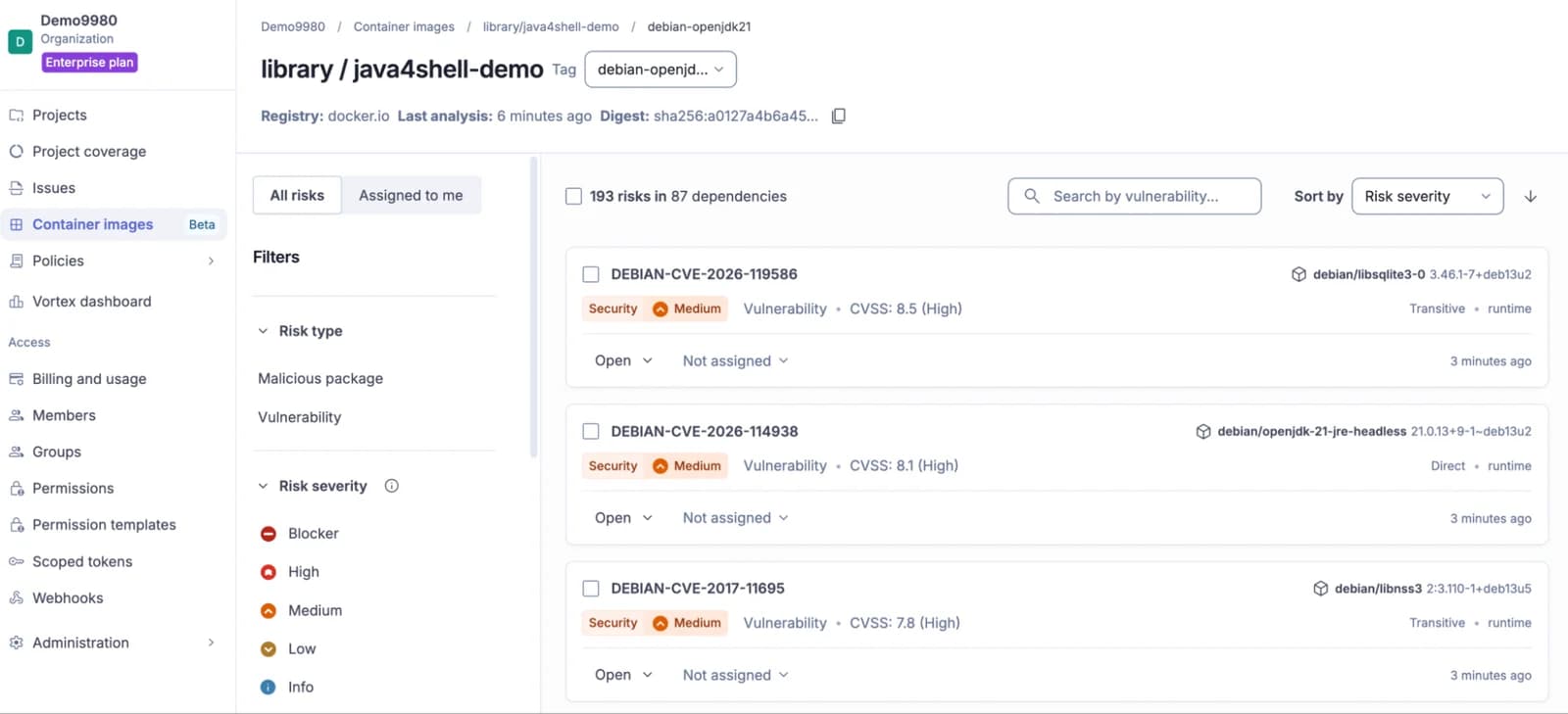
- In SonarQube Cloud, open your organization and select Container images. Select an image to see its dependency risks, including CVE-2026-114938.
What to know before you rely on it:
- Container scanning is available on SonarQube Cloud with SonarQube Advanced Security.
- It covers images built on Red Hat Enterprise Linux, Debian 11 and later, Rocky Linux, AlmaLinux, Ubuntu, and Alpine. It does not cover Amazon Linux.
- It sees the images you scan. It does not see Java on hosts outside containers.
- A JDK installed as a downloaded archive, rather than a distribution package, may not be matched.
- Debian and Ubuntu have not released fixed packages yet, so a finding shows exposure but may not name a fixed version.
- It shows exposure, not whether an attacker can reach the flaw.
SonarQube Server does not have container scanning yet. Server customers with SonarQube Advanced Security can import an SBOM of an image for a similar check.
Fixed builds
Oracle fixed the flaw in its November 17 Critical Security Patch Update. The fixed Java SE builds are below.
Oracle's November update fixes other flaws too. Other OpenJDK distributions ship on their own schedules and use their own build numbers. Amazon Corretto has already released fixed builds. If you use another vendor’s JDK distribution, you will need to check for their updates.
What to do now
- Find every Java runtime you run. Container scanning covers images. For everything else, check java -version on each host. On Linux, grep -m1 avx512vbmi /proc/cpuinfo prints a line only if the processor is in scope. Then check the less obvious places: Oracle Java SE and GraalVM, OpenJDK builds from other vendors, Linux packages such as openjdk-17, applications that bundle their own JDK, and the base image in each container build.
- Update to your vendor's fixed build as soon as it is available. Oracle's builds are in the table above. Other vendors use their own version numbers.
- Start with services reachable from the internet. Remove network exposure you do not need. Java programs that connect out to servers you do not control are also exposed.
- Restart the Java processes. Then confirm the running version, not only the installed package.
- Until you can patch, turn off the accelerated decoder. Add -XX:-UseBASE64Intrinsics to the Java options of each affected process and restart. Java then uses its standard Base64 code, and only Base64 encoding and decoding get slower. The flag is safe on ARM. Apply it only to Java 17 and later: Java 8 does not recognize the option and will not start with it. This is a mitigation, not a fix. Calif, which found the flaw, recommends it. You should still patch.
- After the restart, confirm the flag appears in the running process, not only in the config file.
Running SonarQube?
SonarQube Server and Community Build: add the one-line Java option from our Community advisory. It has exact steps for ZIP, Docker, Kubernetes and Helm, Data Center Edition, and scanners and CI agents. We will post confirmed patch versions and rebuilt Docker images in the same thread.
SonarQube Cloud: we are rolling out the fix to the service. If you run SonarScanner in your own CI, apply the scanner steps in the advisory. For help, contact Sonar Support.