The problem
In March 2026, an attacker force-pushed version tags of aquasecurity/trivy-action, the GitHub Action for the Trivy security scanner, to malicious commits (Aqua's write-up). Pipelines that ran it while the tags were compromised had their secrets read from the runner's memory, and then the real scan ran as usual, so nothing looked wrong.
A year earlier, the same technique hit tj-actions/changed-files and more than 23,000 repositories, that time printing secrets into build logs (CVE-2025-30066). And compromised actions aren't the only route. The GhostAction campaign uses stolen developer accounts to push workflows whose only purpose is to send repository secrets to an attacker-controlled server. GitGuardian first reported it in September 2025, with 3,325 stolen secrets. In October 2026 it came back with about 1,900 compromised accounts and more than 30,000 targeted repositories. In between, the Shai-Hulud 2.0 npm worm pushed workflows that published every repository secret.
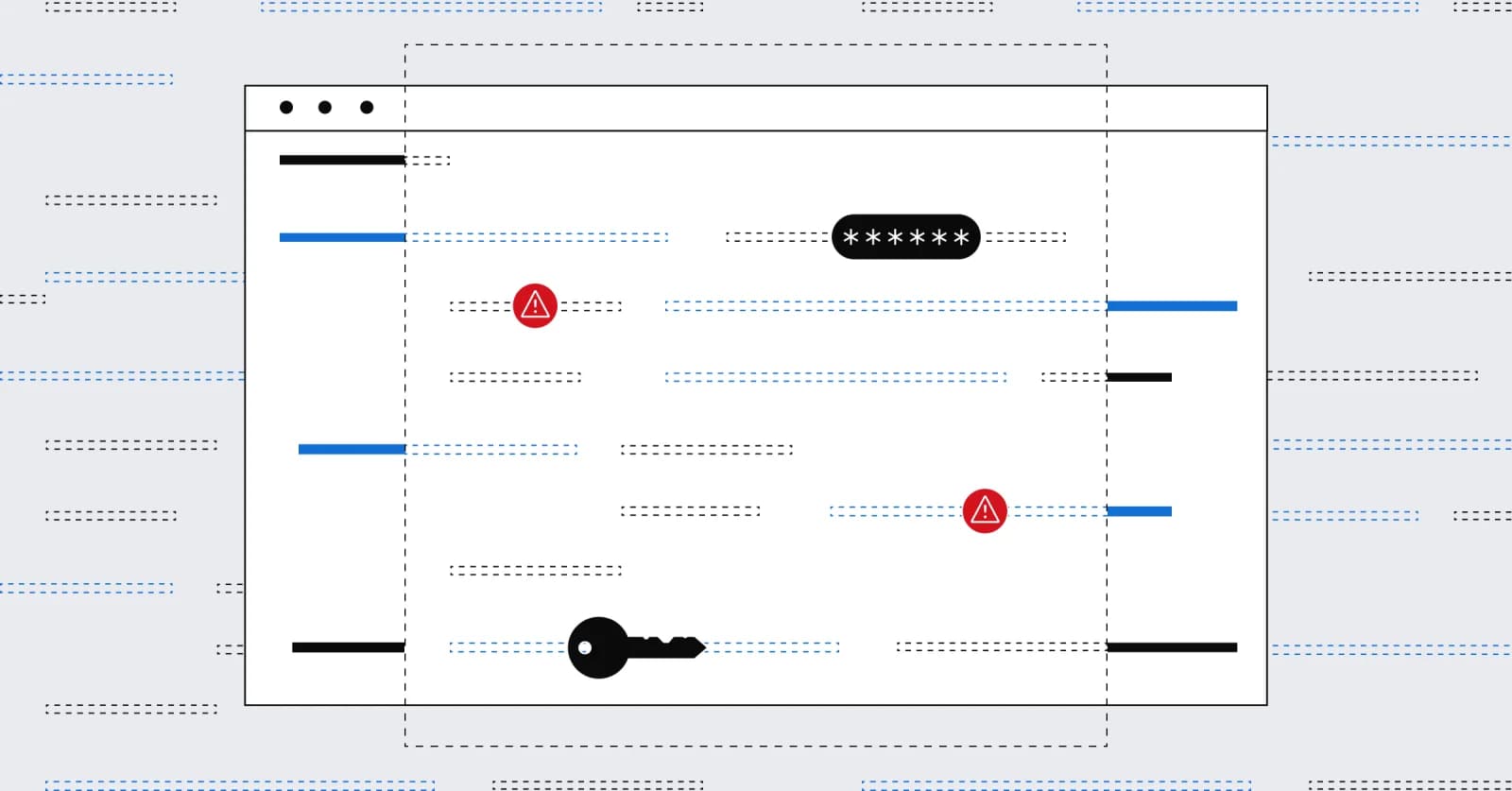
A SonarQube token stored as a CI secret is exactly what these attacks harvest.
What a stored token costs
With token-based analysis, every repository needs the same setup:
- Generate a SonarQube token.
- Paste it into the repository secrets or CI/CD variables.
- Give the pipeline the organization and project keys.
Then repeat it for the next repository, and for all of them at every rotation.
The SonarQube admin can choose between two types of tokens. A personal access token is the easiest to create, but it carries all of its owner's permissions, far more than an analysis job needs. A scoped organization token, available on the Team and Enterprise plans, can be limited to one project, but it still has to be created, distributed, rotated and revoked. Sharing one token across repositories reduces that work but multiplies the impact of a leak.
The real cost shows up during an incident like the examples mentioned above. You have to find every pipeline that uses the token, rotate it and redistribute it without breaking the build. All while the extent of the exposure is still being assessed.
When designing Secretless Analysis for SonarQube Cloud, we didn't try to store tokens more safely. We stopped storing them altogether. Every single analysis now receives an ephemeral token, scoped strictly to that project, that expires in 30 minutes.
No secret to manage, yet more secure than a stored token: that can sound like magic. This post demystifies it. We start with what changes in your pipeline, then open up the exchange behind it: how a CI job proves where it runs, how SonarQube Cloud turns that proof into access to exactly one project, and what this does and doesn't protect you against.
Secretless Analysis is available for GitHub Actions on GitHub.com and for GitLab.com CI/CD, on every SonarQube Cloud plan, including the Free plan.
What changes in your pipeline
Secretless Analysis removes every step of that setup. There's no token to generate, store or rotate, and no keys to copy into the pipeline. Here is a complete GitHub Actions job for a repository bound to one SonarQube Cloud project, using the SonarQube auth action:
The id-token: write permission lets the job ask GitHub for an OIDC token. The auth action exchanges that OIDC token for a short-lived analysis token, makes it available to the scan step as SONAR_TOKEN, and outputs the organization and project keys that SonarQube Cloud resolved for this repository.
Because nothing in it is repository-specific, the same workflow, or one shared reusable workflow, works unchanged across thousands of repositories. Onboarding a repository means binding it to a SonarQube Cloud project, with no new secret and no new pair of keys to maintain. The job targets the EU instance by default; add sonar-region: us to the auth step for the US instance. The region also sets the audience of the OIDC token, one of the checks described below.
Everything that makes this safe happens inside that auth step.
How does OIDC token exchange work in SonarQube Cloud?
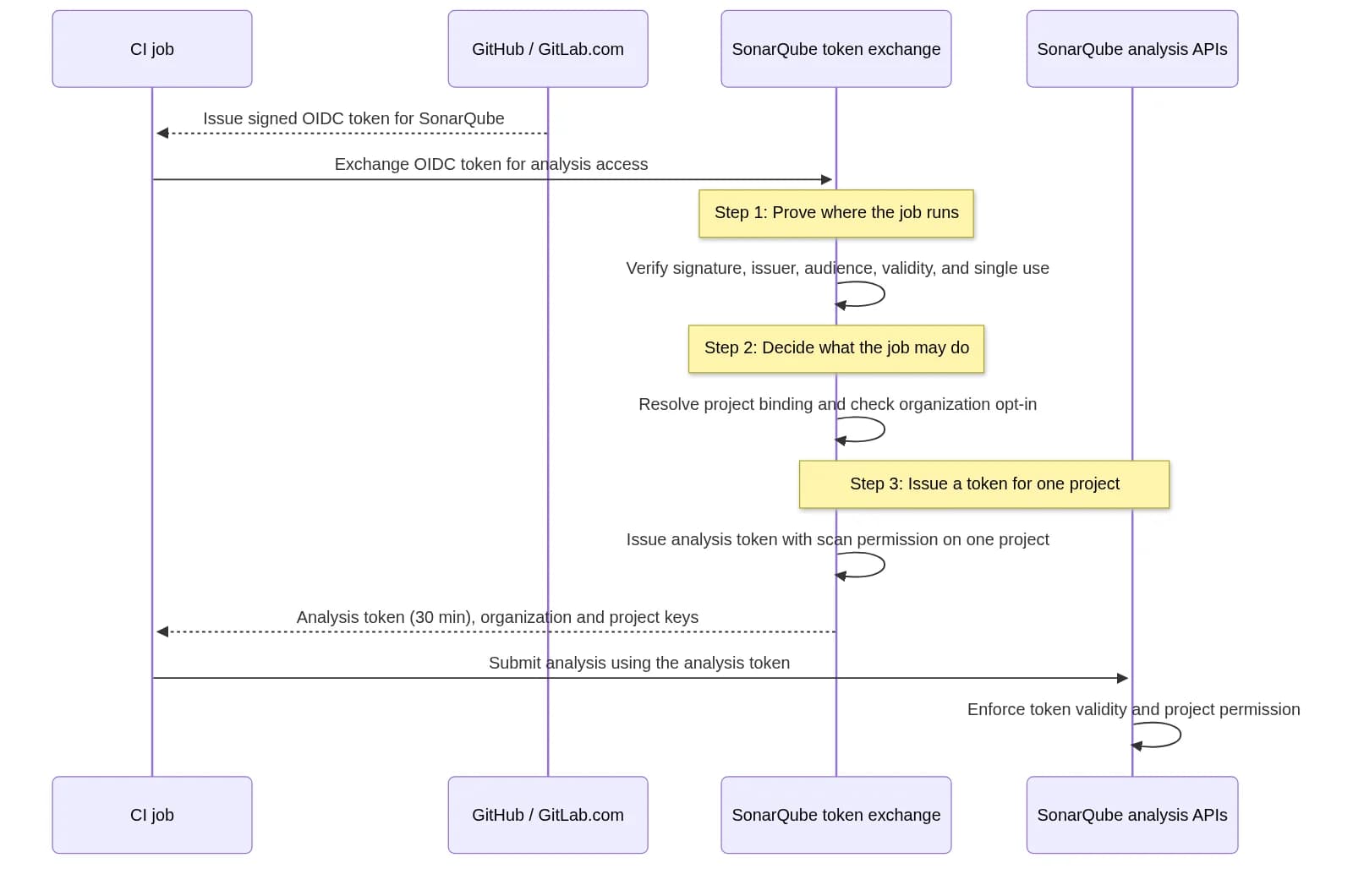
The mechanism is workload identity federation: one system that accepts an Identity established by another, then applies its own authorization policy. Two tokens are involved, which we'll call the OIDC token and the analysis token:
Token
Issued by
What it says
OIDC ID token
GitHub Actions or GitLab.com
"This job runs in repository X." Signed and short-lived.
Analysis token
SonarQube Cloud
"The holder may submit analysis for project Y." Valid for 30 minutes.
GitHub or GitLab vouches for where the job runs. SonarQube Cloud decides what it may do. The CI platform never chooses the SonarQube permissions.
The exchange uses the OAuth 2.0 Token Exchange grant defined in RFC 8693. The auth action sends the OIDC token as the subject token (line breaks added, values not URL-encoded for readability):
And receives (simplified):
We chose a standard grant over a custom endpoint so that any OAuth-aware client can call it, and so that supporting another CI platform means trusting a new issuer rather than designing a new API. RFC 8693 also allows additional response fields, which is how the organization and project keys come back with the token.
Between the request and the response, SonarQube Cloud goes through three steps, each covered in its own section below:
Step 1: Proving where the job runs
GitHub and GitLab issue OIDC tokens as signed JSON Web Tokens. A GitHub token carries around thirty claims about the run; these are the ones the exchange relies on:
GitLab tokens carry the equivalent project_id.
Anyone can write that JSON, so decoding it proves nothing. The signature is what counts, and the exchange checks it against the provider's published keys:
Verification follows the JSON Web Signature standard (RFC 7515), using public keys published as a JSON Web Key Set (RFC 7517) and located through each provider's OpenID Connect Discovery document, at a URL we configure rather than derive from the token. We accept only RS256, and we cache the provider's keys and refresh them in the background, so key rotations on GitHub's or GitLab's side are picked up automatically.
A valid signature isn't enough on its own: a token that GitHub signed for another service, or one that has expired, is still correctly signed. So the exchange also checks that:
- the issuer is the expected provider,
- the audience is the SonarQube Cloud region the job targets,
- the token is within its validity window,
- the token hasn't been exchanged before: each OIDC token, identified by its jti, can be exchanged only once, so a replayed token is rejected,
- the identity claims the exchange needs are present.
Only then are the claims used to find a corresponding SonarQube project.
Step 2: Deciding what the job may do
A verified token proves which repository a job runs in. It doesn't say which SonarQube project that job can analyze. This is where authentication ends and authorization begins, and the CI platform has no say in it: the answer comes from the binding SonarQube Cloud keeps between each SonarQube project and its repository on the DevOps platform.
The exchange looks up that binding by provider and signed repository ID, never by name. If a repository is deleted and recreated by someone else under the same name, a name-based rule would trust the newcomer; that's repo-jacking. An ID is assigned only once, so the recreated repository gets a new ID and no binding. The same goes for forks, which have their own IDs.
For a repository that does match, the lookup has three outcomes:
- No bound project: the exchange is rejected.
- One bound project: the project and organization are resolved without either key in the request.
- Several bound projects (a monorepo): the caller must pass a project key to pick one; the organization is still resolved automatically.
The candidates always come from the bindings, never from the request. Just as the CI platform doesn't choose the SonarQube permissions, neither does the caller. The caller can only narrow the set of bound projects; it can't enlarge it. A monorepo containing a billing service and a web application can get a token for either project, and a request for any other project fails.
A binding is necessary but not sufficient. An organization administrator must also enable the Secretless Analysis feature at organization level. Until they do, no repository in the organization can exchange a token, bound or not.
Step 3: A token for one project, for 30 minutes
When every check passes, SonarQube Cloud issues an analysis token with a single permission: scan on the resolved project. It expires 30 minutes after it is issued. The analysis APIs enforce both limits: an expired token is rejected, and so is a request for any other project.
Nothing about the token outlives the job. The next job goes through the same exchange and gets a fresh one.
What this protects against, and what it doesn't
Back to the attacks at the top of this post.
- There's nothing at rest to steal. GhostAction and Shai-Hulud collected secrets stored in repository settings. With Secretless Analysis, there is no SonarQube secret there.
- A leaked token stops working quickly. tj-actions left secrets in build logs for about a day. An analysis token leaked the same way expires 30 minutes after it is issued, long before most people would find it.
- A leaked token reaches one project. A personal access token exposes everything its owner can access. An analysis token can only submit analysis for the project bound to the repository it was issued for.
- There's nothing to clean up. No long-lived token needs to be rotated or redistributed after an incident, so there's nothing a rotation can miss.
Like any CI credential, the analysis token is available to the code running in your job, including a compromised step like the Trivy action. The difference is what an attacker can do with it: submit analysis for one project, for at most 30 minutes after their code stops running, instead of holding a long-lived token until someone notices and rotates it. As with any pipeline, keep an eye on who can change workflow files, and treat repository bindings and the organization opt-in as security settings.
Try it and tell us
Enable Secretless Analysis in your organization settings, check that your repositories are bound, and replace your token-based job with the configuration above. The documentation covers all the details.
Secretless Analysis is available in all SonarQube Cloud plans today for GitHub and GitLab. We’re planning to bring the same mechanism to SonarQube Server in the near future.
If you are running your pipelines in a DevOps platform other than GitHub and GitLab or in a custom CI environment, tell us on the SonarSource Community which one you’d like to see supported next.