Intelligent Ruby and Rails IDE
Coding RubyMine
RubyMine’s WSL support has evolved over many years, resulting in several ways of working with projects in WSL. Starting with the 2026.3 release, there is one recommended way to work with a project stored in WSL – Native WSL mode: open or clone the project directly from the Welcome screen and use native WSL interpreters to run Ruby.The IDE remains a Windows application, while a lightweight agent inside WSL handles files and processes.
Native mode and the IJent agent
To give your IDE seamless access to the Linux filesystem, processes, and other environment resources, we built IJent, a lightweight agent made just for this job. Because IJent is designed specifically for IDE workflows, we can shape its behavior, protocol, and capabilities around what developers actually need, so working with Linux feels as smooth and responsive as working locally.
Together, the IDE and IJent form a client-server pair. This may resemble the remote development model, but the server component is much thinner and more versatile.This particular technology stack helps us address several important challenges:
- Rust implementation: Rust keeps the executable slim. By not relying on Java or Kotlin for the agent, we eliminate additional runtime dependencies inside containers or WSL environments.
- Transport layer: stdio provides a portable, firewall-friendly transport across all environments. Hyper-V sockets on WSL offer a faster path, which is especially beneficial for large or numerous filesystem transfers.
- Correct filesystem semantics: IJent executes filesystem operations on behalf of the IDE inside the target environment. As a result, path resolution, including symbolic links, follows correct Linux semantics. Third-party plugins also benefit from this model, since their file operations are routed through IJent.
EelApi: One interface for any environment
To make full use of IJent in RubyMine, changes on the IDE side are also required. That’s where EelApi comes in.
EelApi is an API designed to abstract away the distinction between local and remote environments for everyone writing IDE-related code, including plugin authors and platform contributors.
With EelApi, developers don’t need to handle environment-specific differences themselves. The same IDE code can work across local environments, WSL, Docker, and Dev Containers without needing to know where it’s running.
In general, IJent implements the EelApi interface, providing the functionality that EelApi exposes to the IDE and plugins.If you’re interested in a more detailed explanation of EelApi, together with a practical introduction, readThe Dev Containers Story: Introducing EelApi for Plugin Authors.
Performance tests
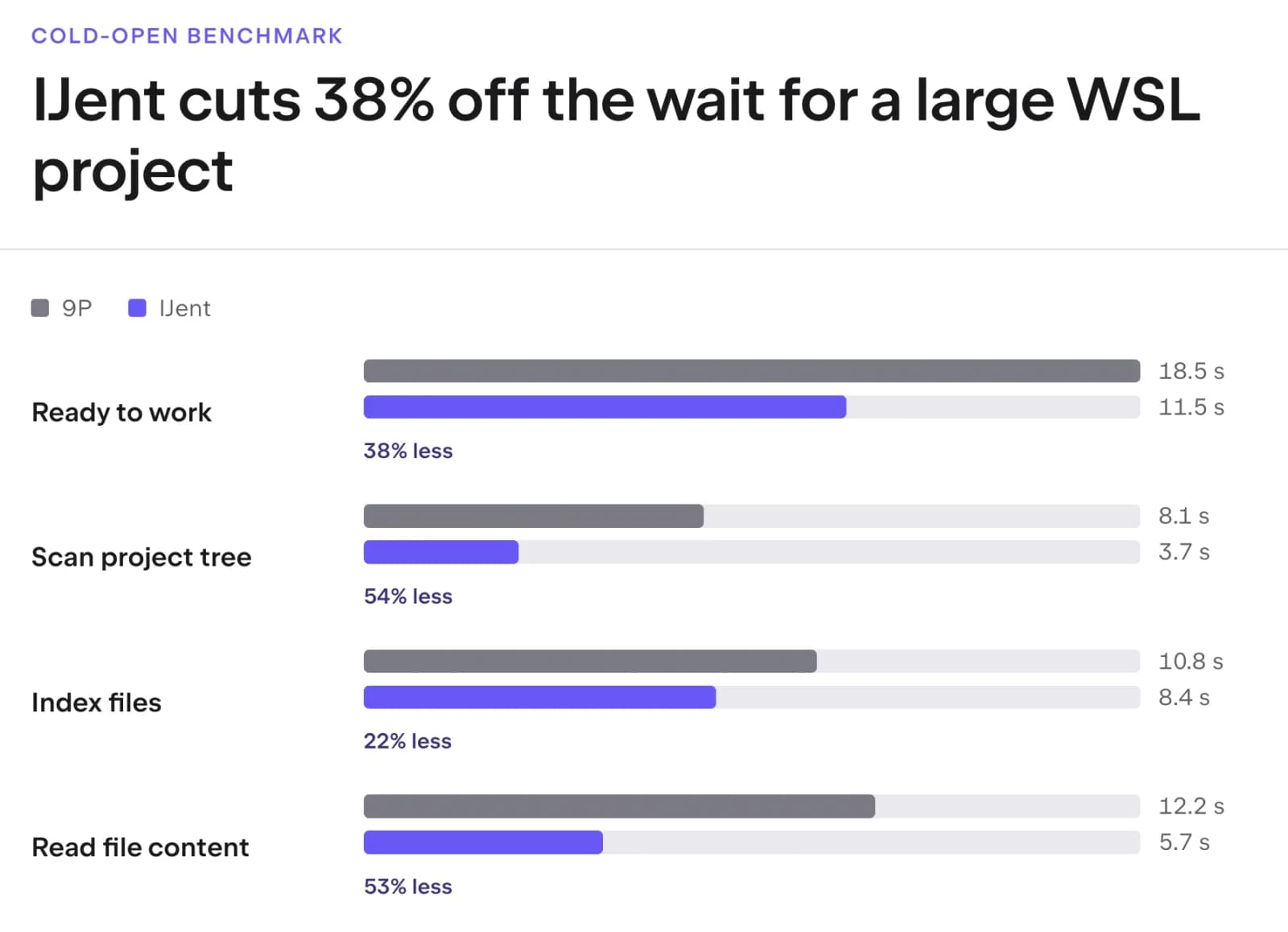
We conducted performance tests to compare working with remote interpreters (based on the 9P filesystem protocol) and Native mode. The results show a clear performance improvement with the new approach:
The test results represent the median of five measured runs performed on Windows 11 using WSL 2 and Ubuntu 24.04.
While Native mode is now our recommended way to work with WSL projects, the other two methods (remote development and remote interpreters) remain supported.
However, from now on we’ll be focusing our development efforts on Native WSL mode. This means other ways to work with WSL projects will no longer receive major feature updates or usability improvements, and only critical regressions will be addressed.
Thank you for reading and for all the feedback that helped us reach this point. Let us know how Native mode performs with your projects.
FollowRubyMine on X for more updates and insights.
The RubyMine team