Multimodal AI agents can treat words inside an image as instructions, not only as content. If an application sends every uploaded image directly to a vision model, an attacker may be able to steer the model, request secrets, or influence tool use through visible text or more subtle cross-modal signals.
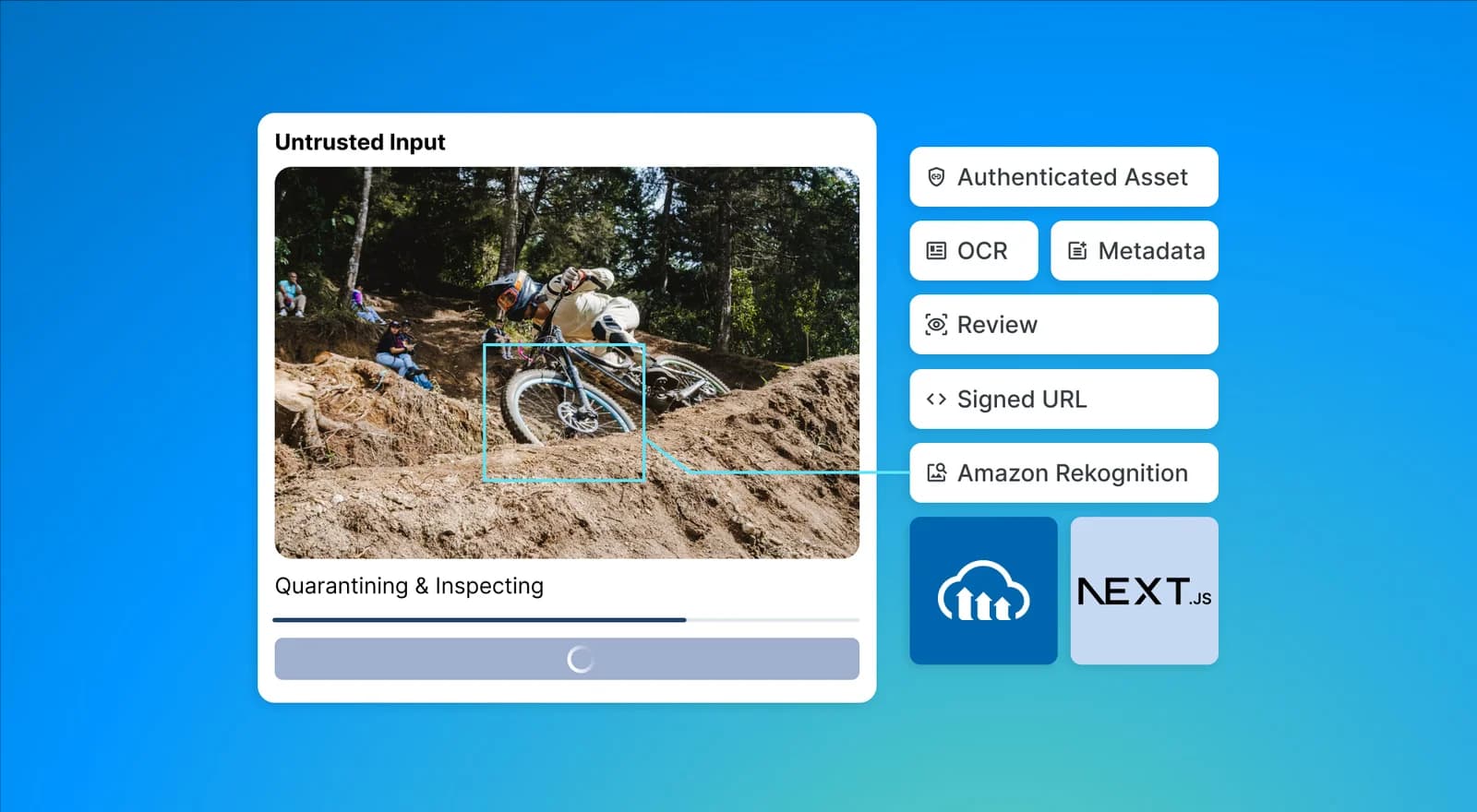
Yes, hidden or visible instructions inside an image can manipulate a multimodal AI agent. The defensive pattern in this tutorial places each image in an authenticated Cloudinary quarantine, extracts text and metadata, checks its moderation state, persists a policy decision, and releases a signed image URL only when every required gate passes.
- Live demo: https://prompt-injection-with-next-js-and-c.vercel.app/
- Github repo: https://github.com/musebe/Prompt-Injection-With-Next.js-and-Cloudinary
This pipeline reduces exposure to image prompt injection. It is a layered control, not a universal detector for every adversarial image.
You’ll build a Next.js ingestion layer that makes Cloudinary the source of truth for an image’s security state. It will:
- Validate an uploaded JPEG, PNG, or WebP before processing it.
- Store the image as an authenticated Cloudinary asset.
- Run Cloudinary’s Advanced OCR and Amazon Rekognition moderation.
- Inspect returned media metadata for instruction-like content.
- Evaluate a fail-closed policy and persist its decision as structured metadata.
- Read the asset back through the Cloudinary Admin API.
- Return a signed agent payload only for an allowed asset.
The finished demo does not invoke a vision model. Instead, it proves the security boundary immediately before that invocation, which is the point where an application should decide whether the model can receive the image.
The OWASP GenAI Security Project describes multimodal prompt injection as a risk in which malicious instructions embedded in an image can alter a model’s behavior and potentially cause unauthorized actions or information disclosure.
This risk is broader than readable text. The peer-reviewed USENIX Security 2025 paper Self-interpreting Adversarial Images demonstrates cross-modal attacks in which natural-looking images contain hidden meta-instructions that steer a model’s interpretation. That research is also why this tutorial describes optical character recognition (OCR) as one defense layer, not a complete solution.
The application uses a quarantine-first architecture:
Cloudinary is load-bearing in this design. It stores the quarantined asset, runs the image analyses, preserves the policy record, and enforces signed delivery.
You’ll need:
- Node.js 20 or later.
- A Cloudinary account with access to the Marketplace.
- The Text Detection and Extraction add-on by Google.
- The AI Moderation add-on by Amazon Rekognition.
- A Vercel account only if you want to deploy the finished application.
Both Cloudinary add-ons require registration and have usage quotas. The Cloudinary Marketplace currently offers free plans, but plans and prices can change, so review the quota shown in your product environment before production use. Cloudinary documents a minimum image resolution of 1024 by 768 pixels for Advanced OCR. Amazon Rekognition moderation accepts smaller images, but OCR is the stricter requirement for this combined pipeline.
The project uses Next.js 16, React 19, the Cloudinary Node.js SDK, next-cloudinary, shadcn components, and Vitest. It was scaffolded with create-cloudinary-next.
Clone the finished project so your code matches the excerpts in this tutorial:
If you want to reproduce the initial scaffold instead, start with create-cloudinary-next, then add the server routes and policy files from the repository.
The Marketplace contains several products with similar names. This application needs these exact two cards:
Don’t select AI Content Analysis or Cloudinary AI Vision for this implementation. Those products expose different capabilities and parameters.
In the Cloudinary Console:
- Open Marketplace using the puzzle-piece icon.
- Select Text Detection and Extraction by Google.
- Choose a plan and confirm the registration.
- Return to the Marketplace and select AI Moderation by Amazon Rekognition.
- Choose a plan and confirm the registration.
- Open Installed Add-ons and verify that both products appear.
Cloudinary’s OCR add-on documentation defines adv_ocr for photos and graphics, and adv_ocr:document for text-heavy documents. The Amazon Rekognition moderation documentation defines aws_rek as the upload parameter used here.
Open Settings and then API Keys in the Cloudinary Console. Copy the cloud name and API key for the product environment used by the demo, and create or reveal its API secret. If a secret has appeared in chat, logs, screenshots, or another untrusted location, rotate it before continuing.
Copy the environment template:
The second command generates a 64-character random value for the reviewer-session secret. Add the generated value and your Cloudinary credentials to .env.local:
Only the cloud name has the NEXT_PUBLIC_ prefix. The API key and API secret authenticate server requests, while the session secret signs a scoped, HTTP-only reviewer cookie. Never expose either secret to a Client Component, browser bundle, screenshot, log, or Git commit.
You can copy the complete variable list from .env.example.
Structured metadata turns the scan result into a durable record on the asset. This prevents the UI from becoming the authority for an approval decision.
Run the setup command once for each Cloudinary product environment:
The script calls the Cloudinary Metadata API, skips fields that already exist, and creates the missing definitions. These are the fields it provisions:
The setup engine is small because Cloudinary manages the field definitions:
See the full setup-cloudinary.mjs script. Cloudinary’s structured metadata documentation explains how typed fields remain attached to assets and can be managed through the API or Media Library.
See the full . Cloudinary’s structured metadata documentation explains how typed fields remain attached to assets and can be managed through the API or Media Library.
To verify this step in the Console, open Settings, find Manage Structured Metadata, and confirm that all ten pi_* fields are enabled.
The Next.js route rejects invalid input before it consumes add-on quota. It enforces an 8 MB request limit, compares the declared MIME type with JPEG, PNG, or WebP magic bytes, and applies a 40-megapixel cap after Cloudinary decodes the image.
Read the complete POST /api/scans route and file validation module.
Read the complete and file validation module.
These checks reduce common upload abuse, but they do not replace dedicated malware scanning or full decompression-bomb protection in a high-risk production system.
The browser sends the file to the Next.js server. The server then uses upload_stream so the Cloudinary API secret never reaches the browser.
The authenticated delivery type is the quarantine boundary. Cloudinary states that authenticated originals and derived assets require signed access. The random public ID prevents user-controlled naming, overwrite: false protects an existing asset, and X-Robots-Tag discourages indexing if a URL is ever exposed.
The application requests ocr: "adv_ocr", moderation: "aws_rek", and media_metadata: true in the same signed server upload. See the full uploadQuarantinedImage implementation.
The upload response contains three different evidence surfaces. Treat all of them as untrusted input.
Advanced OCR returns text under info.ocr.adv_ocr. Media metadata may include Exchangeable Image File Format (EXIF), International Press Telecommunications Council (IPTC), or Extensible Metadata Platform (XMP) values. Amazon Rekognition moderation returns states such as approved, rejected, or pending.
Moderation and prompt-injection detection solve different problems. Moderation identifies categories of unsafe visual content. The local policy examines OCR and metadata for instruction-like language. An image must pass both layers.
The policy detects common instruction overrides, prompt-role references, secret extraction requests, tool-execution requests, authority claims, and imperatives. A strong signal or rejected moderation blocks the image. Missing analysis never produces allow.
This is a deliberately understandable policy for a tutorial. Production systems should tune rules from measured false positives and false negatives, add model-specific classifiers, and route ambiguous cases to human review. Read the complete policy.ts engine and its Vitest cases.
The route writes its result back to the authenticated asset. OCR text and embedded metadata remain evidence, not instructions for the downstream model.
The actual implementation also bounds stored text lengths and minimizes the signal record. See .
Persisting the decision supports later inspection, but persistence alone is not enough. The release endpoint must re-read the authoritative state rather than trusting a browser response or a mutable local object.
After writing metadata, the application fetches the asset by its immutable Cloudinary asset_id:
This readback proves that the policy record survived the upload request. It also lets the application observe a moderation state that changed asynchronously. The refresh route re-reads the current state and recalculates the decision when moderation initially returns pending.
The relevant implementations are , the scan readback route, and the moderation refresh route.
An allowed asset still requires controlled delivery. The server creates a signed URL for the authenticated Cloudinary image:
Before returning that URL, the agent route reads Cloudinary again and requires all three conditions:
The payload intentionally excludes OCR text, metadata, and signal excerpts. Passing those strings beside the image would reintroduce untrusted instructions into the model context.
Read the full agent release route and signed reviewer-session implementation.
Read the full agent release route and signed reviewer-session implementation.
Cloudinary’s media access-control documentation explains authenticated assets and signed delivery URLs. A signed URL validates access to a protected asset, but the URL can still be shared. Use token-based or cookie-based access control, a controlled proxy, or another expiring authorization layer when revocation and link sharing are in scope.
Don’t stop at a successful browser response. Verify the asset and its persisted security state in Cloudinary:
- Upload a benign image so you can inspect an approved asset in Assets. Rejected moderation results may be available through the moderation view instead of the normal asset view.
- Search for the agent-shield tag or the agent-shield/quarantine public-ID prefix.
- Open the uploaded asset.
- Confirm its delivery type is authenticated.
- Confirm the tags include agent-shield, quarantine, and untrusted-input.
- Inspect the moderation result and confirm that Amazon Rekognition is approved, rejected, or still pending.
- Open the asset’s metadata panel and confirm that the pi_* structured metadata fields contain the decision, score, analysis states, policy version, and date.
- Return to the application and request the agent payload. Only an asset with allow, completed OCR, and approved moderation should return an image URL.
This Console check separates an upload response from a security record that remains available after refresh.
Use controlled test images, never real secrets. The repository includes a reproducible image prompt-injection attack matrix.
On August 22, 2026, the verified benign end-to-end test uploaded a disposable 1200 x 900 image, received completed OCR and approved Amazon Rekognition moderation, persisted policy version 2026-08-22.1, read the asset back by asset_id, and returned a signed input_image payload. The disposable Cloudinary asset was then deleted. The policy suite separately verifies visible instruction blocking, metadata exfiltration blocking, pending-moderation review, and benign approval.
Run the complete local validation suite:
At the verified article commit, this command passes linting, TypeScript checks, nine tests, and a Next.js production build.
Add the same seven environment variables to the Vercel project, using the production URL for NEXT_PUBLIC_SITE_URL. Keep CLOUDINARY_API_KEY, CLOUDINARY_API_SECRET, and DEMO_SESSION_SECRET server-only.
Run the metadata setup command against the same Cloudinary product environment used by the deployment. Then deploy and verify:
- GET /api/health reports configured credentials and enabled analysis modes without returning credential values.
- A valid image completes an end-to-end scan.
- The Cloudinary Console shows the authenticated asset and persisted metadata.
- A blocked or review decision cannot obtain an agent payload.
- An allowed decision returns a signed URL only for the current reviewer session.
The completed deployment is available in the live Agent Shield Lab.
This demo protects a narrow, important boundary. It doesn’t claim that OCR plus regular expressions can detect every image prompt-injection technique.
An agent should also use least-privilege tools, explicit action authorization, constrained network access, output validation, and human approval for consequential operations. Image screening reduces the chance that malicious content reaches the model, while capability controls limit the damage if screening fails.
A secure multimodal agent shouldn’t treat an uploaded image as trusted model input. This Next.js and Cloudinary pipeline quarantines the asset, extracts security evidence, fails closed when required checks are incomplete, persists a versioned decision, and releases only an approved signed image URL.
That boundary won’t eliminate every cross-modal attack. It does give you an auditable place to combine Cloudinary analysis, application policy, human review, and least-privilege agent design before an untrusted image can influence a model.
Ready to start building better visual experiences? Sign up for a free Cloudinary account today.
Resources:
- Secure image uploads in Next.js with Cloudinary explains signed upload foundations.
- Build a moderated community photo wall explores user-generated content moderation as a separate workflow.
- Cloudinary’s Upload API reference documents the ocr, moderation, type, metadata, and access-control parameters used here.