Strategy
Cross-posting saves time, but identical posts can look spammy. Learn how to adapt captions, visuals, and timing, plus the best tools.
Key takeaways
- Cross-posting defined: Sharing adapted versions of the same content across multiple social platforms to save time and extend reach.
- Why identical posts backfire: Publishing the exact same copy and creative everywhere can read as spam to your audience and perform poorly against platform algorithms.
- What good cross-posting looks like: Tailoring captions, visuals, hashtags, and formatting to each platform’s specs and audience before you publish.
- How to do it at scale: Tools like Hootsuite Social OS let you customize, schedule, and measure cross-posted content from one workspace.
Cross-posting is the process of posting similar content across multiple social media channels. Social media managers use the tactic to help save time and resources. No more crafting a unique social media update for each channel every time you need to post.
The key word is similar, not identical. Cross-posting works when you start from one core message and then adapt it for each platform’s format, character limits, and audience.
It has also become harder to avoid, with social media platforms now reaching an estimated 5.75 billion users. Most brands now maintain a presence on five or more networks, and with people spending an average of two hours and 21 minutes a day on social media, there is real upside to getting your message in front of audiences wherever they spend their time.
Alongside saving time, cross-posting is a highly effective tactic for social managers because it helps streamline their posting strategy, allows them to repurpose content across multiple platforms, and continually keeps their social channels up to date. It is also easier to execute well than it used to be, since AI-assisted social media management tools can now draft platform-specific variations of a single post in seconds.
Bonus!!!
Get a free step-by-step social media strategy guide with pro tips on how to grow your social media presence.
Who is cross-posting good for?
- Enterprise and mid-market social teams managing multi-brand, multi-region, or franchise accounts, where one campaign message needs to land consistently across dozens of profiles
- Agency social media managers running publishing calendars for several clients at once
- Companies with smaller budgets
- Startups and founders who are running social alongside doing everything else
- New brands that haven’t developed a lot of content yet
- Time-conscious creators who want to free up hours to spend on delivering engaging, compelling posts
Cross-posting vs. content repurposing
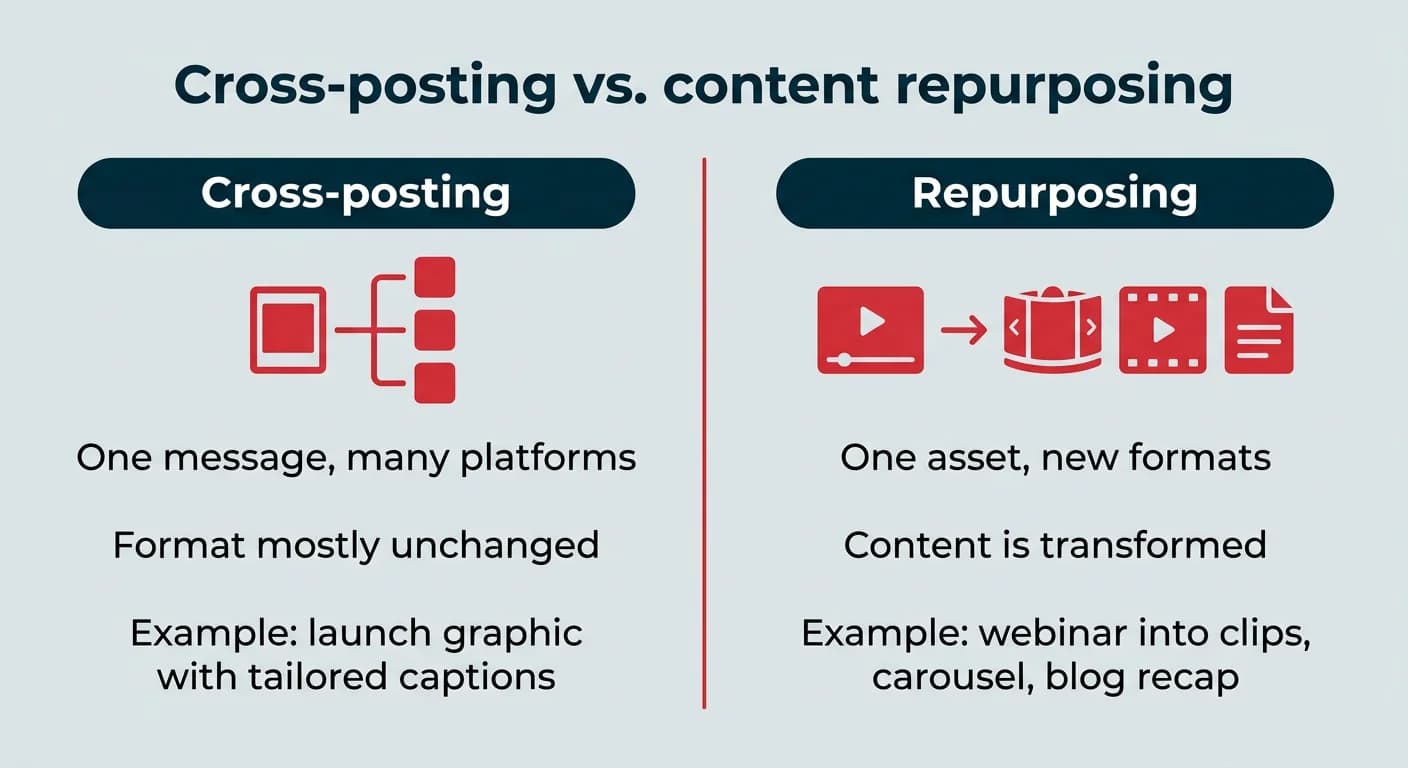
Cross-posting and content repurposing get used interchangeably, but they are different jobs. Cross-posting takes one message and adapts it for multiple platforms, keeping the format mostly intact. Repurposing transforms content into an entirely new format for a new purpose.
A product launch graphic posted to Instagram, Facebook, and LinkedIn with tailored captions is cross-posting. Turning a webinar recording into six short vertical clips, a carousel, and a blog recap is repurposing.
Use cross-posting when the message is self-contained and travels well. Use repurposing when the original asset is too long, too dense, or wrong for the format you are targeting. Most strong content calendars use both.
What are the benefits of cross-posting?
The main benefit of cross-posting on social media is output: more presence across more channels without multiplying your production workload. A few more worth planning around:
- Time savings: One brief, one creative asset, and a handful of caption edits replaces building each post from scratch.
- Wider reach across different audiences: Platform demographics barely overlap. The same announcement can reach a LinkedIn audience in their 30s and 40s and an Instagram audience under 30, where 80% of adults 18 to 29 are active.
- More consistent brand messaging: Starting from a single core message keeps campaign language aligned across channels, which matters most when several people publish on behalf of the brand.
- Better use of your best content: Your top-performing posts deserve more than one shot at an audience.
- Cleaner performance comparisons: Running the same message across platforms shows you where a given asset actually resonates, which sharpens future planning.
- Always-on channels: Quieter platforms stay active instead of going dormant between dedicated campaigns.
What are the risks of cross-posting?
Cross-posting goes wrong when adaptation gets skipped. These are the failure points to watch:
- Content fatigue: Followers who find you on three platforms and see the same post three times have a reason to unfollow two of them.
- Weaker algorithmic performance: Platforms reward native formats. Reposted videos carrying another app’s watermark or logo tend to get less distribution.
- Tone mismatches: Copy written for X often reads as flippant on LinkedIn, and LinkedIn copy reads as stiff on TikTok.
- Broken mechanics: Dead handle tags, clickable links that are not clickable, cropped images, and truncated captions all signal carelessness.
- Narrower discoverability: Reusing one hashtag set everywhere ignores how differently each platform surfaces and ranks tagged content.
How to build a cross-posting strategy
A cross-posting strategy is just a repeatable decision process: what gets cross-posted, where it goes, and how it changes along the way. Here are the six steps:
- Audit your platforms and audiences
- Identify content types that cross-post well
- Create a cross-posting content calendar
- Adapt each post for its platform
- Schedule and stagger your posts
- Track performance and iterate
Start with the audit. List every active profile, who follows it, and how much audience overlap you have between channels. High overlap means you need more variation between versions, not less.
Identify which content types cross-post well
Not everything should travel. Evergreen educational content, brand and product announcements, strong standalone visuals, recruitment posts, and campaign messaging usually cross-post cleanly because the value does not depend on the format.
Content that should stay where it was made includes platform-native trends, TikTok audio-driven formats, LinkedIn long-form articles, community replies, and anything time-sensitive enough that a staggered posting schedule would make it stale.
Create a cross-posting content calendar
Map each core asset to the platforms it will appear on, then assign different publish times to each one. A simple grid with the asset in the left column and platforms across the top is enough to spot duplication problems before they go live.
Build the timing around each channel’s own peak windows rather than one universal slot. We recommend you familiarize yourself with the best times to post for each platform, then plan your calendar in Perch, the content planning and publishing app inside Hootsuite Social OS, which flags recommended publish times per account.
How to cross-post without looking spammy
Cross-posting sounds simple: you’re sharing your content on different networks. How tricky can it be? But, there are essential caveats to the cross-posting process that marketers need to understand.
Posting the exact same message to every network without editing it for the specific requirements and audience demands of those networks can make you look amateur or robotic at best and untrustworthy at worst. The four habits below prevent that.
Adapt your copy and captions for each platform
Start with your core message, then rewrite the caption for each destination. Every social media platform is different in length, tone, and convention, so when you’re cross-posting you need to be mindful of those differences and learn how to speak each platform’s language.
Let’s say you’re the newest coffee shop on the block and want to create a social post to reach your audience on Facebook, X, and Instagram. Each of these social networks has a unique set of parameters for posting, and your cross-posting strategy needs to take these into account.
For example, the character limit on X is 280 for Basic accounts, while the limits on Facebook and Instagram are higher (63,206 and 2,200 respectively), so make sure that you tailor your cross-posted content to fit these lengths.
Also check your tags before you publish. There’s no point in using a handle tag for a brand on X, cross-posting that post to Instagram, and realizing they don’t have an account on that platform.
Here’s a quick list of other parameters you’ll need to take into account when you’re crafting your content to cross-post:
- Clickable links
- Hashtag usage
- Vocabulary
- Audience
- Messaging
- CTA
Don’t post the exact same message across multiple platforms. Beyond the risk of boring followers who see you everywhere, an identical-everywhere approach makes your social media strategy look dull and flat. It also invites small errors, like asking Facebook followers to retweet you, losing part of a caption, or dropping your visual entirely.
If you’re short-changing your followers on one platform by sharing content optimized for another, they’re going to notice. The time you save isn’t worth losing your audience’s respect and attention. After all, if it looks like you don’t care about what you post on your account, why should they?
Stagger your posting times
Timing is everything on social media, and publishing the same message to every channel at the same minute is the clearest signal that a post was automated rather than written. Stagger your posting times by roughly one to three hours between platforms so anyone following you in more than one place does not get the same message twice in a row.
Perch includes a recommended best time to publish for each connected account, so you can schedule every version of a post in one sitting and still land in each platform’s strongest window. You can also bulk schedule social media posts, saving you even more time.
Optimize visuals for each platform
Suppose you plan on adding images and videos to your social media marketing (and we think you should). You’ll need to familiarize yourself with the image sizes for each channel before anything goes out, because a vertical video cropped into a square feed post loses text, faces, and framing.
Watermarks are the other common trap. A TikTok video downloaded with its watermark and uploaded to Reels or Shorts is visibly secondhand, and both platforms prioritize content made natively. Export clean files from your editing tool instead, then size them for their destination.
It is worth the extra step. Visual content consistently outperforms text-only posts, so a poorly cropped image or a missing photo costs you more than tidiness.
Follow each platform’s content policies
Repeating content can result in more than disengaged followers. Your followers aren’t the only ones who’ll notice when you post the same thing everywhere; the platforms are watching too.
X’s platform manipulation and spam policy tells users not to cross-post content across multiple accounts, and not to cross-post similar or duplicate content to the same trending topics or hashtags. Repeat violations can lead to reduced distribution or account suspension. Staying on the right side of anti-spam rules means taking the time to ensure each message you post is thoughtful and deliberate.
Platform-by-platform cross-posting specs
Platform
Caption limit
Recommended image size
Hashtag practice
Links
Audience note
1080 x 1350 (4:5)
3 to 5, relevant over broad
Not clickable in captions
Skews under 30, visual-first (Instagram demographics)
1200 x 630
Minimal, 1 to 2
Clickable, link previews render
Broad age range, strong for local and community posts
1200 x 627
3 to 5, professional topics
Clickable, previews render
Mostly over 30 and career-focused (LinkedIn demographics)
1600 x 900
1 to 2 maximum
Clickable
News, commentary, real-time reaction
TikTok
1080 x 1920 (9:16)
3 to 5, trend and niche tags
Clickable for business accounts
Native vertical video only, avoid watermarks
1000 x 1500 (2:3)
Keywords matter more than tags
Clickable destination URL
Search and planning behavior, long content shelf life
Threads
1080 x 1350
One topic tag
Clickable
Conversational, overlaps heavily with Instagram
Best cross-posting tools in 2026
- Hootsuite Social OS: Built for teams managing several brands or regions. Perch handles planning, platform-by-platform customization, and scheduling across every major network, while Wisdom suggests caption variations tailored to each channel. Plans start at $99 per user per month on Standard, with unlimited social accounts on the Advanced plan.
- Later: Visual-first planning with a drag-and-drop calendar, useful if Instagram, Pinterest, and TikTok carry most of your content.
- SocialPilot: Bulk scheduling and client-level permissions, aimed at agencies publishing high volumes across many accounts.
- Publer: Lightweight and inexpensive, with per-platform post customization and recycling options for evergreen assets.
- CoSchedule: Strong fit if your social calendar needs to sit alongside blog, email, and campaign planning in one view.
How to cross-post with Hootsuite Social OS
Perch includes a built-in feature that lets you customize one post for multiple social networks on the same screen, so you never start from scratch for each channel.
Customizing a single post for several networks before scheduling.
- Log in to your Hootsuite account and navigate to Perch
- Select the accounts you want to publish your social post on
- Add your social copy in the Initial content box, or use Wisdom to generate a first draft
- Edit and refine your post for each channel by clicking the corresponding network icon next to Initial content (add or remove hashtags, tweak the copy, change tags and mentions, or swap in different links)
- Once you’re ready to publish, click Schedule for later or Post now, staggering the time for each network
How to measure your cross-posting results
How will you create a successful cross-posting strategy if you don’t analyze your results? Use your social media analytics as a springboard to see whether your campaigns are getting the desired results. For example, do you see more or less engagement when you cross-post?
Track these per platform rather than in aggregate, since the whole point is to find out where each asset works:
- Engagement rate: The clearest signal of whether your adapted version landed with that audience
- Reach and impressions: Shows whether a cross-posted asset is getting normal distribution or being suppressed
- Click-through rate: Reveals which platforms actually drive traffic versus awareness
- Follower growth and unfollows: Rising unfollows on your most overlapping channels is an early content fatigue warning
Hootsuite’s built-in analytics gives you a detailed overview of key social media performance metrics side by side, enabling you to make data-driven decisions about your cross-posting strategy.
Comparing performance across networks to see which platforms respond best to cross-posted content.
You can also use Lumen, the integrated insights and listening app in Hootsuite Social OS, to gather sentiment on whether people feel like they hear from you too much. The goal is a cross-posting sweet spot: enough content to reach your goals, but not so much that audiences find you’re coming on too strong.
Cross-posting works when adaptation is built into the workflow, not bolted on afterward. With Hootsuite Social OS, you can customize one post for every network in Perch, draft platform-specific captions with Wisdom, stagger your publish times, and track what landed where.
FAQ: Cross-posting
Is cross-posting a good idea?
Cross-posting is a good idea when you adapt your content for each platform’s format, audience, and tone. It stops being a good idea when you publish identical copy and creative everywhere at the same time, which reads as automated and tends to underperform.
How do I cross-post a post?
To cross-post a post, start with your core message and then adjust the caption, visuals, hashtags, and formatting to fit each platform before publishing. A social media management tool lets you do all of that in one editor and schedule each version separately.
What is the 5-3-1 rule on Instagram?
The 5-3-1 rule is a content ratio guideline suggesting you share five pieces of curated content, three pieces of original content, and one promotional post for every nine posts. It is a planning heuristic rather than an Instagram policy, meant to keep feeds from tipping too far into self-promotion.
What is the 5 5 5 rule for social media?
The 5-5-5 rule is a social media engagement framework that suggests spending five minutes finding content to share, five minutes engaging with other people’s posts, and five minutes creating your own content. It is designed to keep daily activity balanced when time is tight.
Does cross-posting hurt engagement?
Cross-posting can hurt engagement if you share identical content without adapting it, because audiences and algorithms on each platform respond to different formats and tones. Adapted versions, published at staggered times, generally perform in line with native posts.
What is the best cross-posting app?
The best cross-posting app depends on your team size and needs, but Hootsuite Social OS is built for teams that need to adapt, schedule, and track content across every major platform from one workspace. Smaller teams on tighter budgets may find a lighter tool like Publer or Later sufficient.
Can I cross-post from Instagram to Facebook automatically?
Yes, Instagram allows you to share posts to Facebook automatically through its linked accounts settings, but the formatting and captions may not transfer cleanly. Hashtag blocks and Instagram-specific handle tags in particular tend to look out of place on Facebook.
Should I post at the same time on all platforms?
No, posting at the same time on every platform is not recommended, because followers who find you in multiple places will see duplicate content simultaneously. Leaving one to three hours between platforms also lets you publish in each channel’s own peak window.
What content works best for cross-posting?
Evergreen content, brand announcements, high-quality visual assets, and campaign messaging with broad relevance tend to cross-post most effectively. Platform-native trends, long-form LinkedIn articles, and community replies usually do not.
How often should I cross-post?
How often you cross-post depends on your content volume and audience overlap, but a good practice is to audit your cross-posting frequency quarterly and watch for signs of content fatigue like declining engagement or unfollows. The more overlap between your channel audiences, the more variation each version needs.
Save time managing your social media marketing strategy with Hootsuite. Publish and schedule posts, find relevant conversions, measure results, and more â all from one dashboard. Try it free today.
The #1 social media tool
Create. Schedule. Publish. Engage. Measure. Win.
Claire Beveridge is a freelance writer, strategist, and editor. Over the past decade, Claire has leaned on her experience in content marketing and social media to help scale B2B and B2C businesses across North America and Europe — including work with Crunch, Lumen5, Method + Metric SEO Agency, and Quietly.
Currently, Claire runs a small marketing studio on the west coast of Canada whose clients include Hootsuite, ConvertKit, Superpath, and Graphite. She specializes in creating editorial assets that educate, entertain, and convert customers.
Claire spends her free time cooking, watching soccer, and spending time with her family.
The #1 social media tool
Create. Schedule. Publish. Engage. Measure. Win.