Well-designed service level objectives (SLOs) help you track the benchmarks your app needs to meet to deliver a successful user experience (UX). To track performance against these SLOs, many SRE teams are turning to real user monitoring (RUM) and synthetic monitoring for their service level indicators (SLIs), as these forms of data provide more direct measurements of UX than backend performance metrics. RUM SLIs measure events from actual user sessions, while synthetic SLIs use scheduled tests to simulate critical user journeys.
Here at Datadog, our product usage data shows an increase of 273% in the number of customer-created synthetic SLOs over the past year (August 2025–August 2026).
However, not all user-centric SLIs are the same. Knowing when to choose between real and synthetic user data is important for building effective SLIs, especially as your SLOs evolve in response to changing goals. In this post, we’ll explore:
- When you should consider reconfiguring your SLIs to use RUM and synthetic data
When you should consider reconfiguring your SLIs to use RUM and synthetic data
- How to choose between synthetic and RUM data for your SLIs
How to choose between synthetic and RUM data for your SLIs
- How to effectively monitor your RUM and synthetic SLIs
How to effectively monitor your RUM and synthetic SLIs
When should you reconfigure your SLIs?
As your app and user journeys change, your SLIs may no longer give you a reliable picture of user impact. A few common signs can help you decide when to use different data sources, particularly when it comes to adopting synthetic or RUM SLIs:
Your reliability goals have changed
A team may initially set reliability targets around application availability and performance, then expand those targets as their app matures to cover specific user behaviors. To assess whether their app meets these goals, the team will need SLIs that measure whether users can complete critical actions. For an ecommerce app, that could mean tracking the rate of successful checkouts.
Your SLIs are missing issues along critical user flows
SLOs should reflect the reality of your services. If your SLOs are showing that you’re hitting your targets during major incidents or in the face of declining key performance indicators (KPIs), you likely need to reconfigure your SLIs to provide better coverage. To do so, you’ll want to re-evaluate the paths you’re monitoring to ensure that they match what users are actually doing in your app instead of the ideal routes you initially designed.
Your burn rate alerts are volatile during low-traffic periods
To balance long-term reliability analysis with fast issue detection, teams often use multi-window burn rate alerts that include both long and short time windows.
The short window could look like the ratio of errors to overall requests observed within a 5-minute time period. Because low-traffic periods often have lower request totals, they can lead to small denominators that may result in high error rates over this short window. Five errors have a larger impact on your budget when you have 100 requests in 5 minutes versus 10,000 requests.
This means that low traffic can make burn rate alerts more sensitive to individual failures and lead to responder fatigue. Synthetic data can help you better measure the health of your app independent of traffic fluctuations.
How to choose between synthetic and RUM data for your SLIs
You’ve identified that your SLIs need metrics that reliably reflect your UX. Now, you need to figure out when RUM or synthetic data makes more sense.
Determining whether to base your metrics on synthetic or real user data isn’t necessarily an obvious choice. While it may seem as though RUM will always give you the most realistic picture of your app, external factors like bots, traffic variations, and browser configuration can introduce noise that hides broader trends.
Your exact SLI setup will likely depend on your team’s goals, your app’s size and audience, and the type of traffic you receive. The table below covers some factors to consider when making your decision. Generally speaking, though, you should use synthetic SLIs for stability and RUM data to understand actual user experience.
Use synthetic SLIs for stability
Synthetic SLIs use tests to evaluate the health of your app. These tests run at user-defined intervals that may last anywhere from 30 seconds to a week. Many teams measure synthetic SLIs using monitors that periodically check for the latest test data, usually about once every minute. Monitors compare the test results against configured alerting conditions to determine whether to enter an ALERT state. For monitor-based SLOs, error budget consumption depends on how long a synthetic test monitor remains in an ALERT state over a given window. Synthetic SLIs can also use time slice SLOs, which calculate uptime from a metric condition without any need for a monitor.
These timing considerations restrict synthetic SLIs in two ways:
- Limited granularity: the granularity of synthetic SLIs is tied to the frequency of the test runs and monitor evaluations. A synthetic test that runs every 15 minutes might be fine for big-picture health monitoring, but you’ll miss smaller, transient errors that pop up outside this time frame. If these tiny errors accumulate over your budgeted window, you can end up with SLOs that show everything’s fine even when users are experiencing issues.
Limited granularity: the granularity of synthetic SLIs is tied to the frequency of the test runs and monitor evaluations. A synthetic test that runs every 15 minutes might be fine for big-picture health monitoring, but you’ll miss smaller, transient errors that pop up outside this time frame. If these tiny errors accumulate over your budgeted window, you can end up with SLOs that show everything’s fine even when users are experiencing issues.
- Limited precision: the limited granularity for synthetic SLIs also results in issues when calculating precision. Short error budget windows for high-precision SLOs have incredibly small error margins. For instance, a 7-day window with a 99.999% target has an error budget of just 6 seconds. Because each synthetic monitor evaluation represents a minute of system health, a single failed run will consume more than your entire 7-day budget.
Limited precision: the limited granularity for synthetic SLIs also results in issues when calculating precision. Short error budget windows for high-precision SLOs have incredibly small error margins. For instance, a 7-day window with a 99.999% target has an error budget of just 6 seconds. Because each synthetic monitor evaluation represents a minute of system health, a single failed run will consume more than your entire 7-day budget.
However, scheduled intervals provide synthetic tests with an advantage: they allow synthetic SLIs to give you a consistent view of system health and performance, regardless of fluctuations in traffic. Since your synthetic tests run multiple times a day, every day of the year, their calculations aren’t affected by dips in requests during slow periods, which gives you a reliable view into baseline system health. This stability makes them useful for regression testing, enabling you to assess the impact of new releases or major incidents on app functionality.
The combination of limited granularity but greater stability makes synthetic data ideal for monitoring the availability of critical user flows from beginning to end. For example, you may want to use synthetic data to design an SLO around a social media post flow. This flow could include logging in to an account, drafting a post, adding photos and music, and finally publishing the post. Here, issues within the individual steps matter only as much as the impact they have on the overall journey.
That being said, synthetic test data doesn’t measure the actual performance of your app under real conditions.
Use RUM data for user experience
Unlike the periodic snapshots that synthetic SLIs provide, RUM SLIs give you a continuous picture of real session activity. Over the course of each session, your RUM platform collects the relevant metrics as they occur and updates the aggregated SLI calculations. Features like Datadog RUM without Limits let you calculate RUM SLIs using pre-sampled session data for an even more complete picture of app performance.
Uninterrupted RUM metrics give you greater precision and granularity compared to synthetic tests. They don’t necessarily provide you with foolproof reporting. RUM data is particularly sensitive to:
- Reliability issues: Unlike synthetic tests, which take place on carefully controlled browsers and devices, RUM data is subject to real-world conditions that can impact data collection, such as ad blockers and bots.
Reliability issues: Unlike synthetic tests, which take place on carefully controlled browsers and devices, RUM data is subject to real-world conditions that can impact data collection, such as ad blockers and bots.
- Traffic fluctuations: Changes in traffic can easily influence RUM data, leaving it subject to everything from daily usage patterns to seasonal trends.
Traffic fluctuations: Changes in traffic can easily influence RUM data, leaving it subject to everything from daily usage patterns to seasonal trends.
Together, these factors can skew RUM results, requiring you to filter non-user traffic and account for sampling and collection gaps. You’ll also want to segment RUM data by dimensions like browser, region, and device to pull out trends that aggregated results can hide.
That being said, real-world obstacles are also what make RUM SLIs important to monitor. RUM data can reveal hidden conditions that your idealized synthetic tests may overlook. Actual user interactions often take place on outdated devices, over slow networks, and involve unexpected user input.
As a result, RUM SLIs are often best for a granular view of particularly important actions. You may want to track the rate of successful payments or account signups, for example. These actions are essential to both overall user satisfaction and, often, key business goals. Therefore, even a small dip merits concern.
Monitor RUM and synthetic data together for the full picture
Because real and synthetic user data give you insight into different aspects of UX, you should use them as complementary SLIs.
Synthetic tests give you high-level insight into whether your app is supporting user journeys at a basic level. They help you ensure that users can navigate your app without running into errors or bottlenecks. Meanwhile, for the most important steps in these journeys, you can use RUM SLIs to see whether actual users can complete important operations under real-world conditions.
These different lenses are reflected in the tools you use to track and evaluate your SLIs. For synthetic SLIs, you’ll want to group your test data into journey test suites so that you can easily evaluate the flows that are suffering the most. Useful visualizations include topology maps that help you understand the different routes that users take to complete a certain task as well as funnels that display conversion rates, which allow you to see the impact that a journey has on overall UX.
In Datadog Journey Monitoring, this data is organized into a high-level view that displays the results of Synthetics SLOs for user journeys, helping you quickly spot degraded flows.
You can contextualize these breached SLOs using topology maps and conversion funnels. Failing tests associated with each journey are highlighted, with summaries of the surfaced issues provided through an integration with Bits Investigation.
For RUM SLIs, it’s important to have a deeper view into individual actions. You’ll want timeseries graphs of request metrics, including the average success rate and completion time, to help you determine whether breached SLOs represent sudden incidents or gradual degradations. Pathways diagrams are also useful, as they help you contextualize individual actions within greater journeys and debug issues more effectively.
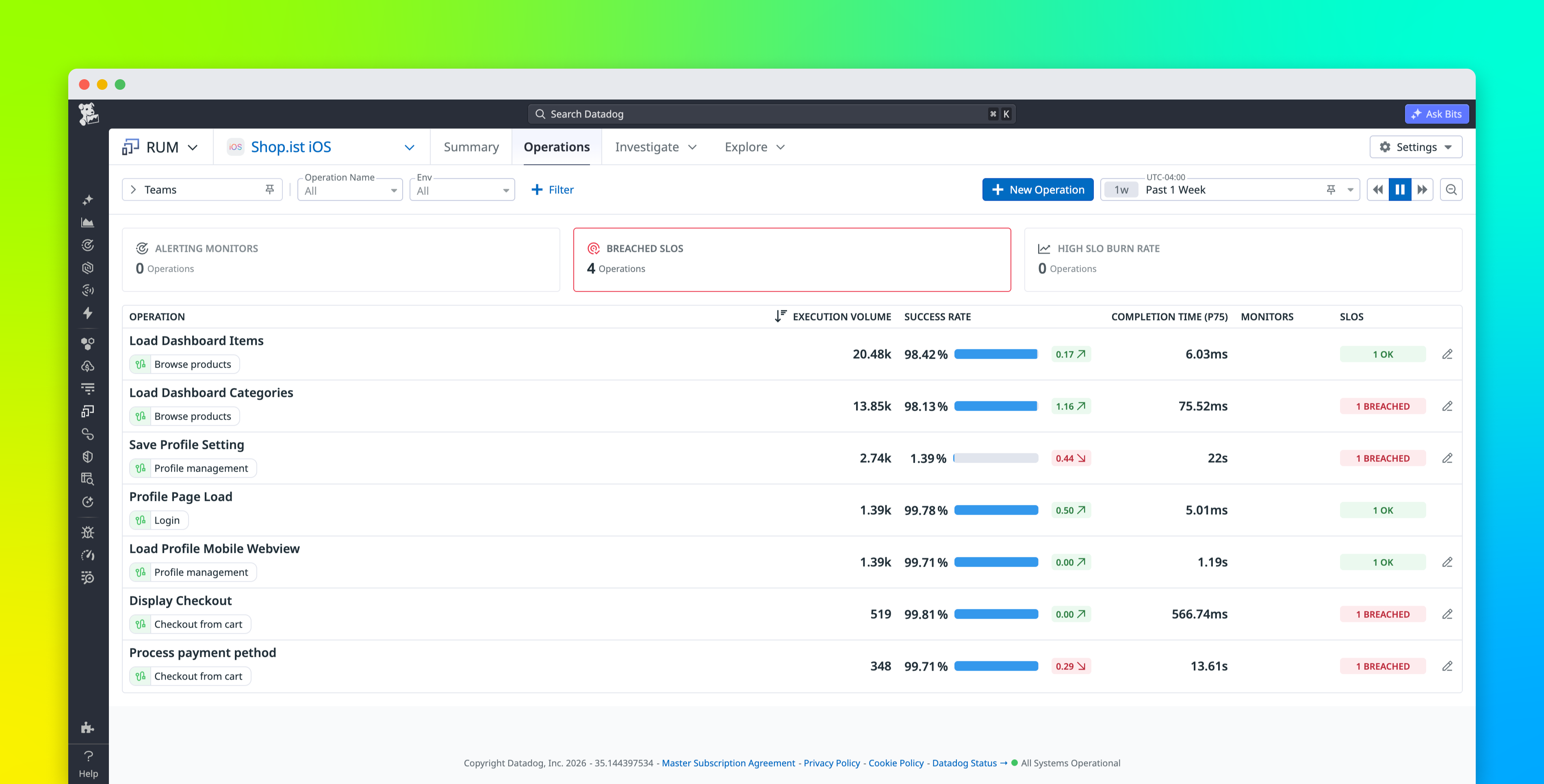
Each journey in Journey Monitoring includes SLOs alongside associated RUM operations. RUM operations are critical moments in the user journey that need to be performant and available for your app to function successfully. As a result, operations usually map to at least one RUM SLO. By associating SLOs with operations, you can group RUM SLOs by the functionality they relate to. You can view both operations and their SLOs in Journey Monitoring alongside timeseries graphs and Pathways diagrams that help you troubleshoot.
For deeper investigation, you can pivot straight to Datadog Operations Monitoring. Here, you can access detailed breakdowns of each SLO within your operations, including error budget consumption and burn rate visualizations.
If you need to create a new RUM SLO for an operation, you can do so using out-of-the-box metrics that track availability and latency.
Get started with RUM and synthetic SLIs
As teams and services mature, SLOs often fail to keep pace. By bridging your RUM and synthetic SLIs into a single view, Datadog Journey Monitoring makes it easy to adopt and troubleshoot user-centric SLIs for more accurate, reliable reports of your UX.
You can read our documentation to learn more about creating metric-based RUM SLOs as well as monitor-based and time slice synthetic SLOs in Datadog. You can also
Or, if you’re new to Datadog, you can sign up for a free 14-day trial.