Organizations may need to keep data in specific regions or infrastructure they control, whether because of data residency requirements, internal policies, or transfer costs. Datadog Bring Your Own Cloud (BYOC) extends the Datadog platform into those environments. Each BYOC deployment runs as a Kubernetes cluster with its own object storage, keeping data close to its source. Teams continue using Datadog’s Log Explorer, dashboards, monitors, Bits AI, and MCP Server while benefiting from existing cloud pricing and discounts.
Deployment boundaries normally complicate investigations that span regions or business units. If an error appears in Frankfurt, engineers may need to determine whether Virginia or Mumbai is affected too. Searching each cluster separately means repeating queries and filters, then comparing results by hand.
Cross-cluster queries let teams and AI agents search selected BYOC clusters with one query. Datadog runs the query against each cluster and combines matching results in the Log Explorer. With cross-cluster queries, engineers can determine whether an issue is local or widespread while the underlying logs remain in their original locations.
In this post, we’ll show how cross-cluster queries allow you to:
- Follow an investigation across multiple regions
Follow an investigation across multiple regions
- Improve token efficiency for AI investigations
Improve token efficiency for AI investigations
- Consolidate a global platform into one view
Consolidate a global platform into one view
Follow an investigation across multiple regions
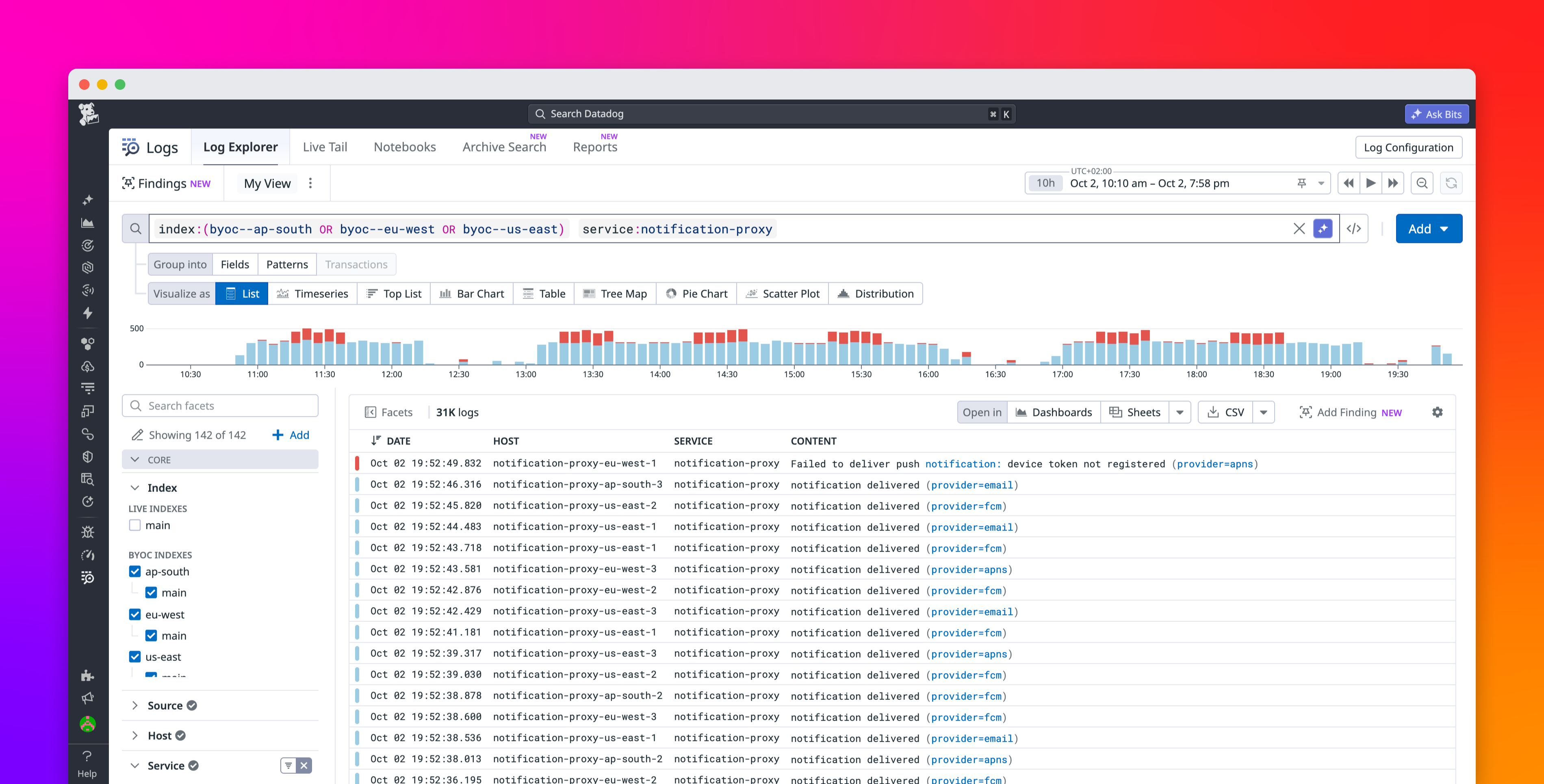
Cross-cluster queries support investigations where the relevant logs may be spread across regions, business units, or services. In the Log Explorer, you define the scope of a cross-cluster investigation by selecting the BYOC indexes you want to search. You can select those indexes in the facet panel or specify the clusters directly with the index filter, as shown below:
Datadog returns matching logs in one list, and any changes you make to your filters or to the time range apply across the selected clusters. After results appear, you can follow the ordinary Log Explorer workflow to open an individual log, inspect its attributes, and refine your next search.
To focus on a specific dataset, use an index’s qualified name, such as byoc--eu-west--application. Specifying a single index is useful when a cluster holds several datasets but the investigation concerns only one of them. The BYOC Logs search documentation explains the naming format.
The following sections describe common tasks you can perform with cross-cluster queries across business units, regions, and application components.
Track a suspicious IP address across business units
When a suspicious IP address appears in one application’s logs, analysts need to find out whether it appears elsewhere. If finance and commerce store logs in separate clusters, one query can check both business units:
index:(byoc--finance OR byoc--commerce) @network.client.ip:203.0.113.42 service:login
Matching login events appear together, so analysts can compare activity across both units. They can adjust the time range or add attribute filters as the investigation develops without repeating each change cluster by cluster.
Find out whether a regional incident is global
For a service deployed across several regions, you can search for errors across its regional clusters to establish the incident’s scope. The following query checks the notification service in three regions: index:(byoc--us-east OR byoc--eu-west OR byoc--ap-south) service:notification-proxy status:error These results help distinguish an isolated deployment failure from errors affecting several regions. When the evidence points to one cluster, narrow the query to that cluster and continue investigating.
Improve token efficiency for AI investigations
An AI agent investigating a service failure may need to search several regional clusters before deciding where to focus. Querying each cluster separately means repeating filters and time ranges across tool calls, then processing separate responses. As the agent refines its search, that overhead can accumulate.
Through the Datadog MCP Server, agents can query BYOC logs by using search_datadog_logs, specifying the relevant indexes, filters, and time range. With cross-cluster queries, an agent investigating notification failures can search the Virginia, Frankfurt, and Mumbai deployments together. Datadog combines the matching results so the agent can assess the incident’s scope without coordinating separate regional searches.
Consolidating those searches can reduce the tokens spent generating repeated tool calls and processing response metadata. The agent still needs to process the matching logs, so total token usage depends on the results returned and any follow-up requests. As the investigation develops, it can refine one query across the selected clusters or narrow its search to the affected region.
Consolidate a global platform into one view
Cross-cluster queries also support ongoing monitoring through dashboards and log monitors. Consider a travel-booking platform running in Virginia, Frankfurt, and Mumbai, with some payments processed outside the region where a booking originates. The team needs to monitor those services together even though each region stores its own logs.
By using cross-cluster queries, a dashboard can track booking and payment errors across all three regional clusters. A log monitor can evaluate payment failures across those clusters against a shared alert condition. When the monitor triggers, engineers can investigate the affected transactions with the same cross-cluster search workflow, rather than assembling separate regional searches.
Get started with cross-cluster queries
Cross-cluster queries in Datadog BYOC Logs let you investigate services across regions and business units without changing where their logs are stored. Searching multiple BYOC clusters with one query lets you scope an incident across regions and business units without repeating the same search in each cluster.
You can use the same cross-cluster query scope in dashboards, monitors, and the Log Explorer to investigate and monitor services that span regions. To review the query syntax and index naming format, read the cross-cluster search documentation.
Contact your Datadog account team to discuss access for your deployment, and see the BYOC Logs documentation for deployment and configuration guidance. And if you’re new to Datadog, sign up for a free 14-day trial.