- Blog
- Win Back Email Subject Lines
November 19, 2026
A win-back email subject line has one job: give a lapsed customer a reason to open a message from a brand they stopped hearing from. The lines that work are short, specific, and tied to something real, such as their last order, a product update, or a question you want answered.
This page gives you 50 win-back subject lines, a way to pick the right angle for each customer, and a sequence you can send in order. If the people you want to reach never bought and simply stopped opening, start with re-engagement email subject lines instead. Win-back is for customers who bought,
What makes a win-back subject line work
A win-back subject line works when it sounds like a person who remembers the customer, not a campaign that found a dormant record. Four traits show up in the lines that earn opens.
These four traits separate strong win-back subject lines from the ones customers skip:
- Specific to the customer. A reference to their last purchase, plan, or favorite category beats a generic greeting.
- Short enough to read on a phone. Aim for about 40 to 50 characters so the key words show before the line is cut off.
- Low pressure. A friendly check-in lands better than guilt for people who left quietly.
- Honest about the email. If the message holds an offer, an update, or a question, the line says which. A misleading line trains customers to ignore the next one.
40 win-back email subject lines by angle
Pick one angle per email and test it against a second. Swap the bracketed details for your own product names, offers, and dates.
Friendly check-in subject lines
A warm check-in works best as the first message in a sequence, before you attach an offer. It reopens the conversation without asking for a purchase.
Use these when you want to reconnect before you sell:
- It's been a while, [First name]
- We miss you, [First name]
- Still thinking about [category]?
- Checking in after [number] months
- Your [Brand] account is still here
Offer-led subject lines
An offer gives a customer a concrete reason to act now. Some lists respond to a discount in the subject line, and others respond better when the offer waits inside the email, so test both.
Use these when the offer is strong enough to stand on its own:
- [First name], [X]% off your next order
- A thank-you for your past orders: free shipping inside
- Your welcome-back offer ends [date]
- Come back for a free [gift] on us
- [X]% off [category], just for returning customers
The email behind an offer-led subject line should deliver on the promise immediately. Pottery Barn's "We've missed you" email makes the 15% discount the largest element, so the offer is the first thing a reader sees after they open.
Curiosity and question subject lines
A question invites the customer to find out what's inside. Ask something they can answer in their head, and make sure the email pays it off.
Use these when you have something new to show:
- What changed at [Brand] since your last order?
- Did we get something wrong?
- Can we show you what's new, [First name]?
- Ready to pick up where you left off?
- One question about your [product]
Past-behavior subject lines
A personal detail proves you remember the customer. Pull it from purchase history, saved items, or product usage so it merges in automatically.
Use these when you have clean order or usage data:
- Your [product] is ready to reorder
- Still have [item] in mind?
- [First name], your [plan] data is still here
- New arrivals in [category you bought from]
- Running low on [product]?
What's-new subject lines
A real update is the most credible reason to write to a lapsed customer. Name the update in the line so the open is a fair trade.
Use these when the product or catalog has changed since they left:
- Something new since your last visit: [feature or product]
- We rebuilt [product] using customer feedback
- Back in stock: the [product] you looked at
- [Feature] is here, and it fixes [problem]
- See what's new at [Brand] this season
Feedback and preference subject lines
Asking for input shows the customer their opinion matters, and it tells you why they left. Link to a one-question survey or a preference page.
Use these to learn why customers stopped buying:
- Help us do better: one question for you
- What would bring you back, [First name]?
- Tell us what you'd like to hear about
- Are we still sending what you want?
- 30 seconds to tell us how we did
Last-chance and sunset subject lines
Use a final-notice line at the end of a sequence, and keep it honest. If a deadline is real, say so. If you're about to stop emailing, say that, because a clear consequence prompts a decision.
Use these for the last email in a sequence:
- This is our last email unless you say otherwise
- Should we keep sending you [Brand] emails?
- Your [offer] ends [day]
- We'll stop emailing soon, [First name]
- Your reward points expire on [date]
Milestone and timing subject lines
A date gives the email a natural reason to exist, which makes it feel less like a mass send.
Use these when the customer record holds a meaningful date:
- It's been a year since your first order
- Happy [number]-year anniversary, [First name]
- Your birthday gift is waiting
- Your [season] favorites are back
- A new year and a fresh start with [Brand]
Win-back subject lines by business type
The right win-back line changes with what the customer lost when they left. Use these as starting points for the four most common setups.
Ecommerce brands can lean on order history and saved items:
- Your last order was [product]. Ready for a refill?
- Your cart misses you, [First name]
- New in [category] since your last visit
Software and SaaS companies can lean on the work customers left behind:
- Your [project or workspace] is still waiting
- [Feature] now does what you asked for
- Pick up where you left off in [product]
Subscriptions and memberships can lean on what the customer is missing:
- Your [membership] perks are still here
- Rejoin and keep your [benefit or streak]
Local and service businesses can lean on the relationship:
- It's time for your next [service], [First name]
- Your [appointment type] is due. Book in two clicks.
How to write your own win-back subject line
Write a win-back subject line by pairing one personal detail with one reason to open, then cutting everything else.
Follow these steps to draft a line for any segment:
- Pick the reason to open: a check-in, an offer, an update, or a question.
- Add one personal detail, such as a first name, a product, or a date.
- Cut the line to about 50 characters and move the most important word to the front.
- Read it as the customer would. If the email inside does not match the promise, rewrite one of them.
Write the subject line after the email, not before. You'll know what the message delivers, so the line can promise exactly that.
When to send a win-back email
Send a win-back email when a customer has gone longer than their normal gap between purchases. Calendar rules vary by business, so measure the lapse against how often your own customers buy.
These starting points give you a window to test for each business model:
- Ecommerce with regular reorders: start at about 1.5 to 2 times your average gap between orders. For a product people replace every 60 days, that is day 90 to 120.
- Ecommerce with occasional purchases: three months of inactivity marks a customer at risk, six to nine months marks one who is lapsing, and nine months or more marks one who has lapsed.
- Subscriptions and software: start when usage drops or a plan cancels. Logins and feature use tell you sooner than email opens.
- Services with long sales cycles: six months of silence can be normal, so use the length of your typical sales cycle.
Catching customers while they are at risk is easier than winning back ones who lapsed long ago. Plan the first message earlier than feels necessary.
Who should get a win-back email
Send win-back emails to customers who engaged before and then went quiet. Build the segment before you write a single line.
Set up the segment with these conditions:
- Last purchase or last activity is older than your lapse window.
- At least one past order, or a paid plan that has since ended.
- Still subscribed to your email.
- No recent purchase and no active automation that already emails them.
- No open support ticket or refund request, since those customers need a different message.
Never email people who didn't sign up or who unsubscribed. Sending a win-back email to your whole list also tells loyal buyers you haven't noticed them, and low-engagement sends can hurt inbox placement. Read the email deliverability guide for how that works.
Split high-value customers from the rest. Someone who spent the most with you deserves a more personal note, and audience segmentation shows how to build those groups.
How to match the subject line to why the customer left
A win-back subject line lands when it answers the reason the customer stopped. You rarely know the reason for certain, so use the signals you have: past orders, survey replies, and replies to earlier emails.
Use this guide to pair each likely reason with an angle:
- Too many emails: lead with a low-pressure check-in or a preference link. Example: "Want fewer emails from us?"
- Content stopped fitting: lead with past behavior or a new category. Example: "New in [category you bought from]"
- Price: lead with an offer. Example: "[X]% off to welcome you back"
- Switched to a competitor or no longer needed it: lead with a feedback request. Example: "What would bring you back, [First name]?"
- Forgot about you: lead with a friendly reminder or an update. Example: "Here's what's new since [month]"
Emails that land in spam never get opened, so check deliverability before you blame the subject line. The spam words list flags phrases that can trip filters.
Pair every subject line with a preheader
The subject line and preheader sit side by side in the inbox. Use the preheader to finish the thought: subject "It's been a while, [First name]" with preheader "Here's what's new since your last order." See how to write an email preheader.
How to build a win-back email sequence
A win-back sequence is two to four emails over about three weeks, with an exit the moment the customer comes back. Each email gets its own subject line and angle.
Follow these steps to build the sequence:
- Define the lapse window for each segment.
- Build the segment and exclude recent buyers, so no one gets a win-back email after they return.
- Write the first email as a check-in with no offer.
- Add a second email with value: an update, useful content, or an offer.
- End with a final email that says you'll stop writing unless the customer responds.
- Exit anyone who clicks or buys, so they leave the sequence right away.
- Stop emailing non-responders, or move them to a sunset segment.
A sample three-email sequence
This starting cadence pairs each email with an angle you can test:
- Email 1, day 0 (check-in): "It's been a while, [First name]"
- Email 2, day 7 (value or offer): "[First name], [X]% off your next order"
- Email 3, day 14 (sunset): "Should we keep sending you [Brand] emails?"
For the full plan, including the email body and the offer, read win-back email campaigns. For tips on the message after the open, see how to write a reactivation email.
Personalization, emojis, and urgency
Personalization
Merge the first name or a purchase detail into the line. A name alone is the weakest form, and a product or date shows you looked at the customer's history. Set a fallback value so an empty field never prints as a blank. See how to send personalized emails.
Emojis
Use at most one emoji, and only when it fits the email's content and your brand voice. Skip emojis in finance, healthcare, and apology emails. Several emojis in a row can look spammy.
Urgency
Real deadlines motivate. Fake ones erode trust, so write "ends Friday" only if it ends Friday.
How to test win-back subject lines
Test one variable at a time on a sample of the segment, then send the winner to the rest. The guide to A/B testing email subject lines covers sample size and setup.
Test these variables in this order:
- Check-in versus offer
- Short versus longer
- With versus without the customer's name
- Question versus statement
Judge winners on clicks, reactivation, and purchases in the following 30 days, not on opens alone. Apple Mail Privacy Protection can inflate open counts, so an open is a weaker signal than it used to be.
Win-back segments are often small. Repeat a test across several sends before you treat a result as settled.
Mistakes that sink win-back subject lines
Avoid these mistakes when you write and send win-back emails:
- Sending to the whole list instead of a lapsed segment.
- Guilt lines such as "Why did you leave us?"
- Fake "Re:" or "Fwd:" prefixes, which mislead and can hurt trust.
- False urgency, such as a deadline that resets every week.
- Offering the same discount to customers who would have bought at full price.
- Letting the sequence keep running after a customer buys.
- ALL CAPS and stacked exclamation marks.
- A subject line that promises more than the email delivers.
Set up win-back emails in ActiveCampaign
ActiveCampaign is an AI platform that lets you build the segment, the sequence, and the subject line tests in one place, so you can run the win-back program you've meant to build. Active Intelligence is built into every plan.
These ActiveCampaign tools cover each step of a win-back sequence:
- Automation: start from a purchase through an ecommerce integration such as Shopify, wait for your lapse window, then use an if/else condition to check whether the customer ordered again. Learn more about marketing automation.
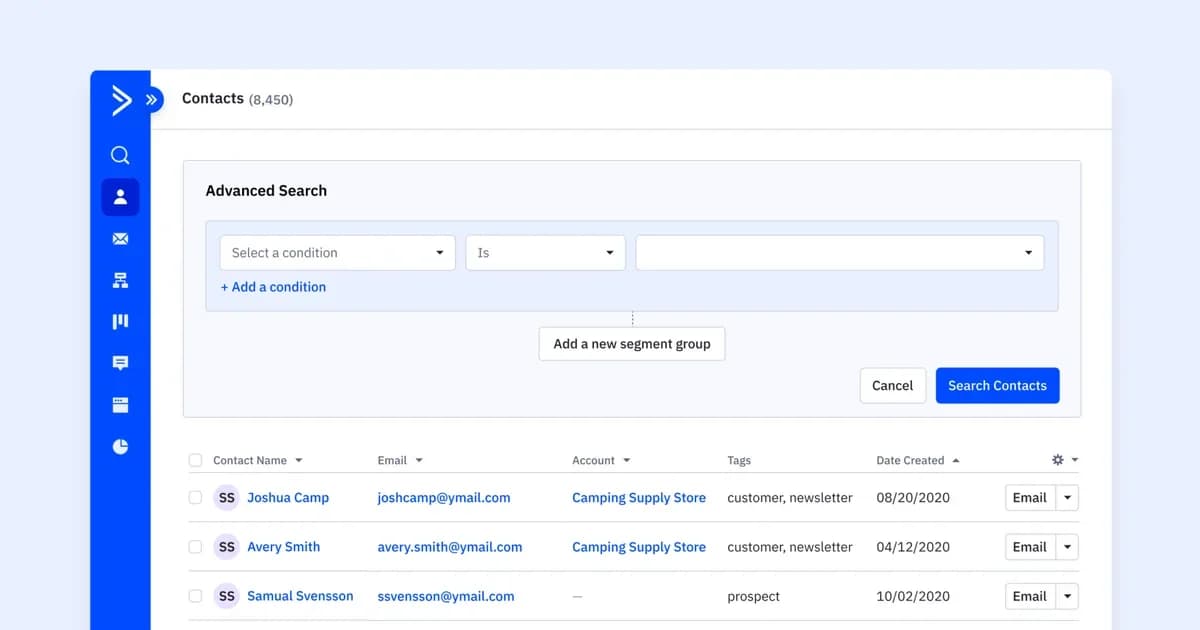
- Segments: build segments from purchase history, engagement, and tags. See segmentation.
- Personalization: insert a field such as first name into the subject line and set a default value.
- Split testing: send two subject lines to part of the segment and send the winner to the rest.
- Active Intelligence: Predictive Sending uses Active Intelligence to pick a send time for each contact.
The automation below waits 60 days after a purchase, then checks whether the contact ordered more than once. Contacts who did not can move on to your win-back emails.
You can also tag lapsed contacts as Disengaged and run them through a short flow. The one below sends a re-engagement email, waits up to seven days for a click or an open, and ends the automation for contacts who respond. Contacts who do neither are unsubscribed from the list, which protects your sender reputation. For more flows like this, read marketing automation for customer retention.
Try win-back emails free with ActiveCampaign
Get a free, 14-day trial of ActiveCampaign (no credit card required).
Frequently asked questions about win-back email subject lines
What is a good win-back email subject line?
A good win-back subject line is short, specific to the customer, and honest about what the email contains. "It's been a while, [First name]" works as a check-in, and "[First name], [X]% off your next order" works as an offer. Test both against your own list.
When should you send a win-back email?
Send it after a customer has gone longer than their usual gap between purchases. For many ecommerce brands that is three to six months of inactivity, and for subscriptions it is the moment usage drops or a plan cancels.
How many win-back emails should you send?
Send two to four emails over about three weeks, and end the sequence for anyone who clicks or buys. Finish with a clear final email, then stop emailing contacts who haven't responded.
Should a win-back subject line include a discount?
Sometimes. Some lists click more when the discount is in the subject line, and others respond better when it waits inside the email. Run an A/B test with a check-in line against an offer line, and judge it on clicks and purchases.
What is the difference between a win-back and a re-engagement email?
A win-back email targets customers who bought before and have since lapsed. A re-engagement email targets subscribers who stopped opening, whether or not they ever bought. For that group, see re-engagement email subject lines.