- Blog
- Evolving Your Segmentation
November 19, 2026
A segmentation strategy grows in four moves. Start with a few broad segments, add conditions as your data deepens, test each segment against a result, and prune the ones that stop earning their place.
Most teams build segments once and leave them alone. Contacts change and so do your offers, so a segment that worked last year can quietly go stale. A regular review keeps every message reaching the right people.
This guide assumes you know the basics. If you want them first, read our guides to audience segmentation and customer segmentation.
Start with a few broad segments
Begin with the data you already collect, and build one segment for each message you actually send.
Three building blocks cover most first segments:
- Lists: the broadest way to group contacts, and usually the first level of segmentation.
- Tags: labels that record what a contact cares about or has done.
- Custom fields: stored details such as industry, job title, or location.
Keep the first set small. Three or four segments you use every month beat twenty you never send to. New
Add conditions as your data grows
Add a condition when one segment is sending a single message to people who need two. Each condition narrows the group, so add them one at a time and check the contact count after each.
The segment builder groups conditions into categories, including:
- Contact details: tags, custom fields, and contact owner.
- Contact list status: a contact's relationship to each list.
- Actions: email opens, clicks, and replies.
- Site and event tracking: pages visited and events recorded.
- Deals and ecommerce: deal stage, purchases, and order totals.
- Dates and geography: relative dates, country, state, and city.
Combine tags in a single condition
One tag condition can hold several tags. Choose all of, at least one of, or none of the tags you select.
Use all of when a contact needs every tag, at least one of to cast a wider net, and none of to leave a group out. Fewer conditions make a segment easier to read and easier to fix later.
Use contact list status to target the right subscribers
Contact list status conditions segment on a contact's relationship to a list. Pair a status with one list or several.
Use an active subscriber status to reach people on your current list, exclude contacts who unsubscribed, and find contacts who were never added to a list.
Add time with activity windows
Activity windows make an email condition time-based. Instead of segmenting on contacts who have opened an email, you can segment on contacts who opened one in the last 90 days.
Three time-based segments are a good place to start:
- Opened in the last 90 days: your engaged audience.
- No opens in the last 60 days: contacts drifting away.
- Subscribed in the last 30 days: new subscribers who still need a welcome.
Example: a re-engagement segment
Build it from three conditions: subscribed to your newsletter list (active), has not opened an email in the last 60 days, and does not have the tag customer. Send this group a short check-in, then review who is still silent at your next segment check.
Let automation and Active Intelligence keep segments current
A segment is dynamic: it returns whoever matches its conditions right now, so the group you build today updates as your contact data changes.
Automations keep that data fresh. A contact who clicks a key link can be tagged on the spot, and the tag moves them into the segment that fits. Active Intelligence also suggests segments from your engagement data. You choose which ones to keep, and you get a starting point for groups you never had time to build.
Test each segment against a result
A segment earns its place when it changes a result. Choose one measure before you send, such as opens, clicks, or replies, and compare the segment with your wider list.
A fair segment test follows three rules:
- Compare like with like: send the same message at the same time to the segment and a comparison group.
- Change one thing: test the segment or the message, never both.
- Name the winner first: pick the measure before the send, not after.
To find out whether the audience or the copy made the difference, run a split test. Our A/B testing guide walks through the setup.
Prune segments and check their health
Segments need the same upkeep as your contact list. Review them on a schedule, and retire any that no longer earn a send.
Segment health signals
Run this review every quarter, and after any major change to your lists, tags, or offers. Pair it with a list clean-up so the contacts inside each segment stay current.
A quarterly review covers four checks:
- Size: note any segment that grew or shrank sharply.
- Engagement: compare each segment with your full list.
- Inputs: confirm the tags, lists, and fields behind each condition are still in use.
- Dependencies: list the campaigns and automations that rely on a segment before you change it.
Build and reuse segments in ActiveCampaign
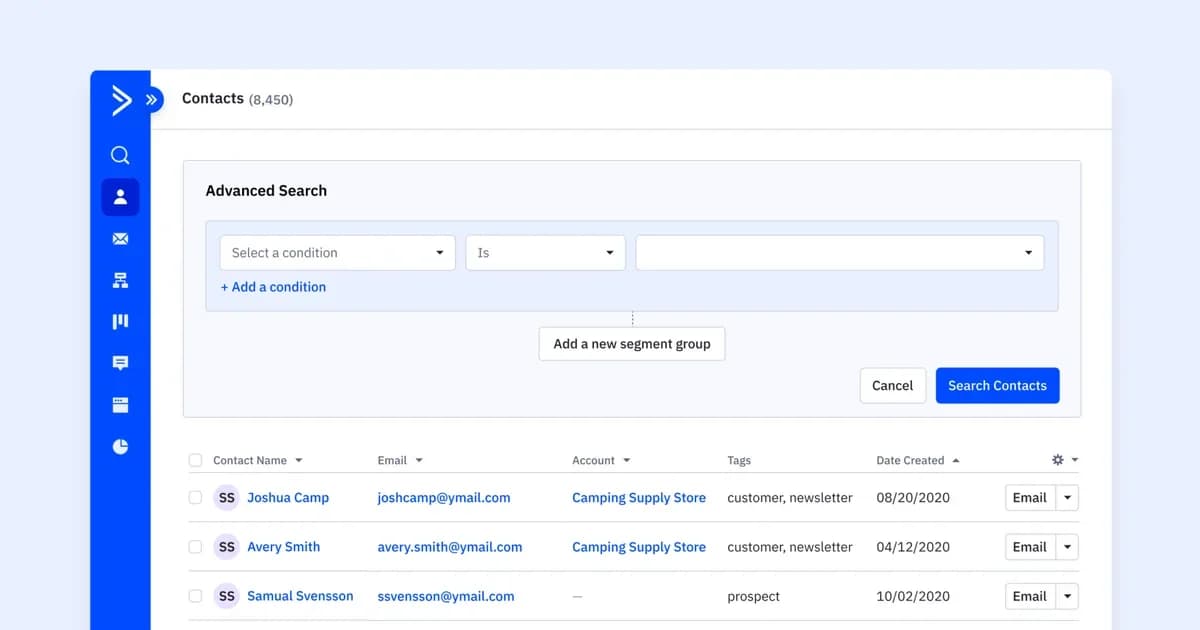
In ActiveCampaign, the segment builder is available wherever you choose who gets a message: Advanced Search, campaign recipients, automation triggers, and the if/else, wait, and goal conditions inside automations.
Save a segment once and reuse it across campaigns and automations. Explore segmentation in ActiveCampaign to see the full set of tools.
Build segments that grow with your audience
Start your free trial to build, save, and reuse segments, with Active Intelligence suggesting where to start.
Frequently asked questions
- How often should you review your segments?Review them every quarter, and after any major change to your lists, tags, or offers. A regular check catches overlap and stale conditions before they affect a send.
How often should you review your segments?
Review them every quarter, and after any major change to your lists, tags, or offers. A regular check catches overlap and stale conditions before they affect a send.
- How many segments should you start with?Start with three or four that match messages you send every month. Add a new segment only when one group needs a different message from the rest.
How many segments should you start with?
Start with three or four that match messages you send every month. Add a new segment only when one group needs a different message from the rest.
- What is the difference between a list and a segment?A list is a group you add contacts to. A segment is a set of conditions that returns whoever matches right now, so it updates as your contact data changes.
What is the difference between a list and a segment?
A list is a group you add contacts to. A segment is a set of conditions that returns whoever matches right now, so it updates as your contact data changes.
- When should you delete a segment?Retire a segment when no campaign or automation uses it, or when it duplicates another. Check what depends on it before you remove it.
When should you delete a segment?
Retire a segment when no campaign or automation uses it, or when it duplicates another. Check what depends on it before you remove it.