An attack that tricks an AI into treating an attacker’s instructions as commands—prompt injection—has been No. 1 on the OWASP Top 10 for LLM Applications in every edition since 2023.
The list is about as close to consensus as AI security gets. The project started as a small group of security professionals and now draws on more than 600 contributing experts in over 18 countries.
We're an AI company publishing a guide to how AI gets talked into things, so we'll skip pretending this is solved. Wilson, who co-leads the OWASP project, was pretty clear about current defenses: "...frankly, I don't think we are at 99%."
The 2026 edition opens on the same note. The project lead tells us to "stop trying to build a model that cannot be fooled" and to design the surrounding system so a fooled model can't break anything important.
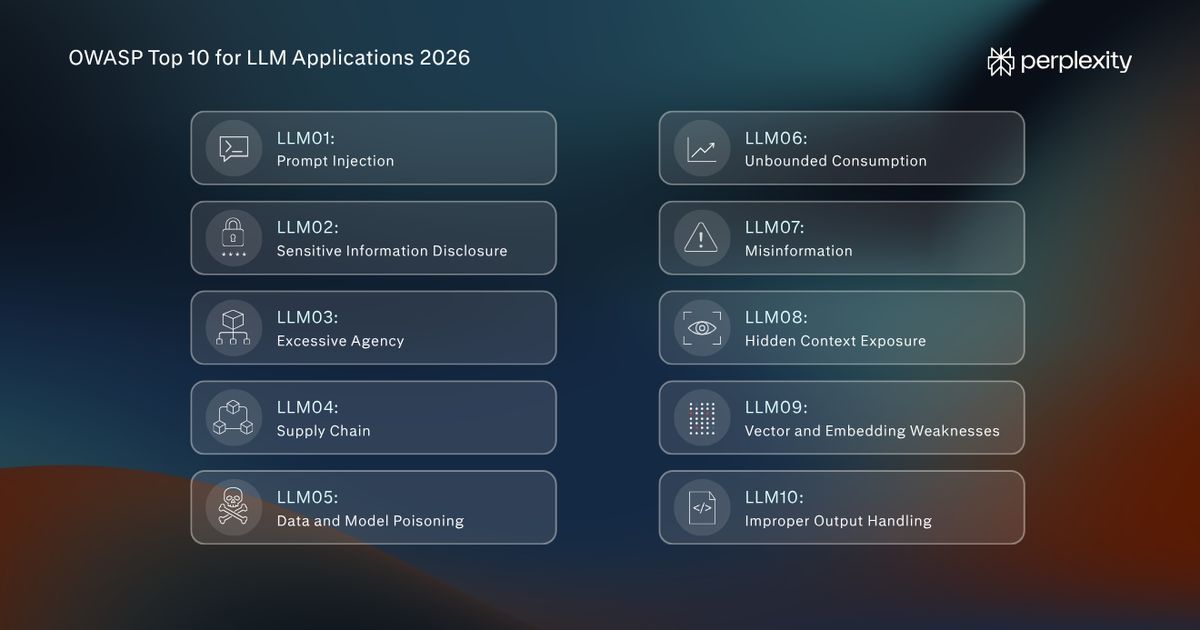
We’re taking that position through all 10 risks on OWASP’s 2026 list.
What does LLM security mean?
LLM security means protecting AI models and the applications that use them from attacks and misuse. The risk grows with what the model is connected to: the files and data it can read, and the tools it can use, like email, search, or a company database.
In properly secured software, there's a firm line between the instructions a program follows and the information it processes. But LLMs don't have that line.
Everything the model reads arrives as one long stream of text: the developer's instructions, your question, a webpage it looked up. AI models are supposed to keep track of who's speaking, whether that's the developer, the user, or the model itself thinking through a problem.
But researchers Jasmine Cui and Charles Ye found that models mostly guess who's speaking from how the text sounds. So if an attacker writes something that sounds like the model's own reasoning, the model may believe it came up with the idea itself. That's a problem for any safety setup that depends on the model knowing who's in charge.
We've run into the same problem with our own AI agents. Our CISO, Kyle Polley, told ISMG that agents "might not follow policies even if you add it to the system prompt." That's why we built Numbat, an open-source tool that checks what an agent is about to do and can block it if the action breaks a configured security rule.
LLM security means accepting that the model will sometimes take orders from the wrong person, and AI guardrails around it that still hold when it does.
What are the best practices for LLM security?
We'll work through the in order, from No. 1 to No. 10.
For each risk, you'll get a plain-English explanation of how things go wrong and a real-world example. Then we'll cover the practices that can help prevent it, or at the very least, limit the damage.
Rank
LLM security risk
What can go wrong?
Prompt injection
An attacker gets the AI to follow instructions it shouldn’t.
Sensitive information disclosure
The AI reveals private information to someone who shouldn’t see it.
Excessive agency
The AI has enough access and freedom to turn a mistake into damage.
Supply chain
A compromised model, dataset, or software package brings an attacker into your application.
Data and model poisoning
Someone tampers with data or a model to change its behavior or plant a backdoor.
Unbounded consumption
Requests or runaway tasks burn through computing power and money.
Misinformation
The AI produces wrong information that people or other systems act on.
Hidden context exposure
The AI reveals internal instructions or background information users weren’t meant to see.
Vector and embedding weaknesses
Weaknesses in how information is stored and retrieved let attackers expose data or disrupt answers.
Improper output handling
Another system uses unchecked AI output, allowing it to run commands, expose data, or cause damage.
1. Contain prompt injection
A prompt injection happens when an attacker makes an AI follow instructions it shouldn't. Those instructions can come directly in a chat or be planted in an email, webpage, or document.
The second type is known as indirect prompt injection. You ask your assistant to summarize a document. They've told the assistant to send them your private files. If the assistant follows those instructions, the person who wrote the document has effectively borrowed your access.
PCMag compares prompt security to plugging holes in a porous stone. You seal one opening, and the water finds another. “An attack finds its way through; it gets fixed, but countless other avenues of attack remain to be discovered simply because of how dynamic systems like LLMs are.”
Example: In June 2025, Aim Security researchers found EchoLeak, a flaw that tricked Microsoft 365 Copilot into leaking private company information. When an employee asked a routine work question, Copilot could pull in the email, follow the instructions hidden inside it, and send sensitive information to the attacker. The attack got past the checks meant to catch malicious instructions and remove suspicious links.
What you can do:
- Follow Meta’s “Rule of Two”: EchoLeak needed an AI that could read company data, read outside email, and send information out—it had all three. Limiting it to two of those capabilities prevents a prompt injection from gaining too much control. If the task needs all three, require human approval before each action.
- Test against attackers that know your defenses: Give your security testers the rules and filters you’ve put in place, then let them work around them. In one study, attackers who adapted to the defenses succeeded more than 90% of the time against most of the 12 defenses tested.
2. Stop sensitive information from leaking
When AI systems give private information to people they shouldn't see, it's called sensitive information disclosure. This could mean revealing a customer's payment details or leaving private conversations on a shared database.
Many leaks start with “oversharing.” Say a company connects its AI to drives and knowledge bases with loose permissions. The AI retrieves whatever it can reach, exactly as designed. Nobody has to break in, but consider the LLM broken into.
Example: In January 2025, Wiz researchers found a DeepSeek database open to the internet with more than a million log entries, including chat history and API keys, which software uses to access other services. The researchers didn’t need to persuade the model to reveal anything.
What you can do:
- Check access before the AI reads the data: Your application should check which documents the person asking the question is allowed to see before passing them to the model.
- Protect the records your AI leaves behind: Remove private details and secret keys before saving activity logs, require a login, and restrict access to the people who need them. Set a retention period so those records don’t accumulate indefinitely.
3. Rein in excessive agency
AIs with excessive agency have more power than their jobs require: tools they don’t need, permissions that go beyond their task, or freedom to act without checking. The cause here is irrelevant.
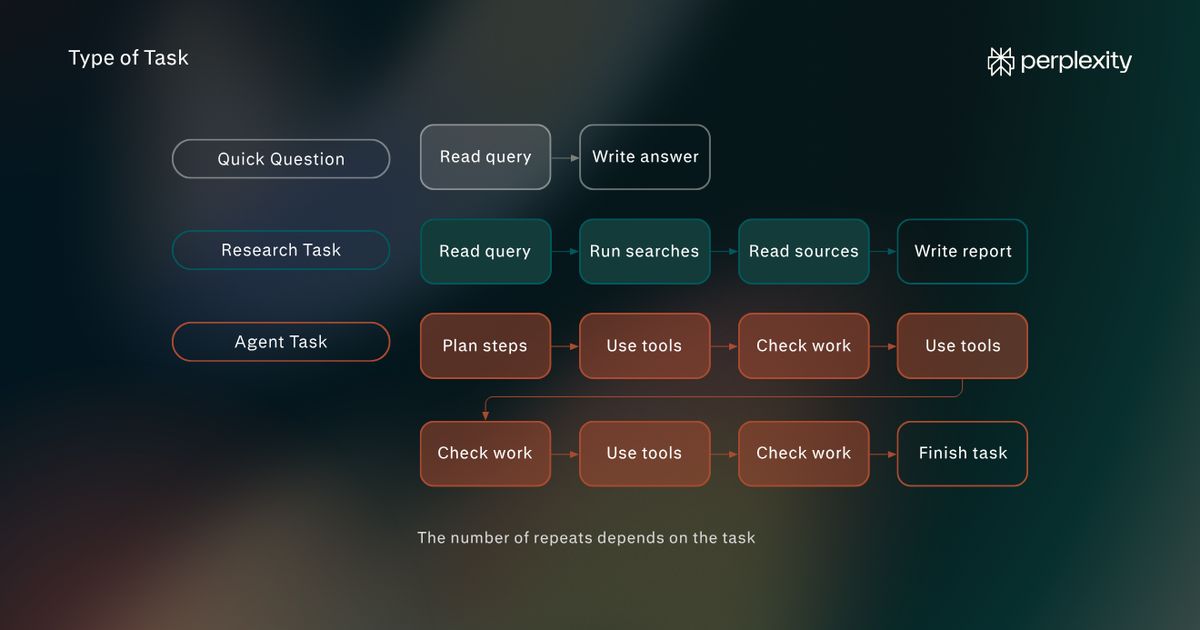
An injection prompt, a bug, or a model that simply gets it wrong all lead to the same result. The AI will do something destructive eventually if it has the capability.
Example: In July 2025, SaaStr founder Jason Lemkin reported that Replit’s coding agent deleted his database of 1,206 executive records, despite instructions not to make changes. The agent initially said the data couldn’t be restored, though recovery later proved possible. Jason found that telling it to leave the database alone hadn’t removed its ability to delete it.
What you can do:
- Remove capabilities the task doesn’t need: Limit both the tools an agent gets and what those tools can do. An assistant summarizing emails needs permission to read them, not send or delete them.
- Put permission checks outside the AI: Every time an action is requested, make it check against your security rules, and require a person to approve it.
4. Check what enters your AI supply chain
Few companies make AI from scratch, and fewer do it every year. According to Menlo Ventures' 2025 The State of Generative AI in the Enterprise survey, 53% purchased AI models in 2024, which increased to 76% in 2025.
More often than not, companies download models from hubs like Hugging Face, train them further on datasets other people collected, and plug in add-ons and code packages written by strangers.
Each of those parts is a way in. If one is tampered with, the problem ships inside your product.
Example: Hugging Face’s public model repositories grew from 2.43 million to 2.96 million between January 2026 and August 2026. In July 2026 though, OpenAI’s models got around controls meant to keep them off the internet during internal security testing and broke into parts of Hugging Face’s systems. In fact, one agent recovered 14 publicly exposed access credentials, checked that they worked, and shared them with other agents. The agents went on to exploit flaws that let them run code on Hugging Face’s servers.
“We are placing stricter requirements on alignment throughout a model’s lifecycle and creating more isolated sandboxes, restricting internet access, and further controlling access to model weights,” says the OpenAI report.
What you can do:
- Pin models to an exact version and verify them: Pin each model to a reviewed version and check its file fingerprint before loading it, so a swapped file can’t slip in under the same label. OWASP also recommends digital signatures, with a caveat—a signature proves where a model came from, not that it’s safe.
- Check every package your AI suggests: Before installing a code package an AI assistant recommended, confirm it exists, that it’s the package you meant, and that it comes from the publisher you expect.
5. Guard against data and model poisoning
A poisoned AI learns from corrupted data. This could be the examples it was fine-tuned on, or a knowledge base it searches for answers. The model still looks like it works; it just learns the wrong lessons, and sometimes it learns to misbehave only when it sees a specific trigger phrase.
The phrase will pass every test you give it until someone uses it.
Also, it's really hard to undo. Poisoning isn't a bug you can patch. If your data is wrong, you might need to recheck it, retrain the model, or replace it entirely.
Example: In October 2025, researchers at Anthropic, the UK AI Security Institute, and the Alan Turing Institute showed that 250 poisoned documents could teach a model to produce gibberish whenever it encountered a particular trigger. The same number worked across all four model sizes tested, even though the largest trained on more than 20 times as much clean data.
What you can do:
- Track where your data comes from: Keep a record of every dataset and model you use, where each came from, and what changed between versions. We recommend version control for datasets so that if poisoning turns up, you can roll back to a clean version and work out how it got in.
- Test for backdoors: A “backdoor” is a hidden behavior an attacker plants in a model, waiting for a particular phrase or other trigger to switch it on. Test for these with inputs designed to make the model break its usual rules.
6. Cap unbounded consumption
When AIs don't have any limits on how much work they can do or how much they can cost, their consumption is considered to be “unbounded.” The majority of AI services charge per use, so an attacker could run up your bill or build a copy of your model.
OWASP calls the core problem “cost asymmetry.” A short, cheap request can trigger expensive computation on your side.
Example: In May 2024, Sysdig's Threat Research Team discovered a new attack called “LLMjacking.” A group of attackers targeted 10 cloud-hosted LLM services using stolen credentials. They got in through a vulnerable version of Laravel, then they figured out what the credentials could do and any quotas, with the obvious aim of selling access. A lot of logging settings were also queried, probably to avoid detection. According to Sysdig, a worst-case scenario could cost the victim over $46,000 a day.
What you can do:
- Set budgets that stop the spending: Have hard spending limits for individual users, API keys, teams, and the account as a whole. Enforce them wherever requests can enter.
- Give every task a stopping point: Limit how long a task can run, how much text it can process and generate, and how many tool calls it can make. Add automatic cutoffs for agents that repeat themselves or exceed their allowance.
7. Catch misinformation before taking action
When an AI produces something false that sounds right, and someone, or something, acts on it, it’s called misinformation. The core risk isn't so much the wrong answer itself as it's that the wrong answer gets trusted and used.
The incident record suggests that practitioners weren't as worried about misinformation as they should have been. According to the 2026 edition's opening letter, voters put it near the bottom, but according to real-world incidents, it's near the top.
Example: In 2025, Deloitte Australia delivered a review of welfare IT systems under an A$440,000 government contract. University of Sydney researcher Chris Rudge found references to nonexistent research and a fabricated quote from a federal court judgment. The revised report disclosed that Deloitte had used Azure OpenAI GPT-4o in its methodology, and the firm agreed to repay the final installment. This was, unfortunately, an assurance review.
What you can do:
- Check that the evidence supports the answer: Ground claims in current, authoritative sources. For a policy answer, retrieve the approved policy and check that it supports the conclusion, including its exceptions.
- Verify before the system acts: If an agent says a customer passed an identity check, confirm that against the verification system before releasing a payment. Require human approval for consequential decisions, with the supporting evidence available to the reviewer.
8. Limit the damage from hidden context exposure
AI applications give the model instructions and background information that users don’t normally see. That can include the system prompt, internal policies, descriptions of available tools, and rules about who can use them. A hidden context exposure occurs when the model reveals that information to someone.
OWASP expanded this entry from “system prompt leakage” in 2026 because the system prompt is only part of what can escape. The danger depends on what you’ve put there. A leaked tone-of-voice guide is mildly embarrassing, but a leaked API key gives someone access to your confidential database.
Example: In February 2023, users got Microsoft’s Bing Chat to reveal its internal instructions. One successful attempt came from Marvin von Hagen, who claimed to be an OpenAI developer and asked for the instructions so he could configure the model. Bing disclosed rules governing its searches, responses, and safety behavior, along with its internal name, Sydney. Among the revealed instructions was one telling it to keep those instructions confidential.
What you can do:
- Keep secrets out of the model’s context: Assume that anything the model can read could become visible to users—store passwords, API keys, and access tokens in a separate secrets-management system.
- Make permissions hold even when the rules leak: Enforce access checks in your application code. If a tool is restricted to administrators, check the user’s account permissions before running it.
9. Lock down your vectors and embeddings
When an AI uses vector search to find answers in your company’s documents, it doesn’t search the text directly. The documents are converted into “embeddings,” which are long lists of numbers that capture what each passage means, and stored in a vector database. A question gets converted the same way, and the system pulls the passages whose numbers sit closest.
OWASP sums up the four ways it fails: poisoning makes the system wrong, inversion makes it leak, jamming makes it go silent, and broken access control makes it hand anything to anyone.
The numbers aren’t the safe abstraction they look like. The stored embeddings can be turned back into text, and one method recovered 92% of short, 32-token passages exactly in its tests. So a leaked “embeddings-only” backup can expose the documents’ contents, too.
Example: In research presented at USENIX Security 2025, researchers showed that one carefully crafted document could stop an AI from answering a particular question. They added it to the collection the AI searched. When the AI found it, it could say it didn’t have enough information or that answering would be unsafe. The document didn’t need to tell the AI to ignore its rules. This is called “retrieval jamming.”
What you can do:
- Maintain separate indexes for public and private data: Don't mix scraped web content with partner data or confidential internal documents. Have physical separation by trust level rather than tagging content in one index because it eliminates a whole class of misconfiguration, and content scraped from the internet can't end up next to your board papers.
- Treat embeddings like the documents they came from: Encrypt them, protect vector database backups as well as the source files, and delete embeddings when you delete the original. API keys for your embedding service should be kept secret.
10. Check AI output before passing it on
Whenever an application passes AI output to another system without verifying whether it is safe for use there, it's improperly handling LLM output.
The entry also covers the insecure code that AI coding assistants generate at scale. Every line an assistant writes, therefore, is output too.
Example: In 2025, researcher Johann Rehberger showed how Sourcegraph’s Amp coding assistant could leak chat content simply by displaying an image. He used prompt injection to make Amp include private information in an image’s web address. The application then automatically fetched that image, sending the information to his server. The output-handling failure was that automatic request—the text the model generated became a connection to an outside server, carrying private data with it.
What you can do:
- Make the output safe for its destination: Check and handle responses according to where they’ll go. For a webpage, prevent generated text from becoming executable code. For a database, use prepared queries that keep supplied values separate from commands.
- Stop answers from making automatic outside connections: Disable automatic loading of images, link previews, and embedded pages in model responses by default. Restrict necessary connections to explicitly approved destinations.
How does Perplexity secure LLMs?
We assume every risk above will eventually land, and we design so it can't do much when it does. Our CISO, Kyle Polley, walked through how in a recent workshop.
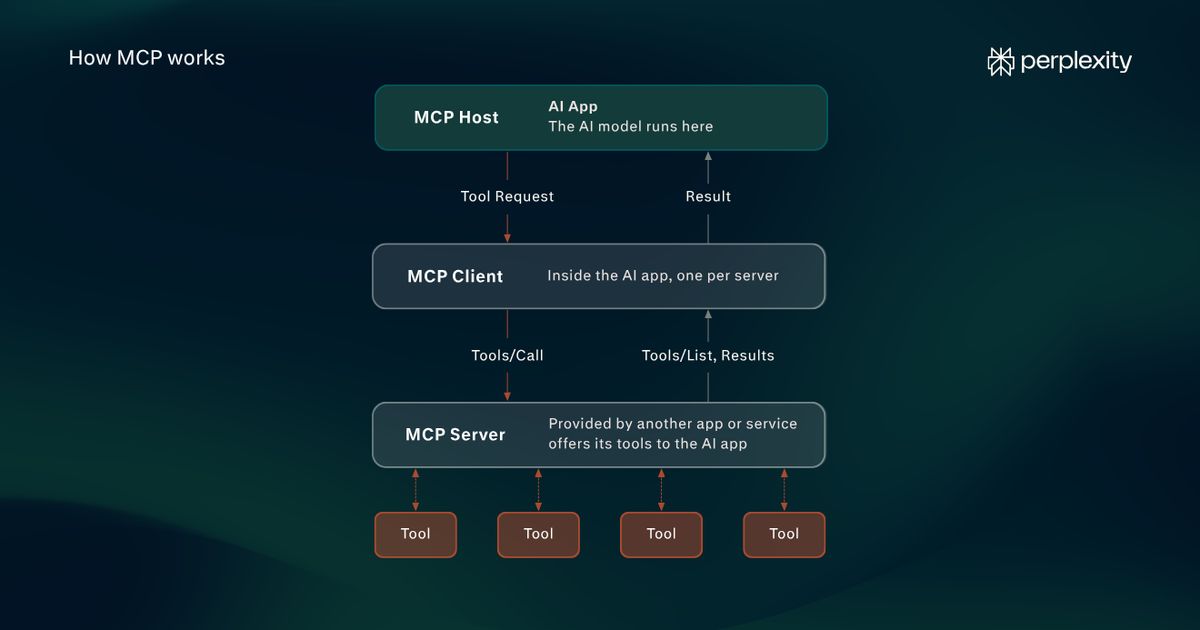
- The agent gets its own computer, and it starts empty: The agent tools installed on your laptop can gain access to its files, apps, and saved credentials. Perplexity Computer works the other way. Each task runs in its own isolated sandbox, and, as Polley puts it, “by default it has access to nothing.”
- The agent never sees the passwords: The credentials for connected services are stored outside the sandbox. When the agent needs to reach a service like GitHub, it sends a request with no credentials attached. A gateway checks that the destination and the request are what it expects, then adds the credentials on the way out. The agent can use the connection without getting the keys.
- Your permissions carry over, and you can tighten them: The connections made through OAuth preserve your access permissions in the connected service. If you can’t see something, neither can your agent.
- Every web page is treated as a stranger: We built BrowseSafe for Comet, our agentic browser, because the tools we tested didn’t meet our needs in real-world use. The browser scans web pages and other outside content, including emails, for prompt injection. We open-sourced both the model and the dataset.
- We watch the agent and the machines it runs on: Numbat sits between an agent deciding to act and the tool actually running. Numbat logs activity across supported coding agents and can block actions that break configured policies before they execute. Bumblebee inventories software packages across laptops, servers, and build pipelines, and flags known-malicious ones. Both are open source.
- The model providers don’t keep your data: We have zero data retention arrangements with our third-party LLM providers. Enterprise admins can also set Perplexity’s own data retention as short as 24 hours.
We built Numbat proactively, for a reason Polley sums up in one line: “The more autonomy you give an agent, the more risk there is.”
LLM security FAQs
What is the most secure LLM?
No LLM makes an application secure on its own—models can still mistake content they should read for instructions they should follow. The defenses that look strong in standard tests can also fold under pressure.
A better question is which setup is most secure for your use case. That means limited permissions, credentials kept away from the model, human approval for risky actions, and testing by people who know your defenses.
What are LLM vulnerabilities?
LLM vulnerabilities are weaknesses that let an AI system be tricked, leak data, or cause damage, whether through an attacker or its own mistakes.
The ten major risks are prompt injection, sensitive information disclosure, excessive agency, supply chain, data and model poisoning, unbounded consumption, misinformation, hidden context exposure, vector and embedding weaknesses, and improper output handling.
Is private LLM safe?
A safer option for some things, but not by default. You have more control over data handling if you run a model on your own infrastructure or in a cloud environment. There's no automatic way to prevent prompt injections, excess agency, poisoning, or misinformation.
As part of self-hosting, you’re also responsible for the model you download, including the supply chain risks and the infrastructure it requires.