MCP tools are functions an AI model can call to perform a task outside the conversation. For example, search your notes or query a database. Each tool sits on an MCP (Model Context Protocol) server and has a name and a short description that help the model decide when to use it.
The term "MCP tool" is used in other ways too. In everyday use, people say "MCP tools" when they mean MCP servers (the applications that offer tools) or the directories that list those servers. MCP Tools is also the name of a command-line program for listing and calling the tools on an MCP server.
This guide is about the protocol functions, not servers, directories, or command lines. It explains what a tool consists of, the kinds of tools servers offer, and how tools differ from resources, prompts, and function calling. It then walks through the steps a model takes to use a tool, and closes with the most common problems related to their use.
What are MCP tools?
An MCP tool is a function that lets AI models complete tasks with other software applications. For instance, my AI agents and workflows use MCP tools to draft emails in Gmail (create_draft), create Trello cards (trelloWriteCard), and pull live search results from DataForSEO (serp_organic_live_advanced), to name just a few.
Software apps often offer multiple MCP tools on their MCP servers. For example, the Trello MCP server currently has 14 MCP tools that enable AI models to read and update boards, lists, checklists, cards, and more.
And because MCP standardizes how tools are described and offered, any AI app that supports the protocol can use the same MCP tool.
What an MCP tool includes
Every MCP tool comes with three things:
- Name: A short identifier the model uses when it calls the tool (e.g., get_event in Google Calendar).
- Description: A plain-language explanation of what the tool does and when it's useful. The large language model (LLM) reads it to decide whether the tool fits your request (e.g., "Returns a single event on the given calendar.").
- Inputs: The information the tool needs to run, such as a client name and a date for a notes search. It's written in JSON, and developers call it the input schema because it sets the form for each input (text, number, or a list).
Some tools add extra metadata: a display name, a description of the results they return (an output schema), and annotations about how the tool behaves.
The AI model never sees the code behind a tool. It works from what the tool says about itself, so a vague name or description leads the model to pick the wrong tool.
What kinds of MCP tools exist
MCP tools fall into four groups by what they do:
- Search and lookup tools: Find or retrieve information (e.g., search notes, read a file, or query a database).
- Action tools: Create or change something in another app (e.g., add a task, create a calendar event, open a support ticket, or send an email).
- Data-processing tools: Transform or analyze data (e.g., analyze a spreadsheet file or run a calculation).
- System tools: Interact with the local system (e.g., execute a command in a terminal).
MCP tools vs. resources & prompts
Besides MCP tools, an MCP server can offer two other types of building blocks, which the protocol calls primitives: resources and prompts.
For example, GitHub's official MCP server offers:
- A tool called issue_write that creates or updates issues,
- A resource called repository_content that gives access to the files in a repository,
- A prompt called issue_to_fix_workflow that sets up the steps to report a problem as an issue and have GitHub's Copilot coding agent generate a pull request to fix it.
The difference is what each one does and who decides when to use one: you, the AI app you're working in (e.g., Perplexity), or the AI model running inside that app.
- An MCP tool takes actions or looks things up. The AI model decides when to call a tool autonomously, and your AI app passes the call to the server. Your AI model picks tools; your AI app should show you each call and let you deny it.
- A resource is content available on the MCP server, such as a file or a set of records, each with its own address (a URI). Your AI app asks the server which resources it has, reads the one it needs by its address, and adds the content to the conversation as context.
- A prompt is a ready-made message template the server provides, sometimes with blanks you fill in. Your AI app shows you the available prompts, and you choose one, often as a slash command.
How AI models use MCP tools
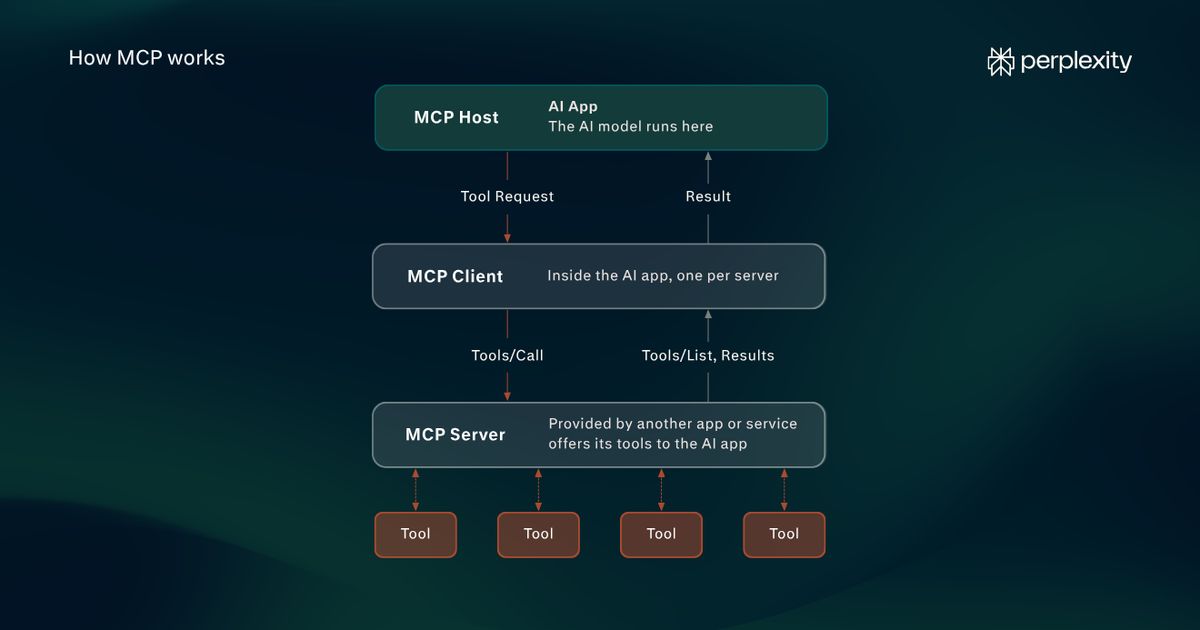
An AI model uses an MCP tool in five steps: discovery, tool selection, invocation, results, and error handling. Your AI app passes everything between the model and the server.
Say you ask your AI app to check your Trello "This week" list and draft an email to your editor with an update. Here's what happens end to end:
- Discovery: When your AI app connects to an MCP server through MCP clients, it asks for the server's list of available tools (a request called tools/list). The LLM only sees what the app passes on: each tool's name, description, and inputs.
- Tool selection: The AI model compares your request with those descriptions and picks the tools that fit. Here, that's Trello's trelloReadList to read the list and Gmail's create_draft to write the email. It also fills in the inputs, such as which list to read.
- Invocation: The model replies with a structured request to run the tool (a step called "function calling"). Your AI app sends that request to the right server (a tools/call request). It should also show you the call and let you deny it.
- Results: The server runs the function and sends back the result, in this case the cards on your list. Your AI app adds the result to the conversation, and the model decides what comes next: answer you or call another tool, such as create_draft with an email based on those cards.
- Error handling: If the tool runs but fails, for example, because the list doesn't exist, the error comes back as part of the result. The model can read it and try again with different inputs. If the request itself is broken, for example, because it calls a tool the server doesn't have, the app gets a protocol error instead. The model is less likely to recover.
The key point is that the model chooses tools from their descriptions alone, and your AI app does all the talking to servers.
Common MCP tool problems and how to avoid them
Problems with MCP tools come down to four things: how many tools are connected, how they're named and described, how much data they return, and which servers they come from.
Here's what each problem looks like and what helps:
Problem
What it looks like
What helps
Too many tools connected
Every tool definition sits in the model's context window before you've asked anything, and tool selection gets worse as the list grows.
Connect only the servers a task needs, and turn off unused tools where your AI app allows it. Example: GitHub's MCP server lets you enable only the groups of tools (toolsets) you need.
Vague or overlapping descriptions
The model calls the wrong tool, or the right one with the wrong inputs, because two descriptions sound alike or one says too little.
Provide clear, specific names and descriptions, ideally with an example of when to use the tool. If a server's tools keep misfiring, MCP Inspector, the official testing tool, shows exactly what each tool says about itself.
The same tool name on two servers
Two servers each offer a tool called search, and there's no telling which one a call is meant for.
Prefix tool names with the server's name. Example: Trello's server (trelloSearch, trelloReadList).
Results that are too big
A tool returns more than the task needs, such as a whole email thread with its formatting, and crowds the model's context.
Use tools that offer compact formats. Example: Gmail's get_thread tool description recommends plain-text format "to prevent context exhaustion."
Untrusted servers
A careless or malicious server could use tool calls to pull data out of your conversation.
Connect servers only from sources you trust, and keep approvals on for tools that change things or send data out.
Why do MCP tools need your approval?
MCP tools need your approval because, without it, the AI model could make changes you didn't intend or share sensitive data with a server you don't control.
A misread request or a vaguely described tool can trigger the wrong action. Every call also sends some of your information to a server.
That's why the protocol expects AI apps to keep a person in the loop, with the ability to deny any tool call.
Here's a practical way to sort tools by how much checking they need:
- Actions that only read: Looking something up, like reading a list with Trello's trelloReadList, changes nothing. These calls can run without asking first, as long as your AI app shows which tool ran and what it looked up.
- Actions you can undo: Creating an email draft with Gmail's create_draft or adding a Trello card changes something you can reverse. Check the inputs before the call runs.
- Actions you can't undo: Sending an email with Gmail's send_message, deleting records, or anything involving payments or sensitive data can't be reversed. Give explicit permission to these every time.
Using MCP tools in Perplexity
Perplexity works with MCP tools in both directions: it can use tools from MCP servers you connect, and it offers its own tools to other AI apps.
- Connect MCP servers to Perplexity: On Pro, Max, and Enterprise plans, you can connect Perplexity to any external tool or data source that has an MCP server and use it in answers and Perplexity Computer agentic workflows. In the Mac app, you can also connect MCP servers that run on your computer
- Use Perplexity's tools in other AI apps: Perplexity's MCP server offers four tools (perplexity_search, perplexity_ask, perplexity_research, and perplexity_reason) to any AI app that supports remote MCP servers, such as Claude Code. A separate server lets other AI apps hand multi-step tasks to Perplexity Computer.
MCP tools FAQs
Is MCP just tool calling?
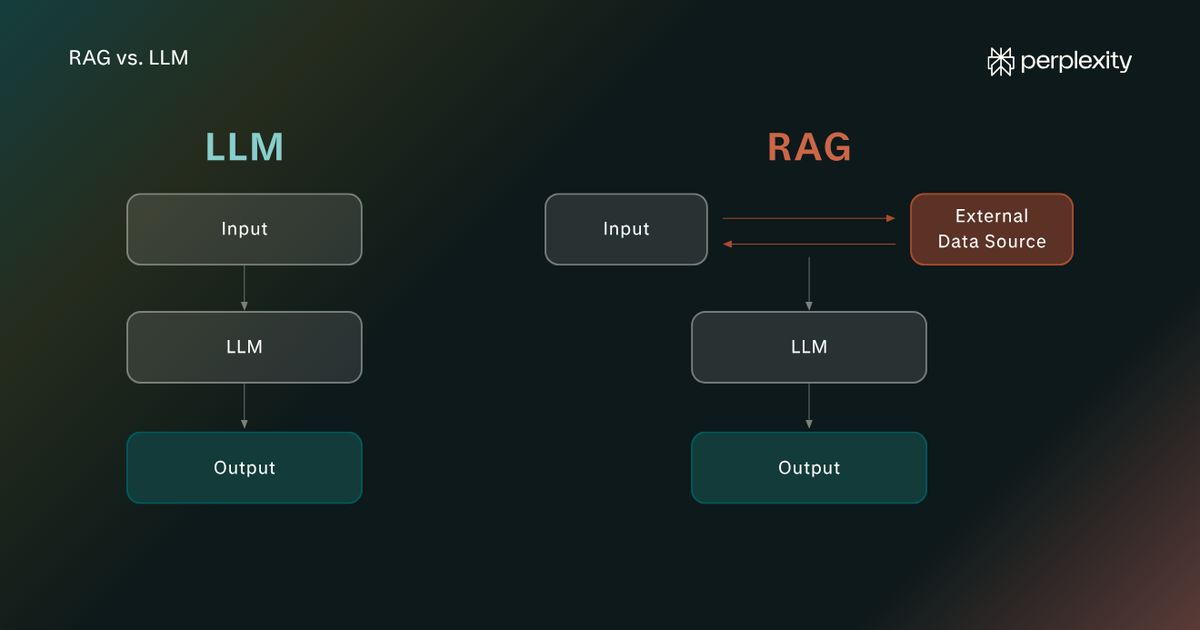
No, MCP isn't just tool calling. Tool calling is how the model asks for a tool, and MCP is how the AI app finds tools and routes each call to the server that runs it.
Tool calling (also called function calling) is the AI model's part of the job: the model sees a list of tools and replies with a request to run one. With tool calling alone, each AI app has to define and run every tool itself.
MCP lets tools live on servers, so any AI app that supports MCP can offer them to its model and send the model's requests to the right server.
Will MCP replace APIs?
No, MCP won't replace APIs, because MCP and APIs work together. MCP tools often sit on top of existing APIs, and when the model calls a tool, the MCP server typically makes an API request.
Which AI apps support MCP tools?
MCP tools work in AI assistants such as Claude, ChatGPT, and Perplexity, and in development tools such as Visual Studio Code and Cursor. The MCP documentation names these and notes that many other apps do too.
Does the AI model itself need to support MCP?
No. The AI model doesn't need to support MCP because your AI app handles the protocol. It connects to servers, passes their tools to the model, and sends the model's tool requests back to the right server. The model needs only to support function calling.
Is MCP becoming obsolete?
No, MCP is still under active development. Its maintainers released a new version of the MCP specification in July 2026 and published an updated roadmap in August 2026, which includes work to let servers reveal their tools gradually as a conversation narrows.