What AI costs include
AI costs are what a team pays to use AI tools. They fall into three types:
- Fixed costs stay the same each month regardless of use, such as a per-person subscription.
- Variable costs rise and fall with use, such as credits (prepaid units a plan draws down for certain tasks) or charges for going past a plan's limits.
- Rollout costs come from putting a tool into everyday use, such as setup and training.
Take a hypothetical 10-person team paying $25 per person per month for an AI research tool. The subscription is a fixed $250. In busy months, two analysts run out of included credits and the team buys $100 more, so the bill runs to $350. Rollout adds 18 hours of staff time that never appears on an invoice: eight hours for an operations lead to connect the tool to the company's sign-in system, and an hour of training for each of the 10 team members.
AI pricing models
AI tools use seven main pricing models. Many plans combine two or more, such as a subscription with included credits.
Pricing model
Example
Best for
Free plans with usage limits
Grammarly's free plan includes a monthly allowance of AI prompts
Testing whether a tool fits a team's work before paying for it
Per-seat subscriptions
GitHub Copilot Business is billed per user each month
Teams where most people use the tool regularly and at similar levels
Premium tiers for heavy users
Claude's Max plan offers 5 or 20 times the usage of its Pro plan
People who regularly hit standard limits or run multi-step tasks
Usage credits
Adobe's Creative Cloud plans include a monthly allocation of generative credits
Teams whose heavy AI work comes in bursts, such as campaign launches
Usage-based API pricing
Perplexity's Sonar API (for adding search-based answers to other apps) charges by length of questions and answers plus a flat fee per question
Teams with technical staff building AI into their own products or workflows
Enterprise contracts
Microsoft 365 Copilot is an annual per-user enterprise add-on to Microsoft 365
Organizations that need security reviews and central administration
Outcome-based pricing
Intercom's Fin charges per outcome, such as a resolved customer conversation
High-volume work with a countable result, such as customer support
How AI pricing models work
Free plans with usage limits
Free plans charge nothing but cap how much each person can use the tool, and they usually leave out the most capable models and some features. When a person reaches the cap, the tool stops handling that type of request or switches to a less capable model until the limit resets.
Per-seat subscriptions
A seat is a license for one named user, and per-seat plans charge a set price for each seat, billed monthly or annually. Team versions usually add admin controls, such as deciding who has access. The bill scales with headcount rather than with use, so a person who runs two queries a week costs the same as one who runs 200.
Premium tiers for heavy users
Premium tiers are higher-priced individual plans with higher usage limits, more capable models, or more advanced features. They're still priced per person, so a team pays the higher rate only for each person it upgrades.
Usage credits
Credit plans include a monthly allowance that tasks use up at different rates. Usually complex tasks use more credits than simple ones. When the allowance runs out, people can wait for it to reset or buy more. Unused credits often expire. Credits usually sit on top of a subscription rather than replacing it.
Usage-based API pricing
Teams that build AI into their own software or workflows pay through an API, which lets software send requests to an AI model directly.
API usage is billed per token (small chunk of text). A short, common word is usually one token, while longer words are split into two or more.
Both the text sent to the model and the text it generates count toward the bill. Some APIs add per-request fees on top.
Enterprise contracts
Enterprise plans combine seats with advanced security and administration features, such as single sign-on and controls over how long data is stored. Pricing is typically annual, and listed per seat or set by quote. Some enterprise AI plans are add-ons that require a separate base license, so their cost comes on top of software the company already pays for.
Outcome-based pricing
Outcome-based pricing charges for a completed result rather than for access or usage, so the bill depends on how the vendor defines a result. Intercom’s Fin, for example, bills only once per customer conversation.
How much AI tools cost
Standard individual plans for the most widely used AI tools cost about $20 a month. Premium individual tiers run $100 to $500. Business seats cost about $14 to $40 per user per month.
Tool
Free
Standard individual
Premium individual
Team or business (per user, per month)
Enterprise (per user, per month)
ChatGPT
Plus: $20 a month
Pro: $100, $200 or $500 a month
Business: $20 billed annually, $25 monthly
Custom quote
Claude
Pro: $20 a month, or $17 billed annually
Max: from $100 a month
Team: $20 billed annually, $25 monthly
$20 billed annually, plus usage at API rates
Gemini
Google AI Pro: $19.99 a month
Google AI Ultra: from $99.99 a month
Google Workspace Business Standard: $14 billed annually, $16.80 monthly
Google Workspace Enterprise: custom quote
Microsoft Copilot
Microsoft 365 Premium: $19.99 a month
Microsoft 365 Pro: $99.99 a month
Copilot Business: $18-$21 billed annually, plus a Microsoft 365 plan
Microsoft 365 Copilot: $30 billed annually, plus a Microsoft 365 plan
Perplexity
Pro: $20 a month
Max: $200 a month
Enterprise Pro: $40, or $400 a year
Enterprise Max: $325, or $3,250 a year
Prices in USD as of October 2026. Prices are subject to change. Check vendor websites for current pricing.
AI costs for software development teams
Development teams may spend more on AI than other teams, because coding tools increasingly run agents.
To take one example, Anthropic reports that Claude Code averages about $13 per developer per active day, or $150 to $250 per developer per month, across enterprise deployments. For comparison, a standard seat on Anthropic's business plan costs $20 per user per month, or roughly $1 per active day for someone who stays within the plan's included usage.
Using Gemini pricing as an example, Gartner suggests budgeting by usage level:
Developer type
How they use AI
Typical monthly budget per developer
Normal
Quick questions and limited help
$1 to $200
Mainstream
Regular use inside their coding tools
$200 to $500
Power
Agent workflows or high-volume automated tasks
$2,500 to $3,500
Take a hypothetical 10-person development team on a plan that charges $20 per seat plus usage.
Here's how a month's bill could add up:
Cost
Who
Calculation
Monthly cost
Seats (fixed)
All 10 developers
10 × $20
$200
4.5%
Regular usage
6 developers using the tool on most working days
6 × $13 a day × 20 days
$1,560
35.4%
Occasional usage
3 developers using it now and then
3 × $50
$150
3.4%
Power usage
1 developer running coding agents most of the day
1 × $2,500
$2,500
56.7%
Total
$4,410
100%
This is a modest budget for a team using AI tools with restraint. If a developer uses frontier models 24/7 across multiple agents, costs can compound quickly. And as a developer team uses AI tools more aggressively, expect the costs to increase.
What drives AI costs for a team
Four factors shape what a team spends on AI tools:
1. Number of users who need access
On seat-based plans, the bill depends on how many people need their own login, not on how many people benefit from the tool's output. A research lead might use an AI tool to produce a report that 10 colleagues read, but only the research lead will need a seat.
Team plans often set a minimum number of seats, so a very small team can end up paying for more seats than it uses.
2. Type of task
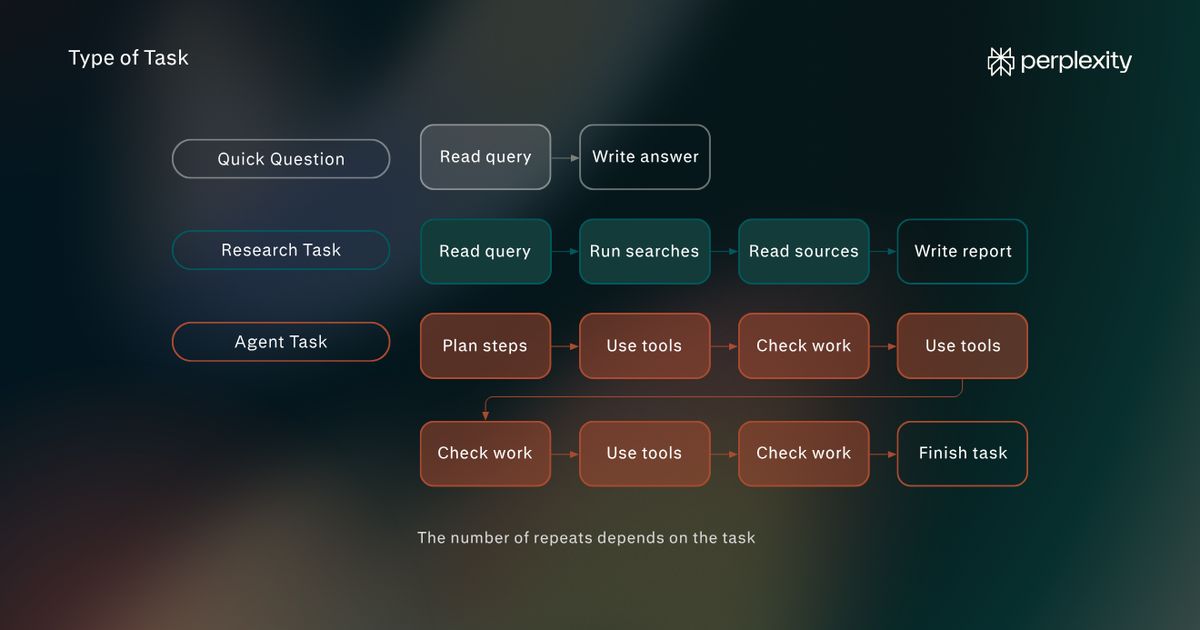
Every step an AI tool takes requires computing work, and tasks with more steps cost more to run.
A quick question takes one step. The model reads the query and writes an answer. A research task takes many. The tool runs several searches, reads the sources it finds, and writes a longer report. An agent task can take the most, since the agent plans its approach, uses other tools, checks its results, and repeats steps until the task is done.
3. Model choice
More capable models cost more to run because they do more work for every answer. They're usually larger, so producing each word takes more computing power, and many write out their reasoning privately before answering, which adds work the user never sees.
Plans pass that cost on in two ways. Some reserve their most capable models for higher-priced tiers. Others include them but count their use more heavily against usage limits, so a person who uses the most capable model reaches the plan's limit sooner than one using a lighter model.
Anthropic’s Claude, for example, does both: its Opus models aren't available on the free plan, and the model a person chooses affects how much they can do before reaching a limit.
4. Security and admin requirements
Security requirements can set the minimum plan a company needs, regardless of how much the team uses AI.
Features such as single sign-on, audit logs (records of who did what in the tool), custom data retention, and commitments not to train models on company content are usually reserved for business and enterprise tiers.
Claude's Pro and Max plans, for example, include none of the security and administration features on its pricing page, while its Team plan adds single sign-on and doesn't train models on a team's content by default. A company that requires these controls has to buy a business plan even for light users.
The hidden costs of AI tools
When calculating AI costs, teams need to consider the time it takes to set them up, as well as the price of the tools themselves. Every new tool will include time for:
Setup and administration
Setting up an AI tool takes administrator time before anyone can use it. Many tools connect to apps the company already uses, such as email or file storage, so an administrator has to decide which connections to allow and who can use them. This work continues after launch, too, as administrators need to add and remove people and review settings when the vendor adds new features.
Security review
Companies need to check whether their data will be used to train models, where it's stored, and which security standards the vendor meets. Perplexity, for example, is SOC 2 Type 2 certified (meaning independent auditors have tested its security controls over time) and lists the outside vendors that handle customer data in its Trust Center.
Training and adoption
A useful rule of thumb is to budget at least five hours of AI training per person. Employees who receive five or more hours of training are significantly more likely to become regular AI users. For a 10-person team, that adds 50 hours of staff time to the cost of the tool, but without it, more of the seats could go unused. Training covers only part of the learning, since people also spend time figuring out a tool while using it for real work.
Overlapping tools across teams
Teams often buy AI tools on their own. For example, marketing and sales might each pay for a different tool that does the same kind of research or drafting. In addition, many products a company already pays for, such as email, document, and meeting software, now include AI features, so a new standalone tool could duplicate capabilities the company already has. In both cases, the company could end up paying twice for the same features.
How to compare AI plans using cost per task
Instead of using the vendor’s monthly pricing to estimate AI costs, teams can use cost per task as a more accurate estimate. Cost per task refers to the cost of the plan, including any extra usage, divided by the number of tasks the team will run on the AI tool.
To estimate the AI cost per task and compare plans before you buy:
1. Pick the top-priority tasks that you want to use AI for.
Choose three to five recurring tasks that take up the most team time and that the team wants AI to help with, such as preparing competitor briefs or summarizing customer calls. For each one, note whether it's a quick question with a short answer or a bigger job that means searching, reading several sources, or working through several steps, since plans usually limit bigger jobs more tightly.
2. Count how often each task runs.
Use records the team already has, such as delivered reports, closed tickets, or meeting calendars, to estimate a monthly number for each group.
3. Document the free trial results.
Using a free plan or trial, have two or three people run their tasks for a week or two. Note which tasks the tool handles well, how long people spend reviewing and correcting its output, and whether anyone reaches a usage limit.
4. Check what each plan includes for those tasks.
On each vendor's pricing page and help center, find the limit for each task type, whether limits apply per person or are shared, and what happens at a limit. If these details aren't published, ask the vendor's sales team.
5. Calculate the total monthly cost and divide it by the number of tasks.
Multiply the base price by the number of seats, then add the cost of any tasks beyond the plan's limits. Divide by the monthly task count from step 2, counting only the tasks the trial showed the tool handles well.
Plans with similar prices can produce very different results here, depending on how much work each includes and how many of the team's tasks each tool handles well.
Here's how the math works for a hypothetical five-person team that needs 120 research reports a month, comparing two fictional AI monthly subscription plans:
Plan A
Plan B
Price per person per month
$20
$30
Base cost for five people
$100
$150
Research reports included
150
Extra reports needed
Cost of extra reports at $2 each
$140
Total monthly cost
$240
$150
Cost per research report
$2.00
$1.25
Plan A looks cheaper by monthly price, but once the team buys the extra reports it needs, Plan B costs less per report.
How to reduce AI costs
These savings come at three points: before buying a tool, at each renewal, and in day-to-day use.
Check on overlapping tools
Before buying a new AI tool, ask IT or procurement which AI tools the company already pays for and which AI features come with software it already uses, such as its email and document suite.
Then list the AI subscriptions team members pay for individually and expense, noting the tasks each one handles and when it renews. Where two tools cover the same tasks, use the cost-per-task comparison above to choose one, and switch at the other tool's renewal date to avoid paying for both.
Check for nonprofit and public sector pricing
Ask vendors about discounts for eligible organizations, since several discount their business and enterprise plans. Expect the largest discounts to require a conversation with the vendor's sales team.
Negotiate enterprise terms
At higher seat counts, ask for a quote rather than paying list price, since enterprise pricing is often negotiable. Beyond the price per seat, ask for these terms:
- A pilot with a small group for a fixed period, so the team can check usage before committing to more seats than needed.
- A one-year term for a first contract, rather than a multi-year commitment before the tool has proven itself.
- The same per-seat price for seats added during the contract, so growing the team doesn't mean paying a higher rate.
- The option to reduce seats at renewal without a penalty.
- A cap on how much the price can rise at renewal.
- A clear rate for usage beyond the plan's limits, or a shared allowance across the team so heavy and light users balance out.
Match seats and tiers to use
Before each renewal, review how much each person used the tool over the past few months, using the plan's usage reports if available. Remove seats for people who rarely use the tool, and move people who never reach standard limits from premium tiers to standard ones. Do this before the renewal date, since annual contracts often lock in the seat count for another year.
Choose annual billing
Switch to annual billing once a trial and a few months of use show steady demand. Many AI plans cost less per month when billed annually, in exchange for paying for a full year upfront.
Use lighter models for simple tasks
On plans that offer a choice of model, train users to choose a faster, lighter model for quick tasks and save the most capable models for complex work.
A quick task has a short answer or makes a small change, such as rewriting an email or answering a factual question. A complex task means reasoning through several steps, such as analyzing multiple documents. When unsure, start with the lighter model and switch only if its answer doesn’t meet requirements. Usage limits then last longer, which can keep heavy users from needing a premium tier or extra usage charges.
How Perplexity approaches AI costs
Every Perplexity plan includes everyday search, and each step up adds more access to advanced models, multi-step work, and team controls:
- Free includes basic searches, three Pro Searches (more thorough, multi-step searches) a day, and one Research query (a full report on a complex topic) a month.
- Pro includes more Pro Searches, Research queries, and file uploads. It adds a choice of advanced models, including the latest from OpenAI and Anthropic, along with image and video generation. It also lets you build some documents, spreadsheets, and dashboards. Pro plans also include some use of Computer, Perplexity's assistant for multi-step tasks, at no extra cost. The amount resets every week and covers tasks run on Computer's lightest setting.
- Max includes everything in Pro, plus the highest access to advanced models, extended limits for creating files and apps, early access to new products, and priority support. In place of Pro's weekly Computer allowance, Max includes 10,000 credits a month.
- Enterprise Pro includes all Pro features, plus seat management, admin control over billing and access, shared Projects for searching internal files, dedicated support, and a commitment that company data is never used to train models. Each seat comes with set limits, such as 400 Pro Searches a week and 50 Research queries a month.
- Enterprise Max includes everything in Enterprise Pro with 10 times the limits, the highest access to advanced models, and larger file storage. If an organization has at least one Enterprise Max seat, the whole organization gets automated account management, audit logs, configurable data retention, and a usage insights dashboard.
Explore these plans in more detail in Perplexity's guide to choosing a plan.
FAQs
Are free AI plans safe for business use?
Free AI plans are fine for testing a tool, but most aren't designed for company data. On many free and individual plans, conversations can be used to train the vendor's AI models unless the user opts out. Business plans usually exclude company data from training by default.
Can a team share one AI subscription?
Sharing one individual AI subscription across a team is usually a poor fit. Everyone shares the usage limits and conversation history. Many vendors' terms also restrict individual accounts to one person, so a team plan is usually the safer choice even for two or three people.
Is it cheaper to build custom AI or buy an AI tool?
For everyday knowledge work, buying an off-the-shelf AI tool is almost always cheaper than building custom AI. Building means paying for development, the computing power to run AI models, and ongoing maintenance on top of usage costs. It makes sense mainly when existing tools can't handle a task or a company needs AI inside its own product.
What is the difference between AI costs and token spend?
AI costs are everything a team pays to use AI tools, including subscriptions, usage charges, and rollout time. Token spend is the metered cost of using AI models through an API, billed per token (a small chunk of text).
-oOdUn61bDRSykk4H951SoDOHzqoOe1.png)