Key Takeaways
- Plan around the downtime: The learning platform will be unavailable from 7 AM PT on November 29, 2026, to 12 PM PT on December 1, 2026. Instructor-led training will continue as scheduled.
- Finish self-paced courses early: Complete any self-paced training you’ve started before November 29, or you will need to restart it after the upgrade.
- New name, new login: The portal is becoming Qualys Academy, and your email address will be your username.
- Reset your password after December 1: Existing users must reset their passwords, and new users will need to create accounts.
- Your records are safe: Your training history and certifications remain intact, and your Qualys Platform data is unaffected.
To better drive learning for customers, partners, and students, Qualys is upgrading its Learning Management System (LMS), the application we use to house and conduct training. If you are a current LMS user, your training history and certifications will remain intact.
When Is the Change Happening?
The upgrade will be completed on December 1, 2026. The learning platform will be unavailable from 7 AM PT on November 29, 2026, to 12 PM PT on December 1, 2026. You will not have access to your learning transcript, self-paced courses, or certification exams during this time. All instructor-led training will still occur during its scheduled time.
You will still have access to our video library.
You will want to complete any self-paced training you’ve started before November 29, 2026. Otherwise, you will need to start again after the upgrade.
Why Are We Upgrading?
The upgrade will allow us to drive learning for customers, partners, students, and other learners. It will provide more flexible ways to learn over time and be easier to use.
There will be user interface (UI) improvements, including a better flow for taking training, and the use of AI to help you get the training you need.
What Is Changing?
User Account Changes
Your username will be your email address. If you used something other than that on our previous system, this will change.
If you have multiple learning accounts with the same email address, they will be merged into a single account.
You’ll also now have the opportunity to provide both a primary work email address and a backup email address. This will help you “take your transcript with you” if you ever move to a different organization.
Training Access Changes
The foundational courses will remain available to all.
All other training and certification will only be available if a work email address is provided.
You will still have access to all videos and knowledge through our video library.
Name Change
The name is changing to Qualys Academy.
Login URL Change
You’ll log in at Qualys Academy.
After December 1, if you have an existing learning account, you must reset your password. You can follow the instructions in the FAQ section below on how to do this.
If you are a new user, you will need to create a new account.
Frequently Asked Questions (FAQs)
How do I reset my password?
1. From December 1, 2026, onward, navigate to Qualys Academy and click the Forgot your password? link.2. Enter the email address you used in the old system.
The system will then send you an email with password reset instructions to the email address we have on file for your username. Be on the lookout for an email from academy@qualys.net for those instructions. The email may take 10 to 15 minutes to appear. You may need to allowlist academy@qualys.net.
If you are unable to reset your password for any reason, please contact us at training@qualys.com.
Where can I find my transcript?
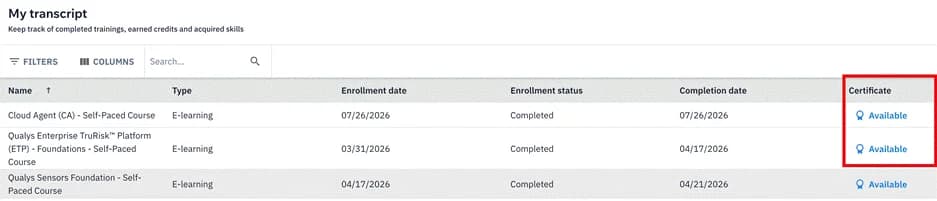
You can find your transcript by logging in to Qualys Academy at academy.qualys.com and then clicking on the View Transcript button on the Home page.
How do I download my diplomas/certificates?
To download your certificates:
1. Log in to Qualys Academy.
2. Select the View Transcript button.
Once on the Training Transcript page, any course or exam for which you have obtained a certificate will have a small certificate icon to the left of its name.
3. Click on that icon, and a new window will appear with Export to PDF and download options.
How do I enroll in self-paced or upcoming instructor-led training?
To register for training:
- Log in to Qualys Academy.
- If you don’t already have an account, create one with your work email address.
- Select the Qualys Catalog button.
- Click on the training you’d like to take.
What if I was in the middle of a self-paced training before the upgrade?
You will need to restart that training. All completed training will be in your transcript.
If I’ve started training after the upgrade, where do I go to resume my training?
1. Log in to Qualys Academy.
2. Select the Resume Training button.
Once on the My Training page, you will see several widgets that show Certifications (from passing exams), In-progress Training, Not Started Training, and Completed Training.
Does this impact my data on the Qualys Platform?
This upgrade to the learning system does not impact your Qualys Platform (vulnerability, compliance, risk, etc.) data. This is only an upgrade to the learning system and training data.
Who do I contact if I have additional questions?
If you have any remaining questions, please reach out to training@qualys.com.