Strategy
AI is welcome on TikTok, as long as you label it. Here’s what needs a label, what doesn’t, and how to add one before TikTok does it for you.
TikTok has labeled over 1 billion videos as AI-generated, which tells you two things: people are using a lot of AI, and TikTok is definitely paying attention.
Here’s how to make sure your content is labeled the right way, from organic posts to paid ads.
Key takeaways
- TikTok lets you use AI, but realistic-looking content needs a label. This covers videos, images, and audio.
- You can use AI for basic editing without disclosing it. Think color correction, cropping, or other small touch-ups.
- Skipping a label can cost you. TikTok may add a label for you, restrict your reach, or remove the post altogether.
- Put AI disclosures on autopilot with Perch. Send your content through custom approval workflows, so every post gets a second look before it hits the feed.
Quick note: This guide is for general information, not legal advice. For paid or branded content, loop in your legal team and review the latest TikTok policies and FTC guidance.
What is TikTok’s AI disclosure policy?
TikTok lets you use AI, but requires creators to add a label when it’s used to create or significantly edit realistic-looking people or scenes.
According to TikTok’s Community Guidelines, the policy covers two types of content:
- AI-generated content (AIGC): Any image, video, or audio made or altered by AI that depicts realistic-looking people or scenes.
- Significantly edited content: Media that’s been edited (with or without AI) to show someone saying or doing something they didn’t, or to make them unrecognizable.
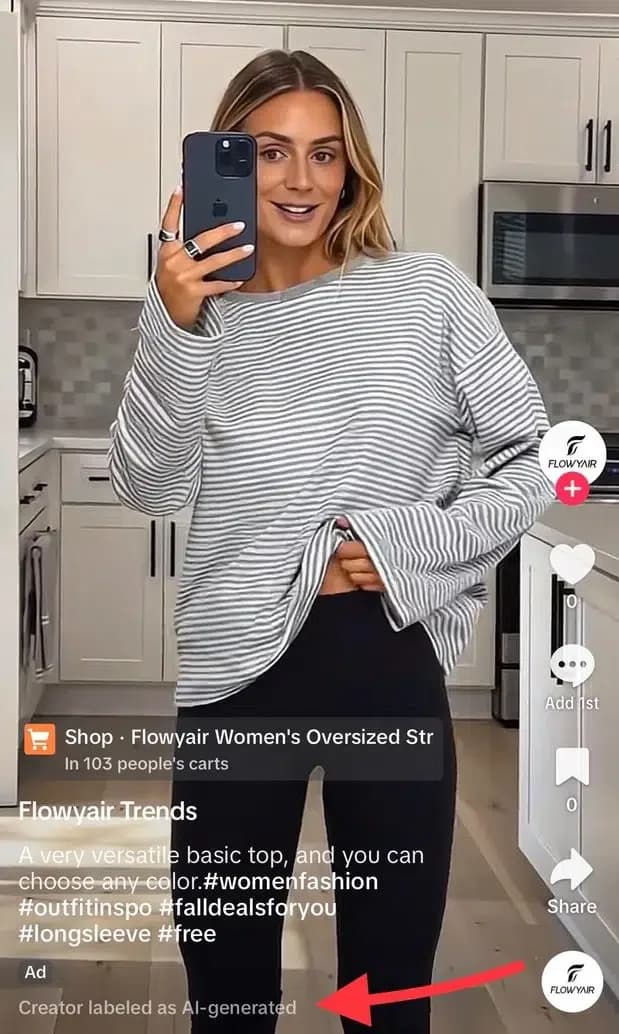
When you add a label to your TikTok video, a tag appears below your caption with text like “Creator labeled as AI-generated.” Forgetting to add an AI label may result in your post being removed or restricted by TikTok.
Some content is off-limits, label or not. For example, TikTok bans AI content that could seriously mislead people about public issues or harm a real person.
Meet the Suite
Understand what matters, decide what to do next, and take action across every social workflow — all from one connected suite.
Creator toggle vs. auto labels vs. ad disclosure
TikTok uses three types of AI labels. Here’s how each one works:
- Creator toggle: This is a label you add yourself. Add it when your post was completely generated or significantly edited by AI.
- Auto label: TikTok may add a label to your video automatically. It happens when you use TikTok AI effects, or when content from other tools carries Content Credentials (a type of metadata that shows how a file was made).
- Ad disclosure: Advertisers have their own AI label. If you’re running an ad made or heavily edited with AI, you need to turn on the “This ad contains AI-generated content” tag in TikTok Ads Manager.
Here’s how the three compare:
What content do you need to label as AI on TikTok?
On TikTok, you need to label content that uses AI to show realistic-looking people or scenes. The key word is realistic. If your AI-generated content could pass for something real, there’s a good chance it needs a label.
Small edits or touch-ups are a different story. Color-correcting or cropping a video, for example, are fine without disclosure. The same goes for everyday filters, like ones that add makeup.
Content that needs a label vs. content that does not
Here’s where TikTok draws the line between content that needs an AI label and content that doesn’t:
Why does TikTok’s AI disclosure policy matter for brands?
TikTok’s AI disclosure rules help brands stay transparent with their audience and avoid unnecessary headaches, from restricted posts to public backlash.
Here’s why it’s worth getting right:
It protects audience trust
If people feel like your brand is trying to sneak AI past them, trust can take a hit. This is especially risky if you’re using AI “to make something look like a real customer or product experience,” says Brittany Garcia, Social Media & Content Strategist at Social By Brittany.
“As synthetic content gets harder to spot, disclosure gives people the context to decide what they trust,” she adds. A label gives them that context from the start, so nobody has to find out from an angry comment section.
It reduces the risk of content restrictions
A missing AI label can get your post restricted or removed. And if it’s an ad, TikTok can reject it or restrict it before it ever reaches your audience. That’s a lot of work (and potentially budget) down the drain.
It keeps influencer partnerships transparent
Your brand might have strict rules around AI, but the influencers you work with may not. One creator might use AI just for brainstorming, while another is perfectly comfortable generating visuals or voiceovers.
That’s fine, until an unlabeled AI video goes live with your brand’s name attached. Talking through your AI expectations keeps everyone on the same page, and your sponsored posts honest.
It protects your brand reputation
Nobody wants a TikTok post to turn into a PR crisis because people felt tricked. The post itself might come down in a day, but the criticism tends to stick around much longer. And cleaning everything up takes far more effort than adding a label in the first place.
How do you label AI-generated content on TikTok?
To label AI-generated content on TikTok, turn on the AI-generated content setting before publishing an organic post, or apply an AI disclosure when creating a paid ad in TikTok Ads Manager.
Here’s how to do both:
1. Organic content: Use the AI-generated content toggle
For regular TikTok posts, you can add an AI label by following these steps in the TikTok app:
- Create or upload your video and tap Next
- Tap More options
- Toggle on the AI-generated content option
- Publish your post
You can also disclose AI with a clear caption, sticker, or watermark. The toggle is just the quickest option.
2. Ads: Apply the required disclosure in the ad flow
You can add an AI disclosure directly in TikTok Ads Manager. Here’s how:
- Open TikTok Ads Manager and create a campaign or go to an existing one
- Navigate to the Ad creation section
- Turn on the toggle that says This ad contains AI-generated content
- Finish setting up your ad and click Submit
Once you submit, you can’t turn the toggle off unless you swap out the video or image. And if you duplicate a campaign, the toggle resets, even if you reuse an ad that was labeled before.
Keep in mind: Spark Ads follow TikTok’s organic content disclosure process, so make sure the original post is properly labeled.
What happens if you don’t disclose AI content on TikTok?
If you don’t disclose AI content on TikTok, the platform may add a label for you, restrict its reach, or remove it altogether. It depends on how much harm the content could cause.
Here’s how that might play out:
- TikTok adds a label for you: TikTok can identify some AI-generated content and add its own label. Once it’s there, you can’t remove it.
- Fewer people see your post: TikTok may limit your post’s reach, which means it won’t show up in as many feeds. Your post is still live, but it has a much harder time reaching anyone.
- Your post gets removed: If TikTok thinks your post could cause harm, it may remove it altogether.
- Your ad gets rejected: TikTok can reject or restrict ads with unlabeled AI content, putting your paid campaign on hold.
The good news is that adding an AI label doesn’t hurt your reach by itself. So if AI played a major role in creating or editing your post, adding the label is the easy call.
How can your team build an AI disclosure process?
Building an AI disclosure process means setting clear rules for AI use, keeping track of AI-generated content, and making disclosure checks part of your publishing workflow.
Here’s how to set it up, step by step:
- Check the disclosure rules for each platform
- Set expectations around AI in your creator briefs
- Flag AI use during handoffs
- Add a disclosure check to your approval flow
1. Check the disclosure rules for each platform
Every platform has its own rules around AI-generated content. What needs a label on TikTok might not need one on Instagram, and vice versa.
That gets messy when you’re posting the same creative across multiple platforms. Just ask Samsung. In early 2026, the brand added AI labels on YouTube but not on TikTok, even when the posts themselves were the same, the Verge reported. And yes, people noticed.
So before you hit “publish,” make sure you’ve met the disclosure requirements for each platform.
Start growing your following on TikTok right now — for free
Try Hootsuite free for 14 days and see how it can help you skyrocket followers, reach, and engagement on TikTok.
2. Set expectations around AI in your creator briefs
If you’re working with influencers or creators, set your expectations around AI before they start creating content.
Your creator brief is the place to get everyone on the same page. Spell out when it’s okay to use AI, what needs your approval, and when they need to disclose it.
Pro tip 💡: Don’t forget about sponsorship disclosure. An AI label isn’t a substitute for telling your audience when a creator has a paid relationship with your brand. See the FTC’s Endorsement Guides and Disclosures 101 for Social Media Influencers for more guidance.
3. Flag AI use during handoffs
A post can pass through several hands before it reaches your social calendar. By then, the person scheduling it might have no idea which parts were made with AI.
Make sure any designers, editors, or creators flag AI-generated elements when they hand off content. A simple note in your project brief can save a lot of back-and-forth later.
4. Add a disclosure check to your approval flow
Before anything goes live, have a designated team member confirm whether the content needs an AI label, and whether the right disclosure is in place.
Even better, build that check into your existing approval process. That way, disclosure becomes part of the routine.
Perch makes this step easy. With its custom approval flows, posts are automatically routed to the right person. Add an AI disclosure check to that review, and every post gets a second look before it hits your feed.
How does Hootsuite help teams stay compliant on TikTok?
Hootsuite helps brands manage TikTok AI disclosures through content approvals, publishing controls, and social listening. Perch helps teams review AI disclosures before publishing, Vigil manages publishing permissions and governance, and Lumen tracks audience sentiment around published content.
Build disclosure checks into approval workflows with Perch
The best time to catch a missing AI label is before the post goes live.
With , you can build AI disclosure checks right into your content reviews. Set up custom approval flows, route posts to the right reviewers, and make sure someone checks whether your content needs a label before it gets published.
That way, AI disclosure becomes part of your team’s routine, not an afterthought.
Keep governed workflows with Vigil
When multiple people manage your social accounts, it matters who (and what) has the power to hit publish.
Vigil is the governance layer within Hootsuite Social OS. It gives teams control over permissions and approvals across every account, so AI tools and team members only have the access they actually need.
Monitor sentiment with Lumen
Even if you’ve checked the disclosure box, it’s worth knowing how people respond to your content.
tracks brand mentions, sentiment, and conversations across 150+ million sources and 30+ social platforms. Use it to see how people are reacting to your AI-generated campaigns, and catch any dips in sentiment early. That gives your team time to respond while it still matters.
FAQ: TikTok AI disclosure policy
What is TikTok’s AI disclosure policy?
TikTok requires creators to label content that’s generated or significantly edited with artificial intelligence when it shows realistic-looking people or scenes. The policy also covers edited media that makes it seem like someone said or did something they didn’t, such as deepfakes. Under the Integrity and Authenticity section of its Community Guidelines, creators can disclose AI use with TikTok’s AI-generated content label, or with a clear caption, watermark, or sticker. Some content isn’t allowed even with a label, like manipulated media that misleads people about public issues or harms a real person.
Why should creators label AI-generated content on TikTok?
Creators should label AI-generated content on TikTok to avoid penalties like reduced visibility or content removal. Labels help viewers tell what’s real and what’s AI-generated, reducing the risk of confusion or misinformation. And for brands, being upfront about AI use is a lot easier than dealing with backlash after the fact.
Does using an AI label affect your TikTok views or reach?
No, TikTok says adding an AI-generated content label will not affect its distribution. That said, TikTok is also testing a setting that lets viewers see less AI content in their feeds, so labeled synthetic content may reach fewer people who choose to dial it down.
Can you remove an AI-generated label on TikTok?
No, TikTok says you can’t remove an AI label once the platform has applied it automatically. For labels added manually by creators, TikTok’s published guidance is less clear, so double-check your disclosure settings before you post.
Does TikTok automatically detect and label AI-generated content?
Yes, in some cases. TikTok uses automated detection to label content made with its own AI effects, plus content from other tools that carries Content Credentials, a type of metadata that shows how a file was made.
Do I need to label AI-generated scripts or captions?
No. TikTok’s policy covers images, video, and audio, so using AI to write a script or caption doesn’t require a label on its own. That changes if the script is read by an AI voice that sounds like a real person, or performed by an avatar with a synthetic face.
How does Hootsuite help teams stay compliant on TikTok?
Hootsuite helps teams make AI disclosure part of their everyday workflow. Perch lets you build AI disclosure checks into content approvals before posts are scheduled. Vigil gives teams control over permissions and approvals across every account. And Lumen tracks sentiment and brand mentions, so you can see how people react to your content.
Put AI disclosures on autopilot with Hootsuite. Use Perch to build label checks into your approval workflows, Vigil to control who (and what) can publish, and Lumen to see how people respond to your campaigns. Try Hootsuite free today.
The #1 social media tool
Create. Schedule. Publish. Engage. Measure. Win.
Erin Rodrigue is a writer and content strategist who knows her way around a sentence and a strategy. A former associate marketing manager at HubSpot, she covers AI, social media, and SEO to help marketers stay ahead of what’s next.
The #1 social media tool
Create. Schedule. Publish. Engage. Measure. Win.