Strategy
Facebook analytics tools help you track paid and organic results in one place. Compare 9 options for 2026, plus key metrics.
- Also available in
- Español
- Deutsch
- Français
Key takeaways
- Facebook analytics tools track organic and paid performance across metrics like reach, engagement rate, conversions, and audience demographics, giving you a clearer picture than Meta’s native reporting alone.
- The strongest tools combine cross-platform reporting, competitive benchmarking, and AI-powered recommendations so you can act on data instead of just collecting it.
- When choosing a Facebook analytics tool, prioritize customizable reports, audience insights, and integrations with the rest of your marketing stack.
- Reviewing your Facebook analytics on a regular cadence helps you prove ROI, sharpen your content strategy, and make smarter budget decisions.
What are Facebook analytics?
Facebook analytics are the performance data behind your Page, posts, and ads, covering how far your content travels, who sees it, and what they do next. The platform is used by 71% of U.S. adults. Think of analytics as the record of every interaction your brand earns on the platform, organized so you can spot patterns.
Most Facebook page analytics fall into a handful of categories:
- Reach and impressions: How many people saw your content, and how many times it appeared.
- Engagement: Reactions, comments, shares, saves, and clicks, usually summarized as an engagement rate.
- Audience demographics: Age, gender, location, and language breakdowns for your followers.
- Ad performance: Spend, cost per result, ROAS, and placement data from your paid campaigns. These metrics matter more as Meta’s average price per ad rose 9% in 2025.
- Conversions: Link clicks, leads, purchases, and other actions tied back to your Facebook activity.
One note on naming: Facebook retired its standalone Facebook Analytics product in 2021 and folded reporting into Meta Business Suite. So when people say “Facebook Insights” today, they usually mean the Insights tab inside Business Suite.
Bonus!!!
Get a free social media report template to easily and effectively present your social media performance to key stakeholders.
Why do you need a third-party Facebook analytics tool?
You need a third-party tool when your reporting questions outgrow what Meta’s free dashboard can answer. Meta Business Suite is a reasonable starting point for checking post engagement and basic demographics, but it was built to report on Meta properties, not to support a full social program.
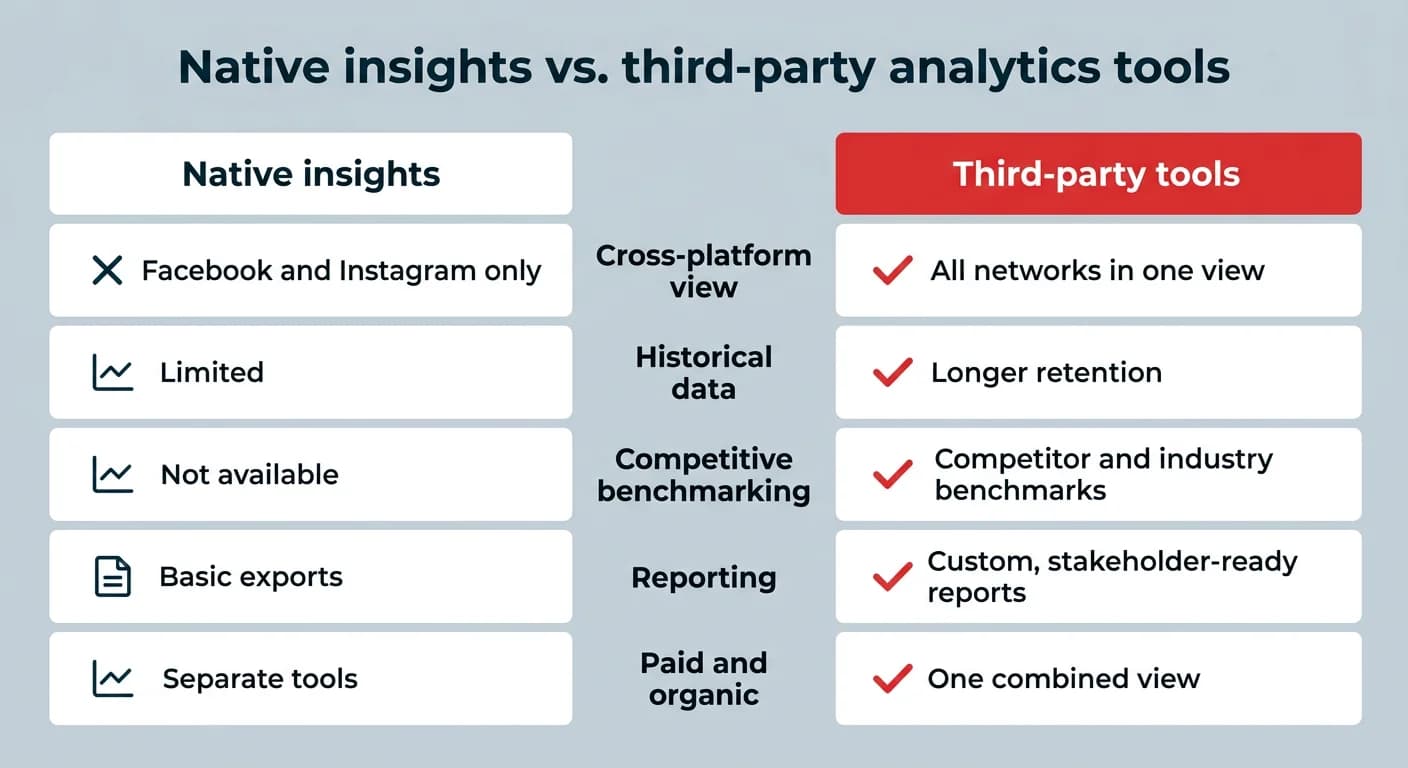
Here’s where native Facebook insights typically run out of road:
- No cross-platform view: You can see Facebook and Instagram, but not TikTok, LinkedIn, X, YouTube, or Pinterest alongside them.
- Limited historical data: Meta caps how far back you can look, which makes year-over-year comparisons difficult.
- No competitive benchmarking: You can’t tell whether a 3% engagement rate is strong or weak without competitive benchmarks.
- Rigid reporting: Exports are basic, and building a stakeholder-ready report usually means rebuilding it in a spreadsheet.
- Paid and organic live in different places: Ads Manager and Business Suite rarely tell one coherent story.
Third-party tools solve for those gaps with a single facebook analytics dashboard, customizable reports, benchmarks, and in many cases social listening. If you only manage one Page and report to no one, native tools may be enough. If you manage multiple accounts or report upward, they probably aren’t.
How do Facebook analytics tools compare?
Facebook analytics tools differ most in analytics depth, price, and best use case. Here’s a quick breakdown of the top tools and what each one does best. Use it to shortlist two or three, then dig into the full write-ups below.
Tool
Best for
Analytics depth
Key strengths
Price
Perch by Hootsuite
Cross-platform reporting and enterprise teams
Advanced
Cross-platform reporting, benchmarking, and scheduling
Meta Business Suite
A free starting point
Basic
Free, direct Ads Manager integration
Free
Buffer
Small teams and simple tracking
Basic
Clean dashboard, simple Facebook performance tracking
$5–$10 per channel/month (billed annually)
Rival IQ
Competitive intelligence
Advanced
Competitor tracking + benchmarking
$239/month
Social Status
Ad analytics and influencer tracking
Advanced
Ad analytics + influencer tracking
$29/month
Facelift Data Studio
Advanced metric customization
Advanced
~350 metrics + API access
From €300/month
Social Insider
Benchmarking and content pillars
Advanced
Industry benchmarks + AI content analysis
Sotrender
Sentiment and campaign tracking
Advanced
Sentiment tracking + proprietary indexes
Custom pricing
NapoleonCat
Social inbox and publishing combo
Intermediate
Publishing, analytics, and inbox in one
$79/month
What are the best Facebook analytics tools for 2026?
The best Facebook analytics tools for 2026 range from full social media management platforms to specialized analytics options. The 9 tools below are ordered roughly by analytics depth and breadth of use case. Each entry includes what it’s best for, its standout features, and current pricing.
1. Perch by Hootsuite: Best for cross-platform reporting and enterprise teams
Perch by Hootsuite helps marketers schedule Facebook content, monitor post performance, and analyze results alongside every other major social network.
With customizable reports, intuitive benchmarking tools, and audience analysis features, Perch makes it easy to share Facebook insights with your team and create stakeholder-ready reports.
Because Perch connects to all of your social accounts, including Instagram, X, TikTok, Pinterest, LinkedIn, and YouTube, you can see all of your social analytics in one place and catch overarching social trends impacting your brand and accounts.
Teams on Hootsuite Social OS can also pair Facebook reporting with Lumen, the integrated insights and listening app, to add brand and conversation context to the numbers. If you’re weighing platforms, our side-by-side platform comparison breaks down how the options stack up.
Key features:
- General analytics: Track key metrics like reach, engagement rate, impressions, likes, shares, plays, clicks, saves, comments, video views, follower growth, total followers, profile visits, reactions, negative feedback rate, website clicks, and more.
- Reporting: Set up custom boards that give you valuable insights into your most important Facebook metrics. You can also look up much more granular information, including real-time page performance and individual Facebook post performance. Quick-start your reporting using our handy templates.
- Recommendations: Get personalized recommendations for the best times to post Facebook content based on goals such as engagement, brand awareness, and more.
- Industry and competitive benchmarks: See how your performance stacks up against industry standards and even competitors.
Price: Pricing starts at $99/user/month for the Standard plan, with Advanced at $249/user/month and custom Enterprise pricing available. Try it free today.
⭐ ⭐ ⭐ ⭐ ⭐ Great for beginner to intermediate social media managers, an example when Hootsuite is perfect is when you are still learning campaign management targets, the analytics are really great.
⭐ ⭐ ⭐ ⭐ ⭐ Great for beginner to intermediate social media managers, an example when Hootsuite is perfect is when you are still learning campaign management targets, the analytics are really great.
Ready to grow your business on Facebook?
2. Meta Business Suite: best free starting point
Facebook shut down its in-platform Facebook Analytics tool in 2021, replacing it with Meta Business Suite.
Meta Business Suite is a free tool for managing content, ads, messages, and analytics across Facebook and Instagram. It also includes a basic tool for reviewing post engagement and Facebook Page analytics.
While its analytics aren’t as advanced as some third-party tools, it’s a solid option for getting a clear, high-level view of how your content is performing. Just keep the limitations above in mind if you need benchmarking or cross-platform reporting.
Key features:
- Review how individual posts are performing.
- Track key trends to see patterns for success.
- Get a snapshot of your audience, including basic demographic data.
Price: Free
3. Buffer: best for small teams and simple tracking
Buffer is a social media management tool that comes with analytics for Facebook. It also connects with Instagram, X, TikTok, LinkedIn, YouTube, and Mastodon.
Buffer is relatively light on analytics features. It doesn’t offer full metrics for every platform, and it doesn’t include social listening, paid content tracking, or competitive benchmarking.
That said, Buffer’s clean, user-friendly dashboard makes it a great choice for social media managers who want a straightforward, no-fuss tool to track Facebook performance.
Key benefits:
- Basic Facebook performance tracking
- Clean, user-friendly dashboard
Price: Buffer’s basic plan is free. More advanced plans range from $5 to $10 per channel/month, billed annually.
4. Rival IQ: best for competitive intelligence
Rival IQ is a social media analytics tool that focuses on competitive analysis.
Along with basic Facebook analytics (including engagement metrics and demographics), you can use the Rival IQ dashboard to analyze your top competitors.
Key features:
- View key metrics at a glance, including likes, comments, posts, reactions, and demographic data
- Access analytics reports on competitors to see how your performance compares
- Track Facebook campaign performance, placements, and audience demographics to better understand your paid strategy
- Directly compare your Facebook Page with competitors to see performance patterns and key trends
Price: Plans start from $239 per month.
5. Social Status: best for ad analytics and influencer tracking
Social Status is a social media analytics platform that helps you track performance, measure growth, and analyze both organic and paid content on Facebook and beyond.
It also includes tools to analyze ads, benchmark competitors, and evaluate influencer campaigns, making it a well-rounded option for performance tracking.
Key features:
- Compare your Facebook performance alongside your other social accounts
- Analyze both ad performance and organic content in one place
- Review how your performance compares against top competitors
Price: A free plan is available (no reporting tools). The Basic plan starts at $29/month.
6. Facelift Data Studio: best for advanced metric customization
Facelift Data Studio (formerly Quintly) is an advanced social media analytics platform that provides access to around 350 performance metrics.
Choose between layered or more extensive Facebook insights. You can also benchmark your performance against competitors or even brands you admire, making it a powerful option for data-driven teams.
Key features:
- Build and automate reports that include the data you care about most
- Choose from around 350 metrics to show your key data points
- Get full data flexibility with Facelift Data Studio’s API integration
Pricing: From €300 a month
7. Social Insider: best for benchmarking and content pillars
Social Insider is a social media analytics and benchmarking platform. It helps you spot what your competitors are doing well and how to use those insights to improve your own strategy.
With built-in industry benchmarks, you can also see how your social performance stacks up.
Key features:
- Track campaign performance and monitor key social KPIs
- See what’s working for competitors with AI-powered content pillars
- Chat with SocialInsider AI to get specific benchmarks, insights, or reports on demand
- Export full reports, raw data, or platform-ready files for deeper analysis
Price: Custom pricing. Request a quote on Social Insider’s website.
8. Sotrender: best for sentiment and campaign tracking
Sotrender is a social media analytics and reporting tool that gives you a clear view of your Facebook performance, campaigns, and competitors.
It covers everything from reach and engagement to audience demographics and customer service metrics. It also tracks the sentiment of your organic and paid campaigns.
Key features:
- Generate AI-enhanced reports quickly, with actionable insights that highlight what matters most
- Compare your results side by side with competitors, including both organic and paid performance
- Sotrender’s proprietary “industry indexes and scores” help measure brand equity and performance
Price: Custom pricing. Request a quote on Sotrender’s website.
9. NapoleonCat: best for social inbox and publishing combo
NapoleonCat is a social media management tool that combines publishing, analytics, and a social inbox in one platform. It collects performance data from Facebook, Instagram, LinkedIn, and YouTube.
Key features:
- Understand performance quickly with clear, easy-to-read graphs
- Build custom reports that center around your goals, then share them with your team
Price: Plans start at $79/month for two users and five profiles.
What to look for in a Facebook analytics tool
The best Facebook analytics tool for your team is the one that answers the questions your stakeholders actually ask. That usually comes down to six criteria.
- Cross-platform coverage: If Facebook is one channel among six, a Facebook-only tool creates more reporting work, not less. Look for cross-platform reporting that pulls every network into one view.
- Reporting flexibility: Can you build a board for your CMO and a different one for your content team? Check for templates, custom date ranges, scheduled exports, and white-label options.
- Competitive benchmarking: Raw numbers mean little without context. Competitive benchmarking and industry averages tell you whether a result is good or just familiar.
- Paid and organic together: If you run ads on a platform forecast to generate $243 billion in ad revenue in 2026, make sure the tool reads ad performance alongside organic so you can see total channel impact.
- Integrations: Connections to your CRM, web analytics, link tracking, or data warehouse determine how close you can get to real ROI tracking.
- Pricing and scale: Per-seat costs, account limits, and user permissions matter more as your team grows. Confirm the plan you buy today still works at twice the volume.
What Facebook metrics should you track?
The Facebook metrics worth tracking depend on what each piece of content is meant to do. A brand awareness campaign and a lead gen campaign should never be judged by the same number, so it helps to group metrics by goal.
Goal
Metrics to track
What it tells you
Awareness
Reach, impressions, follower growth, video views
How many people you’re reaching and whether your audience is expanding
Engagement
Engagement rate, reactions, comments, shares, saves
Whether your content resonates enough to prompt action
Conversion
Link clicks, click-through rate, leads, purchases, cost per result
Whether Facebook activity drives business outcomes
Audience
Age, gender, location, language, active times
Who you’re actually reaching, and when they’re online
Health
Negative feedback rate, response time, sentiment
Whether your content or service is creating friction
How to use Facebook analytics to improve results
Using Facebook analytics well comes down to a repeatable loop: set the goal, review on a schedule, find the pattern, test, and adjust. Here’s what that looks like in practice.
- Define the goal before you open the dashboard. Decide what success looks like for the period, whether that’s follower growth, engagement rate, or cost per lead. Without that, every number looks equally interesting.
- Set your review cadence. Weekly for content performance, monthly for strategy, quarterly for budget and benchmarking. A consistent rhythm beats occasional deep dives.
- Look for patterns, not one-off wins. Sort your top posts by your primary metric and note what they share: format, topic, length, posting time, call to action. Three similar winners is a signal worth folding into your content strategy. One is luck.
- Use benchmarks for context. Compare results to your own historical average and to industry norms before you declare a win or a problem.
- Turn findings into one or two changes. Shift your content optimization efforts toward what’s working, adjust your posting schedule using best time to post data, and reallocate spend to the ad sets earning results. Then measure again next cycle.
FAQ: Facebook analytics tools
What are the best Facebook analytics tools for businesses?
The best Facebook analytics tools for businesses include Perch by Hootsuite, Rival IQ, Social Status, and Social Insider. Perch is the strongest all-rounder thanks to its cross-platform reporting, report templates, benchmarking, and best-time-to-post recommendations, which help teams analyze Facebook data and make content decisions in one place.
How do Facebook analytics tools help measure performance and ROI?
Facebook analytics tools measure performance and ROI by tracking metrics like reach, engagement rate, conversions, and ad spend, then tying those results back to your goals. The better tools also connect to your CRM or web analytics so you can follow a click through to a lead or sale.
What features should brands look for in Facebook analytics platforms?
Brands should look for customizable reporting, audience insights, competitive benchmarking, paid and organic tracking in one view, integrations with their existing stack, and pricing that scales.
How do Facebook analytics tools compare to native Facebook Insights?
Facebook analytics tools compare favorably to native Facebook Insights in depth and flexibility. Insights inside Meta Business Suite covers basic Page and post performance for free, while third-party tools add longer data retention, cross-platform tracking, competitive benchmarking, and stakeholder-ready reports.
How do enterprises use Facebook analytics tools to optimize campaigns and reporting?
Enterprises use Facebook analytics tools to track performance at scale, compare results across markets and business units, and standardize reporting. They rely on granular Facebook data, permissions and governance controls, and automated reports to optimize targeting, creative, and budget allocation.
How can I view my Facebook page analytics?
You can view your Facebook page analytics in Meta Business Suite by opening the Insights section for your Page. From there you can review reach, engagement, content performance, and audience demographics, or connect the Page to a third-party tool for deeper reporting.
What’s the difference between Facebook Insights and third-party analytics?
The difference between Facebook Insights and third-party analytics is scope. Insights, now part of Meta Business Suite, provides basic platform-native performance data for Facebook and Instagram, while third-party analytics tools offer deeper reporting, longer historical data, cross-platform tracking, and competitive benchmarking.
What is the best free Facebook analytics tool?
The best free Facebook analytics tool is Meta Business Suite, which includes post-level performance data, audience demographics, and content insights at no cost. Several third-party tools, including Social Status, also offer limited free tiers if you want to test their dashboards.
Did Facebook shut down its analytics platform?
Yes, Facebook shut down its standalone Facebook Analytics product in 2021 and moved reporting into Meta Business Suite. Page and post data now lives in the Insights section of Business Suite, while campaign data sits in Ads Manager.
What metrics should I track on Facebook?
The metrics you should track on Facebook depend on your goals, but most teams monitor reach, engagement rate, click-through rate, video views, follower growth, and conversions. Group them by objective, pick two or three primary metrics per goal, and treat the rest as diagnostics.
Save time managing your social media marketing strategy with Hootsuite. Publish and schedule posts, find relevant conversions, measure results, and more â all from one dashboard. Try it free today.
The #1 social media tool
Create. Schedule. Publish. Engage. Measure. Win.
By Stacey McLachlan
Stacey McLachlan is an award-winning writer and editor from Vancouver with more than a decade of experience working for print and digital publications. She is editor-at-large for Western Living and Vancouver Magazine, author of the National Magazine Award-nominated 'City Informer' column, and a regular contributor to Dwell. Her previous work covers a wide range of topics, from SEO-focused thought-leadership to profiles of mushroom foragers, but her specialties include design, people, social media strategy, and humor. You can usually find her at the beach, or cleaning sand out of her bag.
The #1 social media tool
Create. Schedule. Publish. Engage. Measure. Win.