Strategy
Tag your links with UTM parameters to see which social posts, ads, and emails drive traffic. Get examples, tips, and GA4 reporting.
- Also available in
- Deutsch
Key takeaways
- UTM parameters are short text codes added to URLs that tell analytics tools exactly where your traffic came from, which campaign drove it, and what content was clicked.
- You can create UTM links inside Hootsuite Social OS or with Google’s free Campaign URL Builder, then track results in GA4 or Hootsuite Analytics.
- Consistent naming conventions include lowercase naming and a shared tracking log to prevent the fragmented data that makes UTM tracking useless.
What are UTM parameters?
UTM parameters are short text codes added to the end of a URL that help analytics tools track where website traffic comes from and how visitors find you.
The acronym stands for Urchin Tracking Module (Google’s own documentation also refers to it as Urchin Traffic Monitor), named after Urchin, a web analytics platform Google acquired in April 2005 and relaunched as Google Analytics. Today, UTM codes work with tools like Google Analytics 4, Hootsuite, and other analytics platforms.
Adding UTM codes to a link doesn’t change the landing page. Visitors still end up exactly where the link points. The extra text simply tags the click with details you can track later, like the source, medium, and campaign name.
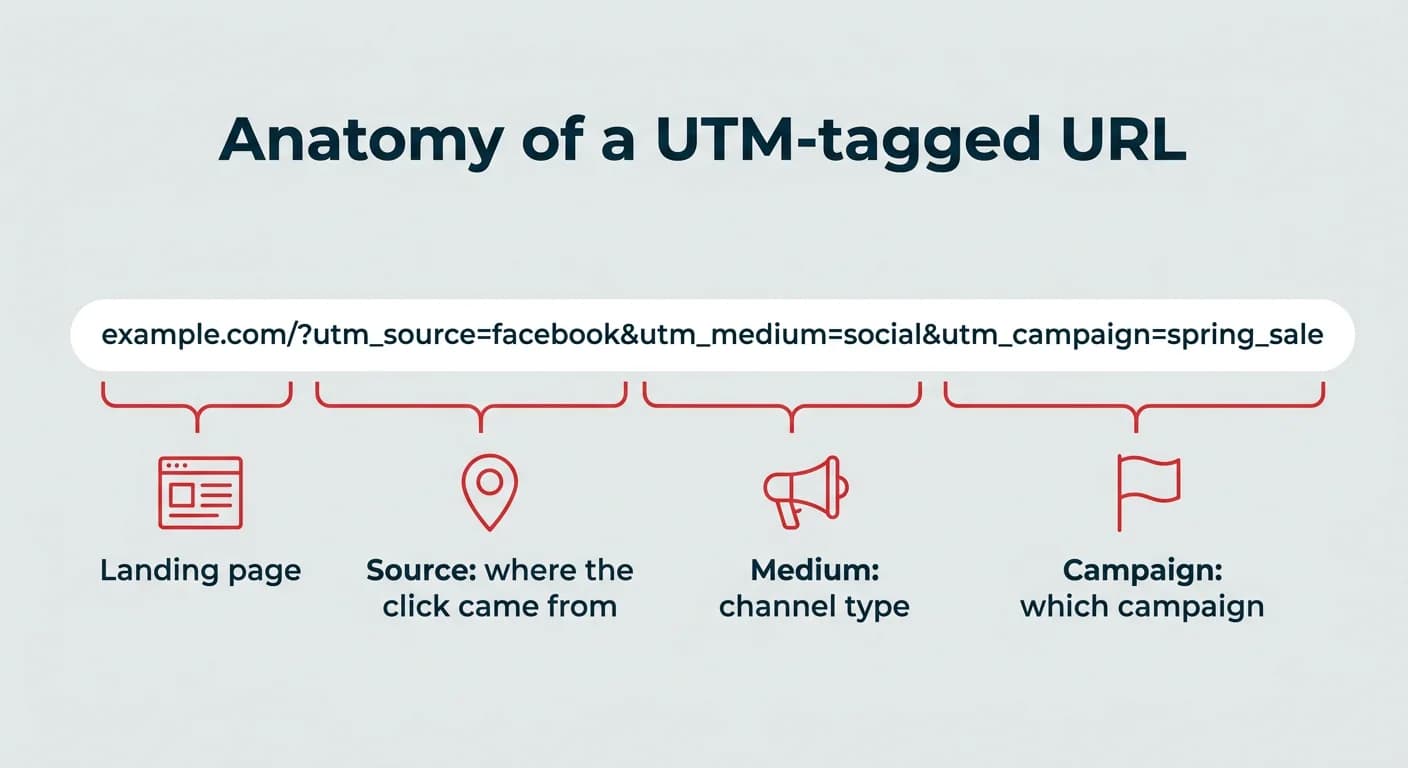
Here’s an example of an URL with UTM parameters:
www.example.com/?utm_source=facebook&utm_medium=social&utm_campaign=spring_sale
In this link:
- utm_source=facebook: This tells you the traffic came from Facebook
- utm_medium=social: This identifies the channel type (social media)
- utm_campaign=spring_sale: This ties it to a specific marketing campaign (spring sale)
Bonus: Download a free guide and checklist to help you convince your boss to invest more in social media. Includes experts tips for proving ROI.
Where to use UTM links
You can add UTM parameters to almost any link you share, but they’re especially useful for:
- Social media posts (organic and paid)
- Email marketing campaigns and newsletters
- Influencer or partner campaigns
- Digital ads (Google Ads, display, retargeting, etc.)
- QR codes on print materials
- Affiliate or referral programs
- Local listings. Apple Business Connect supports UTM parameters on action links, so you can see how many Apple Maps clicks reach your site and convert.
- LinkedIn ad campaigns. LinkedIn’s dynamic UTM parameters let you set tracking once per campaign, then automatically pass through the account, campaign, and creative name.
With 84% of U.S. adults on YouTube and 50% on Instagram, UTM parameters are especially useful for these channels because they help separate traffic that might otherwise get lumped together in analytics.
Without them, clicks from a Facebook ad and an Instagram Story could look the same, or a newsletter link and a partner referral could be indistinguishable.
By tagging each link with the where, you get a clear picture of which platforms, specific campaigns, and content types are actually driving results.
UTM parameters vs. GTM: What’s the difference?
UTM and GTM solve different problems. UTM (Urchin Tracking Module) is a URL tagging system that tells analytics tools where a click came from, while GTM (Google Tag Manager) is a tag management system that deploys and manages tracking code on your website.
Put simply: UTMs live in your links, GTM lives on your site. Most teams use both. UTMs label the traffic coming in, and GTM makes sure the tracking scripts that record what happens next are firing correctly.
UTM parameters
GTM (Google Tag Manager)
Purpose
Label a link so analytics knows its origin
Deploy and manage tracking tags without editing site code
What it tracks
Traffic source, medium, campaign, creative
On-site events like clicks, form fills, scrolls, purchases
Where it lives
In the URL you share
In a container snippet on your website
Example use case
Comparing clicks from an Instagram Story vs. a LinkedIn post
Firing a conversion tag when someone submits a demo request
If you only have time for one, start with UTMs. They require no developer help and they fix the most common attribution problem: not knowing where your traffic came from.
5 standard UTM parameters explained
There are five standard UTM parameters you can use when building tracking links.
Three are required for most analytics tools to make sense of the data. Two are optional but useful in the right situations.
Here’s a quick reference before we get into the detail:
Parameter
Required?
What it identifies
Example value
utm_source
Required
The specific platform, site, or partner that sent the click
utm_medium
Required
The channel category
social
utm_campaign
Required
The campaign the link belongs to
spring_sale
utm_term
Optional
Keyword or audience segment
small_business
utm_content
Optional
The exact creative or element clicked
video_ad
Here’s what each one means, plus tips for using them.
1. utm_source (required)
What it does: Identifies exactly where the traffic came from. This is the platform, site, or partner that sent someone to your link.
Why it’s important: Without a clear source, all your traffic can blur together in analytics. You won’t know if a spike came from Instagram, LinkedIn, a partner site, or your email newsletter.
Example:
- utm_source=instagram
- utm_source=linkedin
- utm_source=newsletter
Tips for utm_source parameters:
- Always be specific. Use “instagram” instead of “social” so you can compare one platform against another.
- For influencer or partner campaigns, use the partner’s name (e.g., utm_source=janedoe).
- Stick to lowercase and avoid spaces or special characters. This keeps your reports clean and consistent.
- If you run LinkedIn ads, dynamic UTM parameters can populate the source and campaign details for you, which cuts down on manual typos.
2. utm_medium (required)
What it does: Tells you the type of channel the traffic came from (the general category rather than the specific source).
Why it’s important: It helps you group traffic into broader buckets for comparison. For example, you can see all traffic from social media (organic and paid) or all traffic from email campaigns in one view.
Examples:
- utm_medium=social
- utm_medium=email
- utm_medium=cpc
- utm_medium=affiliate
Tips:
- Keep your list of mediums short and consistent. Example: “cpc” for paid search, “email” for newsletters, “social” for social media.
- Use the same medium for organic and paid posts if you want them grouped together, or separate them if you want to compare.
- Don’t mix up medium and source. Medium is the category; source is the exact origin.
3. utm_campaign (required)
What it does: Names the campaign the link belongs to so you can group all related links together.
Why it’s important: Campaign names make it easy to measure the total impact of a marketing effort across multiple platforms and formats. You can also compare campaigns side by side in your analytics.
Examples:
- utm_campaign=spring_sale
- utm_campaign=product_launch
- utm_campaign=black_friday_2026
Tips:
- Make names descriptive enough that you’ll recognize them months later.
- Use underscores or hyphens instead of spaces.
- Keep the same campaign name across all platforms for accurate reporting.
4. utm_term (optional)
What it does: Originally created to track paid search keywords. Now often used to track audience targeting, product categories, or other custom details.
Why it’s important: This parameter adds another layer of detail to your tracking. It’s especially helpful if you’re running ads to different audience segments or testing keyword targeting.
Examples:
- utm_term=running_shoes
- utm_term=small_business
- utm_term=enterprise_plan
Tips:
- For Google Ads, this can be filled in automatically.
- Use it for experiments, like tracking performance by audience interest or ad set.
- Keep labels short and clear. Long or cryptic terms make reporting harder.
5. utm_content (optional)
What it does: Identifies the exact element that was clicked.
Why it’s important: It’s ideal for A/B testing or comparing different creative formats that point to the same landing page. This could be different headlines, button colors, or ad formats.
Examples:
- utm_content=video_ad
- utm_content=text_cta
- utm_content=image_banner
- utm_content=blue_button
Tips:
- Use it to test small changes in creative and see what your audience responds to.
- Keep naming consistent across tests so you can track trends over time.
- Be descriptive but concise. Example: “video_ad” is more useful in reports than “vid1.”
Pro tip: Always use lowercase for all UTM parameters. UTMs are case-sensitive, so “Instagram” and “instagram” will show up as separate sources in your analytics, making your reports harder to read.
How to create UTM parameters step by step
You can create UTM tags by typing them onto the end of a link manually, but a dedicated campaign URL builder is faster and far less error-prone.
Here are the two methods most marketers use:
- Build and apply UTM presets inside Hootsuite Social OS when you schedule a post.
- Build a one-off tagged link with Google’s Campaign URL Builder, then shorten it before sharing.
Hootsuite Social OS
If you use Hootsuite Social OS to publish your social media posts, you can use the link builder to add UTMs to your URLs automatically. Even better, you can shorten them using Hootsuite’s built-in shortener (ow.ly) or your vanity URL.
When creating a post in the composer, add a link to the copy of your post. Then, select Add tracking.
From here, fill in your UTM parameters using the “presets” drop down menu.
If you don’t already have UTM parameter presets, select Manage link presets to create one. New to UTMs? Scroll up to the 5 standard UTM parameters section in this guide for a quick refresher before you start.
Presets are the real time-saver here. Once your team agrees on naming conventions, everyone applies the same tags from a shared list instead of typing them fresh each time.
Google Campaign URL Builder
Google’s free Campaign URL Builder is a quick way to create UTM-tagged links for any campaign. It’s especially handy if you’re sending links through channels outside Hootsuite, like partner emails or QR codes.
To begin, go to Google’s Campaign URL Builder.
Enter your website URL in the first field.
Fill in the required UTM fields:
- Campaign Source (utm_source): e.g., instagram
- Campaign Medium (utm_medium): e.g., social
- Campaign Name (utm_campaign): e.g., spring_sale
(Optional) Add:
- Campaign Term (utm_term): For keywords or audience segments
- Campaign Content (utm_content): For creative variations or A/B tests
Here’s how we did it for a Black Friday 2026 campaign on TikTok:
Next, copy the generated link at the bottom, and shorten it before posting to keep it user-friendly (you can also use Hootsuite’s Ow.ly for this). Then, add it to your next campaign and you’re ready to start tracking!
Pro tip: Whether you’re using Hootsuite or Google’s tool, always double-check your spelling and keep your UTM parameters lowercase. Small inconsistencies can split your data into multiple rows in your reports.
Now that your links are tagged, here’s what that extra layer of data unlocks. When you share a link on social media, you can see clicks in your analytics. But, without UTM tracking, you can’t always tell where those clicks came from or what inspired them.
UTM parameters connect the dots between the content you publish and the results you get, so you can make better decisions about what to post, where, and when.
Here’s what you can do with that extra layer of insight:
1. See exactly where your traffic comes from
Clicks alone don’t tell the full story. Let’s say you post the same link on Instagram Stories, LinkedIn, and in your email newsletter. Without UTMs, those visits might all appear in your analytics as “direct” traffic or get lumped into a general “social” bucket.
With UTMs, each link carries its own ID tag. You’ll know that 60% of clicks came from Stories, 25% from LinkedIn, and 15% from your newsletter. That level of detail means you can see exactly which marketing channel pulls people in and which ones might need more work.
2. Know which campaigns are working (and which aren’t)
UTMs can be used to track campaign performance, too. When you give all the links in a campaign the same utm_campaign name, you can measure how that campaign performs across every post, ad, and platform.
For example, you might be running a summer sale with posts on Instagram, Facebook, and TikTok. You can filter by that campaign name to see total clicks, conversions, and revenue in your analytics. If TikTok is outperforming the others, you can shift budget or creative energy there mid-campaign instead of waiting until it’s over.
3. Prove the ROI of your social efforts
Social media teams are often asked to “show results,” especially when global social ad spend is projected to hit $338 billion and it’s time to secure budget or resources. UTM tracking makes that possible.
When UTMs are connected to analytics tools like Google Analytics 4 or Hootsuite Analytics in Hootsuite Social OS, you can see not just clicks but what happens after the click, the kind of campaign-to-revenue proof that justifies budget.
- How many visitors signed up for a webinar?
- Downloaded a guide?
- Made a purchase?
This data connects your work directly to business outcomes through clearer marketing attribution, so you can make a stronger case for the value of your marketing efforts.
4. Improve your content with data
Guessing what will work is expensive. Testing is smarter. UTMs make it easy to run A/B tests on your social content.
You might create two versions of the same post, one with a bold headline, one with a softer, benefit-led approach. Give each link a slightly different utm_content value, and your analytics will tell you which one performed better.
Over time, these small tests reveal patterns in what your audience responds to, helping you fine-tune everything from your calls to action to your ad creative.
How to track and report on UTM performance
UTM parameters only help if you actually look at the data they collect. Once your tagged links are out in the world, you need to know where to find the results, how to keep them clean, and how to report on them in a way that’s easy for your team to use.
Use Google Analytics 4 (GA4)
Google Analytics 4 is one of the most common tools for tracking UTM performance. Once your links are tagged, here’s where to find the data in your GA4 property:
- In GA4, go to Reports > Acquisition > Traffic acquisition.
- Change the primary dimension to Session source/medium or Session campaign to see performance by UTM parameters.
- Use secondary dimensions to drill down further. For example, by Session content to compare creatives.
This is where you can see:
- Which sources are driving traffic the most
- Which campaigns lead to the most conversions
- Which creative variations perform best
If the standard reports don’t go deep enough, build a custom view in Explorations:
- Go to Explore and create a blank exploration.
- Add Session campaign, Session source, and Session manual ad content as dimensions.
- Add metrics like sessions, key events, and conversions, then save the exploration so you can reopen it each month.
- Apply a filter on Session campaign if you want a single-campaign view you can share with stakeholders.
One thing worth checking before you build reports: GA4 data retention is set to two months by default for user-level and event-level data. You can extend it to 14 months in Admin > Data Settings > Data Retention. If you plan to compare campaigns year over year, export the data or send it to a dashboard so you aren’t relying on GA4’s retention window.
Pro tip: Save your Exploration reports for recurring views of UTM data, so you don’t have to rebuild filters every time.
Track with Hootsuite
If you’re adding UTMs when you publish in Hootsuite Social OS, you can also track results inside Hootsuite Analytics.
- Go to Analytics and open the Post performance or Custom reports section.
- Filter by campaign to see clicks, traffic, and conversions tied to your UTM-tagged links.
- Compare results across networks without switching between multiple analytics tools.
Use spreadsheets or dashboards
Once you start creating UTM links, they can pile up quickly. Keeping a central campaign log saves time and prevents duplicate or inconsistent codes.
Your spreadsheet should include:
- Full URL with UTM parameters
- Short link
- Individual UTM values (source, medium, campaign, term, content)
- Creation date
- Notes (e.g., creative type, audience segment)
Pro tip: Use Google Sheets with Google’s Looker Studio to automatically visualize performance from GA4 or Hootsuite. This gives you a lightweight dashboard without paying for extra tools.
Meet the Suite
Understand what matters, decide what to do next, and take action across every social workflow — all from one connected suite.
5 best practices for using UTM parameters
Want to get better at creating, managing, and learning from your UTM parameters?
I spoke to Fanny Lau, Social Media and Communications Manager at LivePerson, about how she uses UTMs to keep tracking clean, consistent, and genuinely useful.
1. Keep naming conventions simple and self-explanatory
When it comes to naming conventions, Lau keeps two things in mind: simple and self-explanatory.
Lau builds UTM names with the end report in mind, the kind someone from another department might open months later. “I try to think about how the attributes I use will show up in a report that someone on a different team might be referencing, and how clear it would be for them to decipher,” Lau explains.
Lau’s approach means campaign names that are short, descriptive, and consistent. For example, Lau uses social-blog-2026 for all blog shares and social-events-2026 for all event promotions. One glance at a report and anyone can tell what the traffic relates to.
The lesson? UTM naming conventions aren’t just for you, they’re for everyone who might use your data later.
2. Double-check for small errors that break tracking
Most UTM mistakes aren’t dramatic. They’re tiny, easy-to-miss errors. But even small errors or typos can break your tracking, and cause your UTM parameters to be faulty.
“It might be a minor typo, a symbol that gets added, or the ? after the URL disappearing,” Lau says. “These seemingly minor things do affect how data shows up in your reporting, if it shows up at all.”
Lau’s fix is simple: slow down. Even when using a template, take a final look before hitting publish. Those extra 10 seconds can save you hours of cleanup later.
3. Document and share your process
UTMs can get messy fast if multiple people are creating links without a shared system. Lau’s solution is to keep one master spreadsheet of all active and past UTMs, and make it easy to find.
“I link ours in my team’s shared Canvas in Slack,” Lau says. “That way, it’s always handy.” This tracking spreadsheet includes each full URL, its short link, the individual parameters, and any notes about where and how it’s used.
Lau also standardizes creation by using Google Analytics’ Campaign URL Builder. “It reduces errors and ensures we’re all following the same format,” Lau says.
The goal is to make UTMs a shared language, not a personal habit.
4. Use UTM data to shape content strategy
For Lau, UTM tracking helps prove results while also revealing patterns that guide what to post next.
“With the data collected through UTM tags, I can see which pieces of content resonate with which audiences on which channels,” Lau says.
One example: LivePerson noticed more click-throughs from Facebook to landing pages that featured educational resources. That insight directly shaped the team’s strategy. “We leaned into that content as part of our ongoing plan,” Lau explains.
If you’re tagging consistently, this kind of learning becomes a byproduct of your regular reporting.
5. If you’re not using UTMs yet, start today
It sounds obvious, but Lau says one of the biggest mistakes Lau has seen is simply not using UTMs at all, especially for organic social.
“There is so much valuable data you can gather and learn from,” Lau says. Lau’s advice: don’t wait for the “perfect” process before starting.
“To get started using UTMs effectively, I’d recommend connecting with someone on your digital marketing team to learn from them and align on what your team may already be doing,” Lau adds. Even a basic setup is better than no tracking at all.
Common UTM mistakes to avoid
Most broken UTM tracking traces back to a handful of avoidable habits. Here are the ones that cause the most damage, plus how to fix each one.
- Mixing uppercase and lowercase: UTM values are case-sensitive, so “Instagram” and “instagram” become two separate rows in your reports. Fix: standardize on lowercase for every value, every time.
- Using spaces instead of underscores or hyphens: Spaces get encoded as “%20” and make campaign names unreadable in reports. Fix: use underscores or hyphens, and pick one style for the whole team.
- Inconsistent naming across team members: One person writes “paid_social,” another writes “paidsocial,” and your campaign totals split in half. Fix: keep a shared naming guide and use link presets so values are picked from a list, not typed from memory.
- Tagging internal links: Adding UTMs to links between pages on your own site starts a new session and overwrites the original source, so your own website shows up as a traffic source in GA4. Fix: only tag links that bring people in from outside your site.
- Sharing long, untidy URLs: A fully tagged link can run past 150 characters, which looks spammy in a post or bio. Fix: shorten it with ow.ly or your own branded domain before publishing.
In short, the fixes all come down to the same thing: agree on one format, and make it easy for everyone to follow it.
UTM limitations and privacy considerations
UTM parameters are reliable, but they don’t track everything. It helps to know where the gaps are before you build a report on top of them.
- No cross-device tracking: If someone clicks a tagged link on their phone and converts on a laptop later, the UTM data won’t follow them.
- Parameters can get stripped: Some browsers, privacy extensions, and in-app browsers remove or rewrite query parameters, so a share of your tagged clicks will land as direct traffic.
- UTMs are visible to anyone: The values sit in the address bar and can be copied, pasted, or shared. Never put customer names, email addresses, internal budget figures, or anything else sensitive in a UTM value.
- Downstream conversion data depends on consent: UTMs tell you how someone arrived, but what happens after the click relies on cookies and consent settings. If a visitor declines tracking, you may see the source without the conversion.
None of this makes UTM parameters less worth using. It just means you should treat UTM data as a strong directional signal rather than a perfect count of every visit.
FAQ: UTM parameters
What are UTM parameters used for?
UTM parameters are used for tracking where clicks on a link come from and how people found a web page. They help marketers see which posts, ads, or emails bring in the most visitors and measure how well each campaign is performing.
What does UTM stand for?
UTM stands for Urchin Tracking Module, named after Urchin, the web analytics software Google acquired in 2005 that eventually became Google Analytics. The naming convention stuck, which is why the parameters still begin with “utm_” today.
How do I create a UTM tracking link?
A UTM tracking link is created by adding short bits of text to the end of a URL to label its source, medium, and campaign. Tools like Hootsuite Social OS or Google’s Campaign URL Builder make it easy to build these links without having to type the codes manually.
What is the difference between UTM and GTM?
The difference between UTM and GTM is their function: UTM (Urchin Tracking Module) is a URL tagging system that tells analytics tools where traffic came from, while GTM (Google Tag Manager) is a tag management platform that deploys and manages tracking scripts on your website. UTMs live in your links, GTM lives on your site, and most teams use both together.