You want to make a social clip about a trend. The work is done by Monday. On Tuesday, it waits for legal review. On Wednesday, the brand lead requests another edit. By Thursday, the post is approved, but your audience has moved on.
For posts built around a trend, that delay matters. In the 2025 Sprout Social Index, 27% of surveyed consumers said joining a trend is effective only within 24 to 48 hours of its start. The people managing these posts are stretched thin, too. Metricool’s 2026 survey of social media professionals found that 59% work alone and 75% feel expected to do too many different things at once.
The question is, “How many reviews does the video actually need?”
A joke about having too many meetings may need a brand check. A video promising that your product cuts meeting time in half needs someone to verify the claim. Sending both through the same approval process can delay the simpler post without giving the riskier one the scrutiny it needs.
We’ll walk you through seven steps to build a social media workflow, with examples for in-house, agency, and regulated teams, plus a template you can adapt to your process.
TL;DR: A social media workflow defines the stages, owners, and approval requirements that take a post from idea to publication and reporting. Separate planned campaigns from eligible timely posts, and give comments and DMs their own response guidance. Record approvals against the final version, set review deadlines, and track where posts wait so you can improve the process.
What Is a Social Media Workflow?
A social media workflow is the documented process your team follows to take social content from planning to reporting. It names an owner for every stage, sets the order of those stages, and defines what must happen before a post moves forward.
A workflow is different from a content calendar. The calendar answers “when does this go out?” The workflow answers who drafts it, who signs off, which version was approved, and where the final asset lives. A post can sit on the calendar for Friday and still be nowhere near ready.
It’s also different from scheduling. Tools like Buffer, Hootsuite, and Later can publish supported content at a set time, and some offer approval features too. Your workflow defines how the team uses those features, who checks that the post went live correctly, and how the results inform the next round of content.
Why a Social Media Management Workflow Matters
A social media management workflow makes review requests, deadlines, and responsibilities explicit. Instead of repeatedly asking “can you take a quick look?”, your team knows who needs to act and when. The benefits show up in five places.
Timely posts spend less time waiting. A review chain with three sequential reviewers can take three working days if each uses a full day. Setting turnaround targets helps you spot delays early and decide whether a post needs every reviewer before it goes live.
The approved version is easier to identify. Feedback scattered across chat, email, and a client’s WhatsApp can leave the publisher unsure which draft was approved. Keep feedback with the post, record who approved it, and identify the exact copy and asset version to publish. Any substantive changes after approval should go back for review.
Solo operators can show where time goes. found that only 9.92% of social media professionals felt their work was very well understood by managers, clients, or stakeholders. Recording time spent creating content and waiting for feedback gives a team of one concrete evidence for stakeholder communication, including conversations about capacity and deadlines.
Someone else can cover for you. Written stages, owners, and approval requirements help a teammate or freelancer pick up work when you’re away. They can see which posts are ready, which need changes, and whom to contact instead of reconstructing the process from messages.
Reporting informs the next cycle. Give the reporting stage a specific output: topics to repeat, formats to reconsider, and changes to test. Assign those decisions to the next planning cycle so performance findings affect what your team produces next.
The two-lane workflow: route posts by risk
A single approval process sends every post through the same reviewers. A product launch announcement and a reply-style meme can end up waiting in the same queue, even though they need different checks.
Separate planned campaigns from timely, low-risk content, and give comments and DMs their own response process:
- Planned lane: Launches, paid campaigns, and posts involving pricing, product claims, or named customers and partners. Involve the relevant brand, legal, compliance, or client reviewers and allow time for revisions
- Fast lane: Timely posts that stay within agreed topics, formats, and brand guidelines, with no claims or sensitive information requiring specialist review. Assign one approver and a turnaround target measured in hours
- Reply track: Comments and DMs handled using approved response guidance, with clear escalation triggers for complaints, legal threats, requests for advice, and press inquiries
The fast lane needs written boundaries. Specify which topics are off-limits, which claims require specialist review, and when a post must move to the planned lane. Keep those rules alongside your brand guidelines, and name someone who can pause or remove a post if a problem emerges.
Regulated teams need to fit these routes to their legal obligations. FINRA’s social-media guidance distinguishes between static content, which generally requires prior principal approval, and interactive communications, which may be supervised without prior approval. The requirements depend on the communication and applicable exceptions, so a “fast lane” label does not establish that a post can bypass compliance review.
In July 2026, FINRA proposed a broader risk-based review framework for retail communications by its member firms. As of October 2026, that remained a proposal. Firms still need to follow current Rule 2210, rather than treat the proposal as permission to change their approval requirements.
A consultant’s account illustrates how selective review can work in practice. Lilach Bullock describes an anonymous UK financial-services client whose posts went through four approvers. After the team limited compliance review to posts mentioning products, rates, or specific claims, other posts needed one approver. She reports 6.5 days from first draft to publication before the change and 1.8 days of approval time afterward. Those are different measures, so they should not be treated as a direct speed comparison.
For your team, start by identifying which posts need which checks. Keep specialist review where it is required, and give routine posts a clearly defined route that avoids unnecessary handoffs.
What Are the Main Types of Social Media Workflows?
Social media work can be organized into five connected workflows: content creation, approval, publishing, community management, and reporting. Smaller teams may share ownership across them; larger teams may assign a different owner to each.
Social media content workflow
The social media content workflow covers intake, briefing, drafting, and asset production. A request that says “graphic for Tuesday” without copy, dimensions, or a platform leaves the designer guessing. A short creative brief gives them the information needed to start and reduces avoidable revisions.
Teams producing graphics, videos, and other campaign assets may need broader creative workflow management, with social content following its own production and review steps.
Social media approval workflow
The social media approval workflow defines who signs off, what each reviewer checks, and whether reviews happen together or in sequence. Approval workflow software can help route requests, record decisions, and remind reviewers, depending on its features and configuration.
When brand and legal checks are independent, reviewers can work in parallel rather than wait for each other. Name someone to reconcile conflicting feedback and confirm whether revisions need another review.
Silence does not count as approval. Record an explicit decision against the version that will be published, and make the named approver responsible for marking it approved.
Publishing, community, and reporting workflows
Publishing covers more than choosing a time. The owner needs to check the account, final asset, caption, links, and platform-specific settings, then confirm that the post went live correctly.
Scheduling support varies by platform, account, format, and tool. Before planning a collaborative or shoppable post, check whether your chosen publishing method supports it. Consult the Instagram Help Center’s scheduling guidance for its native scheduler, and assign a person to handle any steps that require manual publishing.
Community management needs response guidance and escalation rules. Social listening tools can help identify relevant mentions and conversations, while a named owner decides what needs a reply, support follow-up, or specialist attention.
Reporting needs a fixed review date and an owner responsible for turning findings into the next content plan. Record both the results and the decisions they lead to, such as testing a different format or revisiting a topic that generated useful questions.
What Does Every Social Media Workflow Need?
Use these 10 elements as a checklist, and adapt them to your team’s size and review requirements.
- Intake point: One place to collect requests from sales, product, and leadership, including requests that first arrive by DM
- Brief template: Goal, platform, audience, key message, due date, and asset specifications in one short form
- Named statuses: A shared set such as Idea, Drafting, In review, Changes requested, Approved, Scheduled, and Live
- One owner per stage: The person accountable for moving the post forward, even when several people contribute
- Exit criteria: Written conditions that must be met before a post leaves each stage
- Risk tiers: Rules that determine the review requirements for planned posts, fast-lane content, and replies
- Turnaround targets: An agreed review deadline and a clear action when it is missed
- Single feedback location: Comments attached to the exact draft or asset version under review, rather than scattered across messages
- Escalation path: Who to contact about a complaint, legal threat, or post that needs removing, documented in a simple escalation matrix
- Reporting cadence: A fixed review date, with an owner responsible for turning performance findings into decisions for the next cycle
Where Should You Run Your Social Media Workflow?
You can run a social media workflow in a spreadsheet, a social media management platform, or a work management tool. Choose based on where your team needs help: organizing requests, coordinating approvals, or publishing across accounts. You may need more than one tool.
Spreadsheets (Google Sheets, Excel, Airtable)
A spreadsheet gives you a quick way to document the process. Give each post a row, with columns for platform, copy, asset link, status, owner, and publishing date. Google Sheets social media calendar templates provide a starting structure, while Airtable can connect posts with campaign records and offer different views of the same content.
The review process still needs configuration. Without appropriate permissions, validation, or notifications, a status cell tells you little about who approved the post or which version they reviewed. Keep the approval record and final asset linked to the row.
Best for: Solo managers and small teams with straightforward reviews.
Consider another setup when: Maintaining reminders, version links, and approval records creates more work than the sheet saves.
Social media management platforms
Tools such as Sprout Social, Hootsuite, Buffer, Later, Metricool, and Planable focus on preparing and publishing social content. Depending on the platform and plan, they may also support approval requests, engagement management, listening, and reporting.
Compare the features your actual posts require. Check supported networks, account types, formats, client-review access, and any steps that still need a native app. You may also need a separate place to manage campaign briefs, design requests, and launch dependencies.
Best for: Teams whose main workload is publishing, engagement, and reporting across social accounts.
Consider an additional tool when: Social posts depend on work managed by other marketing, design, or product teams.
Work management tools
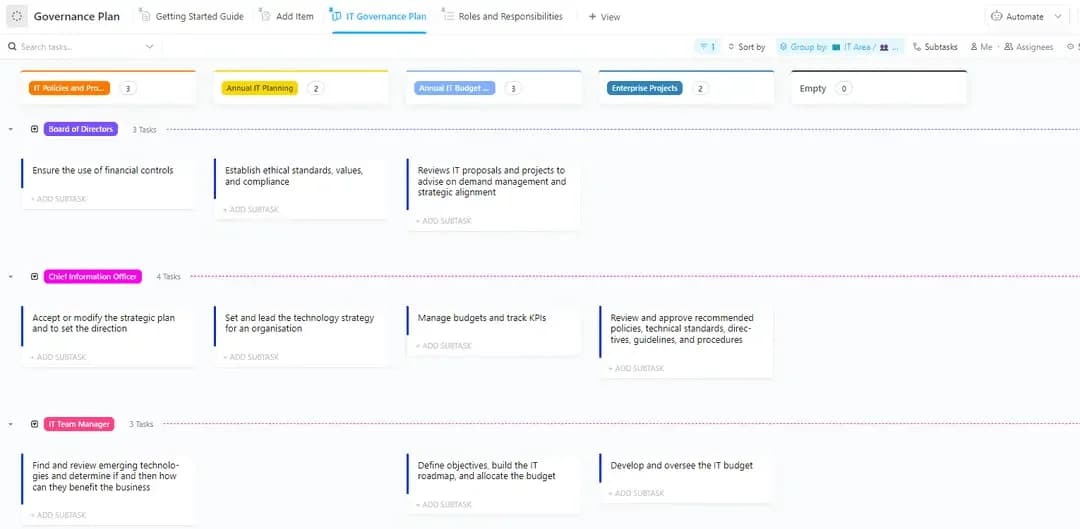
Content workflow software such as ClickUp, Asana, monday.com, Trello, and Notion can organize posts alongside campaign plans and production work. Depending on the tool, you can use statuses, fields, assignments, and automation rules to track reviews and coordinate handoffs.
Define the approval requirements before configuring the tool. A sequence of statuses does not automatically prevent someone from skipping a stage. Check which permissions and approval controls your chosen setup supports, and keep explicit sign-offs attached to the version being published.
Publishing and social-inbox work may still require native apps, a dedicated platform, or an integration. Specify who owns that handoff and how they confirm publication.
Best for: In-house teams coordinating social with wider campaigns, and agencies evaluating marketing agency software for production and client reviews.
Consider a simpler setup when: You publish independently and have few dependencies or approval requirements.
How to Create a Social Media Workflow in 7 Steps
Start with how your team handles posts today. Then assign owners, define review requirements, and set up the handoffs from intake through reporting. You can document the process in a spreadsheet, a social media platform, or a work management tool, then configure the features your chosen tool supports.
Step 1: Map the stages you already run
Pull your last 20 published posts and trace each one backward: who requested it, who drafted it, who reviewed it, and how much time passed between each step. This works like a lightweight social media audit focused on your process rather than your profiles.
Separate time spent working on a post from time spent waiting. A caption might take an hour to write but sit in review for three days. Record revision rounds too, so you can distinguish a slow response from a brief that needed more detail.
Keep the findings in a spreadsheet, a whiteboard, or your work management tool. Use the recorded dates to identify the bottleneck rather than assume which stage needs fixing.
Step 2: Assign one owner per stage and an approver for each review requirement
Each stage needs one person accountable for moving the post forward. Several people can contribute, and some posts may require separate brand, legal, or client approvals.
A lightweight RACI chart can clarify the distinction between the people responsible for doing the work and the person accountable for the outcome. Keep the list of people consulted or informed limited to those who need to be involved.
Avoid assigning approval to “the team.” Name the required approvers, a coordinator for posts with multiple reviewers, and backups who have authority to make the same decisions. Document what happens when no authorized approver is available.
Step 3: Define entry and exit criteria for each status
A status is useful only when everyone agrees what it means. “In review” should mean the copy, asset, platform, and intended publish date are attached, and the required reviewers are assigned. If something is missing, return the post to its owner before review begins.
Write one line of exit criteria for each stage. For example:
- Drafting → In review: Copy and assets are ready, required checks are complete, and reviewers are assigned
- In review → Approved: All required approvals are recorded against the same version
- Approved → Scheduled: The approved copy and asset are loaded into the publishing tool, with the account and publish time checked
If someone changes a claim, caption, or asset after approval, define when that change requires another review. Status labels alone do not enforce these rules; use the permissions and approval controls available in your tool.
Step 4: Set risk tiers and turnaround times
Risk tiers work like an approval matrix: they determine which checks a post needs. Write them clearly enough that a new team member can route a request without guessing.
The table below is a starting point, not a compliance standard. In this example, planned and standard posts share the planned lane, while eligible timely posts use the fast lane.
Define when the review clock starts, which working hours count, and who receives an escalation when the target is missed. Urgent complaints and legal or safety concerns need their own response requirements.
Review the targets after a month. Missed deadlines may point to reviewer capacity, incomplete submissions, unclear responsibilities, or posts assigned to the wrong tier.
Step 5: Build the intake and the content calendar
Give stakeholders one intake point: a form, a shared request list, or a dedicated channel with a defined process for recording requests. Ask for the goal, audience, deadline, and required links. Return incomplete requests for clarification before committing to a publish date.
Build your social media content calendar from accepted requests and content pillars. Keep proposed dates separate from confirmed publishing slots so an unfinished post does not look ready simply because it appears on the calendar.
Batch similar work where it helps: write a set of captions in one session or shoot several videos in one afternoon. Batching can reduce setup time and context switching, but each post still needs its own review and approval record.
Step 6: Automate the handoffs between stages
Social media workflow automation is useful when work changes hands. Depending on your tool’s capabilities and plan, you can configure rules to:
- Assign the appropriate reviewer when a post enters “In review”
- Notify a coordinator or backup when a recorded review deadline passes
- Notify the publisher when all required approvals are complete
- Create a draft in a connected scheduler using the approved content
Tools like Zapier, Make, and n8n workflows can connect supported actions across apps. Check whether the integration creates a draft, schedules a post, or publishes immediately before enabling it. Test with a sample post and confirm what happens if the connection fails.
AI can help prepare first drafts, caption variants, or posts adapted from a webinar. Keep human review for factual claims, customer references, and commentary on news, and check that repurposed content preserves the original meaning.
Step 7: Close the loop with a reporting cadence
Put the monthly review on the calendar with an owner and a specific output: two things to repeat, one thing to stop, and any process changes to test.
Track workflow performance alongside content performance:
- Time in review: How long posts wait, separated by tier
- Missed turnaround targets: How often deadlines are exceeded and why
- Revision rounds: How many posts need another review, and what prompted it
A KPI dashboard can show these measures alongside reach, engagement, and other marketing KPIs. Use the findings to decide whether to adjust briefs, reviewer capacity, or routing rules. Faster publishing is useful only if the content still meets your quality and approval requirements.
Social Media Workflow Examples
These three illustrative examples show how ownership, approvals, and publishing change with team size and risk. Adapt the review requirements to your organization; the financial-services example is not a compliance template.
Example 1: In-house social media manager workflow (team of one or two)
Context: A B2B software company has one social media manager and a part-time designer, publishing 12 to 15 posts a month on LinkedIn and X.
Structure: Requests enter through a short form. Posts move through Idea, Drafting, Design, In review, Approved, Scheduled, and Live. The marketing director reviews launches, pricing, and product claims, with specialist input where needed. Routine posts go to a designated brand approver.
The social manager can publish low-risk posts without a separate reviewer only where the company’s written policy explicitly allows it. Posts outside those boundaries go back for review. A backup approver covers absences; if no authorized reviewer is available, posts requiring approval wait.
What’s different: With one person handling most of the work, the process needs to protect production time and make dependencies visible. A separate Design status shows which posts are waiting for assets, while the review deadline helps the manager plan around the director’s availability.
Example 2: Agency social media workflow with client approvals
Context: A 10-person agency manages Instagram, TikTok, and LinkedIn for 12 clients, each with its own approval requirements.
Structure: Each client has a separate content list and calendar. Posts move through Internal review, Client review, Changes requested, Approved, and Scheduled. The agency and client agree on named approvers, backup contacts, and a 48-business-hour review target.
The client reviews the copy and asset version intended for publication. The approval record identifies that version and any conditions attached to sign-off. Material changes after approval return to the relevant reviewer. If the client misses the review deadline, the agency escalates or moves the post to another slot rather than treating silence as consent.
What’s different: The agency cannot control when a client responds, but it can make deadlines and consequences clear. Before promising a publishing time, it also checks whether its chosen scheduler supports the post’s format and features. Posts requiring native-app steps get a named publisher and a manual checklist.
Client approval does not replace any specialist review, disclosures, or platform requirements that apply to the content. Those checks belong in the client’s agreed workflow.
Here’s a quick video walkthrough for you:
Example 3: Regulated industry workflow (FINRA-member broker-dealer)
Context: A FINRA-member broker-dealer has a two-person social team, registered representatives who post about the business, and an appropriately qualified principal responsible for required approvals.
Structure: Compliance determines how each communication is classified and which approval, supervision, and recordkeeping requirements apply. Under , retail communications generally require principal approval before use or filing, whichever comes first, unless an exception applies.
Static posts promoting products, making recommendations, or discussing performance are routed for the required review before publication. A post is not exempt simply because the team calls it “educational” or takes it from a pre-approved library. Compliance checks whether the intended use, wording, and context remain covered by an approval or qualify for an exception.
Certain interactive-forum communications and nonpromotional, non-recommendation communications may be used without prior principal approval under applicable exceptions, but they still require supervision. The firm’s written procedures define permitted responses, escalation triggers, and review arrangements. FINRA’s social-media guidance explains these distinctions.
What’s different: The workflow must preserve the communication and the applicable approval or supervisory records, not just its current task status. It records the reviewed version, required approvals, publication details, and subsequent changes in the firm’s approved recordkeeping system.
FINRA’s had not replaced the current requirements as of October 2026. The firm should not use that proposal alone to move content from pre-publication approval to after-publication review.