Essential productivity kit for .NET and game developers
.NET Tools Agentic AI AI Releases Resharper C++ ReSharper Platform
ReSharper 2026.2 brought Junie to Visual Studio as ReSharper’s first coding agent. In 2026.3, you can also pick Claude Agent or Codex in the same tool window. All three agents can use ReSharper’s refactoring skill to run refactorings such as Rename. This release also supports .NET 11 and C# 15, and the test runner now supports xUnit v3 4.0 and NUnit 5.0.
Claude Agent and Codex in Visual Studio
Many developers already use Claude Agent or Codex in a terminal or separate app. In ReSharper 2026.3, you can choose Claude Agent, Codex, or Junie in the AI Assistant tool window. Ask your chosen agent to write and edit code, run terminal commands, or explain unfamiliar parts of your solution – all without leaving Visual Studio.
Getting started
- Install or update to ReSharper 2026.3, and make sure AI Assistant is selected in the installer. If you don’t see the AI Assistant tool window later, run the installer again and choose Install or Repair next to AI Assistant.
- Open the AI Assistant tool window, sign in to your JetBrains Account if asked to do so, and choose Claude Agent or Codex from the agent list.
- Send your first prompt. The first time you use Claude Agent or Codex, ReSharper asks for your consent before installing the selected agent, since it’s developed by a third party. If Node.js isn’t installed on your machine, ReSharper installs that too.
ReSharper connects these agents through the Agent Client Protocol (ACP), an open protocol for connecting coding agents to editors.
Learn more about agents in ReSharper in our documentation.
Agents can run ReSharper refactorings
Junie, Claude Agent, and Codex can use ReSharper’s refactoring skill to rename symbols or move types to other namespaces instead of editing files one by one.
Junie Lite
Junie Lite, a free model tier for Junie, is now available in ReSharper to anyone signed in with a JetBrains Account, even without a ReSharper license.
Licensing and limits
What do I need to use Claude Agent and Codex in ReSharper? A JetBrains AI subscription. Claude Agent and Codex consume your JetBrains AI quota, as does Junie unless you use the free Junie Lite tier.
Can I use my own Claude or ChatGPT subscription, or my own API key? Not in this release. ReSharper doesn’t use personal Claude or ChatGPT subscriptions, and it doesn’t support bring-your-own-key (BYOK).
Is there a free AI trial? ReSharper no longer offers JetBrains AI Pro trials. If you’ve already started one, you can continue using it until it ends. Junie Lite is currently available as a free tier, with no trial required.
Regional restrictions on the availability of AI features in Mainland China apply.
Day-one support for .NET 11 and C# 15
Microsoft launched .NET 11 today at .NET Conf 2026, and ReSharper 2026.3 already supports it.
C# 15 language support
ReSharper supports C# 15, including union types, closed class hierarchies, collection expression arguments, extension indexers, and labeled break and continue statements. Code analysis, completion, navigation, and other features work with the new syntax. New inspections, quick-fixes, and context actions help you adopt the new syntax in existing code.
ReSharper also supports the memory safety redesign preview. It recognizes the new safe modifier and unsafe expressions, highlights missing or redundant unsafe contexts, and offers quick-fixes for them.
Readable runtime-async code in the decompiler
.NET 11 supports runtime-async methods, which the runtime handles directly instead of through compiler-generated state machines. Runtime-async is still a preview feature in .NET 11. When you decompile one of these methods, ReSharper now shows it as an ordinary async method, and the IL Viewer marks it with the async keyword. The same improvements are available in dotPeek 2026.3.
Code analysis and coding assistance
ReSharper suggests collection expressions in more places, including lists and immutable builders filled with foreach loops, AddRange, or individual Add calls. New inspections catch character values used by mistake as array lengths or indices, flag culture-sensitive operations and implicit string sorting, and find using statements that dispose of a task instead of its result. Another inspection suggests tuple syntax instead of verbose ValueTuple creation.
Parameter information now groups overloads that share the same leading parameters, so long overload lists are easier to scan while you write a call.
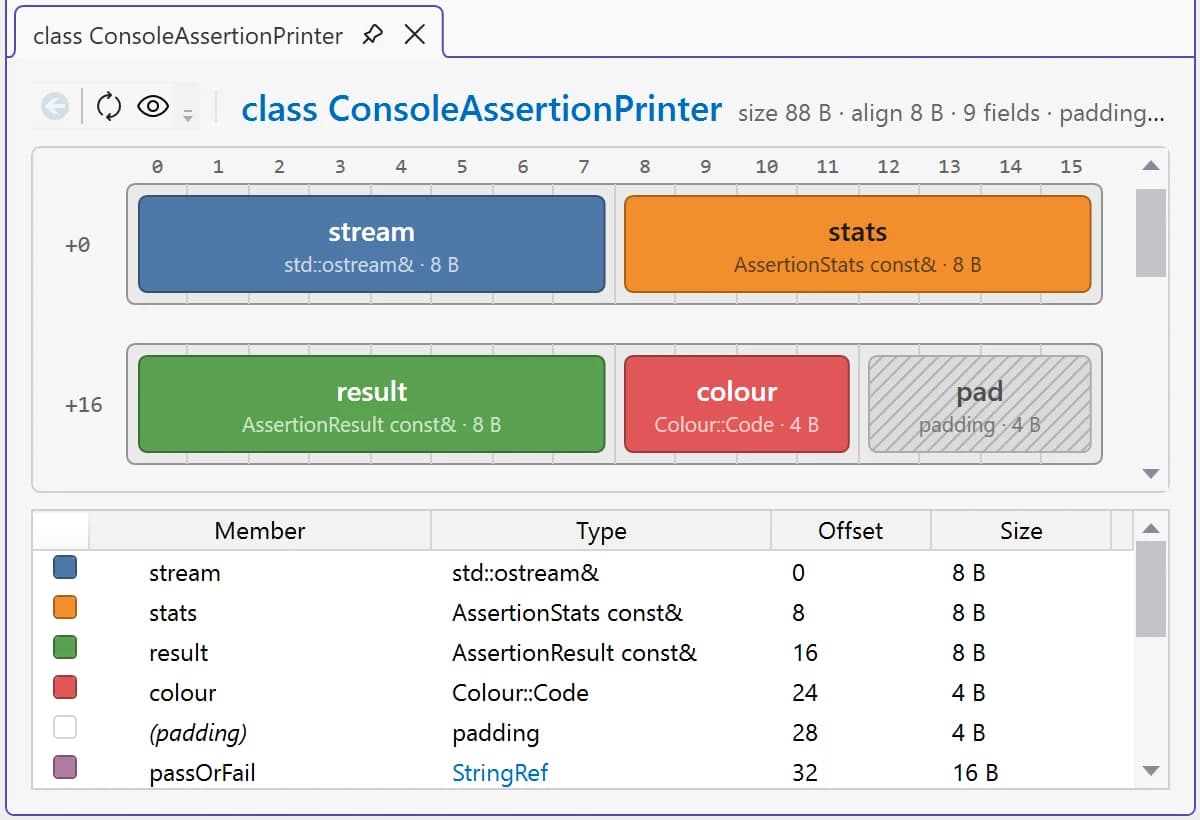
For C++, ReSharper 2026.3 adds a class layout view that shows how a class is arranged in memory. This release also brings format string checks for std::format, std::print, {fmt}, and Unreal Engine’s structured logging macros, new refactoring options, and new CUDA inspections. See What’s New in ReSharper C++ 2026.3 for the details.
Unit testing
The test runner works with the latest versions of popular test frameworks:
- ReSharper now supports xUnit v3 4.0 and NUnit 5.0.
- Test discovery is more reliable for MSTest 4 projects.
- ReSharper applies Playwright settings (such as LaunchOptions) from your .runsettings file, so you can run browser tests with the browser window visible.
- Microsoft.Testing.Platform support is enabled by default, so ReSharper finds tests for frameworks like TUnit without any setting changes.
Try ReSharper 2026.3
Download ReSharper 2026.3 and try working with Claude Agent or Codex in the AI Assistant tool window. For all the updates in this release, see What’s New in ReSharper 2026.3 and the release notes.
Tell us what you think in the comments below, or find us on X and Bluesky.