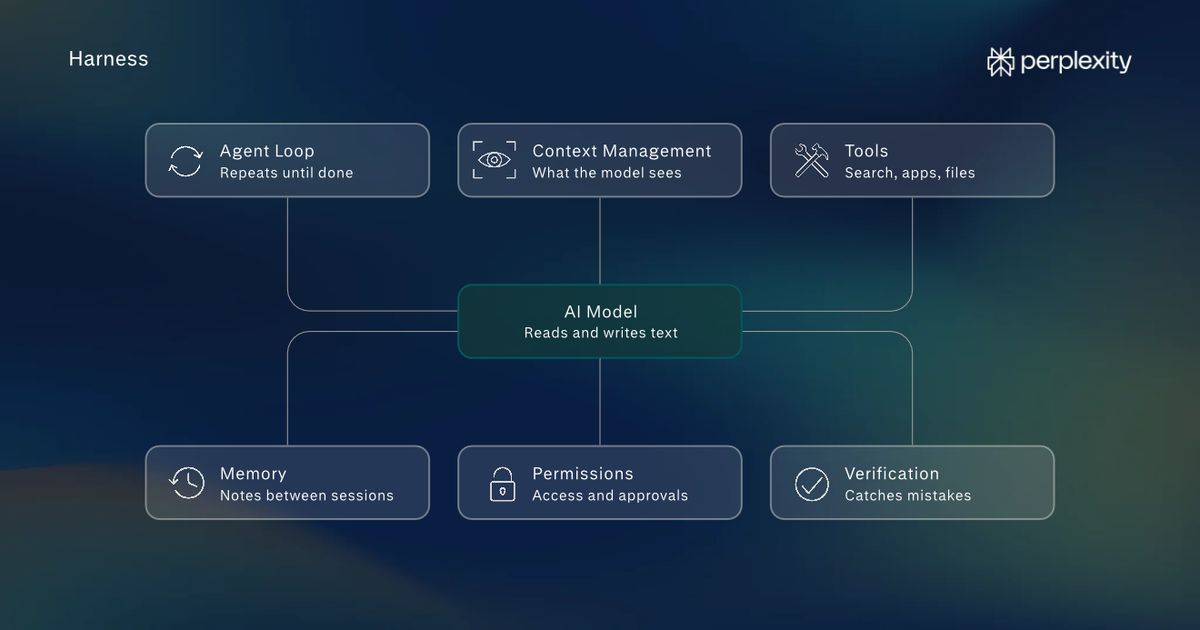
Today, we’re launchingComputer fully local on Mac, making it possible to run the AI model, harness, and task execution entirely on device. When given permission, Computer can work across local files and Mac apps like Notes and Mail without sending personal data to the cloud. This gives users more control over sensitive data and credit spend.
Each advance in models and hardware expands what AI can accomplish on a personal computer. As more demanding workflows become practical to run locally, the machines people already own will take on a larger share of their AI work.
We first brought Computer to local files and native Mac apps with Personal Computer for Mac in May. Last month, Hybrid Compute combined frontier reasoning in the cloud with local models that process private information on the Mac, coordinating both parts of the task automatically.
This takes it a step further with the entire task run fully local on Macs with Apple silicon.
More choice in how to complete work
The Perplexity Mac app offers two ways to run Computer. Hybrid Compute starts in the cloud, coordinating research and reasoning with local work on private files. Running Computer locally starts on the Mac, keeping the task’s planning, reasoning, and file processing on device.
Computer uses the Mac’s own processing power to complete work locally. It runs Qwen 3.6 or PPLX Pro, a post-trained version of Qwen. With powerful AI compute available on their Macs, individuals can perform complex, multi-step work while keeping private or sensitive data on their machines.
Running Computer locally, the choice of where to run tasks and how to use credits is completely in the user’s hand. A portfolio analysis based on private holdings and downloaded market data can run entirely on device. A deal review that combines current market research with confidential financials can use Hybrid Compute.
Users can authorize Computer to escalate to the cloud for current information, browser use, and connected apps. The local orchestrator can call on one of 15+ frontier models for advanced reasoning.
Work across Mac files and apps
Running on Mac locally brings Computer’s ability to plan tasks, use tools, and complete multi-step work to the Mac. When users give it permission, Computer works across local files and supported apps, including Notes, Messages, Mail, and Numbers.
Local Computer can read a project’s to-do list in Notes, check a teammate’s request for a budget update in Messages, and pull planned and actual spending from Excel. It can then prepare a status update showing open tasks and remaining budget, and send a meeting invitation to discuss next steps.
Security and controlled access
With both the model and agent running locally, sensitive work can stay on the Mac through every stage of a task, from planning and analysis to the finished output.
Code and tool execution run in isolated sandbox environments with controlled access to files and connected apps. These same security protocols persist in the cloud version of Perplexity Computer.
Computer works across local workflows
Local Computer can work with private files and information across a range of tasks. Examples include:
- Portfolio review: Computer checks private holdings against investment guidelines and downloaded market data on a Mac mini. It flags concentration risk and allocation drift, then updates an Excel workbook and Keynote deck for the analyst’s review.
- Client proposal: Computer turns confidential discovery notes, a client brief, and an internal rate sheet into a proposal. It drafts the scope, builds a budget in Excel, and prepares a cover email in Outlook for review.
- Morning priorities: Computer reviews recent conversations in Messages and Mail, identifies requests and deadlines, and creates an action list in Notes. It gathers relevant local documents and drafts follow-up replies for review.
Available on supported Apple silicon Macs
Local Computer on Mac is now available to Perplexity Pro, Max, and Enterprise subscribers. It runs in the Perplexity Mac app on supported Apple silicon Macs, like the new Mac mini with M6 and M5 Pro. For running Computer locally on Mac, 36 GB or more is recommended. It launches with Qwen 3.6 and PPLX Pro as local model options.
To get started:
- Download and open the latest Perplexity Mac app.
- Follow the in-app instructions to download and set up a local model.
- Choose fully local to run the task on the Mac.
Try running Computer locally on Mac today.