What harness engineering means
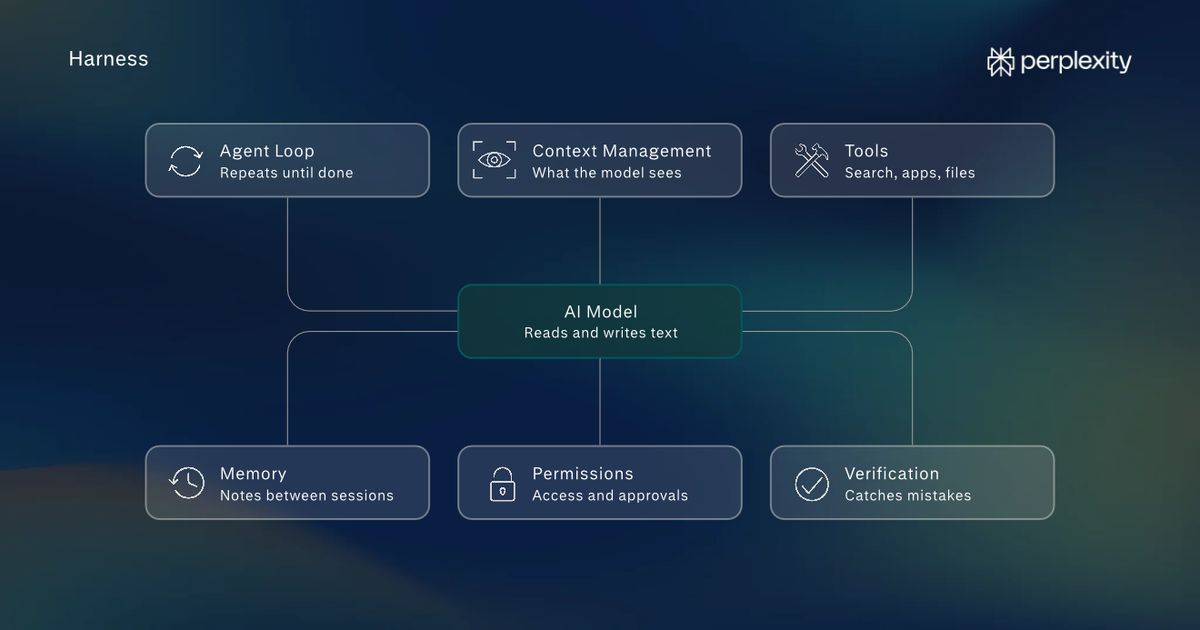
Harness engineering is the work of building an AI tool's harness, meaning every part of the tool except the AI model.
The model is the AI system, which has been trained on large volumes of text so that it can read and write language. Examples of AI models include OpenAI's GPT, Anthropic's Claude, or Google's Gemini.
On its own, a model can only take in text (and sometimes images or audio) and write text back. It can't remember past conversations, look up current information, or run code. So it requires a harness that manages what information the model gets, which apps it can use, what it's allowed to do, and how its work gets checked.
Even a basic chat assistant needs a harness. The model forgets each exchange as soon as it answers, so the harness keeps a record of the conversation. If someone asks about Paris and then follows up with "what's its population?", the harness sends both questions to the model together. That's how the model knows "its" means Paris.
Harness engineering is one of the reasons two tools built on the same model can perform so differently. For instance, in one independent test, researchers kept the model (GPT5) the same and changed only the harness, and the model's score on a coding test moved by up to 11%.
AI model developers like Anthropic and OpenAI build harnesses for their own AI products, such as Claude Code and Codex. And companies building AI products design harnesses for the underlying models they choose. People using AI tools shape part of the harness, too. Many tools let them add standing instructions, connect apps, and choose which actions need their approval before the tool goes ahead.
Harness engineering for AI agents
Every AI tool has a harness, but harness engineering becomes particularly important when working with AI agents. Agents handle multi-step tasks on their own, like researching competitors and putting the findings into a spreadsheet, and the harness runs every step. So if the harness makes a mistake, such as pulling last year's prices, it will impact the rest of the steps too.
Most agent harnesses have six main parts:
1. The agent loop
The agent loop is code within the harness that keeps a task moving forward, one step at a time.
The AI model decides on the next step needed to complete the task, and writes a tool call: a short request that names a tool in the harness, such as web search, and what the tool should do.
The harness spots the request, runs the search, and adds the results to what the model can see. The model reads them and decides what to do next.
2. Context management
A model learns general knowledge during training, but that knowledge stops at the date the training ended. It doesn't include anything specific to the task at hand, like a company's files, today's news, or what was said earlier in the conversation.
For all of that, the model depends on its context window: the text the harness gives it before each response, such as its instructions, the query, the conversation so far, and search results.
The window will only hold a fixed amount of text. And even before the window fills up, models sometimes miss information buried in the middle of long inputs.
So the harness handles the context management and picks only the information that each step needs. For instance, if the task is to compare five competitors’ pricing, the harness might include each company's pricing page rather than their entire website. On long tasks, the harness can also replace the detailed record of earlier steps with a short summary, so the model keeps track of what it's done without that history filling the window.
3. Tools
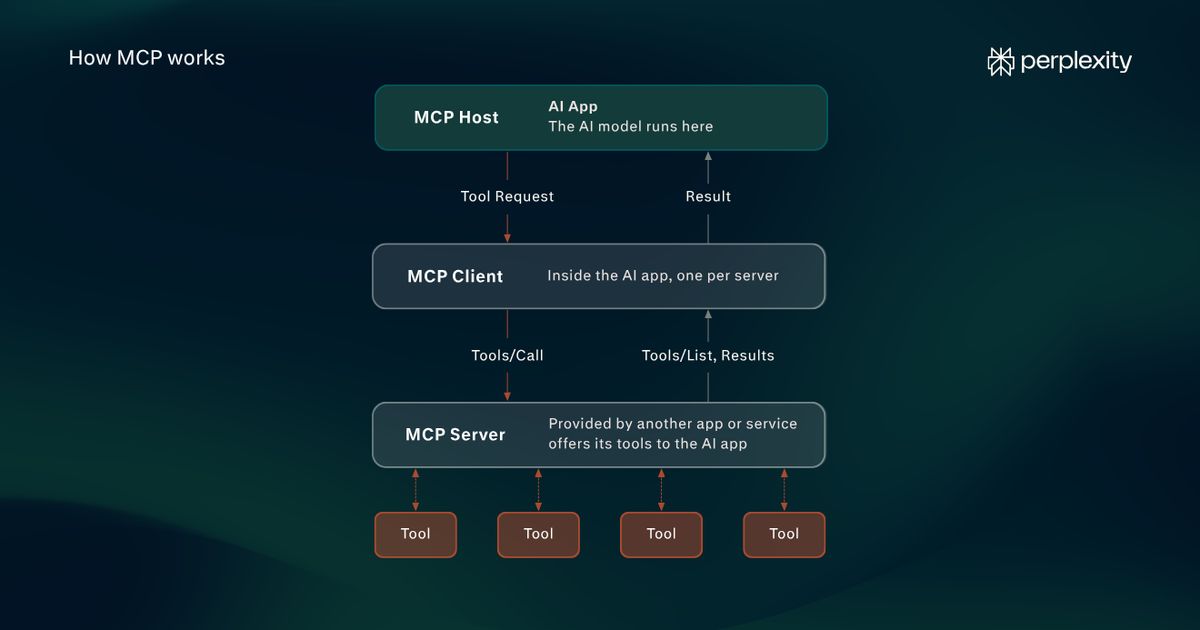
Tools are code that carries out the actions the model asks for. Each tool handles one kind of action, such as searching the web, opening and reading a web page, running code, or editing a file. When the model writes a tool call, the harness passes it to the right tool and returns the result.
Many harnesses also include connectors, which are tools that link the agent to a specific app, such as email, a calendar, or a shared drive, using access a person has granted. With a calendar connector, for example, an agent can check someone's availability before suggesting a meeting time.
4. Memory
Memory is stored information that carries over from one session to the next. The harness saves short notes during a session, such as a person's preferences or where a project stands. At the start of the next session, the harness adds those notes to the context window, so the model reads them before it reads the new query. That's how an agent can pick up a weekly report where it left off instead of starting from the beginning again, for example.
5. Permissions
Permissions are rules about what an agent can reach and do. Access rules set which files, apps, or websites it can open. Approval rules set which actions have to wait for a person's sign-off, such as sending a message or making a purchase.
The company that makes the agent sets up some of these rules in the harness's code. Then an organization's admins can add their own, and individual users can choose things like which accounts to connect.
6. Verification
Verification is code that checks the agent's work before it reaches a person. It uses two kinds of checks:
- Fixed rules, which are specific tests that pass or fail the same way every time, like confirming that every figure in a report appears in a document the agent actually read.
- A review by another AI model, which reads the work and judges it. It can catch problems that are hard to turn into a rule, like a summary that leaves out an important point.
No single check catches everything, so harnesses usually combine both kinds. When a check finds a problem, the harness adds a description of it to the model's context window and sends the task back through the agent loop. The model fixes the problem and tries again, so many mistakes get corrected before the user sees the result.
Harness engineering examples
Preparing for a client meeting
Task: An account manager asks an agent to prepare a briefing for tomorrow's meeting with a client, covering open issues and a draft agenda.
What the harness does:
- Through an email connector, the agent searches the manager's inbox for messages with the client.
- Permissions let it read email but not send any.
- Context management passes the model only the last three months of messages with that client, not the whole inbox.
- The agent loop runs several rounds of searching and reading, and the model groups what it finds into open issues.
- Verification then checks that every issue in the briefing links back to a real email.
Possible result: The manager gets a one-page briefing in which every point can be traced to its source email.
Updating a monthly sales report
Task: An operations lead asks an agent to update the monthly sales report with this month's numbers.
What the harness does:
- Memory loads notes from last month's session, including the report's format and the lead's request to round figures to the nearest thousand.
- A file tool opens the sales spreadsheet on the team's shared drive.
- Permissions let the agent edit the draft report but not the source spreadsheet, so the original numbers can't be changed by mistake.
- Verification checks that the totals in the report match the spreadsheet.
Possible result: The report arrives in the same format as last month's, without the user having to explain it again.
Sorting a shared inbox
Task: A support team asks an agent to sort the morning's incoming requests by topic and draft replies to the common ones.
What the harness does:
- The agent loop works through the inbox one message at a time.
- For each one, the model picks a topic label, and the harness applies it through the email connector.
- At the start of the task, the harness adds the team's approved reply templates to the context window as guides, so the model bases each draft on a template.
- An approval rule holds every reply as a draft until someone on the team reviews and sends it.
Possible result: The team starts the day with requests sorted and replies waiting for review.
Fixing a bug in a website
Task: A developer asks a coding agent to fix a bug that stops a checkout button from working.
What the harness does:
- The agent works in a sandbox, an isolated copy of the code where its changes can't affect the live website.
- A code tool lets the model read and edit files.
- After each change, verification runs the project's automated tests.
- Any failures go back to the model as new information.
Possible result: The agent keeps adjusting its fix until the tests pass. The developer then reviews the change before it goes live.
Harness engineering vs. prompt engineering vs. context engineering
Prompt engineering is the work of building and optimizing a single query. Context engineering is the work of managing everything the model sees. Harness engineering is the process of designing and improving the whole system the model works inside.
Term
Who usually does it
Example from a competitor research task
Prompt engineering
Anyone writing a query
Asking for "one row per competitor, one column per pricing tier"
Context engineering
The people who build the harness, plus users who attach files or templates
Giving the model each competitor's pricing page and the team's spreadsheet template
Harness engineering
Companies that make AI products, plus teams and users who choose settings and preferences and upload information
Deciding which tools the agent can use, which actions need approval, and how its work gets checked
How users can influence an AI harness
Most of an agent harness comes from the company that makes the agent, but many AI products let users adjust part of it through settings like custom instructions, connected apps, and approvals.
Users can shape an agent harness, and improve the agent's results, in four ways:
1. Standing instructions
Standing instructions are notes a person writes once, so the harness can add them to the context window at the start of every task. They're worth setting up for anything a person would otherwise repeat in query after query: who they are and what they do, how they like work written, or the rules for a recurring job like a client's monthly report.
Many AI products offer standing instructions at two levels. Account-wide instructions suit things that are true of all work, like spelling preferences. Project instructions suit a single client or workflow, so guidance for one doesn't carry into another.
Standing instructions work the same way in chat assistants and agents, but agents depend on them more. In a chat, a person can correct the AI after each answer. An agent may take many steps before anyone sees its work, so instructions given up front are one of the few ways to steer it along the way.
How to write effective standing instructions
- Start with a short instruction, like: "I'm a marketing manager at a software company. Write in plain English, keep summaries under 200 words, and use U.S. spelling."
- Add to them when the AI makes a mistake. If the AI keeps rounding figures the team needs exact, add a line saying so.
- Make instructions specific: "Give exact figures, never rounded" beats "Be accurate."
- Keep the list short and remove lines once they stop being useful, since every line takes up room in the context window.
2. Connected apps
Connected apps link an AI product to the tools a person already uses, such as email, a calendar, or a shared drive. Once an app is connected, the AI can work with a person's own information instead of only what's pasted into the chat.
Connections are worth setting up when a task depends on information that lives in those apps, like preparing a meeting briefing from email threads or summarizing documents on a shared drive.
How to connect apps safely
- Connect only the apps a task needs, since each connection adds another opportunity for errors.
- Choose read-only access where it's offered. For instance, an agent preparing meeting briefings needs to read email, not send it.
- Set connections by project where the product allows it. In Perplexity, for example, people can choose which connectors each Project uses.
- Remember to disconnect apps that are no longer in use.
3. Approval settings
Approval settings decide which actions have to wait for a person's sign-off before the AI goes ahead. Some approvals are built into the product, and some products let people choose which other actions need one.
How to set approval rules
- Require approval for actions that can't be undone, such as sending a message, making a purchase, or deleting a file.
- Keep the list of approvals short. If an agent asks for sign-off on every small step, people start approving without reading.
4. Standards and checks
Most AI products come with some standards built in. Perplexity, for example, includes citations with its answers so each claim can be checked. User-set standards add what a product can't know on its own, like a team's preferred report format.
How to set standards for AI work
- Provide a template for recurring work, so the AI has a fixed structure to fill in.
- Ask for a source link next to every figure.
- Review early results closely, and turn any repeated gaps into a new standing instruction.
How Perplexity approaches agent harnesses
Perplexity Computer runs on a model agnostic harness, which brings 20+ advanced models into one system. It breaks each task into subtasks, hands them to subagents (separate agents that each take one part), and routes each piece of work to a model suited to it.
Explore how to set up instructions, files, and connectors in the guide to Perplexity Projects.
FAQs
What is a harness engineer?
A harness engineer designs and maintains the system that lets an AI model do reliable work. That can mean adding a new tool for the agent to use, tracking down why an agent keeps making the same mistake, or tightening the checks it runs before finishing a task. It isn't a standard job title, although that might change. The work is usually done by software engineers at AI companies or on teams building agents. In manufacturing, the same title refers to someone who designs wire harnesses, the bundled cables inside cars and machines.
What is an agent harness?
An agent harness usually means everything in an AI agent other than the model itself. That includes the code that runs the agent loop, manages context, carries out tool calls, stores memory, enforces permissions, and checks the agent's work before it reaches a person.
Does every AI tool have a harness?
Yes. Even a basic chat assistant relies on a harness to keep track of the conversation, since the model doesn't remember earlier messages on its own.
Developers can also use a model by sending requests to it from their own software through an API (a connection that lets one program send requests to another). In that case, the developer's own code does the harness's job.
Will better models make harnesses unnecessary?
Better models may need less step-by-step guidance, so some of what harnesses do today could shrink. But a model on its own only turns text into text. It has no internet connection and no access to other apps. Reaching files, carrying out actions, and enforcing approval rules all happen in the software around the model, so that work is likely to stay with the harness however capable models become.