Strategy
Using AI in your Instagram content? Before you hit publish, make sure you know what needs a label (and what doesn’t).
Posting AI content on Instagram isn’t the problem. Hiding it is where things get messy.
Here’s how the Instagram AI disclosure policy works, and how to label your content the right way.
Key takeaways
- Realistic AI video and audio need a label. If it looks or sounds real (and isn’t), you need to disclose it.
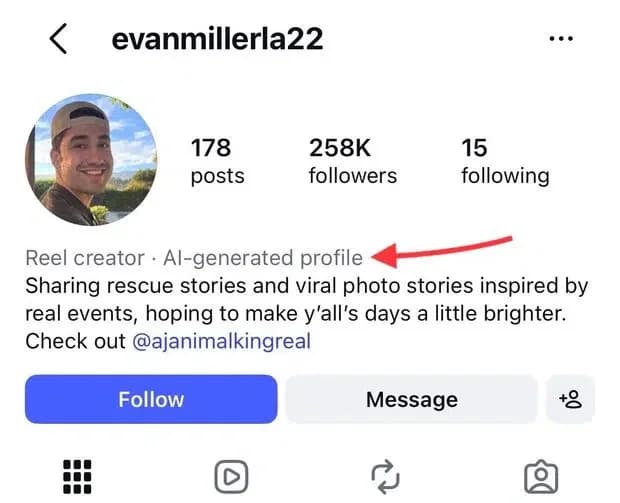
- Instagram has two AI labels. “AI info” goes on individual posts. “AI-generated profile” goes on accounts that feature an AI-generated person.
- Skipping a label can cost you. If Instagram detects AI, it may add a label for you, restrict your reach, or apply other penalties.
- Make disclosure part of your workflow. With Perch, you can add AI checks to your approval flows, so the right people sign off before anything goes live.
Quick note: This guide is for general information, not legal advice. For paid or branded content, loop in your legal team and review the latest Instagram policies and FTC guidance.
What is Instagram’s AI disclosure policy?
Instagram lets you use AI, but requires creators to label AI content that looks or sounds real, and to label profiles that feature an AI-generated person. If you don’t, Instagram may add a label itself, limit your reach, or apply other penalties.
Meet the Suite
Understand what matters, decide what to do next, and take action across every social workflow — all from one connected suite.
“AI info” label vs. “AI-generated profile” label
Instagram has two AI disclosure labels:
- “AI info” label: Applies to individual posts, Reels, and Stories. It tells people that a specific piece of content was made or modified with AI.
- “AI-generated profile” label: Applies to an entire account. It tells people that the person featured on the profile is AI-generated. This label was formerly known as “AI creator.”
Here’s a closer look at how they differ:
Why does Instagram’s AI disclosure policy matter for brands?
Instagram’s AI disclosure policy matters because it affects how people see your content and, in some cases, whether they find it at all. Getting the labels right can also help you keep your audience’s trust.
Here’s where it makes the biggest difference:
It maintains audience trust
People want to know whether what they’re seeing on Instagram is real. For brands, labeling AI content is a simple way to be transparent and protect the trust you’ve worked hard to build.
“When audiences find out after the fact that something was AI-generated, they start questioning the whole company, not just that one post,” says Ambreen Sharif, Creative Director of Ambreen Sharif Creative.
And as AI gets harder to spot, being upfront can actually work in your favor.
“When people can’t tell what’s real anymore, honesty becomes part of the brand itself,” Sharif says. “Disclosing AI use signals that you respect your audience enough to let them decide how they feel about it, and that kind of respect builds loyalty.”
Your discovery depends on it
Recommendations are how Instagram shows your content to people who don’t already follow you. For AI-generated profiles, a missing label can cut off that pipeline entirely. That’s a big deal if your brand relies on Explore to reach people who don’t follow you yet.
It keeps influencer partnerships transparent
Plenty of brands rely on influencers to make content. But if a creator uses AI and skips a required label, it’s still your product (and your brand’s reputation) on the line. That’s why brands need to pay attention to AI disclosures even when they’re not the ones hitting “publish.”
It reduces compliance risk
For some brands, missing an AI label is more than a trust issue. Sharif points to regulated spaces like financial services, where “getting this wrong can also create compliance exposure on top of the reputational hit.”
The FTC, for example, bans fake reviews and testimonials that claim to come from people who don’t exist, including ones made with AI.
So if you work in a regulated industry, it’s worth bringing in your legal or compliance team before any AI content goes live. Check out our full guide to social media compliance here.
What content do you need to label as AI on Instagram?
Instagram requires you to label organic posts that contain realistic-looking videos or realistic-sounding audio that were created or altered with AI. Accounts featuring an AI-generated person also need a separate profile label.
Note: AI-generated images don’t require a label, but Instagram may add one automatically.
Content that needs a label vs. content that does not
Here’s a quick look at what Instagram expects you to label (and what it doesn’t):
Pro tip 💡: Posting to TikTok too? Its rules work differently, so check out our TikTok AI disclosure guide.
How do you label AI content on Instagram?
To label AI content on Instagram, turn on the “Add AI label” toggle before you share a post, Reel, or Story. If your account features an AI-generated person, you’ll also need to turn on “AI-generated profile” in your profile settings.
For ads, Meta will add a label automatically when it detects AI. The exception is ads about social issues, elections, or politics. For those, you’ll need to disclose AI when you set them up.
How do you add an AI label to an Instagram post?
For a post or Reel:
- Upload your post or Reel in the Instagram app, then tap Next.
- Find Add AI label and toggle it on.
- Hit Share.
For a Story:
- Tap More, then Label AI.
- Toggle on Add AI label.
- Hit Share.
How do you add the AI-generated profile label on Instagram?
If you’re running an account for a virtual influencer or another AI-made person:
- Go to your Instagram profile.
- Tap Edit profile.
- Toggle on AI-generated profile.
Once it’s on, the label appears on your profile, next to your content (Feeds, Reels, and Stories), and next to your comments and messages.
Meet the Suite
Understand what matters, decide what to do next, and take action across every social workflow — all from one connected suite.
What happens if you don’t disclose AI content on Instagram?
If you don’t disclose AI content on Instagram, Meta may label it for you or apply other penalties. And if you’re running an AI-generated profile, leaving off the profile label could limit your reach.
Here’s what that looks like in practice:
- Instagram might label a post for you. Meta looks for signs of AI-generated content, so skipping the toggle doesn’t guarantee your post will stay unlabeled.
- Instagram might penalize you. Meta warns that skipping a required AI label may lead to penalties, but doesn’t specify what those are.
- Your AI profile might lose reach. When Instagram detects an unlabeled AI profile, it stops recommending the profile to new people. You’ll get a notification if this happens. From there, you can add the missing label or appeal.
Bottom line: It’s easier to add the right label before publishing than to deal with the consequences afterward.
How can your team manage AI disclosures on Instagram?
Your team can manage AI disclosures on Instagram by knowing where AI shows up in your content and checking for it before anything goes live. That includes your own posts and the content influencers create for you.
Here’s how, step by step:
- Get clear on how your team uses AI
- Check whether you need the profile label
- Include AI in your influencer briefs
- Add an AI check to approvals
1. Get clear on how your team uses AI
Start by mapping out where AI actually shows up in your Instagram content.
Maybe your team uses AI to write captions, generate product images, or add voiceovers to Reels. Only some of those need a label (in this case, just the voiceover). But it’s much easier to make that call when everyone knows which tools are in play.
2. Check whether you need the profile label
Do a one-time review of your Instagram account. Do you use a virtual influencer or spokesperson as the face of your brand? If so, you’ll need to turn on “AI-generated profile.”
Most brands won’t need this label at all. But it’s worth five minutes to confirm, since an unlabeled AI profile can lose its spot in recommendations.
3. Include AI in your influencer briefs
Influencers have their own workflows (and their own favorite AI tools). So don’t assume you’ll know when they use AI.
Set expectations upfront in your creator brief. Outline which kinds of AI content need a label on Instagram, and ask them to flag any realistic AI video or audio before the post goes live.
Psst: Instagram’s AI labels aren’t a substitute for disclosing a paid partnership. If you’re working with influencers or publishing branded content, make sure you’re also following the FTC’s Endorsement Guides and Disclosures 101 for Social Media Influencers.
4. Add an AI check to approvals
Make AI disclosure one of the final things your team checks before publishing on Instagram. That means confirming whether a post needs an “AI info” label and making sure whoever publishes it (you, an influencer, or an agency partner) knows to turn it on.
With , you can build that check into your approval workflow, so every post gets a second look before it goes live.
How does Hootsuite help teams stay compliant on Instagram?
Hootsuite helps teams build AI disclosure into the way they already plan, approve, and publish social content. Perch adds disclosure checks to your approval workflow, Vigil gives you control over permissions and approvals, and Lumen shows you how people are reacting once a post is live.
Build disclosure checks into approvals with Perch
When you’re managing a busy Instagram calendar, it’s easy for a missing AI label to slip through the cracks.
, Hootsuite’s content planning and publishing app, makes it easy to give your content the extra look it needs with:
- Custom approval workflows: Add disclosure checks into your review process so someone can catch missing labels before a post is published.
- One calendar for every channel: See what’s in progress, what needs review, and what’s ready to publish at a glance.
- Shared content libraries: Keep approved assets and templates in one spot, so everyone’s working from the same playbook.
Keep governed workflows with Vigil
Vigil is the governance layer within Hootsuite Social OS. It helps teams manage permissions and approvals across accounts, so the right people stay in control at every step.
That’s especially useful for enterprise and regulated teams. If a post needs sign-off from brand, legal, or compliance before it goes live, Vigil helps keep that process in place.
Monitor sentiment with Lumen
AI can ramp up your content, but the best ideas start with knowing what your audience actually cares about.
Lumen helps you keep tabs on conversations, sentiment, and emerging trends around your brand across more than 150 million sources. Use those insights to spot new content ideas, sharpen your messaging, and see how campaigns are landing once they’re out in the world.
FAQ: Instagram AI disclosure policy
What is Instagram’s AI disclosure policy?
Instagram requires you to disclose realistic-looking video or realistic-sounding audio that’s been created or altered using artificial intelligence. That includes manipulated media such as AI-generated people, cloned voices, and realistic AI voiceovers.
Do I have to label AI-generated captions or edited photos?
No. Using an AI prompt to write your Instagram caption doesn’t trigger the platform’s AI labeling requirement. The same goes for still photos edited with AI tools. Keep in mind that Instagram may still add an “AI info” label to a photo if it detects signs of AI editing.
Does Instagram penalize AI-generated content?
No, Instagram doesn’t penalize content just because it was made with AI. But you could face penalties for breaking its disclosure rules, like posting realistic AI-generated audio made with voice cloning without adding an AI label. Meta warns that failing to meet its disclosure requirements may lead to penalties, but doesn’t specify what those penalties are.
Do you have to disclose AI-generated images on Instagram?
No, Instagram doesn’t require you to label AI-generated still images in organic posts. However, Meta may automatically add an “AI info” label if its systems detect signs of AI, like C2PA metadata that many AI tools attach to their files. So even if you don’t add a platform label yourself, your audience may still see one.
How does Hootsuite help manage AI disclosures on Instagram?
Hootsuite helps teams build AI disclosure into the way they already plan, approve, and publish content. With Perch, you can add disclosure checks to your approval workflow, so missing labels get caught before a post goes live. Vigil helps you manage permissions and approvals across accounts, and Lumen helps you keep tabs on conversations and sentiment around your brand.
Keep AI disclosure from slipping through the cracks. Perch builds disclosure checks into your approval workflow, Vigil keeps the right people in control of every post, and Lumen helps you see what your audience actually wants next. Try Hootsuite free today.
The #1 social media tool
Create. Schedule. Publish. Engage. Measure. Win.
Erin Rodrigue is a writer and content strategist who knows her way around a sentence and a strategy. A former associate marketing manager at HubSpot, she covers AI, social media, and SEO to help marketers stay ahead of what’s next.
The #1 social media tool
Create. Schedule. Publish. Engage. Measure. Win.