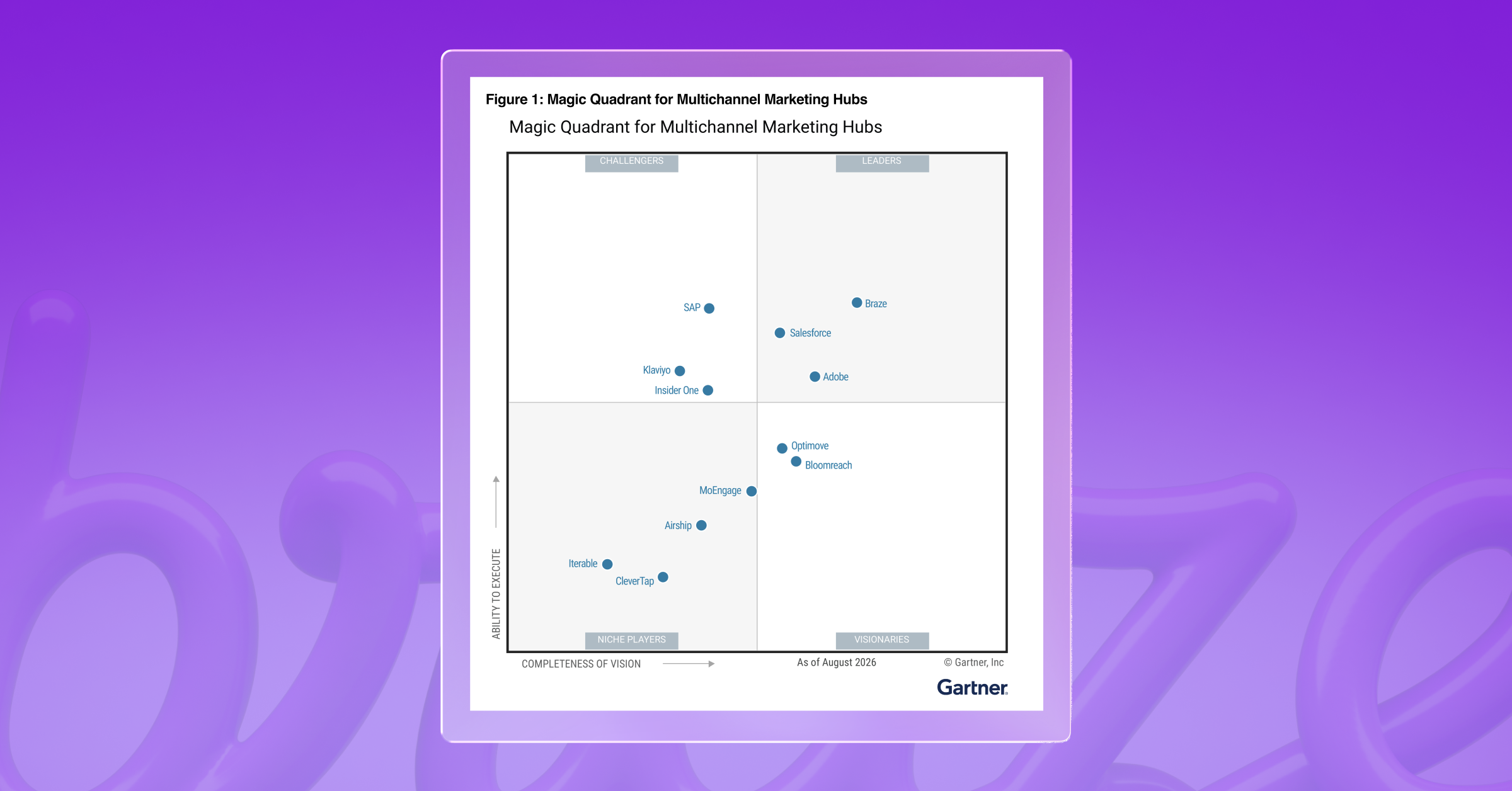
The best email marketing platforms in 2027 depend on the needs and goals of your business. Braze suits consumer brands sending deeply personalized, real-time email at volume, Klaviyo is built for ecommerce and direct-to-consumer and Mailchimp works for small businesses with straightforward sends.
Hubspot fits teams running email alongside a CRM, Brevo serves growing businesses on a budget and ActiveCampaign handles sales and marketing automation together. Salesforce and Adobe are aimed at organizations already standardized on those ecosystems, Iterable covers multi-brand retail and media and Customer.io is built for product led and developer-heavy teams.
This comparison of email marketing platforms looks at send volume, personalization depth, deliverability control and how much of the program is automated rather than size of the business.
TL:DR
- There's no single right platform, only the one that fits how you send. Match it to your volume, your personalization needs, how much deliverability control you want and how much of the program you expect to run automatically.
- Authentication is no longer a differentiator. Google, Yahoo and Microsoft all require SPF, DKIM and DMARC from bulk senders, so judge platforms on IP warming, inbox placement monitoring and whether real people help when something breaks.
- Understand the vendor’s AI capabilities. Generative AI writes subject lines and copy, while action optimization decides who receives what and when. Vendors sometimes lump both under one heading.
- Pricing units matter more than headline prices. Mailchimp charges by contacts, Klaviyo by active profiles, Brevo by emails sent and Braze by monthly active users, so the cheapest entry tier is rarely the cheapest at your volume.
- Email-only is the right architecture for some businesses but it’s worth asking what happens if you need other channels in the future.
What is an email marketing platform?
An email marketing platform is software a business uses to run its email program. A single system deals with everything, from the moment someone subscribes, to the reporting, and analysis after sending. That includes managing subscriber lists, message creation, audience segmentation, automated and triggered sending, deliverability management, sending infrastructure and performance reporting.
A marketing automation tool is organized around lead workflows, fed by sources across the business, with email as one step inside them. Email marketing platforms are organized around email itself. Some run other channels too, with varying degrees of coordination between them.
Since 2025, there have been changes in email marketing that brands need to consider when choosing a platform. Mailbox providers have now made authentication a condition of delivery. Google, Yahoo and Microsoft now require SPF, DKIM and DMARC authentication if you're sending more than 5,000 messages a day to personal accounts. Sending has moved from batch to behaviour-triggered too, so how quickly a platform responds to an event is important. And AI can now choose audience and timing, not just assist with subject lines and copy.
What to look for in the best email marketing software
Most platforms claim similar features, but whether you’re sending out thousands or millions of emails each year, you need more than a few good features. Here are the capabilities that will help you determine whether a platform can carry you through the busiest weeks in your calendar and support your growth.
Capability
What to look for
What to ask for in a demo
Message creation
Drag-and-drop builder, reusable content blocks, HTML access, and previews across inbox providers and dark mode.
Build a new email from a template, start to finish including QA. Time it.
Segmentation depth
Behavioral, transactional and engagement attributes, updating on their own, buildable without a developer.
How long does a segment take to recalculate, and what happens when you add more filters?
Experimentation
A/B and multivariate testing on subject lines, content, send times, and audiences, with automatic winner selection and results you can read without a data analyst.
How long from idea to a live test, and how soon can you read results?
Automation and triggering
Sends that fire the moment someone acts, alongside scheduled campaigns.
How long between a customer acting and the email going out?
Deliverability
Dedicated IP or shared pool, who runs IP warming when you migrate, and whether inbox placement and complaint rates are visible in the platform.
Who do you talk to if your domain lands on a blocklist, and how fast?
AI capability
Native connections to your warehouse, commerce platform and customer data tooling, and how often data updates.
What can a marketer connect and use without engineering help?
Reporting depth and flexibility
Revenue per campaign, conversion by segment, and attribution windows that match how the rest of the business reports.
Can the platform run holdout groups? How easy is it to set up customizable reports?
Scale and reliability
Throughput: how many messages the platform sends in a given timeframe, not how many subscribers it holds.
What did uptime look like on Black Friday?
Data integration
Dedicated IP or shared pool, who runs IP warming when you migrate, and whether inbox placement and complaint rates are visible in the platform.
Who do you talk to if your domain lands on a blocklist, and how fast?
Message creation and template flexibility
Look for simple drag-and-drop email builders with reusable content blocks, HTML access and preview testing in dark mode so that you can see how the email renders across different email providers.
What to ask for in a demo: Ask them to build a new email from an existing template, from start to finish, including the quality assurance. Time it, because this is what your team will be dealing with day-to-day.
Audience segmentation depth
Segmentation should reach across behavioral, transactional and engagement attributes and update on their own as behavior changes. You should be able to build segments without the need of a developer.
What to ask for in a demo: Ask for how long a segment takes to build, recalculate and what happens when you add more filters.
Experimentation
Look for testing that goes beyond subject lines. You should be able to test content, send times, and audiences, and run multivariate tests when you want to change more than one element at once. Results should also be easy to read without a data analyst, with clear reporting on whether a difference is statistically significant or just noise. The best platforms let you test across a whole journey, not just a single send, so you can learn which sequence works and not only which email.
What to ask for in a demo: Ask them to set up a subject line and email body test with at least 3 variants for each. Watch how long it takes, and ask how the platform decides a winner and how it shows you the result is statistically significant.
Automation and triggering
Look for triggered and transactional email sending that can respond the moment someone’s behavior changes, like abandoning a cart or finishing onboarding, and also carry out scheduled sends.
What to ask for in a demo: Ask how long it takes for an email to go out after a customer acts. Some platforms take seconds, others wait for a new cycle.
Deliverability infrastructure
Mailbox providers now enforce authentication, so look past that and treat it as the bare minimum. Ask if you get a dedicated IP or shared pool and who handles IP warming. A dedicated IP gives you a reputation that’s yours alone, but needs a steady volume to build one, so a well-run shared pool is often better below a certain send size. Warming is crucial when you’re migrating as a new IP has no send history and volume has to be raised gradually over time. Some platforms will give you instructions for this, or might have tools for automated warming, and others will run it for you. Inbox
placement, sender reputation, bounces, and complaint rates are also good to have visibility of, so check if you can see them in the platform or whether you need a separate tool.
What to ask for in a demo: Ask what happens and who you talk to if your domain lands on a blocklist. Some platforms have deliverability specialists who diagnose the problem and help you fix it. Ask how quickly that support kicks in.
AI capability
AI capability can be split into content generation and audience, timing and message selection. Content generation writes and designs subject lines, body copy, imagery and variants at volume. Action optimization decides who gets to see what, and learns from how people respond.
What to ask for in a demo: Ask to see each type of AI capability separately as they often get packaged together but have very different jobs.
Data integration
Email personalization will only be as relevant as your unified data. Check for native connections to your data warehouse, commerce platform and any other customer data tooling. Find out whether data flows both ways or only inbound and how often it updates, as this will greatly affect how you can respond to your audience in the moment.
What to ask for in a demo: Ask if you can connect data points and use them without any engineering help. That will show you how quickly you can build.
Reporting depth and flexibility
Open rates are an unreliable indicator on their own, so look for flexible, customizable reporting that connects sends to business outcomes, like revenue per campaign, conversion by segment and performance across a whole journey. Check that attribution windows can be matched with how the rest of your business reports so that there is no confusion about any of the financial numbers.
What to ask for in a demo: Ask to build a custom report on a key metric important to your business to gauge how easy it is to build customizable reports. Ask whether the platform can run holdout groups. This is a portion of your audience you deliberately don’t send anything to, so you can compare them against the people you did, and better understand the impact of your emails.
Scale and reliability
A platform can hold millions of subscribers and still take hours to reach them all, so scale and reliability go hand in hand. Understand what the throughput is — how many messages a platform can send in a given timeframe.
What to ask for in a demo: Ask what uptime looked like during a busy period like Black Friday.
The best email marketing platforms in 2027
The best email marketing platform for your business is the one that fits your business needs the best. The list of platforms below isn’t a ranking — there are no scores, but we’ve looked closely at email capacity, pricing and what sets them apart.
Email marketing platform comparison
Platform
Best for
Email capability
Pricing
Key differentiator
Braze
Consumer brands. High-volume personalized email
Real-time triggers, 100+ segmentation filters
Four editions, priced on monthly active users
Decisioning at the individual level
Klaviyo
Ecommerce and DTC
160+ templates, product recommendations
Free tier, then from $60/mo
Built-in customer data platform
Mailchimp
Small businesses
130+ templates, AI copy drafting
Free tier, then from $13/mo
Ease of use, 300+ integrations
HubSpot
Email alongside a CRM
CRM-field personalization, workflow triggers
Free tier, then from $20/mo per seat
Email on the same record as sales
Brevo
Growing businesses on a budget
Dynamic lists, predictive sending
Free tier, then from $9/mo
Billed on sends, not contacts
ActiveCampaign
Sales and marketing automation
250+ templates, 950+ automation recipes
Four tiers, quote only
Automation tied to a sales CRM
Salesforce
Salesforce-standardized orgs
Email Studio, Einstein Engagement Scoring
From $1,250/mo
Email on the same CRM as sales
Iterable
Multi-brand retail and media
Snippets, Catalog recommendations
Quote only
Multivariate testing at every journey stage
Customer.io
Product-led and developer teams
Code editor, accessibility and dark mode checks
From $100/mo
QA tooling built into the editor
Adobe
Experience Cloud enterprises
Litmus previews, real-time journeys
Quote only
Journey engine tied to Adobe creative tools
Braze
Braze is a customer engagement platform built on real-time first-party data, used by consumer brands across retail, ecommerce, media, travel, financial services and food services. Braze email runs on the same live customer profile the rest of the platform uses, so messages can reflect in-the-moment behavior and decisions. Other channels are available alongside email, though there is nothing that requires you to use them.
Email capability: Emails can be built in a drag-and-drop editor, in HTML, or through native Figma and Canva integrations with reusable content blocks, and where you can pull across designs without having to start from scratch each time. Braze Email Creative Services is an additional service that can provide customized, inbox-ready email templates. Inbox Vision allows for spam testing and cross-client previews before a send goes out. Sends trigger on customer behavior in real time, and content can be personalized at send or at open, pulling live product data, pricing or recommendations into the message as it's read. Segmentation runs on more than 100 out-of-the-box filters or a SQL composer for anything more specific. Throughput holds up during peak retail periods. On deliverability, Braze provides automated IP warming, a Deliverability Center that integrates with Google Postmaster Tools and Microsoft SNDS, and an in-house team of deliverability specialists who work directly with customers on warming plans and inbox placement.AI capabilities are embedded throughout the marketer’s workflow: BrazeAI™ handles content generation, segmentation, experimentation, while BrazeAI Decisioning Studio™ selects the message, timing, and creative for each individual.
Best for: Consumer brands running high-volume personalized email programs where real-time communications are critical.
Pricing: Braze has four platform editions, starting with Braze Go for early-stage growth teams and running through to Select, Pro and Enterprise. Pricing scales with monthly active users, so you don’t pay for dormant profiles. Action Credits cover channel volume and BrazeAI™ usage. Email is included in every edition and there’s a free trial.
Key differentiator: Individual-level decisioning in real-time. Braze chooses the message, creative, timing and offer for each person on a 1:1 basis and keeps adjusting as they respond.
Further reading: Braze in The Forrester Wave™: Email Marketing Service Providers, Q1 2026
Klaviyo
Klaviyo is a B2C CRM for ecommerce and direct-to-consumer brands. Customer data sits at the heart of it with more than 350 integrations pulling store, browsing and purchase history into one profile that email, SMS, mobile push, WhatsApp and social all read from.
Email capability: Emails are built in a drag-and-drop editor with more than 160 customizable templates and AI can generate on-brand templates and subject lines. Segmentation runs on any data point held in the Klaviyo Data Platform and product recommendations can be added to emails based on past behavior, like browsing history and past purchases. Send-time optimization happens with Smart Send Time, which delivers each email when someone is most likely to engage. AI can pick the winning version for each subscriber and a reputation repair feature can restore sending reputation automatically. Flows, Klaviyo's automation builder, sends email and SMS off customer data and real-time behavior, with Flows AI for building them faster.
Best for: Ecommerce and direct-to-consumer brands.
Pricing: A free plan covers up to 250 active profiles and 500 email sends a month, with the drag-and-drop editor, automations, segmentation and reporting included. Exceeding these limits means upgrading or pausing sends. Paid plans start at $60 a month priced for active profiles and the platform is sold in modules, with marketing, data and analytics, service and the AI agents each priced separately.
Key differentiator: The built-in customer data platform and depth of ecommerce integrations, which pull purchase and browsing data straight into emails for product-level personalization.
Mailchimp
Mailchimp is an email marketing and automation platform aimed at small and growing businesses that want to send well-designed campaigns without a specialist team. It covers email, SMS as a paid add-on, landing pages, and reporting, with more than 300 integrations connecting stores and other tools.
Email capability: A drag-and-drop editor with more than 130 templates, plus segmentation on behavior and purchase history and more than 50 behavior-based triggers for personalization. Marketing Automation Flows handle welcome, abandoned cart, and re-engagement sequences, with up to 200 flows on Standard and Premium and up to four flow steps on Essentials. Intuit Assist drafts headlines, body copy, and complete emails, and AI-powered product recommendations pull best sellers and new arrivals into dynamic content blocks. Predictive segmentation and behavioral targeting are limited to Standard and Premium.
Best for: Small businesses and straightforward sends.
Pricing: Priced by contact count across four tiers. Free covers up to 250 contacts and 500 emails a month. Essentials starts at $13 a month, Standard at $20, and Premium at $350, with monthly send allowances of 10, 12, and 15 times your contact count. Above 200,000 contacts, pricing moves to a high-volume plan arranged with sales.
Key differentiator: Ease of use and the breadth of the integration library, which makes it quick to connect a store and start sending without technical setup.
HubSpot
HubSpot is a customer platform that runs marketing, sales, and service on one shared CRM record, with more than 306,000 customers across 135 countries. Marketing teams work in Marketing Hub, and email sits on the same contact record as the sales pipeline rather than in a separate system.
Email capability: A drag-and-drop editor with goal-based templates, plus AI that generates emails from a prompt and rewrites or adjusts the tone of existing copy. Personalization pulls from CRM fields including contact name, company, lifecycle stage, and list membership, and automation workflows trigger follow-ups based on opens, bounces, and clicks. A/B testing and smart content are limited to paid tiers, while send time optimization, programmable email using CRM object data, and email approvals sit higher up the range. Multi-touch revenue attribution is Enterprise only.
Best for: Teams running email alongside a CRM.
Pricing: Free tools cover 2,000 email sends a month with HubSpot branding. Marketing Hub Starter starts at $20 a month per seat, Professional at $890, and Enterprise at $3,600, with send limits of 5, 10, and 20 times your marketing contact tier. Professional and Enterprise also carry mandatory one-time onboarding fees of $3,000 and $7,000.
Key differentiator: Email runs on the same record as sales and service, so contact data, lead handoff, and pipeline reporting stay connected in a way a standalone email platform doesn't match.
Brevo
Brevo is a marketing and sales platform used by more than 600,000 customers, spanning email, SMS, WhatsApp, web and mobile push, live chat, and a sales pipeline. Billing is tied to emails sent rather than list size, which suits a large list that gets mailed selectively.
Email capability: A drag-and-drop editor with responsive templates, plus AI for subject lines and body copy. Segmentation filters on demographics, website activity, campaign engagement, and custom events, with dynamic lists that update as subscriber behavior changes. Ready-made workflows cover welcome, birthday, and abandoned cart sequences, and predictive sending on Standard and above optimizes send time per recipient. Brevo reports a 99% delivery rate. Advanced reporting adds click heatmaps plus geography and device breakdowns, and transactional email through SMTP and API is included on every plan.
Best for: Growing businesses on a budget.
Pricing: A free plan covers 300 emails a day, with paid tiers from $9 a month for 5,000 emails, rising to Professional from $499 and a custom-priced Enterprise tier. Paying yearly takes 10% off. Removing Brevo branding from your emails is a paid add-on on the entry tier.
Key differentiator: Breadth of channels at an accessible price, with billing tied to sends rather than contacts stored.
ActiveCampaign
ActiveCampaign is a marketing automation platform with a built-in CRM, used by more than 180,000 businesses. It runs email alongside WhatsApp, SMS, and transactional email as add-ons, and the platform is built around Active Intelligence, its AI layer for creating and optimizing campaigns.
Email capability: A drag-and-drop designer for plain text and HTML with more than 250 pre-built templates, plus AI content and image generation, an AI campaign builder, and brand kits for keeping output on-brand. Automation runs on more than 950 recipes with unlimited actions on most tiers, though Starter caps at five actions per automation. Segmentation is tiered as Limited, Standard, Advanced, and Premium depending on plan, and higher tiers add conditional content and predictive sending. Spam check and inbox preview testing are included, capped at five previews a month on Plus and Pro and unlimited on Enterprise. ActiveCampaign claims campaign creation runs 8x faster on its platform.
Best for: Sales and marketing automation together.
Pricing: Four tiers, Starter, Plus, Pro, and Enterprise, priced by contact count and billed annually, with a 14-day free trial and no setup fees. Send limits run at 10, 10, 12, and 15 times your contact count, and user seats at 1, 1, 3, and 5. SMS, WhatsApp, transactional email, and enhanced CRM are all separately priced add-ons.
Key differentiator: Marketing automation tied to a sales CRM, with AI agents that build campaigns from a prompt and suggest next steps.
Salesforce
Salesforce doesn't sell email on its own. Email Studio, its email marketing tool, sits inside Marketing Cloud Engagement, the enterprise platform for email, SMS, push, and journey orchestration built on the ExactTarget technology Salesforce acquired. Alongside it, Salesforce now sells Marketing Cloud Next, a rebuild on the core Salesforce platform with Agentforce AI agents, which it describes as the direction of travel while Engagement is where most customers operate today. Either way, you're buying a marketing suite rather than an email platform.
Email capability: Email Studio has a drag-and-drop email builder and editor with reusable content blocks, code snippets, personalized scripting, and interactive content including carousels and weather data. Approval workflows control sign-off, and a shared content repository can be scoped to one business unit or across several. Einstein Engagement Scoring rates both emails and individual subscribers on opens, clicks, and conversions, and send time and frequency can be optimized per subscriber. Salesforce reports the platform delivers more than 4 billion messages daily.
Best for: Organizations standardized on that ecosystem.
Pricing: Marketing Cloud Engagement starts at $1,250 per org a month for Professional, rising to $4,200 for Corporate, with Enterprise on request. Marketing Cloud Next starts at $1,500. Basic email marketing is included in Salesforce Starter from $25 per user a month, and additional email sends are charged at $10 per 1,000.
Key differentiator: Email runs on the same CRM and data platform as sales, service, and commerce, so journeys draw on records the rest of the business already works from.
Adobe
Adobe runs email through Adobe Journey Optimizer, built on Adobe Experience Platform alongside Real-Time CDP and Customer Journey Analytics. Email is one channel inside a journey canvas that also covers web, mobile, push, and SMS, aimed at enterprises with the data and IT resources to run the wider Experience Cloud stack.
Best for: Enterprises already inside Experience Cloud.
Iterable
Best for: Multi-brand retail and media teams.