If you run a platform where people upload video — a short-form feed, a creator hosting service, a community clip site — you need to know what music is in a file before it goes live. AudD identifies the recorded music in an upload against a database of 160 million tracks, returns the artist, title, label, and recording identifiers for each match, and tells you where in the track the match occurred. The sections below cover scanning at ingest, turning matches into moderation verdicts, assembling takedown evidence, and keeping the cost of all three predictable.
What you can do
Scan uploads for copyrighted music at ingest
Send each upload to the enterprise endpoint (POST https://enterprise.audd.io/) as part of your ingest pipeline. It accepts the video formats your users upload — MP4, AVI, MOV, MKV, WebM — extracts the audio server-side, chunks it, and returns one match per recognized segment. A file with no recognizable music comes back as an empty result, which is distinct from an error, so a clean upload is unambiguous.
- The enterprise endpoint has no practical file-size cap, so full-length uploads go through in one call.
- Each match carries artist, title, album, label, and timecode (the position inside the matched track at the recognition point).
- isrc and upc come back on enterprise responses for accounts on the Startup plan or higher — the identifiers you cross-reference against licensing systems.
Build a moderation queue with a clear verdict
The match list is the input to whatever policy you run. Because a clean file returns an empty list rather than an error, your pipeline can branch on a single condition:
- Publish when nothing is recognized.
- Block on a commercial release — a non-null label, or a present isrc/upc.
- Queue for human review when something is recognized but ambiguous.
This keeps the automated decision narrow and routes the genuinely uncertain cases to people instead of guessing.
Assemble takedown evidence
When you receive a complaint or need to justify a removal, the enterprise response gives you the recording identifier (isrc), the release identifier (upc), the releasing label, and the per-chunk position of each match. That is the structured record a takedown filing needs — track identity plus where it appears — rather than a screenshot or a manual note.
Keep cost predictable at scale
The enterprise endpoint bills per 12 seconds of audio processed, so cost scales with how much audio you fingerprint, not with how many files you have. Two levers control it:
- limit=N caps how many 12-second chunks a single call recognizes, and so what it can cost. Set it on every call during development so an unbounded scan can’t ingest hours of audio.
- every=N recognizes every Nth chunk instead of all of them — enough to catch sustained use of a track when you only need a yes/no verdict, at a fraction of the metered audio.
Always set limit during development. The enterprise endpoint bills per 12 seconds of audio processed. An unbounded call on a multi-hour upload can produce hundreds of metered matches. Start with limit=10 and raise it only once you understand the cost on your real inputs.
Always set limit during development. The enterprise endpoint bills per 12 seconds of audio processed. An unbounded call on a multi-hour upload can produce hundreds of metered matches. Start with limit=10 and raise it only once you understand the cost on your real inputs.
Where to start
- Build a copyright scanner for user-uploaded content — the end-to-end recipe: accept an upload, forward it to the enterprise endpoint, and turn the match list into a publish / block / review verdict.
- Generate DMCA takedown evidence — read the per-chunk position the enterprise endpoint returns and build a timestamped record for a filing.
- Identify music in Instagram and TikTok content — scan content already live behind a social URL by passing the URL instead of uploaded bytes.
- Enterprise cost optimization — how limit, every, and sampling change what you pay at platform scale.
API teaser
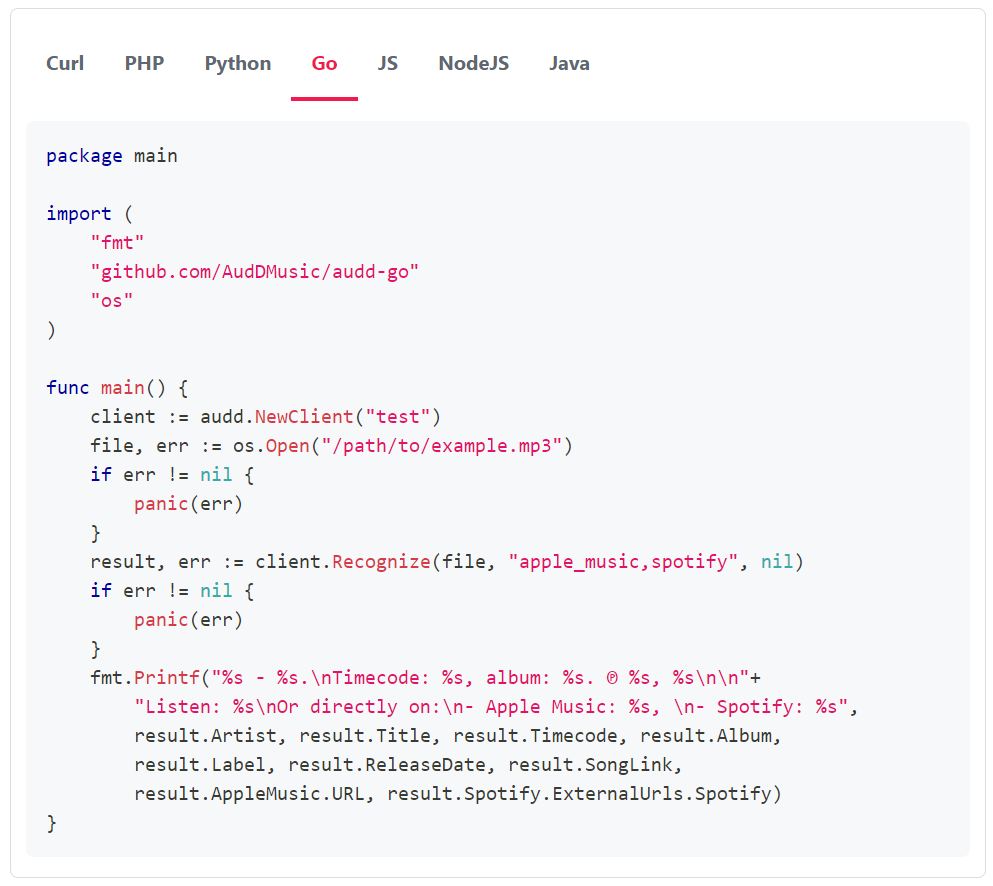
A minimal scan: forward an uploaded file to the enterprise endpoint, cap the matches, and branch on whether anything came back.
The same call works against a raw video upload — the SDK accepts a file path, raw bytes, or a stream, so you can forward the uploaded bytes straight through without writing them to disk:
A clean: true with an empty matches list is your “no copyrighted music detected” verdict. Install the SDK for your stack — pip install audd for Python, npm install @audd/sdk for Node — and see the SDK docs for the other supported languages.
- From match to decision: allow, block, and review policies
- EU Article 17 and the DSA: where music recognition fits
- What music recognition matches, and what it doesn’t
- Build a copyright scanner for user-uploaded content
- Generate DMCA takedown evidence
- Standard, enterprise, or streams: how to choose
- Enterprise cost optimization
- SDK docs
- API reference