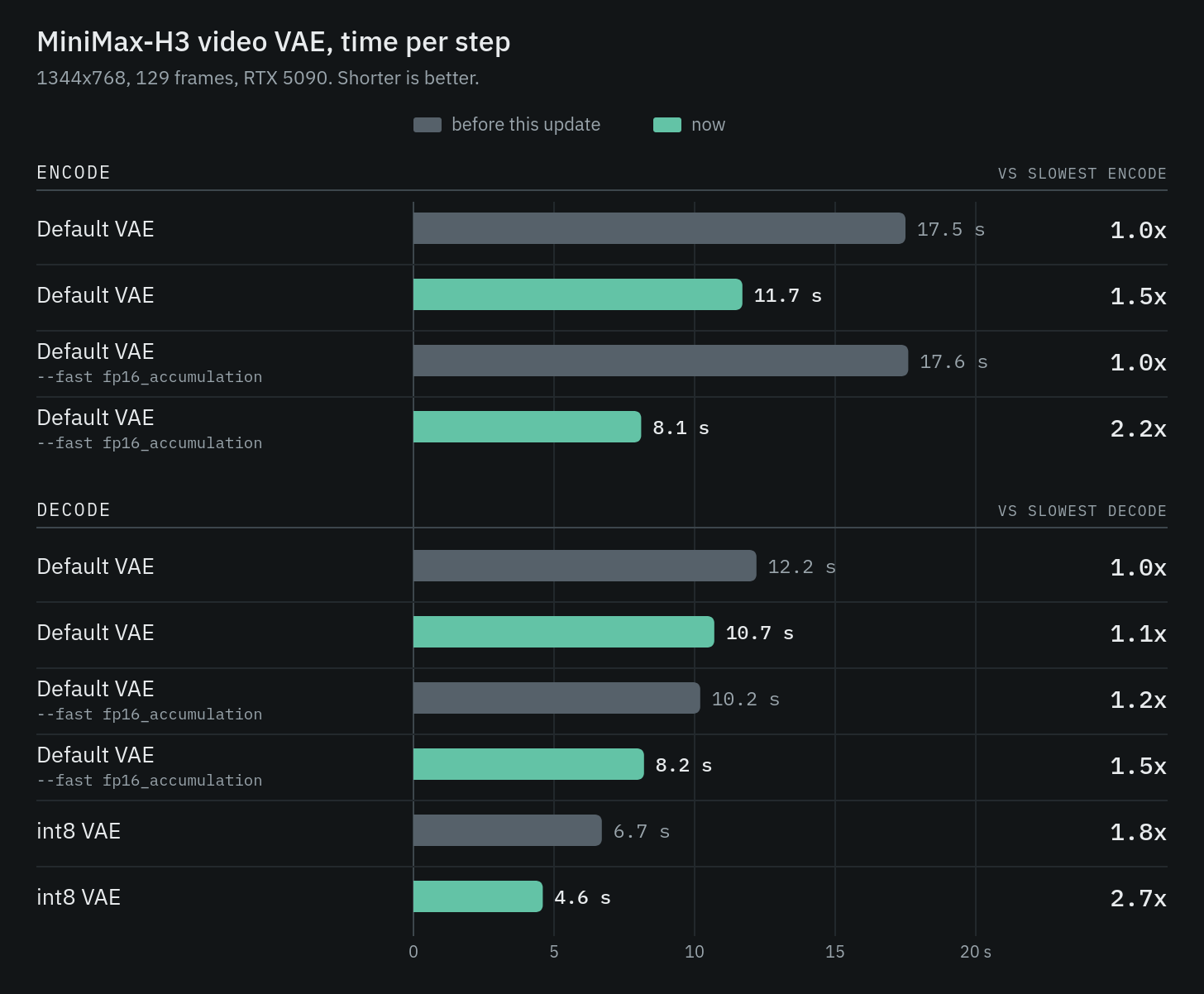
The MiniMax H3 video VAE now encodes up to ~2.2x faster and decodes ~1.4-2.7x faster. Together that can roughly halve the time a video workflow spends in the VAE: a 1344x768, 129-frame encode and decode round trip drops from 24.3 to 12.7 seconds.
- A fused encoder kernel, on by default. Between convolutions the encoder normalized each frame, applied an activation and padded the edges, each one a separate pass over hundreds of megabytes. That is now a single pass, writing straight into the memory layout the convolution wants next. ~1.5x faster, with identical output.
A fused encoder kernel, on by default. Between convolutions the encoder normalized each frame, applied an activation and padded the edges, each one a separate pass over hundreds of megabytes. That is now a single pass, writing straight into the memory layout the convolution wants next. ~1.5x faster, with identical output.
- Convolutions that honor --fast fp16_accumulation. PyTorch sends convolutions to cuDNN, NVIDIA’s library, and there is no way through it to ask for fp16 accumulation, so the flag only ever applied to matrix multiplications and the encoder got nothing from it. The new custom convolution does honor it, with the bias and skip connection folded into it. That takes the encoder to ~2.2x.
Convolutions that honor --fast fp16_accumulation. PyTorch sends convolutions to cuDNN, NVIDIA’s library, and there is no way through it to ask for fp16 accumulation, so the flag only ever applied to matrix multiplications and the encoder got nothing from it. The new custom convolution does honor it, with the bias and skip connection folded into it. That takes the encoder to ~2.2x.
- An int8 decoder. With the int8 VAE file the decoder’s weights are 8-bit, and the normalization, activation and skip connection fold into the matrix multiplications, so intermediate results never reach memory. Attention runs in 8-bit too. 1.4x faster over what int8 VAE used to be.
An int8 decoder. With the int8 VAE file the decoder’s weights are 8-bit, and the normalization, activation and skip connection fold into the matrix multiplications, so intermediate results never reach memory. Attention runs in 8-bit too. 1.4x faster over what int8 VAE used to be.
Measured on an RTX 5090 at 1344x768, 129 frames, comparing each configuration against itself before this update. Nothing here is specific to that card, the fused encoder kernel removes memory traffic, which helps any NVIDIA GPU.
The --fast fp16_accumulation path helps on the consumer cards where fp16 accumulation runs at double rate.
You will most likely not see a difference by eye.
Every VAE loses a little detail when it compresses a video and reconstructs it, and that loss is there always. What the faster int8 paths add on top of it is roughly 30x smaller loss again, well under anything that shows up in a frame.
Encoding still runs in fp16 even with the int8 VAE, the fused kernel is lossless, it just computes the same values in a different order.
In technical terms: the int8 decoder matches the standard decoder at 67.7 dB PSNR and the faster encoder at about 68 dB, against roughly 38 dB for the VAE’s own reconstruction of real footage.
- Update ComfyUI to v0.36.0 or above. The fused encoder kernel needs nothing else.
Update ComfyUI to v0.36.0 or above. The fused encoder kernel needs nothing else.
- Start ComfyUI with --fast fp16_accumulation for the faster encoder and decoder.
Start ComfyUI with --fast fp16_accumulation for the faster encoder and decoder.
- Download the workflows below, or find them in the template library.
Download the workflows below, or find them in the template library.
- Load the int8 MiniMax-H3 VAE file for the fastest decode. It is a drop-in replacement for the standard one.
Load the file for the fastest decode. It is a drop-in replacement for the standard one.
All figures are same-day A/B measurements against the pre-change build, taken through the VAE Encode and VAE Decode nodes.
No posts