The IDE for professional development in Go
GoLand JetBrains Air
If you’ve ever built backend services in Go, chances are you’ve also written a webhook handler or two. They’re small and rarely get much attention – that is, until something breaks. A third-party provider sends a signed request, and then you check the signature, store the event, and reply. Sounds like three easy steps, but a lot can go wrong. A captured request could get replayed, a duplicate could get saved twice, or a forged signature could slip through.
Coding agents are not likely to make these types of mistakes, so with code becoming cheaper to generate, handlers are a good task to give them. They can also write handlers faster than you can. But even with their suitability to the task, it is still on you to check that they got the details right if you want to avoid issues in production.
That’s where JetBrains Air in IDEs comes in. It gives you one place to start your preferred agents, follow their progress, and review their work. In this article, we’ll build a small webhook receiver, review the changes and send feedback straight from the diff, and then run a few follow-up tasks in parallel, each in its own worktree, that will all be merged together later. Finally, we’ll verify the combined output with GoLand’s tools, including the HTTP client and database tools. And to make things easier, we’ll let an agent profile the handler with our new profiling skill, goland-profiler.
Tag along to see how to create a working service you own and trust in a matter of minutes.
What we’re building
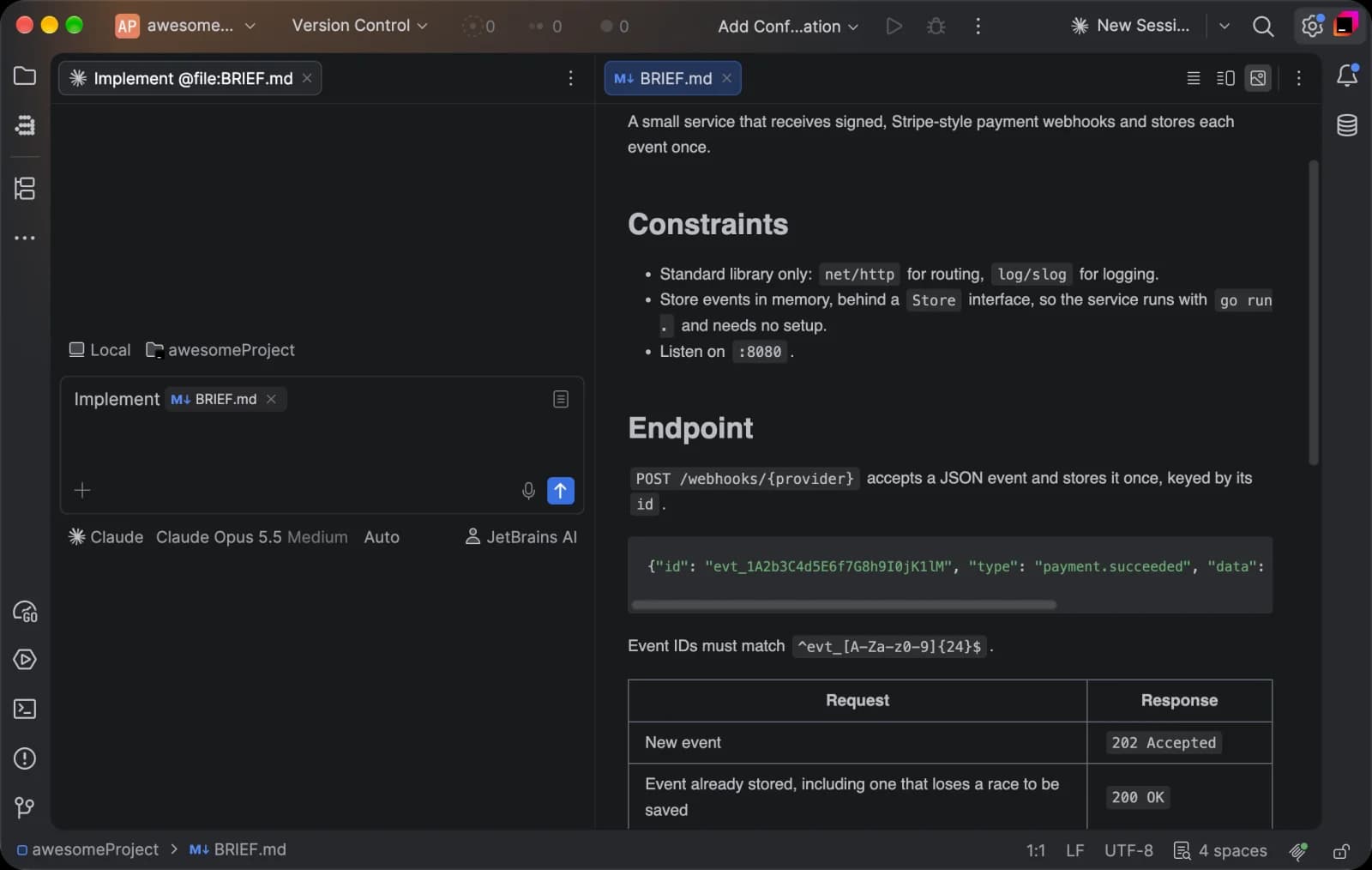
Our example is a small service that receives signed, Stripe-style payment webhooks and stores each event just once. We start with an empty Go module with nothing in it but a brief, BRIEF.md, that agents will use as a reference. You can copy it from the demo repository: air-goland-demo.
These are the principles of our project:
- Standard library only: Our project uses net/http for routing, log/slog for logging, and an in-memory store, so the service runs with go run and needs no extra setup.
- One endpoint only: POST /webhooks/{provider} accepts a JSON event and stores it once by its ID. A new event gets 202 Accepted, and a redelivery gets 200 OK.
- Signed requests: Every request carries a signature, and anything with a missing or invalid signature, or a timestamp older than five minutes, gets 401 Unauthorized.
Laying out the core principles is something you don’t necessarily want to hand off to agents straight away, because that’s where you decide on the definition of “done”. Also, because several agents will use it at the same time, the brief is what ties their work together. Naturally, the better you scope your project, the easier it will be for the agents to follow along and make fewer mistakes.
First, we’ll ask an agent to build the service from BRIEF.md – the store, the handler, the signature check, and main.go. Once that’s in place, we’ll take on three follow-up tasks: an SQLite store, extra tests for the signature check, and a set of signed test requests for GoLand’s HTTP client. When we’re done, the core of the service should resemble our demo repository – a reference version of the service you can use to try out our new Profiling skill (more on that later). The reference keeps only the in-memory store, so it doesn’t include the SQLite store or the HOOKRELAY_DB setting your agent adds.
Getting started with Air in GoLand
In GoLand 2026.3, Air has become the default AI workspace (replacing AI Assistant), so there’s nothing to install – you’ll see it on your home screen after you update. You can choose which agents you want to work with, including Junie, Codex, Claude Code, or any other agent that supports the Agent Client Protocol (ACP).
There are three ways to start a session:
- Agent widget: Click the widget in the main toolbar to start a session with your current preset, or click the drop-down button next to it to pick a different agent.
- Agent Sessions tool window: Open it with View | Tool Windows | Agent Sessions.
- Global prompt: Press Ctrl twice anywhere in the IDE, type your request, and press Enter. If you have code selected in the editor, it will be used as context.
Each session opens in its own tab. You can pick the model, the effort, and the access level (i.e. how much oversight the agent has). The first time you send a request, the agent may ask you to authorize it – with your service account, JetBrains AI, or a provider key you add under Settings | AI | Air | Accounts.
Launch your first agent task
First, we’re going to hand off the core of the service to Codex. With a properly defined scope, one agent with a sufficiently robust model should be able to build this simple service without any major hiccups.
- In the Agent Sessions tool window, click the drop-down button next to New Session and select Codex.
- Pick a model in the model selector below the text field.
- Enter the prompt and press Enter.
Here’s the prompt we used:
Build the service described in BRIEF.md: an in-memory event store behind a Store interface in internal/store, the webhook handler in internal/webhook, signature verification as net/http middleware in internal/middleware, and a main.go file that wires them together. Store each event once by its ID, replying 202 Accepted for a new event and 200 OK for a duplicate, and log with log/slog. Add table-driven tests and a benchmark for the handler.
Review changes
The easy part is done. Now it’s time to make sense of what the agent produced and see if it’s done everything right.
When an agent finishes a turn, the session lists the files it changed, with added and removed lines, under Since last turn. Click a file to open its diff, or click Review to step through all of them. Since this session works directly in your project, its changes also show up in the Commit tool window (⌘K). For sessions that run in a worktree, which we’ll get to shortly, Worktree Changes in the session header shows everything the agent has changed compared to the base branch.
Luckily enough, webhook receivers fail in pretty predictable ways. This is where your actual experience as a developer comes in handy. Instead of reading the diff top to bottom, you can check it against a short list of known offenders:
- Constant-time comparison: Signatures should be compared with hmac.Equal. A plain == or bytes.Equal returns at the first mismatched byte, which can leak how much of a forged signature was right.
- Raw body: The HMAC has to cover the timestamp and the body exactly as it arrived, not a re-encoded version of the parsed JSON.
- Replay window: Stale timestamps should be rejected, or a captured request can be replayed indefinitely.
- Size limit: Without http.MaxBytesReader, a client can send a body of any size, and the service will read all of it.
- Read once: If the middleware reads r.Body to check the signature, it has to put it back for the handler.
- Idempotent replies: Providers retry anything that doesn’t get a 2xx response, so duplicates – including one that loses a race to be saved – should get 200 OK.
- Quiet errors: Error responses should carry a short, fixed message, while the details go to the logs. We covered this in our guide to secure error handling in Go.
Give feedback in the diff
If you find any mistakes, you can describe each change you want in the chat, but it’s quicker and leaves less room for error to point the agent at the right line of code instead. In the diff, click the chat icon in the gutter next to a line or selection of lines, type your note, and click Add Note or press Enter. You can also leave several notes and send them together.
Once you send the message, the notes stay attached to it as a read-only record of what you asked for. The agent picks up from there, and its next Since last turn list shows only what changed since then.
When you’re happy with the results, commit them from the Commit tool window (⌘K). This will be our starting point for subsequent tasks.
Run more tasks in parallel
Normally, you’d probably complete the tasks that we’ll work on in a sequence. But since they don’t really depend on each other, you can hand them out to agents all at the same time and review the changes as they come in. We’re going to create:
- SQLite store: A persistent store behind the existing Store interface.
- Tests for the replay window: Proof that the signature middleware rejects requests that are more than five minutes old.
- Signed test requests: A way to try the whole service from GoLand’s HTTP client.
We will work with worktrees, so that agents don’t get in each other’s way. Here’s how to set them up:
- In the Agent Sessions tool window, click the drop-down button next to New Session and select the agent.
- Open the run mode list in the toolbar above the text field and select New Local Worktree. The session will get its own Git worktree and a branch.
- In the branch list next to the project name, choose the branch with your first commit as the base.
- Pick a model in the model selector below the text field.
- Enter the prompt and press Enter.
We’re going to give the SQLite store to Claude with this prompt:
Add an SQLite implementation of the Store interface in internal/store, using the pure-Go driver modernc.org/sqlite, so the service still runs with go run. Make the event ID the primary key, so a duplicate insert returns the same error as the in-memory store. In main.go, use SQLite when HOOKRELAY_DB is set to a file path, and keep the in-memory store as the default. Add table-driven tests against a temporary database. The driver is the one exception to the brief’s standard-library rule.
The other two tasks are pretty routine, so they’re a good fit for Junie Lite – our coding agent with a cost-efficient model for everyday tasks that works with your JetBrains Account. Here are the prompts:
Add table-driven tests for the signature middleware in internal/middleware to check that a request is rejected with 401 Unauthorized when its timestamp is more than five minutes old, and accepted when it’s just inside the window. Only change test files.
Create requests/webhooks.http for GoLand’s HTTP client with three requests to POST {{host}}/webhooks/stripe: a valid event, the same event sent again, and an event with a bad signature. Sign the first two in a pre-request script, as described in BRIEF.md. In a dev environment, put the host in requests/http-client.env.json and the secret in requests/http-client.private.env.json. Give each request a response check for the status code the brief expects.
All three agents now work side by side, each in its own worktree. The Agent Sessions tool window shows which sessions are In Progress, which need your input, and which have finished with results you haven’t looked at yet, so there’s no need to keep clicking through tabs to check. If you turn on Time and Cost under the Filter icon, you can also see how long each session has been running and what it has cost so far.
If an agent needs a decision from you – like permission to run go test – its session is marked as waiting for input, and you can answer right in its tab. You can also queue follow-up prompts while an agent is busy. They’re sent as soon as it finishes its current turn.
Tie it all together
Each of the new additions has only been tested on its own – the SQLite store against a temporary file and the new tests against the middleware, while the test requests haven’t been sent anywhere yet. So now that we want to combine the branches, it’s time to check the whole thing.
First, you want to review each worktree the same way you did the original service: Review the changes and leave notes in the diff.
Be mindful that test requests have to sign exactly what the middleware checks, ensuring that the same string with the same secret in the same header format. The secret belongs in the http-client.private.env.json, not in the shared environment file or the script.
Once you’re happy with the results, you can bring these three branches together:
- In your project, check out the branch the work should land on. Air cherry-picks onto whichever branch is currently checked out, not the worktree’s base branch.
- In each session’s header, click the drop-down button next to Commit, select Commit, and cherry-pick all.
Send the test requests
The private environment file is in .gitignore, so Junie Lite’s copy stayed behind in its worktree. Create your own in requests/http-client.private.env.json:
Next, start the service with SQLite: Open the run configuration for main.go (Run | Edit), add HOOKRELAY_DB=hookrelay.db under Environment, and run it. Then open requests/webhooks.http, select dev in the Run with list, and click Run All Requests in File.
A pre-request script signs each request before it’s sent, and a response check after each one compares the status code with what the brief expects. That means you don’t have to read the responses yourself – the Tests tab of the Services tool window lists each check as passed or failed.
Check the database
The database tells you what the HTTP client stored. Open the Database tool window, click +, choose Data Source | SQLite, and point it at hookrelay.db in the project folder. GoLand may offer to download the SQLite driver first. Next, open the events table, or run a quick query in the query console (adjust the table and column names to whatever your agent chose):
The valid event and its duplicate should leave one row between them. Since the database keeps its data between runs, delete hookrelay.db before you send the requests again, or the valid event becomes a duplicate and its check fails.
Let an agent profile the handler
Voilà! Our agents’ service works, but for now, nothing tells us how it behaves under load. Webhooks tend to arrive in bursts – after an outage, for example, when a provider redelivers its whole backlog at once – so a slow handler is more than a theoretical problem. Normally, this is where you’d reach for the profiler. With GoLand 2026.3, you can hand that job to an agent, too.
To demonstrate the profiling skill on an actual problem, we’ll switch to a reference version of this service that you can find on . It’s a finished receiver built to the same brief, with one difference: We’ve left a performance problem in it on purpose, so you can repeat every step below on your own machine.
Where skills can help
A skill is a set of instructions that teaches an agent how to handle a specific type of task. On its own, an agent can only work with what it sees from the outside: It reads the code, runs commands, and parses their output. GoLand’s skills connect supported agents to the IDE’s own tools so that the agents can use them more effectively, allowing the agents to know which profile to take, how to read it, and how to tell whether a fix actually worked.
The goland-profiler skill is bundled with Air and works with Claude Code, Codex, and Junie. These agents can run your application with GoLand’s profiler, record a CPU profile while it handles traffic, and read its hot paths and line-level hints. Thanks to the skill, there’s nothing to set up – the agent loads the skill when a task calls for it, or you can attach it explicitly by typing / in the prompt or by clicking Add and choosing Skills.
How to use it
To try out the skill, open the demo repo in GoLand and stay on its main branch. The service needs traffic to profile, so the repo comes with a small load generator that sends signed events for 30 seconds. Start a new session with this prompt:
Run the service with /goland-profiler and record a CPU profile while go run ./cmd/loadgen sends it traffic. Tell me where the handler spends its CPU time and memory, and what you would change. Don’t edit any code yet.
We suggest asking for a diagnosis first so that you can check the agent’s reading of the profile before it acts, and decide what you want to change based on evidence.
The agent starts the service with the profiler, records CPU while the load generator runs, reads the hot paths, and comes back with the culprit: validateEventID compiles its regular expression on every call. In our run, validateEventID accounted for 69% of the CPU use, with regexp.MustCompile being the hottest call. The allocation churn was keeping the garbage collector busy on top of that.
You don’t have to take the agent’s word for it, though. The profile it captured is an ordinary Go profile, so you can open it in the Go Optimization tool window and look at the flame graph yourself, where regexp.MustCompile sits right under validateEventID and takes up most of the handler’s width.
The fix is pretty straightforward: Compile the pattern once, at the package level, instead of compiling on every request.
Sharing one compiled pattern across all requests is safe in this case, since a *regexp.Regexp can be used by multiple goroutines at the same time, but it’s worth confirming first before you let your agent run loose. We asked the agent to apply the fix and profile the service again under the same load. To put numbers on the difference, we also ran BenchmarkHandler before and after.
After the change, the benchmark is about 4.6 times faster with 59% fewer bytes and 80% fewer allocations per request. Times will vary by machine, but the drop in bytes and allocations should be about the same.
Try it yourself
You can repeat this exercise on your own machine to play with the skill. The repository has two branches:
- main: a finished service with a planted slow event ID validation.
- fixed (use for reference): the same service with the regular expression compiled once.
To try it out:
- Clone the repository and open it in GoLand 2026.3. You’ll need Go 1.27.3 or later.
- Start an Air session with Claude Code, Codex, or Junie.
- Ask the agent to profile the running service – you can use the prompt from the previous section.
- Once the agent has applied its fix, compare your working copy with ours by running git diff origin/fixed, or view our fix on its own with git diff origin/main origin/fixed.
Your agent’s fix doesn’t have to match ours line for line. But it should hold up against the same checks: The tests pass, and the new profile no longer has regular expression compilation at the top.
Run the final checks before you merge
Whether you’re merging the service or the profiling fix, run the checks one last time on the final code. Then, reset the store and run webhooks.http again so the first request is a new event, and restart the service if it uses the in-memory store or delete hookrelay.db if it uses SQLite. If everything checks out, commit from the Commit tool window (⌘K) and merge the branch. A pull request is always a good place for a human to look at the changes – especially ones where three agents were in the driver’s seat.
Code the way you want
AI has changed the coding game to the point that it’s no longer a question of whether you use agents, but how you use them. At JetBrains we support all your workflows. Whether it’s in the IDE or the terminal, whether you use agents for small tasks or orchestrating entire services, whether you YOLO your way through or meticulously check every change, Air is there to help you with the one thing that hasn’t changed: your ownership of your code.
This quick demo only scratches the surface of what Air in IDEs can do, but it’s a good starting point to explore more. Let us know how you like this new addition to your IDE and what features we should demo next. And keep an eye out for more tutorials and skills in the coming months.
Happy coding,The GoLand team