The professional Python IDE for you and your agents. Ship web, data, and ML code you can trust.
Polars is a favorite among data scientists. It’s a high-performance, columnar DataFrame library written in Rust and powered by Apache Arrow.
Unlike traditional single-threaded tools, Polars uses full multicore CPU parallelism, efficient memory allocation, and lazy execution with query optimization. These features let data professionals execute complex joins, filters, and aggregations on large datasets significantly faster while saving RAM.
However, real-world data processing often requires specialized processes to prepare raw data for operational or analytical use cases.
Built-in Polars expressions may not cover highly specialized algorithms or proprietary business logic out of the box. Without custom expression plugins, data engineers and scientists often resort to standard user-defined Python functions or iterative processing. This potentially introduces performance bottlenecks and sacrifices some of Polars’ native speed and memory efficiency. To overcome these bottlenecks, you may want to consider creating Polars expression plugins.
Polars expression plugins
Polars expression plugins allow you to create custom functions and register them as expressions in the Polars library. The Polars engine dynamically links these functions to the runtime, and their performance will be close to that of native expressions.
Expression plugins offer three key benefits:
- Optimization: Plugins seamlessly integrate into Polars’ lazy query engine, allowing expressions to benefit from logical plan optimizations and predicate pushdown.
- Parallelism: Expressions automatically leverage Polars’ multi-threaded execution framework to process data chunks concurrently across available CPU cores.
- Native performance: Implemented directly in Rust, plugins execute with bare-metal speed and zero Python GIL overhead during runtime.
But there’s a catch: These functions must be implemented in Rust (because of the native functionalities mentioned above). To write Rust code in PyCharm, you will need to install the Rust plugin and configure the Rust toolchain.
The Expression Plugins chapter of the Polars user guide gives you a quick overview of the core concepts. This blog post digs a little deeper and is geared toward PyCharm users who are new to Rust.
Create a Polars plugin project using a template
The Rust plugin in PyCharm uses cargo-generate under the hood, allowing developers to quickly scaffold new Rust projects directly from templates.
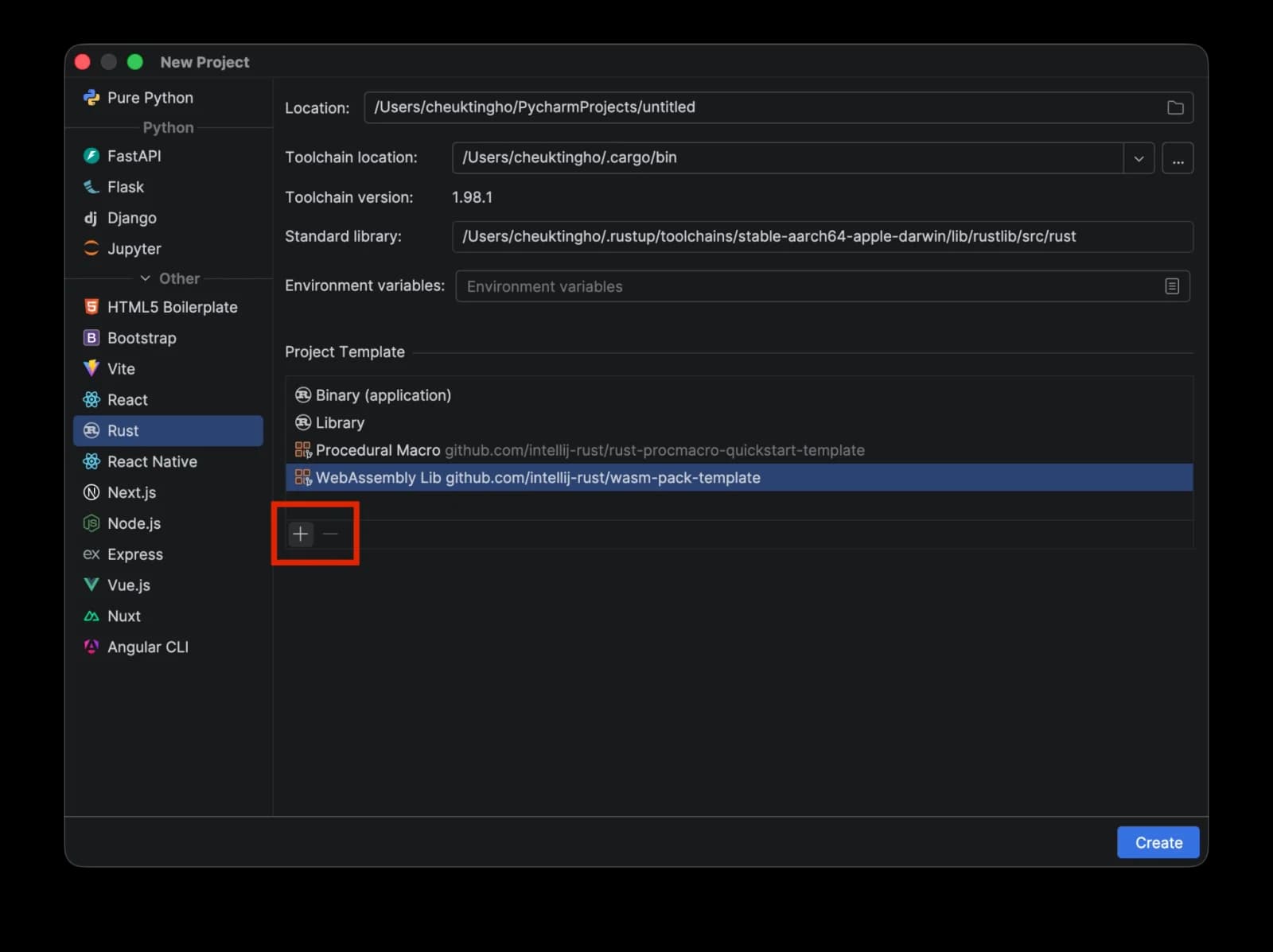
To create a Rust project, start by installing the Rust plugin and toolchain, following the instructions in this documentation. Then, while you have the New Project window open, click on the + icon at the bottom.
In this example, we’ll create our Polars plugin from a template I made earlier. Simply paste the URL for this template into the Template URL field and click Add.
Now the template will be available as an option, and we’ll select it for our current project. Don’t forget to use the Location field to establish a location and name for your project. In this example, ours will be called “polars-plugin-demo”.
When we click Create, a project is created with the necessary .toml files and file structure. Then we can just dive straight into it.
Before we start developing, we’ll have to add a Python environment and interpreter, as you can see <No interpreters> in the bottom right of the screenshot above. Let’s set one up now by clicking on <No interpreters> and selecting Add New Interpreter, then Add Local Interpreter. For this example, we’ll use uv (which I’ve already installed). We should also make sure to select the latest Python version, which is Python 3.14 at the time of writing.
With everything set up, we can start creating our custom Polars plugin.
What’s in a Polars plugin project
Let’s start by looking at what’s inside a new project by default
First, we have two .toml files for the project settings. Cargo.toml is for Rust, and pyproject.toml is for Python. Since our project uses both languages, we’ll need both files:
- Cargo.toml – Rust dependencies: polars, pyo3, pyo3-polars, and serde.
- pyproject.toml – maturin build settings, with module-name wired to polars_plugin_demo._internal.
Now we’ll follow the steps laid out in the Writing the expression section of the Polars user guide. The source code for Rust will be in the src/ folder. This is the same as using maturin init or cargo init to start a Rust project:
- src/lib.rs – The _internal PyO3 module and the Polars global allocator.
- src/expressions.rs – Empty for now, but your #[polars_expr] functions will go here.
Then we’ll have a directory with the same name as our project. This is where all the Python-specific files are located:
- polars_plugin_demo/__init__.py – Where you register each expression with Polars.
- polars_plugin_demo/_typing.py – IntoExpr / IntoExprColumn aliases, so we never have to import the private polars._typing.
- polars_plugin_demo/_internal.pyi – Type stub for the compiled module.
As we go along, I’ll explain the contents of each file and how they all work together.
If you’re using PyCharm, you might also notice the target/ folder in your project files. Although we have not built the project yet, once we’ve configured a local virtual environment (.venv) as its Python interpreter, PyCharm regularly scans and indexes the environment. When PyCharm runs background tasks, it can inadvertently trigger PEP 517 build hooks using information in pyproject.toml. However, this build (the target/ folder) is mainly used to service PyCharm’s checking and indexing functionality. We will ignore it for now.
Writing a Polars plugin
Working out the expression logic
As explained above, we will mainly be working in src/expressions.rs, which is currently empty. In our example project, we’ll start by adding this code to the file:
Let’s look at this code line by line to understand what it does. First we have the imports:
- use polars::prelude::*; – This line brings commonly used Polars types, traits, and macros into scope so they can be used everywhere in the file without specification of their full paths.
- use pyo3_polars::derive::polars_expr; – This line imports the #[polars_expr] attribute macro that we’ll be using. This macro turns an ordinary Rust function into a plugin entry point that Polars can find at runtime.
- use std::fmt::Write; – This line is here to ensure that the write!(output, …) macro works properly.
The logic of our expression is implemented in the capitalize_str function. Instead of returning a String, the function takes the input value and a mutable output buffer. This is necessary because it’s the format demanded by apply_into_string_amortized, which we will call later, so that it can promise one allocation for a whole column instead of one per row.
In this case, the caller in Polars owns the buffer and hands the same one back on every row. Our function can’t own that buffer, because otherwise it only lives for one call. The only way to reuse it is for the caller to hold it and lend it out as a &mut String.
Inside the function:
- if let Some(mut first_char) = value.chars().next() {...} provides an owned, mutable copy of the first char as first_char. There’s no mutable borrowing of value itself.
- first_char.make_ascii_uppercase(); capitalizes in place, but only for a–z. Non-ASCII characters are left untouched by design.
- write!(output, "{first_char}{}", &value[1..]).unwrap(); appends the capitalized character plus the rest of the string.
Note that, in this example, we assume that each character is stored in a single byte only. If the first character is multibyte, byte 1 lands mid-character, the slice panics, and the program will stop working.
After the logic is set, the capitalize function with the #[polars_expr] attribute is responsible for exporting the expression.
- #[polars_expr(output_type=String)] – The #[polars_expr] attribute wraps the capitalize function into an extern “C” symbol in the compiled cdylib, plus a companion function reporting the output dtype. output_type=String declares a fixed output schema, so Polars knows the resulting dtype during lazy planning without running anything.
Note that Polars looks up symbols by name at runtime, which means there’s no need to register our expressions to the module in lib.rs by hand. Instead, we’ll register them on the Python side later.
- fn capitalize(inputs: &[Series]) -> PolarsResult<Series> {...} – Every plugin expression has the same signature: It receives its input columns as a slice of Series values and returns a PolarsResult<Series> containing the resulting column or an error.
- let ca = inputs[0].str()?; – inputs[0] is the single input column; .str() downcasts the type-erased Series to a &StringChunked (Polars’ typed chunked array). It returns a PolarsResult, so `?` turns an incorrect dtype into a clean Polars error instead of causing a panic that would stop the program.
- let out: StringChunked = ca.apply_into_string_amortized(capitalize_str); – out will be a StringChunked type result from moving through the column and calling capitalize_str(value, &mut buf) for each row. As mentioned before, in this process, Polars reuses one String buffer across all rows and copies the bytes into the output Arrow buffer.
- Ok(out.into_series()) – At the end, we convert the typed StringChunked back to a Series and wrap it into the Result type’s Ok variant.
Putting it together as a module
Now that we’ve created the expression logic and registered it as a symbol, we can look at the rest of the project and see how the pieces fit together. Let’s look at src/lib.rs, which is the crate root for a Polars expression plugin:
This code is pure scaffolding, with no expression logic of its own. However, it’s still essential that we understand what it does:
- mod expressions; pulls in src/expressions.rs, where your #[polars_expr(...)] functions live. It’s declared here purely so the module gets compiled; nothing in lib.rs calls into it. As mentioned before, the symbols were looked up by name at call time, so there’s no registration list anywhere in this file.
mod _internal {...} declares the Python extension module using PyO3’s declarative module syntax. The name _internal has to match module-name in pyproject.toml, which is what maturin uses to decide where to drop the compiled _internal.abi3.so inside the Python package.
The module body is nearly empty. But this is intentional, as Polars plugin functions aren’t exposed as Python functions. The only thing #[pymodule_init] does is set __version__ on the module from CARGO_PKG_VERSION, resolved at compile time by env!. The module still matters even though it’s empty because importing it is what loads the .so file into the process, which is what makes the exported #[polars_expr] symbols available for Polars to resolve.
static ALLOC: PolarsAllocator = PolarsAllocator::new(); installs Polars’ allocator as the Rust-side global allocator. This is the recommended setup for pyo3-polars plugins: It ensures the plugin shares the same allocator as the Polars build it’s loaded next to, keeping memory management compatible when data passes between Polars and the plugin, and it lets Polars’ memory accounting see the plugin’s allocations.
The Python-side setup
Now let’s look at the Python side. There are three files inside the polars_plugin_demo/ folder. These files are all scaffolding for a Polars expression plugin and are essential when adding our custom expressions to Polars.
- _typing.py is created because we need a type alias for polars._typing, which is a private module that is subject to change from one release to the next.
- __init__.py is where the Python-side registration surface lives. PLUGIN_PATH points to the package directory, where maturin develop drops _internal.abi3.so. The commented-out capitalize demonstrates how one Python wrapper calls register_plugin_function for each #[polars_expr] in src/expressions.rs. function_name needs to match the Rust function name exactly so Polars can locate the correct plugin function.
- _internal.pyi is the stub for the compiled extension. However, expression functions are exported as C symbols, not Python attributes, so they do not appear here. We use this file to declare __version__: str.
After reading through these files, uncomment the example in __init__.py:
We are now ready to build our custom Polars expression.
Building and testing our plugin
Although we can build the plugin manually with maturin develop, PyCharm can handle this step for you. It invokes maturin develop to compile your Rust modules into a native shared library (an .so file in this case) and drops it into the designated directory.
Since we’ve configured
[tool.maturin]module-name = "polars_plugin_demo._internal"
in the pyproject.toml file, our .so file is placed in the polars_plugin_demo/ folder. We also need to make sure the name of the PyO3 module in src/lib.rs matches the last part of module-name (_internal in this case).
To trigger a build, simply run or debut a Python script that uses the plugin. In a real project, you’d typically have a set of Python tests sitting in a tests/ folder or something similar. However, since this is only a demo, let’s keep things simple and use the following script:
Now that our customized plugin capitalize has been built and included in the polars_plugin_demo module, we can import it and use it like other Polars expressions.
Run the script just like you’d normally do in PyCharm – for example, by clicking the Run button in the top-right corner:
You’ll see the loading bar at the bottom:
This indicates that maturin develop is running in the background. The result is cached, so the next time you run the script (assuming you haven’t made changes to the module), it will execute much faster.
Want a challenge? Try writing some unit tests and running them with pytest to see if everything works as expected.
What’s next?
If you’d like to learn more about how to create Polars plugins, check out my workshop on GitHub. You might also enjoy this tutorial by Marco Gorelli or the Expression Plugins section of the Polars user guide.
Explore more of what the Rust plugin in PyCharm offers to streamline your project with Rust and Python. The plugin enhances cross-language development with intelligent code completion, seamless navigation between Rust and Python modules, and automated refactoring across your codebase. Furthermore, its integrated debugging support lets you step through both Python scripts and compiled Rust code effortlessly, ensuring a smooth and unified workflow.