JetBrains Research
Research is crucial for progress and innovation, which is why at JetBrains we are passionate about both scientific and market research
Research
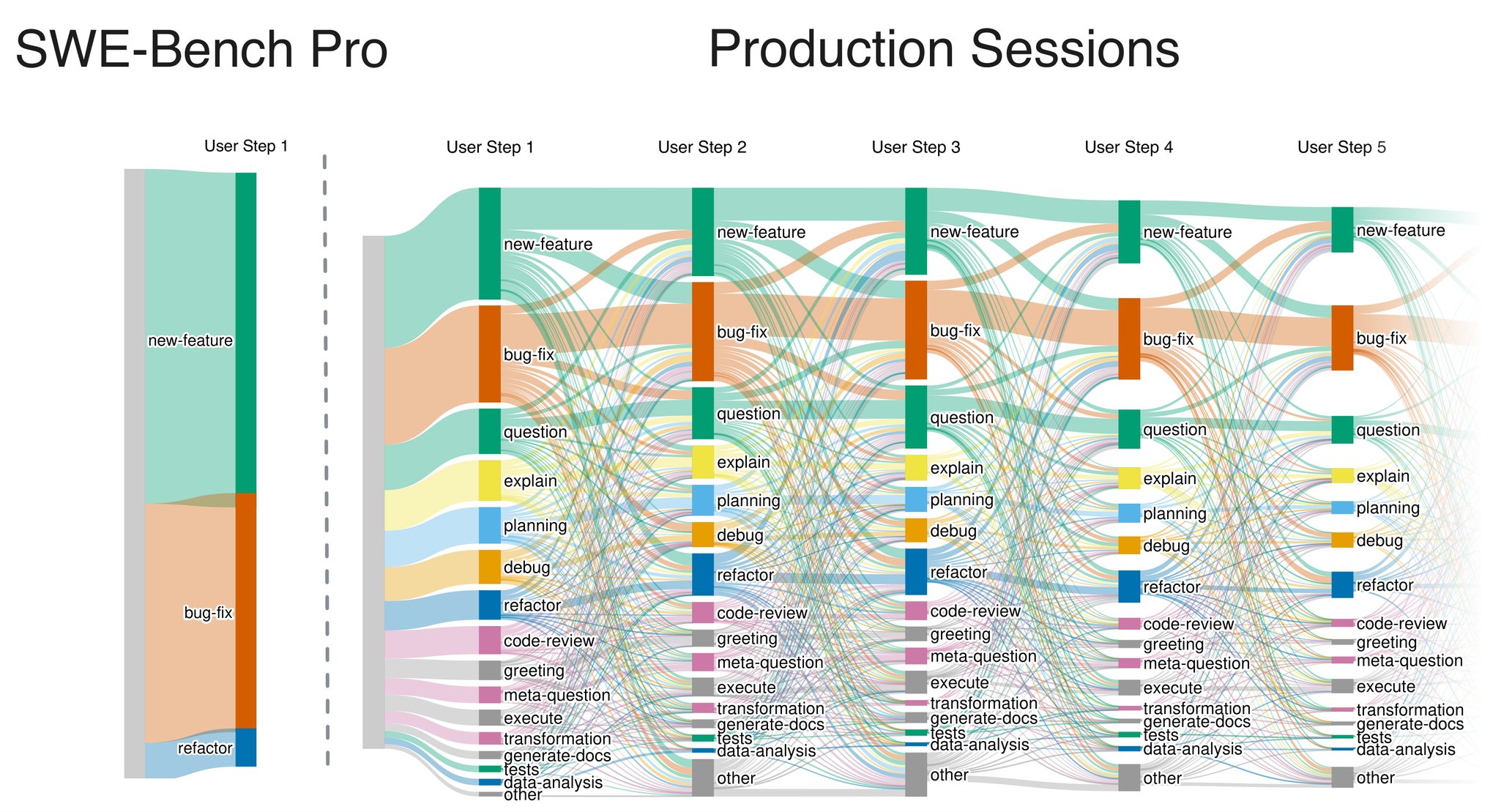
Left: SWE-Bench Pro, where each task is a single user message, almost always a new feature or a bug fix. Right: the first five developer messages in sessions of software engineers working in JetBrains IDEs, counting only sessions with at least three messages. Each column is a message position, colored Cblocks are request types, and band widths show how often one type follows another.
This post summarizes our paper Opinion: Coding-Agent Benchmarks Should Match Their Users’ Task Flows, accepted to the Evaluation of Interactive Agents workshop at NeurIPS 2026.
This post summarizes our paper , accepted to the Evaluation of Interactive Agents at .
At JetBrains Research, we recently analyzed 4,782 agent sessions of software engineers working in JetBrains IDEs and compared them with three public collections of agent conversations. In the developer sessions we looked at, fixing bugs and adding features account for less than half of what developers ask a coding agent to do. The rest contains questions about the codebase, planning, code review, refactoring, and command execution. In SWE-Bench Pro, on the other hand, 93.8% of tasks are features and bug fixes, and every task arrives as one complete message. That’s quite a difference.
That gap is the subject of this post. Our conclusion from the analysis is that there is no universal realistic coding-agent benchmark: a benchmark should be calibrated to measurements of a specific user population. SWE-TaskFlow is our contribution for doing this with any issue-derived benchmark; in this post, we apply it to SWE-Bench Pro.
What an issue-based benchmark measures
SWE-bench and its successors (SWE-Bench Pro, SWE-rebench, DeepSWE) build tasks from GitHub issues. The agent gets a repository checkout and the issue text, explores the code, edits it, and submits a patch. Tests decide whether the patch resolves the issue; the share of resolved issues is the resolve rate.
The infrastructure behind these tasks is expensive to build: i.e. a repository at the right commit, an environment where the code runs, and tests that verify the change. The interaction layer on top of it is fixed, however. The full specification arrives in one polished message, and one final patch is scored.
Despite the fixed nature of the interaction layer, developers in an IDE work like that only some of the time. That is, half of the sessions we saw are a single message. In the rest, requirements come in pieces: Between one change request and the next, the developer asks the agent to explain how some part of the project works, to plan the next change, or to review what was done, while the earlier requirements still have to be carried along.
How developers actually use the agent
Each of the 4,782 sessions, which we call Production Sessions, is one conversation between a developer and the coding agent inside the IDE; together, they contain about 14,000 developer messages. We looked only at the developer’s side, and the figure below shows the distribution of messages across the Production Sessions.
The 4,782 sessions by number of developer messages (the chart calls them prompts). One developer message can trigger many agent actions.
Half of the sessions (50.9%) are a single message; about 15% run past five. Since our subject is interactive agents, the rest of the analysis is on the 33% of sessions with at least three developer messages, the long sessions, as follows.
An open-weight LLM (Gemma 4-31B) labeled every message with one of 16 request types, or intents: bug fix, new feature, explain, planning, code review, execute, and so on (all 16 are defined in the paper). The same classifier, with the same prompt, labeled the public collections and the SWE-Bench Pro issues, so every distribution in this post is measured on the same footing.
Across all sessions, bug fixes make up 26% of the labeled messages and new features 19%. In the long sessions, explanations of the project’s own code account for 6% of messages, and general programming questions for another 10%; planning, code review, refactoring, debugging, and execution make up most of the rest. SWE-Bench Pro, labeled the same way, comprises 55% new features, 39% bug fixes, 6% refactoring, and nothing else.
Session length and intent mix are two of the three components of a Task Flow; the third is the order in which intents follow one another. A session that opens with a feature request often continues with a question about existing behavior, a planning step, and a review request.
How public collections compare
Our Production Sessions are for one user population. To see how much the picture depends on the population, we ran the classifier on 1,000 sessions from each of the public collections below and kept the long ones. Below, we include Sankey diagrams for each. The Sankey diagrams in this post are Task Flows, where each column is a message position, and the bands between columns are these transitions.
SpecStory consists of public IDE session exports, the data analyzed in Programming by Chat. 521 of its 1,000 sessions are long. Of the three, it sits closest to our sessions, with a larger share of planning.
DataClaw collects coding-agent sessions shared by the community. 585 of 1,000 are long. It is dominated by execution requests and short operational messages.
SWE-chat is a collection of coding-agent conversations from real users, gathered in a chat setting. 698 of 1,000 are long. Execution and planning are its largest intents.
These three corpora come from different products, different users, and different collection methods, so we do not compare them quantitatively. Still, a benchmark calibrated to any one of them would have a different mix of tasks and transitions than one calibrated to another. None of them is ground truth, and neither are our Production Sessions; the target has to be chosen and stated.
For our pilot, the target is the long Production Sessions. Calibrating to frequencies has a side effect: anything rare in the target gets pushed toward zero. Rare but consequential behaviors, such as a destructive shell command or a security-relevant review, should instead be evaluated in separate stress-test slices with their own task counts.
How SWE-TaskFlow adapts existing tasks
Building a new interactive benchmark for every target would throw away what issue-based benchmarks already have. Instead, we propose SWE-TaskFlow, which transforms an existing benchmark: it keeps the repository, the environment, the tests, and the original requirements, while regenerating only the user messages.
Splitting the issue into several requests
An LLM rewrites each issue as three ordered requests; we call them issue requests, since everything in them comes from the original issue. The agent works on the first before it sees the second. The split has to preserve every original requirement and add none; identifiers and code snippets are kept verbatim; each request has to be actionable in the repository state that the previous one left behind. A second model pass checks the result for completeness. 31 of the 731 public SWE-Bench Pro issues did not pass these splitting and evaluation checks and were left out, leaving 700 tasks.
Here is what it looks like for a qutebrowser issue titled “LinkedIn Fails Due to Missing Array.prototype.at Support in Older QtWebEngine”. The original issue is one message of about 1,000 characters. Split, it becomes:
- Please fix the LinkedIn compatibility problem in qutebrowser on macOS with QtWebEngine 5.15.2. LinkedIn’s frontend JavaScript uses Array.prototype.at, which is missing from that older engine, so JavaScript execution fails and LinkedIn pages remain stuck or unresponsive. Add the qutebrowser JavaScript compatibility support needed so LinkedIn can load and function normally, using a polyfill to resolve the issue transparently.
- The compatibility support should provide Array.prototype.at on QtWebEngine versions prior to 6.3 when it is not available natively, and it must be active and functional on LinkedIn domain pages and qutebrowser test domains. For array instances, positive integer indices should return the element at the specified index, while negative indices count backward from the end, with -1 referring to the last element.
- Complete the behavior so indices outside the array bounds return undefined for both positive and negative indices. The polyfill must only be injected when the native Array.prototype.at method is not already available in the JavaScript environment.
The first request is enough to start working; the edge cases arrive later.
Adding questions about the repository
Explanations of the project’s own code are common in Production Sessions and absent from issue benchmarks, so we generate them. A model reads the repository together with the trajectory of an agent that previously solved the issue and proposes one to three questions. Each question must be answerable from the repository alone, stay valid both before and after the fix, and not give away the solution.
Every question ships with a reference answer and an executable proof script that collects evidence for the answer from the repository. At dataset creation, we run the script in a clean checkout and keep the question only if it passes, produces the evidence, and leaves the repository unchanged. This rules out, by construction, questions whose answers are not observable in the code (“why was it designed this way?”). At evaluation time, the agent answers in text, and a separate LLM judges the answer against the hidden reference and its evidence.
In the released configuration, the qutebrowser task above gets one question, placed between the first and second issue requests:
Concise answer: Trace how a relevant stylesheet configuration change updates both future QtWebEngine documents and the already loaded document, including CSS assembly, script replacement, execution world, subframe behavior, and the no-op path for unrelated options.
The reference answer names the two config options that trigger this path and walks through five files. The proof script performs a stylesheet config change against the real code, checks the resulting script registration and the call into the live page, and confirms that an unrelated option does nothing. The question is unrelated to Array.prototype.at: it comes from code the solving agent read along the way, not from the fix itself.
Picking sequences that match the target
Questions can go before, between, or after the issue requests, so each task has several candidate sequences. We pick one per task so that the benchmark as a whole resembles the long Production Sessions, as measured by the TaskFlow Alignment Score (TFAS). TFAS compares the three distributions (session lengths, intents, transitions) between target and benchmark with the Jensen-Shannon divergence and combines them into a 0–100 score. Pure splitting scores 59.6 against our target. Adding questions at fixed positions raises it to 75.6–77.1; letting an optimizer choose how many questions each task keeps and where they are placed raises it to 77.8. The result is 454 questions across 255 of the 700 tasks (113 tasks with one question, 85 with two, 57 with three), with 67 tasks carrying their questions only before the issue requests, 86 only after, and 102 interleaved. The other 445 tasks keep their three issue requests.
Task Flow of SWE-Bench Pro (left) and of the TFAS-optimized selection with TFAS 77.8 (right). One user prompt per issue becomes up to six sequential prompts of different types. Repositories, requested changes, and the final tests are unchanged.
In the right panel, the issue requests carry the task types that were already in the issues: bug fix, new feature, and some refactoring, the same three that make up all of SWE-Bench Pro on the left. Smaller intents also surface once an issue is split: debug, transformation, tests, planning, and a few others. These are not additions but parts of the original issue that the classifier folded into the dominant intent when it saw the issue as one message (a bug-fix issue that also asks for a regression test, for example) and that became visible as separate messages after the split. The only intent that comes from outside the issue is explain, carried by the repository questions.
Pilot results: four models, three setups
To evaluate SWE-TaskFlow, we ran GPT-5.6 Luna, GPT-5.6 Terra, GPT-5.4 Mini, and Gemini 3.7 Flash through mini-swe-agent on the same 700 tasks, three runs per setup:
- Single: The original issue in one message.
- Split: The three requests, delivered one after another in a single conversation.
- Split+QA: The TFAS-selected sequences with repository questions.
Means of three runs; whiskers are observed min–max. Colors are models, shapes are setups.
Splitting the issue into three messages made every model 2.0–2.6× more expensive per task. Since the repository, the tests, and the requirements did not change, the extra cost measures how much more effort an agent spends when the requirements arrive in pieces. Resolve rates moved less: GPT-5.6 Terra stayed flat, the other three dropped by 4–5 points on average, which is comparable to the spread between individual runs of the same setup. With three runs per setup, these results do not rank the models; they show that progressive disclosure reliably changes the effort and only weakly changes the outcome.
The LLM rewrite itself, rather than the sequencing, could also have made the tasks harder. A control condition, Concat, delivers the same three rewritten parts pasted into one message. For the three GPT models, with one run each, it lands next to Single on both cost and resolve rate, so the extra cost of Split comes from the sequential delivery, not from the rewording.
Adding the repository questions costs another 4%–24% on top of Split, depending on the model. On the 255 tasks that carry questions, the share of answers the judge marks correct (answer accuracy) ranges from 69.8% (GPT-5.4 Mini) to 83.0% (GPT-5.6 Terra).
Filled circles: answer accuracy. Hollow circles: resolve rate on the same 255 tasks, which is why these resolve values differ from the plot above.
A split trajectory also admits intermediate verification. After each issue request, we can snapshot the repository and rerun the tests, scoring only against the requirements revealed so far. In a 64-task ablation, both the resolve rate and test-pass rate grow with each issue turn, and the position of the questions does not move the curves. One task yields several verified checkpoints instead of a single final score. That is useful for diagnosis and potentially for training; we have not tried the latter.
What SWE-TaskFlow does not yet cover
SWE-TaskFlow currently generates two kinds of messages: issue requests and repository questions. Everything else in the Task Flow of real sessions (general programming questions, planning, code review, refactoring beyond what the issues already contain, execution, debugging without a fix) still needs its own generator and its own verifier, and for most of these, it is unclear how to check the response automatically. The measured Task Flow at least tells us which augmentations are missing and in what proportion.
All messages are also fixed before the run. That gives exact replayability and paired comparisons, and it measures progressive disclosure, memory, and adaptation, but not how the agent handles feedback: the “user” cannot react to what the agent did. Reactive benchmarks with simulated users cover that at the price of trajectory variance; a full evaluation suite would combine a calibrated static core with targeted reactive slices. Beyond that, the classifier has no human-labeled accuracy set; some issues cannot be split, question difficulty depends on the model that writes them, and the pilot has three runs per setup.
The SWE-TaskFlow-SWE-Bench-Pro dataset on Hugging Face has 12 configurations as separate splits: the original prompts, the split prompts, the Split+QA variants, and QA-only sessions. Every question comes with its reference answer and proof script. Repositories, gold patches, and tests stay with the original SWE-Bench Pro release.