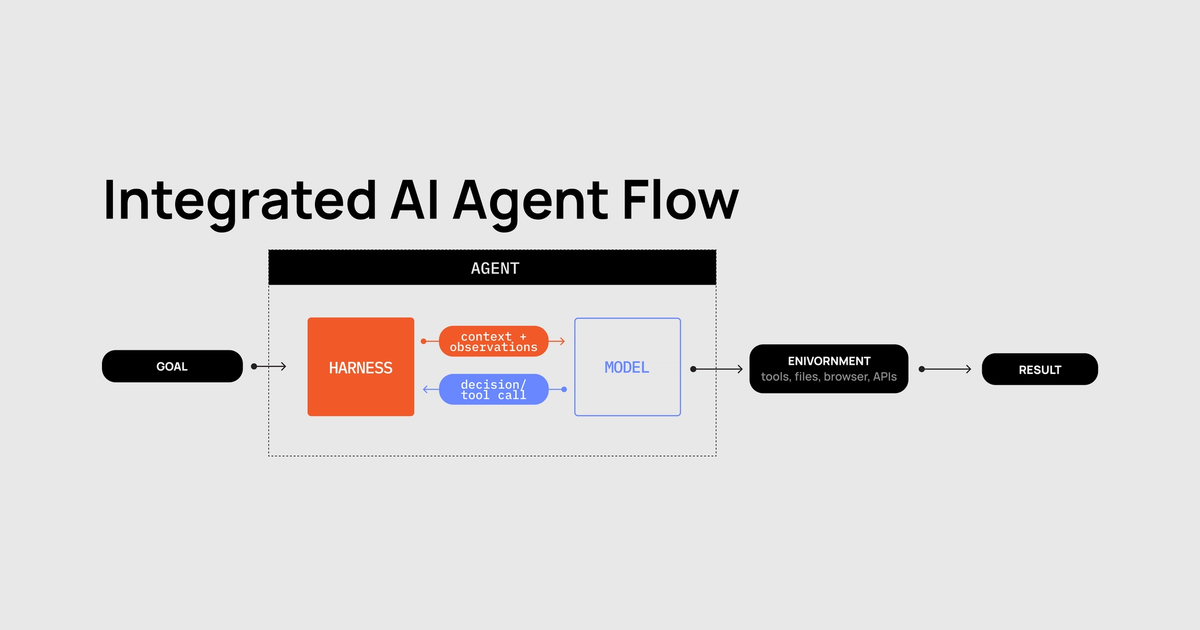
An agent is roughly a model inside a harness, operating in an environment.
The model supplies the intelligence. It reasons, makes decisions, writes code, and decides what actions to take next. The environment is the actual computer, repository, browser, or container where this work happens, and the user (sometimes another agent) is the one providing the goals and providing guidance when needed.
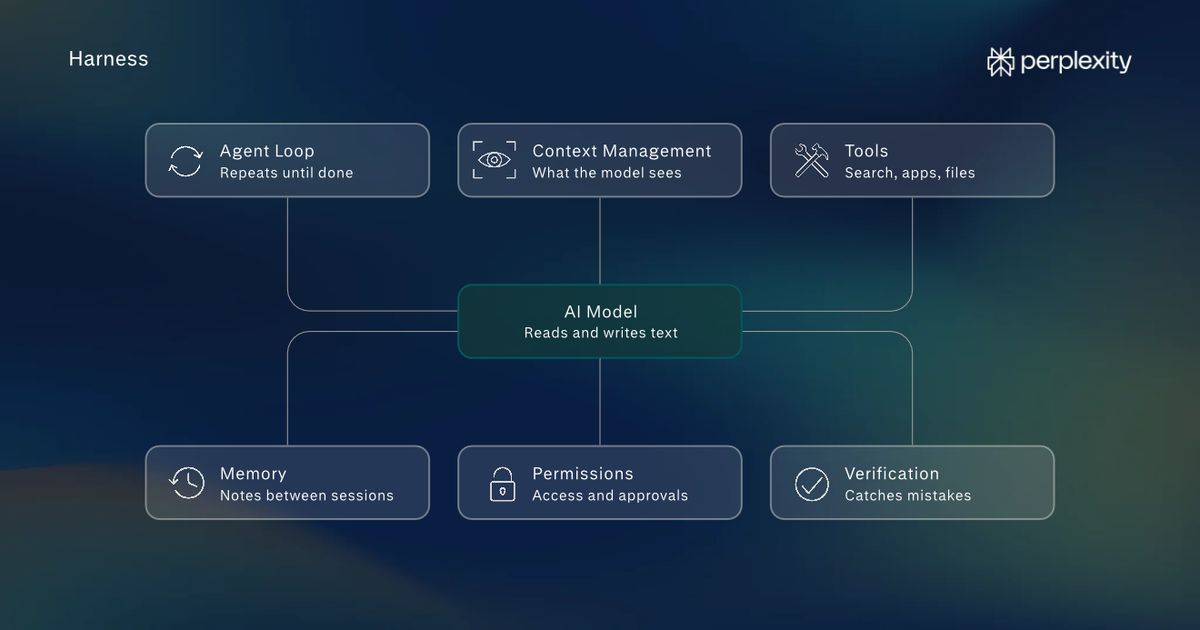
The harness decides what the model can see, what actions it can take, how results get fed back into the next inference, and when work is actually done.
You can think about harness engineering as the system you build around a model to make it an engine for completing real work. It does not matter how intelligent a model is. Without a harness, it is simply a token-generating machine. Harnesses are what makes that intelligence actually useful. A harness is what transforms the model into an agent.
There are many types of harnesses. Some are tuned towards different types of work
- Personal work: Openclaw and Hermes are primarily personal agents, they're embedded into external applications (Telegram, Discord, iMessage).
- Coding: Typically these harnesses run in the terminal, or in code editors. There are harnesses designed for reinforcement learning and research, harnesses for finance, marketing, and many other verticals.
- Knowledge Work: ChatGPT Work and the Claude Desktop App are great examples of this. While many also use them as coding agents, these apps have a plethora of tools and plugins that allow you to connect your agent to tools such as Slack, Notion, Gmail, Sheets, Teams, Clickup, and dozens more - all with the goal of supporting general knowledge work.
ChatGPT Work from OpenAI (pictured) has a robust ecosystem of plugins available for generalized work and software engineering.
But fundamentally, they all share the same skeleton. Today we're going to breakdown the layers of an agentic harness to gain a better understanding of the tools of our crafts.
What is a harness?
Large Language Models accepts inputs, then uses those inputs to generate the next token, it then appends the last generated token to the inputs, and the loop continues, until it decides it's done. On their own, they cannot:
- use a computer
- maintain durable state
- search the web
- run shell commands
- read, edit, or create files
- execute code
- or verify what they produced even works
If a large language model is a brain, the harness is its body.
When you give a query such as:
Your prompt does not just go straight to the model and come back as a magically completed patch. The harness compounds many inference calls in a feedback loop that looks like this:
That loop is what we call the “agent.”
And each step outlined here requires quite a bit of engineering
The harness generally owns:
- Prompt construction - system/developer instructions, repo instructions, user prompt.
- Context selection - which files, previous messages, tool outputs, memories, diffs, etc. are visible.
- Tools - shell, file editing, search, web, MCP tools, Git, testing.
- Tool schemas - how those capabilities are described to the model.
- Tool execution - actually translating the model's intent into actions.
- Agent loop - deciding how tool results get returned and triggering the next inference.
- State - remembering what's happened across steps/sessions.
- Orchestration - spawning specialized or parallel agents.
- Hooks - deterministic execution of scripts on pre-defined triggers (linting, blocking dangerous commands, code review).
- Memory - personal context gets stored and injected into model prompts to help agents "remember" previous sessions.
- Context compression - deciding what gets summarized or discarded as the session grows.
- Planning - plans, TODO lists, subgoals.
- Permissions/sandboxing - what the agent is allowed to execute.
- Error handling - retries, failed commands, timeouts.
- Verification - tests, linting, checking whether changes work.
- Termination - deciding when the agent turn is actually finished.
- Constraints - rules that dictate what the agent can, and cannot do.
The Harness Can Change the Result
If you've used the same model in two different coding tools, you've probably felt this already. The model may be the same, but the experience and quality of outputs can be dramatically different.
One paper, Stop Comparing LLM Agents Without Disclosing the Harness, reports that Claude Opus 4.5 scored 45.9% under a standardized SEAL scaffold but 55.4% when used through Claude Code on SWE-bench Pro.
Table 1 in Stop Comparing LLM Agents Without Disclosing the Harness
And complexity is not always king. Sometimes a smaller tool schema can improve an agent more than additional layers of orchestration. More recently, Prime Intellect released their coding harness. Built on Pi, Prime Agent has managed to outperform the harnesses their models were trained to use.
The moral of the story here is this: a benchmark telling you “Model A beats Model B” can sometimes actually really be unintentionally misleading if the same harness was not used for both tests. Context (and the harness) matters.
A benchmark result belongs to a model-harness pair. If the harness changes, the result can change too. And as harnesses become more ambitious, they also make more model calls. That is where fast inference starts to matter.
Artificial Analysis Harness Comparison
Here you can see clearly: the same model varies wildly in performance depending on the harness.
The Harness is an Inference Multiplier
Look at the list of things a harness owns: planning, looping, retries, verification, testing, compaction, orchestration, review. Every single one of these requires another model call, costing tokens, but more importantly time.
A validation pass might catch bugs, but it also doubles runtime. Subagents may parallelize some of this work, but the orchestrator still has to plan, dispatch, and synthesize these results, and all of those steps are sequential.
Every model call adds latency, and in a mostly serial agent loop, the rough budget looks like this:
If one step is slow, ten steps become unwatchable. But by contrast, if the model steps are fast, the harness has room to do more useful work before the agent stops feeling interactive.
The distinction matters. Running GPT-5.6 Sol on Cerebras reaches up to 750 tokens per second, with full-turn responses in as low as 0.4 seconds. This level of speed unlocks new capabilities, and provides harnesses with a larger budget for reasoning, tool use, recovery, and verification.
What a "Fast Harness" Can Do Differently
Once a model latency shrinks, engineers can spend that time in several useful ways.
- Real-time agent orchestration. Intelligent models like GPT 5.6 Sol Ultrafast can orchestrate large projects and wide subagent fan-out, rapidly compounding the latency benefits.
- Computer use at human speed. Agents can already use computers, but they're still clunky, mistake prone, and slow compared to humans. Fast inference removes the latency that makes agents move at the speed of humanity.
- Live Steering. Agents react instantly to correction, providing a truly collaborative experience.
- Speculative execution. Users considering an approach can implement and test several alternatives in real-time using work trees, being presented with working options rather than hypothetical suggestions.
- Aggressive retry and self-correction. Agents can aggressively test and fix its own code as it is written, with minimal cost to the end user. Hooks fire as soon as a file is edited, and validated or fixed in milliseconds.
- Adaptive interfaces. Agents can generate previews, graphs, visualizations, and mock-ups in response to the current state, all in real-time.
These are just a few examples, and an imaginative builder can certainly utilize low-latency inference in thousands of advantageous ways, but certainly the largest benefit overall is allowing the human to be part of the building process interactively, and in real-time. Search, reasoning, tool use, and editing collapse into a tighter loop, closer to the feel of a real pair-programming teammate.
Building a Lightweight Whiteboard App
To isolate the effect of the harness from the intelligence of the model, we ran a simple controlled experiment:she’s Claude Opus 4.6, the same task, and inside two different coding agents: Factory Droid and Claude Code.
Both agents started from an empty repository and received the same prompt:
No Excalidraw code, proprietary assets, or icons where used in this demonstration
The evaluation focused on the same five requirements: drawing rectangles and arrows; selecting, moving, and deleting elements; undo and redo; exporting as PNG; and running the result in a browser. Both agents passed all five requirements. The difference was how efficiently each harness turned the same model into verified work.
Factory Droid results
Claude Code results
In this single run, Factory finished 11 minutes sooner, about 2.4× faster, while using roughly half as many tool calls. It also identified and fixed a blocking hit-testing issue before reporting completion, then documented the remaining non-blocking gaps.
This is not a claim that one harness will win every task, but it is an illustrative example of the harness acting as an inference multiplier: even when the model is held constant, the system around it can materially change the path, cost, speed, and quality of the final result.
Note: Results may vary by harness, task, and model configuration.
The Harness as the Bottleneck
At present, the biggest bottleneck for agents are the inference steps. With Cerebras Fast Inference, that is no longer the case. The new bottleneck becomes the harness itself, or more specifically, tool calls.
Tool calls are both critical and common when working with agents. Like in the example above, tasks can string together dozens, or in some cases, hundreds of tool calls. Below are some example tasks we ran in a real production codebase to give you an idea of how many tool calls you might use for a given task.
When inference is no longer the slowest step, harness engineers can focus on optimizing the rest of the agent stack, optimizing for efficiency and performance of the harness itself.
Speed Changes the Shape of the Harness
None of these agent capabilities are necessarily new. Almost any harness can run tests, orchestrate agents, operate a browser, or generate visualizations. The difference is whether or not those actions are practical, whether they fit “inside the interaction,” or if they force you to send work into the background.
Slow inference pushes people toward fewer, larger model calls. Multi-step work becomes async, where the user reviews the result after the agent has already made most of its decisions (as the mistakes compound). Let's not forget, the models are smart, but they are not infallible. A high agency human with good design taste continues to be invaluable in the loop to provide judgement, guidance, and steering.
In addition to GPT‑5.6 Sol, Cerebras serves leading open models at thousands of tokens per second on its public endpoints:
- OpenAI GPT OSS 120B at 3,000 tok/s
- Gemma 4 31B at 1,850 tok/s
- Z.ai GLM 4.7 at 1,000 tok/s
For dedicated enterprise endpoints, Cerebras also supports Kimi K2.6, GLM 5.1, MiniMax M2.5, Qwen3 Coder 480B, Llama 4 Maverick, Mistral Large 3, DeepSeek V3.2, and many additional model families.
Designs by @halleychangg.