Executive Summary
BlueHammer (CVE-2026-33825) is an eight-stage local privilege-escalation chain targeting the Windows Defender Antimalware Platform before 4.18.26030.3011. It does not grant initial access; an attacker needs standard-user code execution first. Still, in the lab, it reached NT AUTHORITY\SYSTEM, recovered domain-admin credentials from LSASS, and moved laterally via pass-the-hash. This is not memory corruption. It chains CloudFilter callbacks, batch oplocks, object-manager symlinks, Defender’s update RPC, offline SAM parsing, and SAMR. Crucially, affected is not the same as exploitable: runtime factors — pending signature update, WinDefend state, filter drivers, VSS, CloudFilter reachability decide whether the path works on a given host. That’s the gap version-based scanning can’t close. Qualys TruConfirm marks a host Exploit Validated only after environmental checks, plus a non-destructive BAS validation of the CloudFilter freeze (Stages 2–3), no SAM extraction, no password reset, no service creation, no SYSTEM shell.
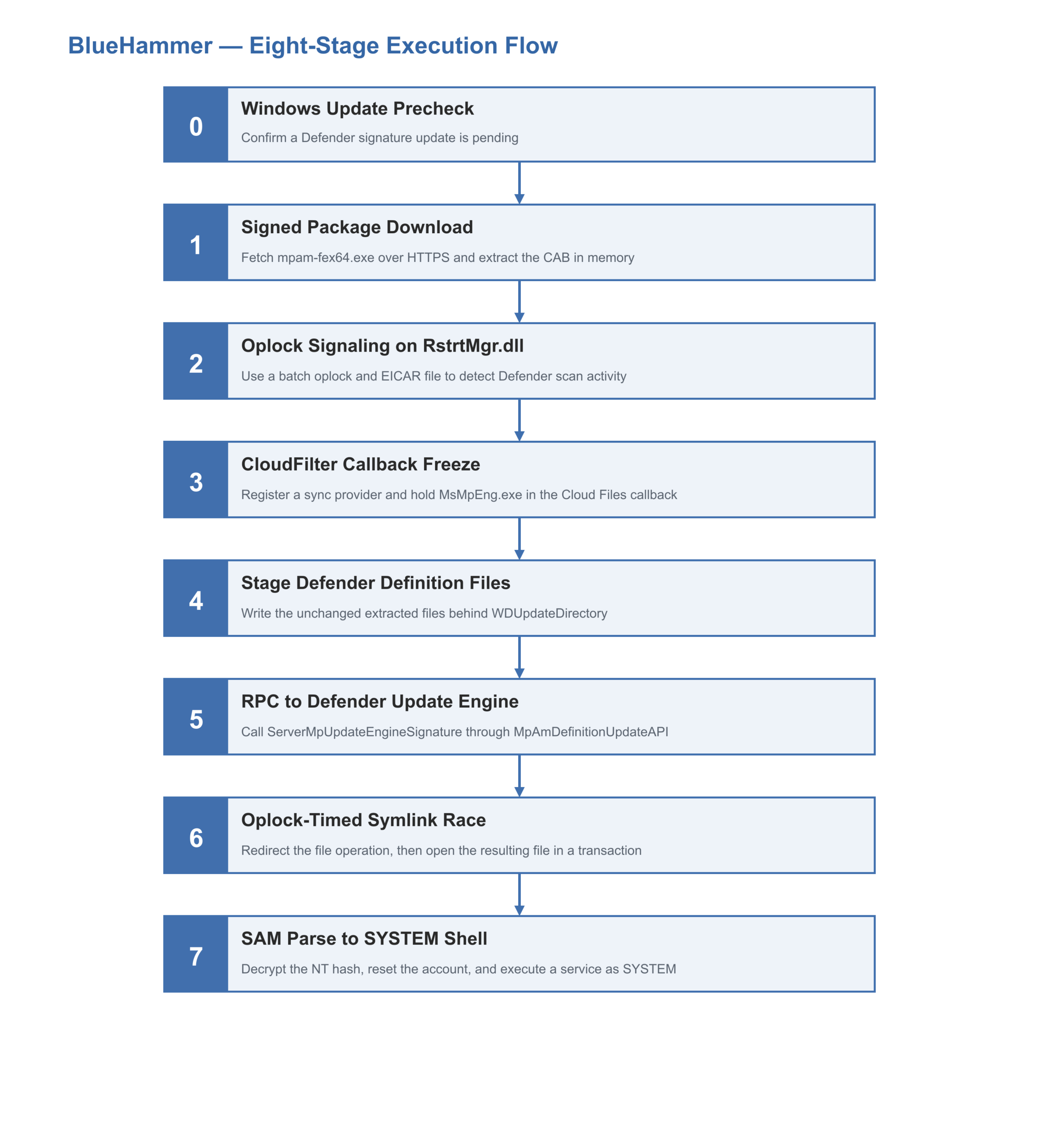
Introduction and Execution Flow
A CVE tells you what could go wrong. It does not tell you whether an attacker can actually make it happen on your machine. Exploitation depends on a reachable vulnerable path, the privileges an attacker starts with, the available services and components, and the system’s current state. Exploitability analysis brings these signals together to answer a practical question: can this vulnerability be exploited on this machine right now?
BlueHammer provides a concrete case study. Windows Defender is an always-running, highly privileged component whose filter drivers, RPC interfaces, scanning engine, and update mechanisms operate with SYSTEM authority. Publicly tracked as CVE-2026-33825, BlueHammer combines these trusted components in an eight-stage local privilege-escalation chain. Microsoft identifies Defender Antimalware Platform versions earlier than 4.18.26030.3011 as affected; our reverse-engineering host ran version 4.18.2104.10.
BlueHammer does not provide initial access. An attacker must first obtain code execution as a standard user, potentially through phishing, malicious content, or abuse of valid accounts. In our lab, the exploit abused Defender’s privileged update and file-handling paths to obtain NT AUTHORITY\SYSTEM. From that shell, we recovered credential material for CITRIX\administrator that was already present in LSASS. Using pass-the-hash, we authenticated to the domain controller as CITRIX\administrator, and then accessed protected system locations, started services, and extracted NTDS.dit. This demonstrated the tested path from a user-level foothold to verified domain-administrator control.
The complete tested attack path, along with its potential follow-on impact, is as follows:
BlueHammer does not depend on memory corruption. Instead, it integrates several components, including cloud files, callbacks, opportunistic locks, object-manager symbolic links, Defender’s local update RPC interface, offline registry parsing, and SAMR operations, with each stage preparing the next. We reconstructed the chain by reverse-engineering the original FunnyApp.exe binary in IDA Pro and tracing it in x64dbg. The subsequent sections explain the eight stages, the verified post-exploitation path, and how Qualys TruConfirm safely validates vulnerable customer environments before an attacker reaches the destructive stages.
Test environment used for this analysis:
- PoC binary: FunnyApp.exe (SHA-256 : f4ffef4204880031a6a532ff5c1b5686e6a301c365f492071c1d462fa5b6b4a0)
- Host: DESKTOP38, Windows 11 Pro 21H2, OS build 22000.2295
- Defender platform: 4.18.2104.10 | Engine: 1.1.17300.4 | Security intelligence: 1.321.69.0
- Real-time protection: enabled
This article discusses two distinct test contexts. Reverse engineering and end-to-end debugging were performed on DESKTOP38 using the original, unmodified FunnyApp.exe PoC whose SHA-256 is listed above. The TruConfirm’s evidence presented later was collected from the validation asset BlackHat2-CVE-2026-33825, which utilized a modified, non-destructive PoC. This validation process stops before any actions such as: SAM extraction, password modification, service creation, credential recovery, or shell execution.
Exploit Reasoning
BlueHammer’s approach to determining exploitability is tailored to each host. While identifying an affected version of Defender indicates a vulnerability, it does not guarantee that the vulnerable path is reachable or that the complete exploit chain can execute successfully. The effectiveness of the exploit is influenced by runtime and environmental factors, which may vary across similar endpoints.
The analysis begins by considering the attacker’s perspective, especially their ability to execute code as a standard user. Several critical factors are assessed, including the Defender platform version, the status of WinDefend and its real-time protection, the presence of necessary filter drivers, the availability of Volume Shadow Copy, and the existence of pending updates to Defender signatures. It also checks whether the CloudFilter and Defender update paths are reachable based on the current privilege level.
In the case assessed, the Defender platform version 4.18.2104.10 was found to meet all required conditions. The original PoC demonstrated that it completed all eight stages of the exploit, gaining a SYSTEM shell, recovering domain-administrator credentials from LSASS, and authenticating to the domain controller via pass-the-hash. This confirmed not only that the host was running an affected version but also that the entire exploit process worked correctly within its actual configuration and system state.
On the other hand, TruConfirm adopts a proactive strategy in customer environments. It initiates the process by verifying that all required environmental factors are in place. Following this, it employs a modified Qualys Breach and Attack Simulation workflow to replicate only the non-destructive aspects of the exploit. This step is crucial for confirming the accessibility of the critical CloudFilter primitive. The validation process focuses on the relevant behaviors from Stages 2 and 3, ensuring the Defender freeze and a clean Defender release. It does not perform potentially harmful actions such as extracting SAM data, resetting passwords, creating a service, recovering credentials, obtaining a SYSTEM shell, or reproducing the domain-compromise path demonstrated in the original PoC. An endpoint is designated as “Exploit Validated” only when it successfully passes environmental checks and validation. This thorough approach yields stronger, host-specific evidence than relying solely on version detection, all while avoiding the execution of destructive and post-exploitation phases of the original PoC.
Stage 0 — Windows Update Precheck
The exploit begins by querying the standard Microsoft.Update.Session COM interface to determine whether a Defender signature update is pending. It specifically filters Windows Update (WU) results by the category ID E0789628-CE08-4437-BE74-2495B842F43B, which is associated with Definition Updates. This GUID serves as a distinctive identifier within the .rdata section, effectively acting as a hunting signature. If no updates are pending, the exploit will terminate without further action. For the subsequent stages to successfully hijack the update consumption process, a pending update is crucial. Additionally, this initial check serves as a soft-target filter, since systems on aggressive update schedules typically do not retain pending updates long enough for the exploit to be operational.
Stage 1 — Signed Package Download and CAB Extraction
The exploit begins by downloading Microsoft’s signed executable file, mpam-fex64.exe, from fwlink and extracting its embedded CAB payload without saving it to disk. It mimics a Chrome/141.0.0.0 User-Agent in the HTTPS request, which is atypical for a native binary, and reads the response into a buffer via InternetReadFile. Then, GetCabFileFromBuff extracts the CAB payload from the executable by locating its header and creates custom I/O callbacks to handle the file. This results in the extraction of five files: mpasbase: vdm, mpavdlta.vdm, and mpengine.dll. In the exploit, specifically, it replaces the mpasbase.vdm file with a malicious version, while keeping the other four stay byte-identical to the legitimate signed originals. This tactic helps the exploit evade detection by allowing Windows Defender’s update-engine signature checks to pass successfully.
Stage 2 — Oplock Signaling on RstrtMgr.dll
The exploit relies on precise timing to detect when Defender begins scanning a file it has placed on the system. Since there is no official API to achieve this, the exploit cleverly combines two documented methods. It initiates a batch oplock on RstrtMgr.dll, a system DLL frequently accessed during Defender’s scanning process, and subsequently creates an EICAR test file to trigger a scan.
To implement this, the exploit first writes the EICAR file and opens RstrtMgr.dll with the FILE_FLAG_OVERLAPPED flag. It then requests a batch oplock via a DeviceIoControl call with control code 0x90008. Opening the EICAR file initiates Defender’s real-time scanning. The exploit then uses GetOverlappedResult to wait for Defender’s scanning process to touch RstrtMgr.dll and release the oplock, signaling the start of the scan. In the background, a thread named ShadowCopyFinderThread monitors the NT object namespace for any VSS snapshots that Defender may create during its scans. As Defender often uses shadow copies, the exploit captures its path for later use. In the context of an exploit, when a specific condition arises, the exploit captures the path of the VSS copy, typically designated at \\?\GLOBALROOT\Device\HarddiskVolumeShadowCopyN. This captured path is then stored for later use in Stage 6 of the exploit. During this stage, the exploit manipulates the process by redirecting Windows Defender’s file access to the system’s Security Account Manager (SAM) file, located at \??\<fullvsspath>\Windows\System32\Config\SAM on the previously captured shadow copy.
To evade detection, the EICAR string is stored in reverse within the binary’s .rdata section and is reversed again at runtime, ensuring the binary does not trigger Defender’s EICAR signature detection. Notably, the 0x90008 FSCTL code, used to establish the oplock, reappears in later stages of the exploit, indicating a strong signal: two independent batch oplocks are present in a single binary.
Stage 3 — Freezing MsMpEng.exe via the CloudFilter Callback
The Stage 3 exploit targets Windows Defender’s scanning engine, MsMpEng.exe, by placing it in a controlled wait state. This manipulation allows the exploit to perform file operations without interference from Defender. The technique leverages the behavior of the Cloud Files subsystem, particularly the CloudFilter minifilter (cldflt.sys), which intentionally blocks a thread in kernel mode while awaiting completion from a user-mode synchronization provider. The intentional wait in the process allows cloud providers, such as OneDrive, to perform network I/O operations necessary to retrieve and prepare a file before delivering its data to the requester. It’s important to note that there is no predefined limit to the duration of this wait.
To implement this strategy, the exploit registers itself as a CloudFilter provider for a sync-root directory it controls and drops a decoy executable named foo.exe in that directory. When the real-time scanner of MsMpEng detects the executable file foo.exe, which is prioritized for scanning by Defender, the driver cldflt.sys activates a callback to fetch placeholders within the process associated with the exploit. At this point, the exploit checks whether the caller’s process ID, CF_PROCESS_INFO, matches the WinDefend service’s process ID obtained via QueryServiceStatusEx. If they match, the callback halts the operation using an event controlled by the exploit’s worker thread. This effectively keeps MsMpEng stalled in the waiting state of cldflt.sys, enabling the exploit to proceed without detection by Windows Defender.
The worker thread initiates a batch oplock on a designated lock file in the sync root, then signals the release event. During this process, the callback, which retains control over MsMpEng, invokes the CfExecute function using a placeholder for the lock file. The cldflt.sys component then handles the CfExecute call, accesses the lock file, and breaks the oplock, allowing MsMpEng to continue its operations. The entire cycle sequence occurs within a single CfExecute round-trip, allowing the exploit to perform its Stage 4 | Stage 6 operations without being hindered by Defender.
MsMpEng.exe operates as a Protected Process Light (PPL) with PsProtectedSignerAntimalware protection, preventing any user-mode observers from attaching debuggers or inspecting its threads. Although Task Manager displays the process as “Running,” it can be misleading, as its main scan thread may be halted within cldflt.sys, and per-thread wait states are not visible to users with limited privileges. While PPL protects the process, exploits can weaponize it. The key action in this context is performed by a single SetEvent instruction, which releases the callback, as illustrated in detail in Figure 7.
Microsoft has identified Defender Antimalware Platform version 4.18.26030.3011 as the threshold for addressing CVE-2026-33825. Endpoints that operate on this version or any later version are safeguarded against the vulnerable Defender path exploited by BlueHammer, effectively preventing access to Stage 4 of the attack.
Stage 4 — Staging Fake Definition Files
In Stage 4 of the exploit, the attacker prepares update files under their control by creating an NT object manager path structured as \Sessions\<N>\BaseNamedObjects\<GUID>. This path is established using the NtCreateDirectoryObjectEx function. Within this directory, a symbolic link named WDUpdateDirectory is created, pointing to a temporary filesystem location where in-memory update files from Stage 1 are stored. This approach is crucial because, in Stage 6, the attacker will replace the symbolic link without being detected after the Defender has accessed it.
The staged update files are designed to be byte-identical to Microsoft’s original signed versions, except for mpasbase.vdm, which is replaced with a malicious version. The remaining files retain their valid signatures, ensuring that Defender’s signature validation checks continue to succeed. It is important to note that these update files differ from the foo.exe decoy used in Stage 3, which was intended to entice MsMpEng into a CloudFilter callback that would freeze it. Instead, the focus here lies on the genuine signature-update files that Defender will eventually utilize.
Stage 5 — RPC to Defender’s Update Engine
In Stage 5 of the exploit process, the malicious update files are delivered to Windows Defender via its local update engine through an RPC interface. This interface, specifically the MpAmDefinitionUpdateAPI, is typically used for legitimate Defender signature updates and is managed by MsMpEng.exe with assistance from MpSvc.dll.
The exploit creates a worker thread, WDCallerThread that binds to the RPC interface using a specific UUID over the ncalrpc transport. It targets the endpoint designated as IMpService77BDAF73-B396-481F-9042-AD358843EC24 and invokes procedure 42, called ServerMpUpdateEngineSignature. In the compiled exploit binary, the corresponding MIDL-generated stub for this procedure has been streamlined, with the pseudocode reflecting a direct call to the core function.
Notably, the argument provided to this procedure is not a typical filesystem path; instead, it is formatted as an NT object-manager path that leads to a staging directory set up by Stage 4 of the exploit. This path can be represented as \\?\GLOBALROOT\Sessions\<N>\BaseNamedObjects\<GUID>\WDUpdateDirectory. When Defender processes these files, it successfully validates their signatures except for the manipulated mpasbase.vdm, which is disguised as a genuine Microsoft file.
As Defender creates a new SYSTEM-owned copy of the files in a subdirectory of C:\ProgramData\Microsoft\Windows Defender\Definition Updates\, the exploit actively monitors this directory using the ReadDirectoryChangesW function. It captures the name of the new subdirectory as soon as Defender completes its copy operation, allowing the exploit to proceed with its objectives.
Stage 6 — Oplock-Timed Symlink Race
Stage 6 represents an advancement from Stage 5 by transforming the arbitrary file write as SYSTEM into a targeted file read. Specifically, it focuses on accessing the SAM registry hive from the VSS shadow copy created in Stage 2. Following Stage 5, Windows Defender creates a new directory for signature updates and populates it with SYSTEM-owned versions of the staged files. Prior to loading these new signatures, Defender reopens the mpasbase.vdm file from the WDUpdateDirectory to verify its contents. This second opening is critical, as it becomes the target of a race condition.
In this setup, a batch oplock is placed on the current mpasbase.vdm located in the exploit’s staging directory. The file is accessed with the FILE_DELETE_ON_CLOSE option via NtCreateFile, causing it to disappear immediately upon closing the handle, leaving no forensic trace. Subsequently, DeviceIoControl activates the batch oplock using FSCTL 0x90008, the same control code utilized in Stage 2. The process then leverages GetOverlappedResult to block until Defender’s second opening of the file interrupts the oplock.
When an oplock is broken, Defender’s I/O operation is temporarily halted during the open process. The kernel intervenes by breaking the oplock and waits for the current handle holder to close before allowing Defender’s operation to continue. This situation creates a brief opportunity, typically lasting only a few hundred microseconds, for the exploit to execute a swap of the symbolic link.
During this narrow time frame, the exploit closes the existing WDUpdateDirectory symlink handle. It then creates a new symlink that points to the object-manager directory itself and introduces a new mpasbase.vdm symbolic link within that directory. This link directs to the SAM file located in the Windows System32 directory on the Stage 2 shadow copy.
Once the CloseHandle(FileHandle) function is called, it releases the paused state of Defender’s open process. At this point, Defender accesses the SAM hive using its SYSTEM token through the newly swapped symlink chain. Since Defender’s operation runs within a transaction established by the exploit, the exploit can call CreateFileTransacted with the same transaction handle to open the same file. Both handles recognize the SAM hive that Defender just accessed as SYSTEM, allowing the exploit’s handle to navigate the leaked SAM handle as Stage 7 progresses.
Stage 7 — SAM Parse to SYSTEM Shell
The final stage of the exploit, Stage 7, serves as the culmination of the previous stages, granting access to a crucial artifact: a leaked handle that allows access to the System’s SAM registry hive on a volume shadow copy (VSS). This process circumvents the standard registry API, which typically requires a hive to be mounted under HKLM or HKCU. Instead, the exploit relies on the offline registry API in offreg.dll, specifically the OROpenHiveByHandle function, to interact with the hive directly from its file bytes.
Furthermore, the Security Accounts Manager (SAM) encrypts each account’s NT hash using a unique per-machine syskey. This syskey is derived from a 16-byte value known as the LSA bootkey, which is distributed across four specific registry subkey class names located under HKLM\SYSTEM\CurrentControlSet\Control\Lsa. Accessing these class names requires using RegQueryInfoKey, as they are not visible via standard registry queries. A function called GetLSASecretKey navigates through these four subkeys, retrieves their class names, decodes them from hexadecimal, and applies a specific permutation to reconstruct the 16-byte bootkey.
The process begins with the function UnprotectPasswordEncryptionKey, which extracts the encrypted syskey blob from SAM\Domains\Account\F using the Windows CryptoAPI. This involves acquiring the “Microsoft Enhanced RSA and AES Cryptographic Provider” to import a DES-derived intermediate key and then performing a 32-byte AES-CBC decryption. This method is standard for Windows 10 and 11 and is designed to exploit the encryption chain associated with these systems while avoiding older versions that only used DES for syskeys. Once the syskey is obtained, the exploit accesses the SAM database at SAM\Domains\Account\Users\<RID>, parsing its entries to retrieve the encrypted NT hashes for each user. The function UnprotectNTHash then decrypts these hashes using the recovered syskey and the account’s RID as a salt. During testing, the administrator account with a RID of 1001 revealed a plaintext NT hash of 8846f7eaee8fb117ad06bdd830b7586c and the corresponding MD4 hash for the password “password.”
The next phase, referred to as the “swap,” occurs in two steps. The function CalculateNTLMHash is called with the plaintext password “$PWNed666!!!WDFAIL,” resulting in an MD4 hash to replace the existing NT hash. During the execution of the CalculateNTLMHash function, the RCX register directly references a specific set of plaintext bytes. These bytes are represented as a string that also appears as a literal in the binary .rdata section. This string stands out as a significant indicator of compromise (IoC) within the entire binary.
When changing a user password, the ChangeUserPassword function is invoked with specific parameters: the target account name in RCX, the decrypted old NT hash in RDX, and the newly generated NT hash. At the entry point of this function, the account name “admin” is stored in RCX, while R12 holds the decrypted old NT hash from the Security Account Manager (SAM). This hash is displayed in hex format, specifically “8846f7eaee8fb117ad06bdd830b7586c.”
Within ChangeUserPassword, the SamiChangePasswordUser function is invoked, replacing the admin account’s stored NT hash. A noteworthy aspect of this process is that SamiChangePasswordUser requires the old NT hash for authorization, rather than the plaintext password. As the exploit has already obtained the necessary old hash from the SAM decryption, it meets the authorization criteria.
However, it’s important to note that simply extracting the SAM does not grant elevated permissions, as you cannot use a raw NT hash to log on. Additionally, performing a password reset typically requires administrative rights. It is only when these two actions are executed together, in the specified order, that a local admin’s cached hash can be transformed into a functional password of the exploit’s choosing.
After the admin password is reset, the exploit uses the new credentials to log in as an administrator. It then retrieves the UAC-elevated linked token using the GetTokenInformation(TokenLinkedToken) function and impersonates the admin. With administrative authority now established, the exploit accesses the Service Control Manager and creates a temporary service. This service is assigned a random GUID name and has its ImagePath linked to the exploit’s own binary, allowing it to start successfully. The Service Control Manager (SCM) defaults to launching the service as LocalSystem.
In a security exploit scenario, two instances of the conhost.exe process appear on the desktop as the attack unfolds. One process runs under the NT AUTHORITY\SYSTEM account, originating from the SYSTEM-side component of the exploit, while the other runs under the compromised administrator’s account, initiated by the original process via CreateProcessWithLogonW using the altered admin credentials.