Introduction
Phone number quality and validity are quiet but persistent problems in e-commerce. Numbers collected at checkout are often malformed, inconsistently formatted, or belong to lines that cannot receive SMS, and you typically do not find out until a delivery notification bounces.
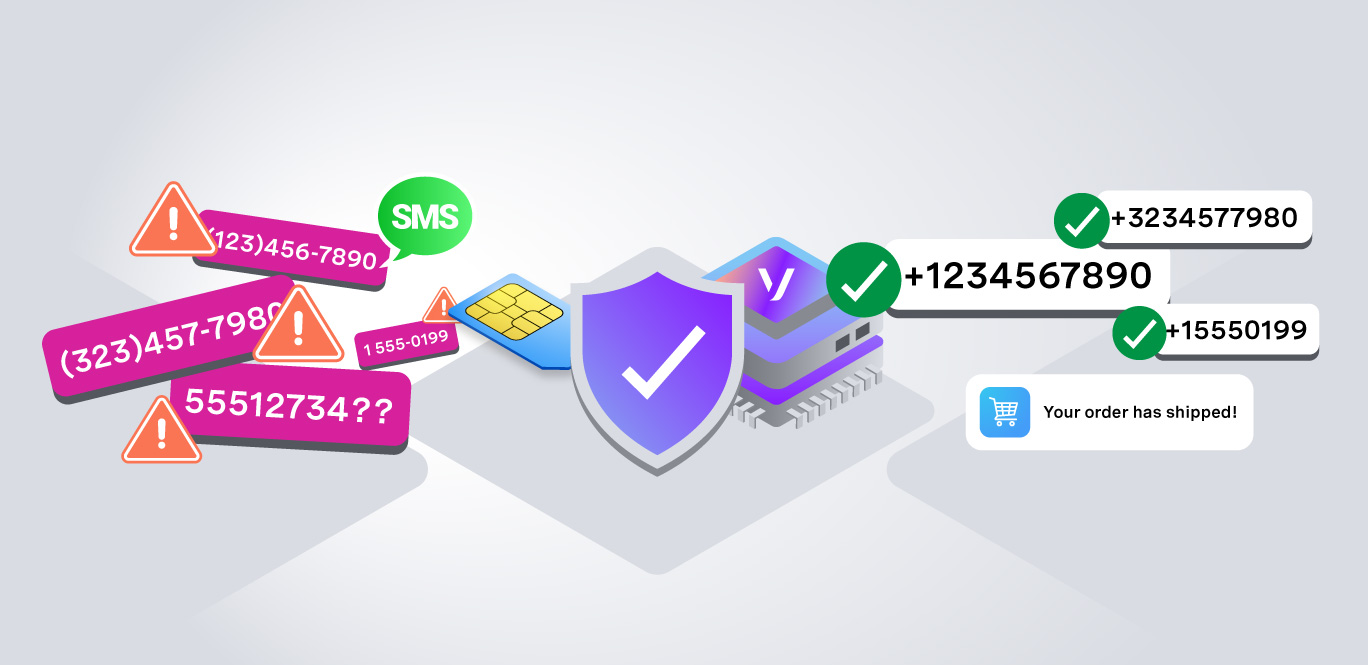
This article explains how to sanitize to clean phone number data with the format insight (normalize every number to E.164 Format), then validate with the current_carrier insight (confirm the number is a mobile that can normally receive an SMS). The Vonage Identity Insights API returns both a sanitized number and confirms it is SMS capable in a single API call. Using the Identity Insights API's format and current carrier insights together gives you a way to sanitize every number to E.164 before it hits your database and confirm it is mobile before you rely on it for delivery communications.
Sanitization and Validation Failures
A common backend scenario is when a customer filling in the checkout form types their phone number in whatever format comes naturally and confirms to place the order. The HTML5 input of telephone type accepts it. The server-side regex confirms it has ten digits. The order is written to the database, a confirmation email goes out, and a delivery SMS is dispatched.
Then nothing happens, no error is logged, no retry is triggered, no alert is fired. A few days later, the customer opens a support ticket asking where their order is. A WISMO (Where Is My Order) call that costs your team real time and money, and it was entirely avoidable. The failure has two hidden causes:
- A sanitization failure: The number was stored in national format (4155551234) instead of E.164 (+14155551234).
A sanitization failure: The number was stored in national format (4155551234) instead of E.164 (+14155551234).
- A validation failure: Even if the format were right, the number belongs to a landline, or a number that was once a mobile and was ported to a landline carrier last month. Your regex sees ten digits and passes it. A static lookup table sees the original carrier allocation and says "mobile." The delivery SMS queues and bounces, never reaching the customer's phone.
A validation failure: Even if the format were right, the number belongs to a landline, or a number that was once a mobile and was ported to a landline carrier last month. Your regex sees ten digits and passes it. A static lookup table sees the original carrier allocation and says "mobile." The delivery SMS queues and bounces, never reaching the customer's phone.
Phone Number Validation
Phone number validation means confirming that a string of digits is a real, reachable phone number that an SMS or voice call will arrive at. Learn About Phone Number Validity.
Regex catches wrong digit length, non-digit characters, missing area code. Regex misses mobile vs. landline, virtual/VoIP numbers.
Carrier Lookup and Identity Insights API Returns
A carrier lookup is a query that asks the live mobile-network routing graph: which operator currently owns this number, and what kind of line is it? You can check the Identity Insights API Reference to learn about key fields returned by Identity Insights API calls. A successful response looks like this:
Note: unlike network-powered insights such as SIM Swap or Location Verification, the format and current_carrier insights do not require Network Registry approval. They are available worldwide without additional operator onboarding.
Note: unlike network-powered insights such as SIM Swap or Location Verification, the format and current_carrier insights do not require Network Registry approval. They are available worldwide without additional operator onboarding.
Get Started With the Identity Insights API
The fastest way to see this in action is through the Identity Insights Getting Started tutorial in the Vonage Dashboard. Enter any phone number, select format and current_carrier, and see the response in real time. There is also a Demo mode with predefined numbers if you want to explore without using a live number and see the response in real time. There is also a Demo mode with predefined numbers if you want to explore without using a live number.
Getting Started with Identity Insights
Set Up Identity Insights In a Node.js Project
You could put into practice the theory you learnt today and normalize the number to E.164 format, confirm the number is a mobile before queuing delivery SMS and integrating the validation step into an express checkout route. We have a Vonage Identity Insights SDK for Node.js. See the Vonage Identity Insights API documentation and the Identity Insights SDK for Node.js for the full SDK reference.
Frequently Asked Questions
Q1. How do I authenticate with the Identity Insights API?
The Identity Insights API uses JWT authentication via a Vonage application. Create an application in the Vonage Dashboard, download the private key, and initialize the SDK with your applicationId and the path to your private.key file. This is different from the API key/secret pattern used by older Vonage APIs.
Q2. Why does the Identity Insights API return a different carrier than my existing phone validation library?
The Identity Insights API queries live operator routing data, not a static number-range allocation table. If a customer ported their number from a landline carrier to a mobile carrier since your static library was last updated, the Identity Insights API returns the current carrier while the static library returns the original one. For ported numbers, current_carrier is always the authoritative answer.
Q3. Can I use the Identity Insights API to validate international phone numbers at checkout?
Yes. The Identity Insights API covers numbers globally. Pass the number in E.164 format (with the + prefix and country code) for best results. The format.number_international field in the response gives you the normalized E.164 version regardless of how the customer typed the number at checkout.
Q4. Does calling the Identity Insights API at checkout slow down the checkout form submission?
A typical call completes in 200 to 500 ms. Run it server-side after the customer clicks “submit” and before you write to the database. Cache the result in the session so you do not call twice if the customer revisits the same phone number in the same session. Add a graceful timeout and a fallback that lets the checkout complete even if the service is temporarily unreachable.
Conclusion
A lot can happen to e-commerce teams if phone numbers are not properly sanitized and validated. WISMO (Where Is My Order) support calls can spike, and chargebacks rise when phone numbers stored at checkout are malformed, or landlines pretend to be mobiles.
When working with Vonage APIs, ensure your checkout pipeline normalizes the phone number to E.164 format and validates the carrier using the current carrier before passing it to the Vonage Messages API for SMS delivery. If you need to escalate to OTP-based verification for high-risk orders, the Vonage Verify API is a natural addition to the same checkout pipeline.