Qodana 2026.3 release brings Dart and Flutter projects into Qodana, so you can review code analysis findings together with your team. Baseline matching is now more accurate: In targeted validation across four scenarios, average precision rose from 45% to 90%. Qodana is better at recognizing an existing issue after a file move, rename, or refactoring, helping quality gates stay focused on new problems.
There’s more to explore on the security side. New .NET checks help you find cryptographic algorithms and SSL protocols that need a closer look as you plan for post-quantum security. Qodana can now follow untrusted input through Spring applications, while improved inspections for JavaScript, TypeScript, and C# produce fewer false alarms.
Table of Contents
- Dart and Flutter code analysis
- A new baseline algorithm for more accurate issue matching
- Deeper security analysisPost-quantum cryptography inspections for .NETSpring-aware taint analysisOpenGrep taint analysis without a trace limitMore precise security inspections for JavaScript, TypeScript, and C#What to do next
- Post-quantum cryptography inspections for .NET
- Spring-aware taint analysis
- OpenGrep taint analysis without a trace limit
- More precise security inspections for JavaScript, TypeScript, and C#
- What to do next
Dart and Flutter code analysis
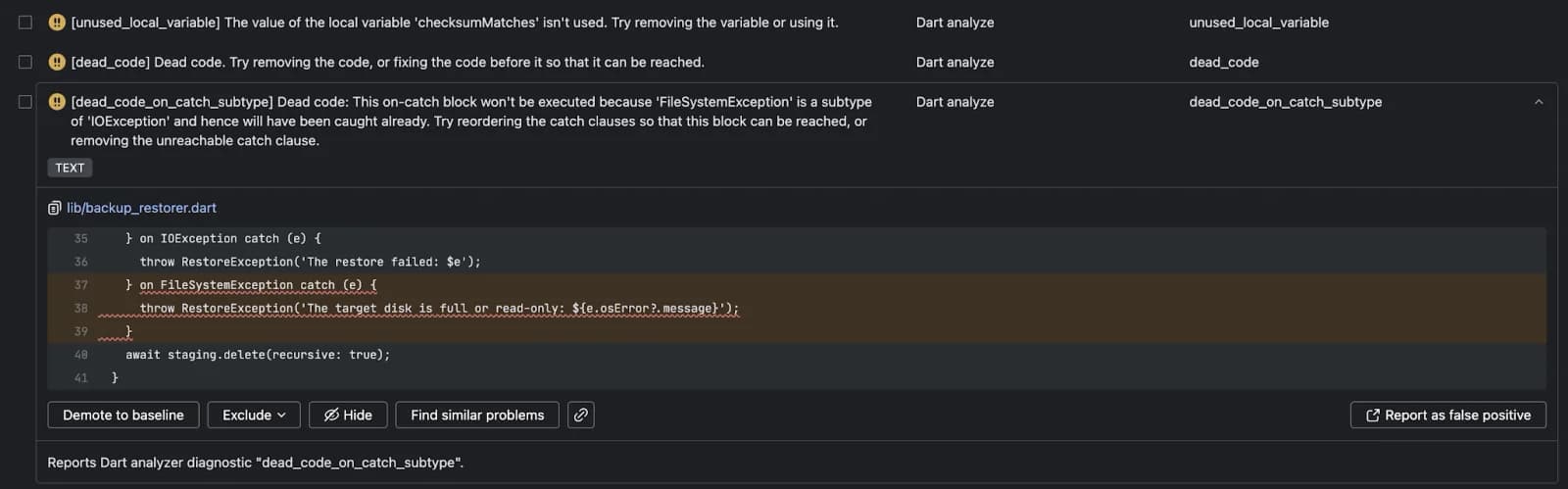
Building a Dart or Flutter app? You can now analyze it with Qodana. When the Dart analyzer flags a problem, the Qodana report shows the affected code and explains what happened. Your team can review those findings together, decide what to address, and see what changes over time.
In the first illustrative example, Qodana reports a dead_code_on_catch_subtype diagnostic in backup_restorer.dart. A general IOException handler comes before a FileSystemException handler, so the more specific handler can never run. The report highlights the unreachable block and explains why it will be skipped.
The second example shows an unreachable_switch_case diagnostic in job_queue.dart. Earlier patterns already cover the restore case, so that branch will never execute. Qodana points to the affected case and shows the analyzer’s explanation in the report.
Run Qodana 2026.3 on a Dart or Flutter project to see these diagnostics alongside your code and review the findings with your team.
A new baseline algorithm for more accurate issue matching
A file move, rename, or refactoring can make an old finding look like a new one. Qodana 2026.3 is better at recognizing when a given finding has come up before, so your quality gate can focus solely on issues that arose during the latest development cycle. An extended hash cascade and an improved matching algorithm make this possible. The improvement is currently available for Java, Kotlin, JavaScript, and TypeScript, with more languages to follow.
We tested this on findings that are easy to misclassify after code changes. The tables show how often Qodana recognizes an existing finding or identifies a new one. They measure baseline matching, not whether an inspection catches a defect. All differences are shown in percentage points.
Java and Kotlin: 889 findings from five months of incremental analysis of the Ultimate monorepo (January – May 2026), limited to changed files.
JavaScript and TypeScript: 359 findings from four months of analysis of the open-source Next.js repository (May – August 2026).
The biggest improvement is in recognizing findings that have come up in previous analyses, even when the surrounding code has changed. Matching of new findings improved overall, too. The tables also show a trade-off: for JavaScript and TypeScript, recall for new findings is lower, even though precision and F1 have improved.
The code examples show why matching is difficult. The original finding is attached to a condition that is always true. The following changes move or rename the file and refactor the surrounding code, while the underlying problem remains.
Original code, where the condition is always true:
After a file move and a small refactoring:
After a file rename:
After a larger refactoring that moves the condition into another method:
On your first Qodana 2026.3 run with an existing baseline, review how findings are classified after file moves or refactorings and check the quality gate result. This is especially useful for teams whose CI pipelines depend on the distinction between new and existing problems.
Deeper security analysis
In the last release, we introduced post-quantum checks for JVM projects and made the SABER benchmarks public. Now those checks are also available for .NET projects, Spring analysis can follow untrusted input through Java applications, and existing security inspections produce fewer false alarms.
Post-quantum cryptography inspections for .NET
Before you can plan a move to post-quantum security, you need to know which algorithms and protocols your .NET code uses. Qodana 2026.3 helps you find them. Its new inspections flag algorithms that are not post-quantum compatible and detect pre-quantum SSL protocols. They also show the algorithms used in your code and their NIST security ratings.
The example below shows a finding next to the affected .NET code, with an explanation you can use to review it.
To try it, analyze a .NET project with Qodana 2026.3 and review the security findings for algorithm and SSL protocol usage.
Spring-aware taint analysis
A value can enter a Spring application through an HTTP request and travel through the code before reaching a SQL query. Qodana 2026.3 can now follow that path. It recognizes annotations such as @RequestParam as sources of untrusted input and reports paths that could lead to a security issue. The example below shows one such path flagged as a potential SQL injection.
What can a PDF conversion endpoint reveal about AI-generated code? In our companion case study, Qodana follows a JSON request value from Spring’s @RequestBody through DocumentController and DocumentService to a ProcessBuilder shell command. Read the full case study to see the trace, why the path matters, and how the conversion could be made safer.
OpenGrep taint analysis without a trace limit
To identify risky data flows, taint analysis follows a trace: one possible route from untrusted input to a sensitive operation. Branches and function calls can create many such routes through an application. Previously, Qodana’s OpenGrep-powered inspection had a default limit of 100 traces. The limit helped keep analysis time under control, but once it was reached, any additional paths went unchecked.
In Qodana 2026.3, we reduced the time needed to process each trace and removed the limit. Qodana can now examine more paths while keeping overall analysis time roughly comparable. For developers and security teams, this means broader coverage of complex data flows and fewer paths left unchecked because of a fixed threshold.
More precise security inspections for JavaScript, TypeScript, and C#
We ran the same SABER benchmark projects against both releases to see how the updated JavaScript, TypeScript, and C# inspections performed. The comparison below shows more known benchmark issues found and fewer false alarms.
This leaves security teams with fewer alerts to sort through. Results vary by benchmark, and SABER does not report TypeScript separately.
Explore the full benchmark for project-level results and individual reports.
What to do next
Already using Qodana? These features are available now. On your next run, see how the baseline handles findings after a move or refactoring, and explore the new checks that apply to your project.
New to Qodana? See the analysis workflow in a demo and find out which of these checks would be useful for your team.
Get more practical insights on code quality and security. Subscribe to the Qodana blog for new posts.