We got tired of waiting for pivot tables to load, so we made them faster.
Previously, pivot tables in Metabase could be slow and the implementation needed complicated logic to keep results consistent. Metabase would send separate queries to the database to calculate row, column, and grand totals. That meant a pivot with two grouping fields could run four queries, one with five fields could run up to 32.
That approach had two costs. The obvious one was speed, since this many round trips to the database take time. But row limits could also affect results. Metabase caps how many rows a query can return, and when that cap hit some of the pivot’s queries, but not others, we’d have to handle these disagreements so that results would be consistent.
In Metabase 64, we shipped a major upgrade to pivot tables. Now Metabase can instead ask the database to compute the entire pivot in a single query, using a standard SQL feature (GROUPING SETS) that most modern data warehouses support. The result is the same pivot table, but in our benchmarks often 2–3× faster, and with details and totals guaranteed to be consistent.
This post digs into the nitty-gritty of the new approach: how a pivot query is represented inside Metabase’s query processor (QP), the SQL that the old and new paths each generate, how the row-limit safeguards work, and the dialect quirks we hit rolling the new path out.
What is a pivot query?
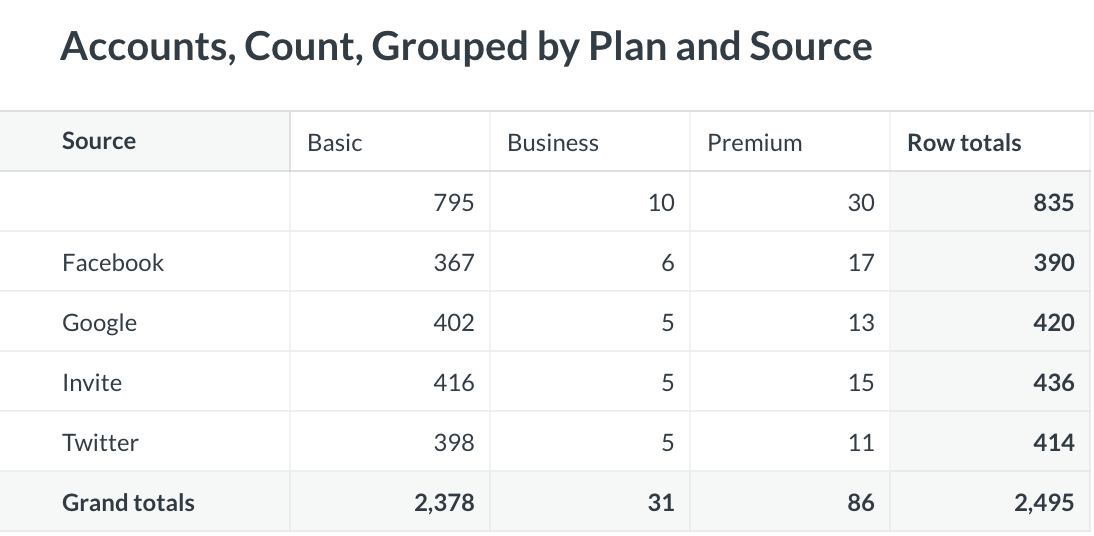
A pivot table crosses a set of row dimensions against a set of column dimensions and shows one or more aggregated measures in the cells. The frontend can ask for subtotals along the row and column axes, as well as a grand total.
Concretely, the following query is a two-breakout pivot with one measure (count). The query is a sequence of Clojure function calls written using Metabase’s MBQL library. Metabase uses MBQL to construct queries created with the graphical query builder’s pivot settings, before the query is compiled.
Breakouts listed under :rows become row headers in the pivot table. Breakouts listed under :columns become column headers. The aggregation fills each intersecting cell (in this case, the aggregation is count).
Given two breakouts and both totals turned on, the pivot renderer needs four result sets:
The pivot-grouping column carries the bitmask: one bit per breakout, set when that breakout is aggregated away in this row. The frontend uses it to decide where each row goes in the pivot table.
The old, multi-query path
Historically, run-pivot-query generated one subquery for each subset of the pivot’s breakouts, ran them separately against the database, and stitched the results together at the application level. For our two-breakout example that means four subqueries, one for each row of the table above:
Each subtotal level is a separate round trip to the data warehouse: four for our two-breakout example, and up to 32 for a five-breakout pivot.
We included the NULL AS <column> and <n> AS "pivot-grouping" parts for illustration only, because the frontend expects a uniform row shape across all four subqueries: [source, plan, pivot-grouping, count]. The real subqueries would omit the dropped columns, and the query builder would instead splice the constant bitmask and the missing NULLs into each row.
The row-limit complication
Metabase applies a default :max-results cap (10000) to aggregated queries. Apply that cap naively to each pivot subquery and the results can disagree with each other. For example, the detail subquery might hit the cap and drop rows that the subtotal subqueries still count. When these counts disagree, people see subtotals that don’t add up.
The old, multi-query path handled this by short-circuiting: if the first (detail-level) subquery is truncated by :max-results, the remaining subtotal subqueries are skipped entirely and :pivot_rows_truncated is set. So the frontend gets either a complete pivot, or truncated details with no subtotals and a warning (so Metabase didn’t show incorrect data).
With the new native path, however, we were able to drop the entire detect-and-skip machinery.
The native path with GROUPING SETS
GROUPING SETS is an extension of GROUP BY that’s part of the SQL standard. It lets one query aggregate over several groupings at once. You list each set of columns to group by, and the database returns all of those groupings in a single result. That’s the same rows you’d get from a UNION ALL of separate GROUP BY queries. In each row, the columns that aren’t part of that row’s grouping come back as NULL. ROLLUP and CUBE are shorthands for common patterns of grouping sets.
We could have gotten around the row-cap problem with UNION ALL. Just run the four subqueries, union them, and wrap the results in an outer query with a single LIMIT. But then the database would still run four independent aggregations over accounts.
With GROUPING SETS, however, we can let the database’s query planner compute all four subtotal levels in a single scan of the fact table. Its GROUPING() function also hands us the pivot-grouping bitmask directly (instead of needing a hard-coded constant per branch).
For the two-breakout example above, the native path compiles to:
The GROUPING() function labels each row with its subtotal level. Its bit order is the reverse of Metabase’s pivot-grouping convention, so the compiler flips the argument list.
The ORDER BY clause sorts detail rows first and totals last, so if the row cap cuts the result short, the pivot loses its totals off the end instead of showing a scattering of missing cells. It also means we don’t have to worry about the order in which the database returns the rows.
Finally, not every database uses the same GROUPING() function: some call it GROUPING_ID(), and others only accept one argument at a time. A small per-driver override keeps those differences contained in one place.
Advantages and limitations of the native path
There are obvious advantages to the new native path:
- Improved performance: one shared scan. GROUPING SETS lets the database compute all subtotal levels in one pass over the fact table. Every warehouse that’s been tuned for pivot-style workloads knows how to do this.
Improved performance: one shared scan. GROUPING SETS lets the database compute all subtotal levels in one pass over the fact table. Every warehouse that’s been tuned for pivot-style workloads knows how to do this.
- Consistent results. Details and totals come from the same query, so any truncation applies to both.
Consistent results. Details and totals come from the same query, so any truncation applies to both.
- Easier to inspect and debug. The whole computation is one SQL statement. You can copy it into your database client, run it, EXPLAIN it, or trace how a specific subtotal is produced.
Easier to inspect and debug. The whole computation is one SQL statement. You can copy it into your database client, run it, EXPLAIN it, or trace how a specific subtotal is produced.
There are also a few limitations worth noting, however:
- Not all databases support GROUPING SETS. :native-pivot-tables gates the feature. The database driver must derive from :sql, and its dialect must accept GROUP BY GROUPING SETS. That covers most analytical warehouses, but MySQL (which offers only WITH ROLLUP) and SQLite (no support at all) stay on the multi-query path.
Not all databases support GROUPING SETS. :native-pivot-tables gates the feature. The database driver must derive from :sql, and its dialect must accept GROUP BY GROUPING SETS. That covers most analytical warehouses, but MySQL (which offers only WITH ROLLUP) and SQLite (no support at all) stay on the multi-query path.
- No support for window-function aggregations. :offset, :cum-count, and :cum-sum compute their value at each row from other rows in the result set (a running total, an offset, etc.). Computing over GROUPING SETS output would include subtotal rows, which doesn’t make sense.
No support for window-function aggregations. :offset, :cum-count, and :cum-sum compute their value at each row from other rows in the result set (a running total, an offset, etc.). Computing over GROUPING SETS output would include subtotal rows, which doesn’t make sense.
What’s next
Some pivots still can’t use GROUPING SETS: anything on MySQL or SQLite, and queries with window-function aggregations. The UNION ALL halfway step from earlier still works for these: it closes the round-trip and row-cap gaps without needing the warehouse to plan a shared scan.
MongoDB is a different story entirely. Its aggregation pipeline can express the same “several grouping levels in one query” idea, but through $facet rather than SQL. This requires its own piece of engineering, so MongoDB stays on the multi-query path in v64.
Try faster pivot tables
Single-query pivot tables shipped in Metabase 64.
The native path is chosen when two conditions hold: the MB_USE_NATIVE_PIVOT_TABLES setting is on (it defaults to off in v64 until it has proven itself across enough real-world installations), and the driver declares the :native-pivot-tables feature. If either condition doesn’t hold, Metabase falls back to the multi-query path.
Turn them on in Self-hosted: upgrade to Metabase 64, set this environment variable, and restart Metabase:
If you’re running the JAR:
If you’re running Docker:
Turn them on in Metabase Cloud: contact support and we’ll turn it on for you.
Once it’s on, pivot tables on supported databases (PostgreSQL, Redshift, Snowflake, BigQuery, Oracle, SQL Server, Presto, Starburst, Vertica, Athena, ClickHouse, Druid, and the Hive-family drivers Spark SQL, Databricks) switch to the single-query path automatically. Everything else keeps working the way it did before. You don’t need to change any questions or dashboards.
Tell us how it goes. If your pivots get faster (or something looks off), open an issue on GitHub or post in the forum. Reports from real setups are how this becomes the default.
- How we picked LibreChat — and ended up with a Slack agent
- Meet Repro-Bot, our GitHub issue triage agent
- How we built ten custom subagents to tame a 500K-line Clojure codebase
- Improving the performance of the popular Clojure development tool clojure-lsp
- PA: a persistent agent for developer workflow automation

/)
/)