TL;DR
- The bottleneck in analytics used to be querying: technical people writing SQL for everyone else. AI removed that obstacle. Now anyone can ask in plain English, and the bottleneck is accuracy, correctness and validation.
- The solution isn’t a smarter model. It’s a curated semantic layer underneath the model: transforms, metadata, metrics, a glossary, then a Library and verified items marking what you actually stand behind.
- Doing that curation where the data gets used, rather than upstream, is what gives you lineage from a transform all the way down to an AI-generated answer.
- Everything from AI Analytics Week lives in the AI Readiness Hub: a two-minute readiness check, the verified framework, the on-demand sessions, and the Metabase skills for Claude Code. If you’d rather do than watch, run npx skills add metabase/agent-skills --skill ai-readiness-checklist -a claude-code and the AI readiness checklist skill walks the same list against your own instance.
The analytics bottleneck has moved
“Don’t be a bottleneck” was our central pitch for years, and it was right. SQL was scary, not everyone could write it, and the people who could turned into a human ticket queue.
Pierina opened AI Analytics Week by resurfacing that tagline, not for nostalgia but to point at where the bottleneck lives now. Querying was the hard part. Natural language querying makes it trivial. Ask a question, get a chart, done.
So the queue is gone, and anyone can turn AI loose on your data and get a number in seconds. The catch is that AI gives wrong answers confidently, and nobody can tell you which numbers are right (or wrong). Context and judgment are now the most important part of the job.
What the room was worried about
We polled everyone before the session. The concern wasn’t whether AI could answer questions. It was control: who can see what, who gets to do what, and whether it can run on their own servers. The MCP server was the most preferred method to work with AI, and analytics-as-code was in second place.
Then we asked the webinar attendees what specifically worries them about AI-generated answers. Two things dominated the responses: wrong numbers, and not being able to tell where the number came from.
Those two worries are the same problem. An answer you can’t trace is an answer you can’t check, and an answer you can’t check is one you can’t trust. Whether you’re asking through Metabot, Metabot in Slack, or an agent on the MCP server, the model is only as reliable as the context it’s reading from. Which means the guardrails aren’t in the model. They’re in the foundation beneath it.
You can’t verify anything on top of data nobody has curated. A semantic layer is the curated version: the tables that count, what each column means, how each metric is calculated, and what your company’s words refer to. (If you want the full definition, we wrote one for the AI analytics era.) People have needed it for years. AI needs it more, because AI has no one to ask.
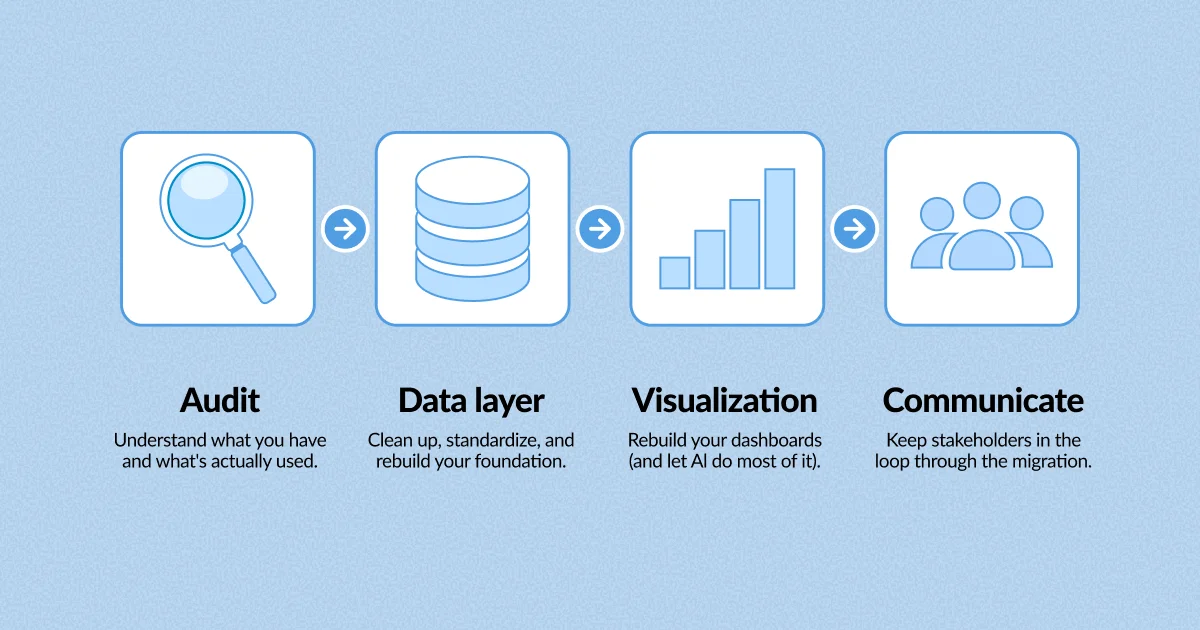
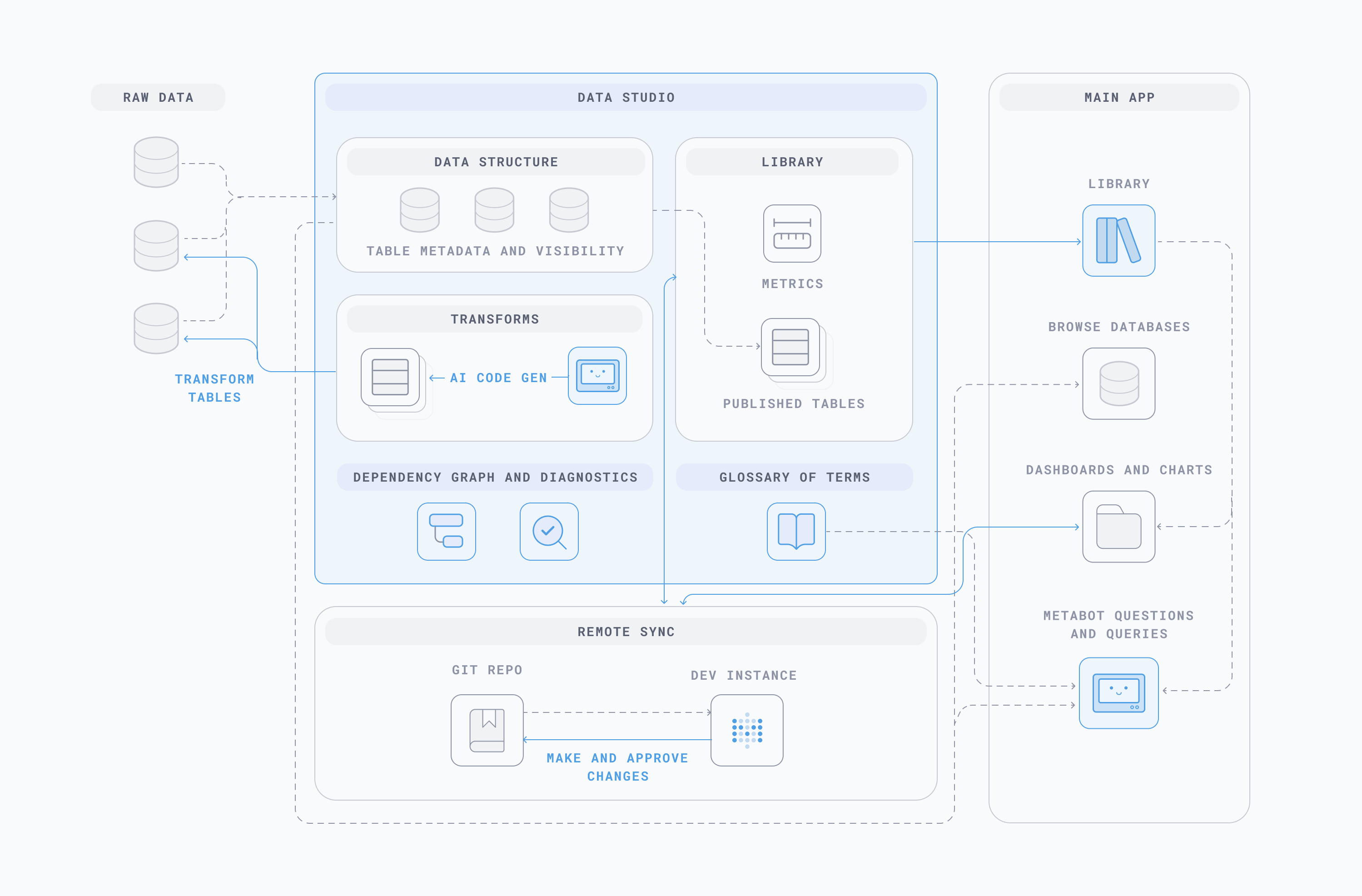
In Metabase that layer lives in Data Studio, and Metabase AI reads from it. Same tables, same definitions, same permissions as a person clicking around. Here’s what goes in it, in the order the session built it.
Start with transforms. SQL or Python jobs that run on a schedule and write their results back as a table. Clean up the naming, pre-join the things that always get joined, filter out the test rows nobody wants counted. A model reasoning over a tidy, purpose-built table takes fewer wrong turns than one reasoning over your raw production schema. If you already have dbt, this is the last mile. If you don’t, it’s the whole thing.
Then table metadata, which is in every Metabase plan, including open source. Field descriptions and semantic types explain what a column actually holds: what rev_1234 means sitting next to earnings-q3-445, or which of those two is gross. Whoever owns the data model writes it down once, and every answer after that gets better. That’s usually your analytics engineer or data lead, the person who knows why there are three Accounts tables in the first place. Which of the three is canonical is a separate job, and it belongs in the Library further down.
Then metrics. Calculations you define once: revenue, active accounts, churn rate, gross margin, whatever your company argues about in meetings. Define it in Data Studio and it’s the same calculation whether somebody builds a question in the notebook editor, drops it on a dashboard, or asks Metabot in plain English. Nobody re-derives it slightly differently in their own saved question and presents it at the board meeting. Open a metric and you can see how it’s calculated, which dimensions you can break it out by, what it depends on, and who defined it.
Then the glossary. This handles vocabulary, where ARR means one thing to success and something with an asterisk to finance. Write the term down and AI stops picking a side. Of everything on this list, the glossary is the one the Metabot docs are most explicit about: defining your terms there is how it learns your organization’s language.
How do you mark which tables and metrics are canonical?
Curation gets your data into shape and writes down what it means. This part is about marking which version of it is the real one, so neither a person nor a model has to guess.
The Library is where you publish the tables, metrics, and snippets that count. Published tables appear first when anyone picks a data source, which nudges people toward the table you want them using, and it’s how you settle which of those three Accounts tables is canonical. Available on Pro and Enterprise.
Verified items let an admin sign off on individual questions, models, metrics, and dashboards, including the ones AI wrote. Something gets generated, somebody who knows checks it, it gets a blue checkmark and ranks higher in search. It’s worth being precise here: verification is a signal for the people browsing, not an input to Metabot. It doesn’t teach the model anything.
What does steer AI directly is scope. Admins can point natural language querying at a specific collection and its sub-collections, so exploration happens inside a curated corner instead of across everything. Pair that with system prompts, where you put standing instructions: tone, naming conventions, which tables to prefer, the context about your business that makes it answer like a colleague instead of a stranger.
Why build your semantic layer in your BI tool instead of upstream?
You can model your data and curate your semantic layer upstream in your warehouse or a dedicated modeling tool. Plenty of teams do. The reason to do it where the data gets used is lineage.
Change a transform in Data Studio and the dependency graph shows everything it touches: the published table, last week’s AI-generated dashboard, the question someone on your team verified, all the way down. Finding out a number is wrong is the easy part. The hard part is working out everything downstream that’s been quietly wrong along with it, and that’s the part nobody manages to bolt on afterward.
It also means there’s one set of permissions. Metabot and the MCP server see what the person asking is allowed to see, because they’re reading the same layer through the same rules. There’s no second access model to keep in sync.
Where this leaves you
Analytics work has shifted. The most valuable work is in making what AI produces verifiable, keeping it inside the right perimeter, and letting people see exactly how it got there. Your semantic layer is now the key thing that decides whether any of your AI answers are worth acting on.
Ain’t nothing to it but to do it. Start a free trial of Metabase and build a metric, or talk to our product experts about what a curated layer looks like at your size.
AI analytics resources
- AI Readiness Hub
- AI analytics, with receipts
- AI analytics, on your terms, on your infrastructure
- AI analytics, with a build button