By the Krea Team. Published October 20, 2026.
Krea for DaVinci Resolve brings AI look development, plates, inserts, and grade references into your Resolve project. It runs on macOS 12 or later and requires DaVinci Resolve Studio. Windows support is coming.
Why Studio? The panel opens from Workspace → Workflow Integrations, which ships with Resolve Studio. The free version of Resolve isn’t supported.
Get Krea for DaVinci Resolve
For DaVinci Resolve Studio on macOS 12 or later. Windows support is coming.
Open the plugin page
Who is Krea for DaVinci Resolve for?
Colorists and editors who want lighting, palette, and mood references before they build a grade. It also generates plates, environments, and inserts that land in your project as regular media.
Krea works alongside Resolve’s editing, compositing, and grading tools; it doesn’t replace them. You grade in Resolve. Krea gives you the reference for the look, the plate for the composite, and the frame that keeps the sequence coherent.
Krea also has plugins for other creative apps; see them all on Krea plugins. If you cut in Premiere, read Krea for Premiere Pro.
How do I install Krea in DaVinci Resolve?
Check the requirements before you download:
- macOS 12 or later. A Windows installer isn’t available yet, but Windows support is coming.
- DaVinci Resolve Studio. The panel lives under Workflow Integrations, which only Studio includes.
- A Krea account and an internet connection. Generation runs on Krea’s servers.
- Download the macOS installer from the DaVinci Resolve plugin page.
- Run it and follow the prompts.
- Restart DaVinci Resolve Studio.
- Open the panel. Go to Workspace → Workflow Integrations → Krea.
- Sign in with your Krea account.
How do I turn a generated look into a grade?
Generate lighting, palette, and mood references, pick a direction, then build the grade from it.
- Open your project in Resolve Studio.
- Go to Workspace → Workflow Integrations → Krea.
- Describe the look: the light, the palette, the mood. Think a night exterior with sodium practicals, a daylight commercial with a cool fill, or a warm period grade.
- Keep the still next to the shot as a reference.
- Build the grade from it with your usual color wheels, qualifiers, and nodes.
Krea explores the picture. Resolve grades it.
How do I generate plates, environments, and inserts?
Create backgrounds, inserts, and textures, then bring them into your project as regular media. Use them for a missing establishing shot, a VFX background plate, or an insert the camera never got.
Once it’s in the media pool, edit and composite it like any other clip.
How do I preview a treatment in real time?
Krea Realtime lets you test visual treatments live while you shape the final direction. Change the treatment, watch the preview update, and keep the frame that fits the scene.
You can also use Krea Realtime on the web. For video generation in the browser, head to Krea video.
How do I hold continuity across shots?
Develop related frames, lighting references, and treatments that belong to the same sequence. Use it when a scene needs one lighting idea across its coverage: the same room from a new angle, a matching grade reference for a pickup, or a plate that fits the shot in front of it.
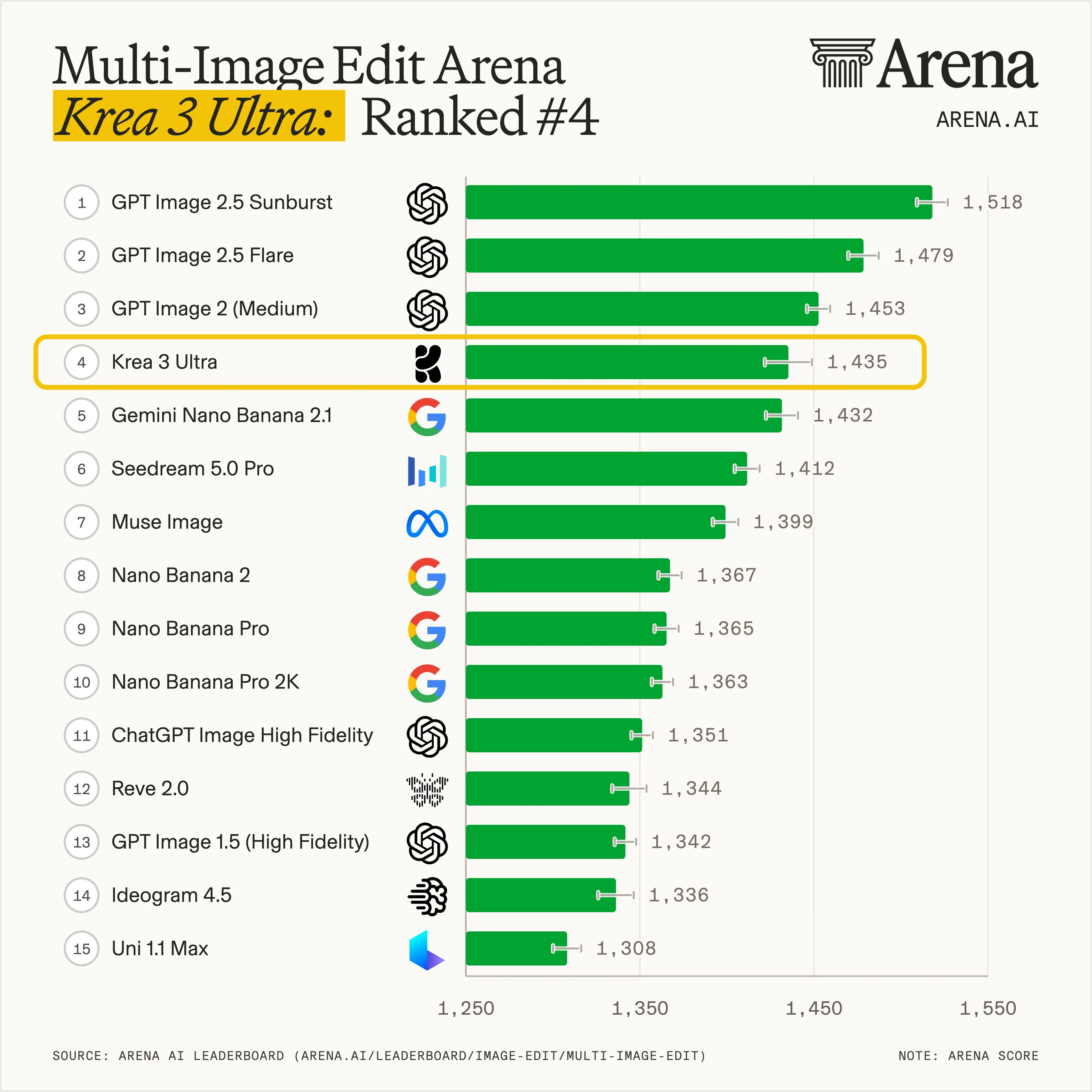
For relighting and reference-driven edits on the web, try Krea 3. It takes up to 8 reference images per edit and is 10× faster and 3× cheaper than GPT Image 2 and Nano Banana Pro, with fast, high, and ultra modes. See how it ranks in Krea 3 benchmarks.
Which sessions is this for?
- Pitch looks, when you need a lighting and palette reference before the grade exists.
- Missing pictures: establishing shots, inserts, and plates the edit doesn’t have.
- VFX work: background plates and environments for a composite.
You still finish in Resolve. Krea gives you references and generated media; the color page stays yours.
Yes. Krea for DaVinci Resolve handles look development, plates, inserts, and visual exploration inside your Resolve project. It runs on macOS 12 or later in DaVinci Resolve Studio. Windows support is coming.
No. The plugin opens from Workspace → Workflow Integrations, which ships only with DaVinci Resolve Studio.
Not yet. The plugin runs on macOS 12 or later today, and Windows support is coming.
Download the macOS installer from the DaVinci Resolve plugin page, run it, restart DaVinci Resolve Studio, and go to Workspace → Workflow Integrations → Krea. Then sign in with your Krea account.
No. Krea complements Resolve's editing, compositing, and grading tools. You generate lighting, palette, and mood references, then build the grade in Resolve.
Yes. Generation runs on Krea's servers, so you need to be online and signed in to your Krea account.
Yes. Krea Realtime powers the live preview, so you can test visual treatments while you shape the direction.
Yes. Krea's free plan includes 100 compute units a day, with no credit card required. You still need DaVinci Resolve Studio. Compare plans on Krea pricing.
Get Krea for DaVinci Resolve
For DaVinci Resolve Studio on macOS 12 or later. Windows support is coming.
Get the plugin