ROS 2 is built for distributed systems, but its default networking model works best on a local network. Connecting a robot to a remote operator, cloud service, or another robot on a different network often means teams have to build and maintain their own transport layer around the ROS graph.
Today, we're releasing LiveKit Portal for ROS 2. It's a standalone ROS 2 node that connects a ROS graph to a LiveKit room. It gives ROS and non-ROS participants a common way to exchange topics, service calls, and video over WebRTC, using LiveKit's realtime network.
LiveKit Portal for ROS 2 lets you build remote robotics systems without exposing DDS across networks, changing the nodes that already run your robot, or building and maintaining your own transport layer.
Connect your ROS graphs to any LiveKit participantLink to this section
A ROS Portal node discovers configured topics in the local ROS graph and publishes them as LiveKit tracks. Once published, another ROS Portal node can subscribe and republish those tracks into its own graph. And, for instances where robotics systems are communicating with non-ROS clients, web applications, cloud services, and other LiveKit clients can consume the same data without running ROS.
ROS Portal supports four main data paths:
- ROS topics. Forward topics in either direction through LiveKit DataTracks. ROS Portal discovers message types at runtime and advertises a schema with each track.
- ROS services. Route configured service calls to a specific LiveKit participant through LiveKit RPC.
- ROS images. Publish sensor_msgs/msg/Image or sensor_msgs/msg/CompressedImage topics as LiveKit VideoTracks with configurable codec and bitrate options.
- Video Sources. Bypass ROS and publish video directly as LiveKit VideoTracks.
ROS Portal stores each topic's message schema with its own DataTrack, so every subscriber knows how to read the data:
- For ROS-to-ROS connections, messages stay in ROS's native CDR format, with no per-message conversion. Before forwarding a topic, ROS Portal checks that both graphs use the same message definition.
- For ROS-to-non-ROS connections, ROS Portal can encode a topic as JSON and publish a JSON Schema generated from the ROS message type, so a browser app or cloud service can read it without ROS tooling.
What you can build with ROS PortalLink to this section
With Portal, DDS remains inside each robot's local ROS network. LiveKit handles the wide-area connection between participants, including encryption, congestion control, and selective subscriptions. Each remote participant
This model supports several common use cases:
- Teleoperation. Stream video and sensor data to an operator interface, then send control topics back to the robot.
- Remote inference. Run compute-heavy ROS components or native LiveKit clients on remote machines.
- Fleet coordination. Exchange selected topics and service calls between robots without joining their DDS networks.
- Monitoring. Send diagnostics and state to browser dashboards or cloud services as schema-described JSON.
Control what crosses the networkLink to this section
ROS Portal uses a YAML configuration file to define which topics and services can cross the LiveKit connection. Topic rules support regular expressions, direction controls, rate limits, schema encoding, latched delivery, and video options.
The following configuration publishes test topics in both directions, limits an IMU stream, receives remote velocity commands, and publishes a stereo camera directly on a LiveKit VideoTrack:
Only forward the topics and directions that your application needs. This keeps unnecessary traffic off constrained robot links and limits the remote surface of the ROS graph.
Demo: offload SLAM to a remote GPULink to this section
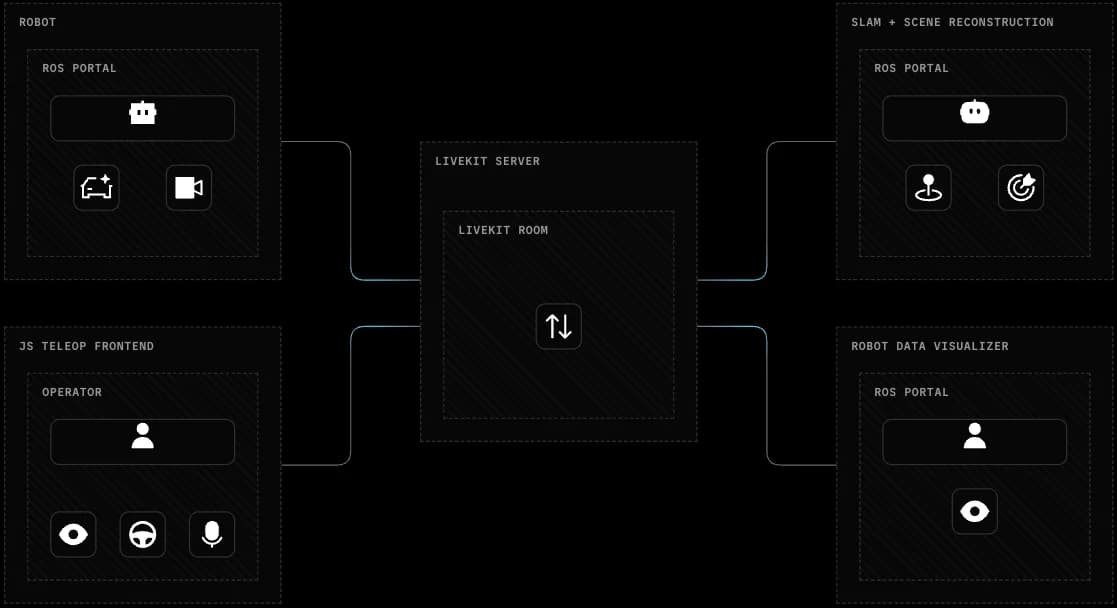
This demo brings three use cases together: teleoperation, remote inference, and monitoring. A rover streams its stereo camera through LiveKit, and an operator who doesn't run ROS drives it around a scene. A ROS participant with a desktop GPU performs SLAM and dense scene reconstruction. Finally, the robot's pose and a growing 3D map are sent to the LiveKit room and visualized by another ROS participant.
The rover is a Waveshare Cobra Flex with a Jetson Orin Nano and a relatively cheap USB stereo camera. The Jetson runs the drive stack, but it doesn't have the GPU headroom for learned depth estimation. A desktop with an NVIDIA RTX 5090 does that work instead. Nor does the edge device inherently enable remote viewing or control. The machines don't share a local network or a DDS domain.
The demo has four LiveKit participants:
- Robot. The cobra_flex_ros Docker Compose stack runs the rover drivers and ROS Portal. ROS Portal publishes the stereo camera as a LiveKit VideoTrack and republishes incoming velocity commands as ROS cmd_vel topics.
- Operator. A browser app built with the LiveKit JS SDK, teleop, shows the camera feed and sends joystick and keyboard commands. It doesn't run ROS.
- SLAM host. The remote_ros_slam Docker Compose stack runs ROS Portal, RTAB-Map stereo SLAM, and ScaRF-SLAM scene reconstruction on the desktop.
- Visualizer. A Mac runs ROS Portal and Foxglove Bridge. ROS Portal republishes the pose and map topics into the Mac's local ROS graph, and Foxglove renders them.
How the SLAM host builds the 3D mapLink to this section
Each camera frame holds the left and right images side by side, so both eyes share one timestamp. ROS Portal on the SLAM host receives the VideoTrack and republishes it as a ROS image topic. The SLAM nodes read that topic like any local camera.
The rover has no IMU, so RTAB-Map computes poses from stereo odometry and loop closure. ScaRF-SLAM takes RTAB-Map's keyframes, estimates dense depth on the GPU, and adds to the map in batches while the rover drives. The map trails the rover by a few seconds.
The SLAM host's ROS Portal configuration takes the camera in and sends only the results out:
The SLAM host doesn't publish video. Participants that want the camera view subscribe to the robot's stereo_camera track directly through LiveKit, which leaves the SLAM host's uplink for map data.
The full ScaRF-SLAM map grows to several megabytes per message, so it stays in the SLAM host's local graph. The host instead sends voxelized, compressed chunks of at most 32 KB, each on its own topic. The /scarf_slam/submaps/.* rule forwards new chunk topics as they appear. Foxglove keeps the latest message on each topic, so the chunks together render the whole map.
The demo in three views. Top left: the teleoperator's view in the browser, from a participant that doesn't run ROS. Bottom left: a ROS participant's Foxglove view of the realtime video. Right: Foxglove's view of the scene reconstruction.
None of the SLAM nodes know about LiveKit. They read and write ordinary ROS topics, and the ROS Portal configuration decides what crosses the network. You can use the same pattern for other heavy components, such as perception models, planners, or policy inference.
Try ROS Portal locally with DockerLink to this section
ROS Portal is available as Docker images and Debian packages for supported ROS 2 distributions and architectures. You can connect it to LiveKit Cloud or a self-hosted LiveKit server.
For a local setup, start a LiveKit server with participant data blobs enabled:
Then create a token for the ROS Portal participant:
Create /tmp/all_topics.yaml for a quick local test:
Run the container for your ROS distribution:
The current release supports ROS 2 Humble, Jazzy, Kilted, and Lyrical.
Next stepsLink to this section
The repository includes installation guides, a complete configuration reference, Docker instructions, and a Turtlesim tutorial for connecting two ROS graphs.