Agent Skills for Couchbase Mobile
Enterprise AI is moving to the edge. Generative AI applications that reason about customer context, supply chains, or field operations need access to data where it lives: on devices, in stores, on vehicles, offline. But building always-on mobile and edge apps still demands specialized expertise most teams don’t have. Engineers piece together local databases, sync infrastructure, access control, and native platform code from different vendors, each with its own constraints and learning curve. This slows shipping and creates operational risk.
Today, we’re launching Agent Skills for Couchbase Mobile. They bring Couchbase Mobile directly into your AI development workflow. Describe your app in plain language, and the skills configure your cloud backend, generate native iOS or Android code, and set up bidirectional sync in minutes. You get a working app, without being a mobile infrastructure expert.
What is Couchbase Mobile
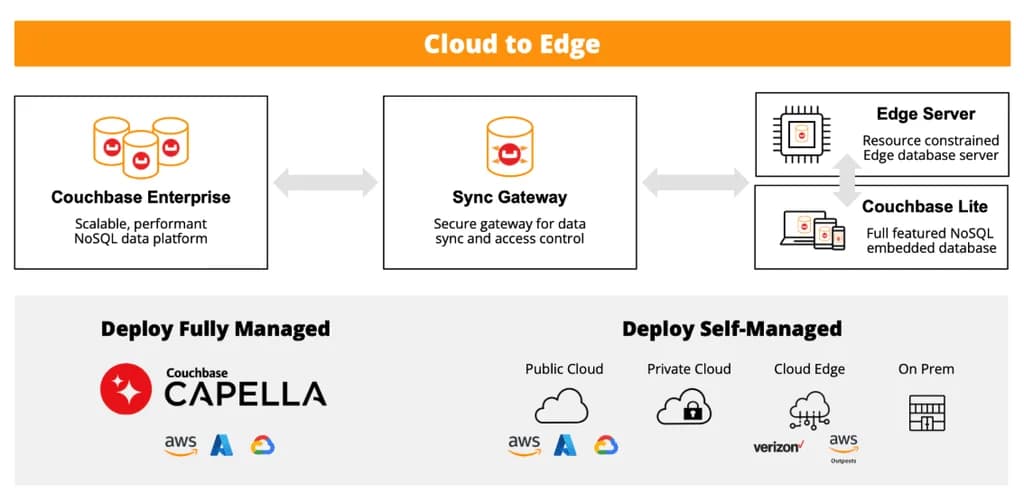
Couchbase Mobile extends our operational data platform from the cloud all the way to edge locations and mobile devices—whether fully managed on Capella or self-hosted.
The complete stack brings together Couchbase Server (our distributed, highly scalable, multi-modal database platform), Sync Gateway (for secure data sync and access control), Couchbase Lite (an embedded NoSQL database for mobile, desktop, web and custom hardware), and Edge Server (database built for resource-constrained edge environments). Your apps run reliably even without a network connection, then sync changes back to the cloud when online. Delta sync saves bandwidth by transferring only modified fields, while peer-to-peer sync lets devices talk directly to each other without internet access. Built-in features like SQL queries, full-text search, and vector search bring local semantic search and RAG right to the edge device. Since it’s a converged platform, you don’t have to piece together cloud databases, local storage, and sync tools from different vendors.
This same stack powers PepsiCo’s always-on order-to-cash operation across 25,000 field users and 350,000 merchants. It digitizes pre-flight operations for Emirates, delivering personalized experiences to 2 million annual cruise passengers on Princess Cruise Lines, supports 2.3 million mobile users across Maccabi Healthcare’s patient and clinician applications, and powers field maintenance for PG&E that must always work with or without a network connection. Now, Agent Skills bring that same capability to your workflow with a simple prompt.
Why developers need this
Building always-on mobile apps requires expertise across multiple systems: local databases, cloud sync, access control, and native platform code. Most mobile dev teams lack the full stack experience, which slows onboarding and development – often requiring several iterations to get to the first working prototype. Agent Skills encapsulate Couchbase’s approach to each layer, so developers can start with functional code rather than empty projects.
Developers are increasingly using agentic coding tools, describing what they need and getting working code back. We created Agent Skills to bring Couchbase Mobile directly into that workflow.
An Agent Skill is a modular set of instructions, reference docs, and scripts that your AI assistant loads when tackling a specific task—turning a general AI into a domain specialist. The skills encapsulate how our own team builds apps:
• Couchbase Mobile best practices: Handles data modeling (scopes, collections, channels), access-control patterns, Capella backend setup, and SDK versioning automatically based on your prompt.
• Full-stack setup: Goes beyond client code to provision and configure the backend, validating sync end to end before handing off the app project.
• Tailored to your app: Builds around your specific domain and business rules rather than generating generic boilerplate.
• Modular architecture: A core recipe orchestrates specialized skills, making it easy to layer on capabilities like peer-to-peer sync, Edge Server, or vector search in future.
You get to see Couchbase Mobile working inside your application right away, giving you a functional codebase to explore and adapt at your own pace.
How Agent Skills work
A central recipe coordinates the build and calls specialized skills as needed. You interact with the primary prompt. The skills handle the following functions:
• Concepts and data modeling: scopes, collections, document structure, and the access pattern that fits your app, such as Admin-Assigns (a manager assigns records to users), Shared Read-Only (reference data for everyone) or Team/Group (shared data within a team).
• Access control: Writes the javascript function that enforces read/access logic by routing documents to channels and granting users and roles access to them.
• Provisioning: Sets up the free-tier Capella backend (in an idempotent fashion), compete with project, cluster, bucket, scopes and collections, App Service, and App Endpoint), creates the app’s users and roles, and provides option to tear it all down when you’re done
• Client build: Generates the iOS (Swift) or Android (Kotlin) project.
In a single session
1. Answer a few prompts: Specify your platform, application domain, and access pattern.
2. Automated build: The assistant models data, provisions the backend, configures access rules, generates and tests the app code, populates with sample data, and verifies sync.
3. Test live sync: Launch the app on two simulators under different accounts to see updates propagate in real time. Disconnect the network to test offline support, then watch data catch up upon reconnecting.
What you get
You get fully custom code, not a canned demo:
• A provisioning script you can rerun, plus a matching teardown script.
• The access-control logic defining user permissions.
• A ready-to-build native Xcode or Android Studio project with Couchbase Lite as the local database.
While the UI remains intentionally straightforward, the underlying architecture is something that you can adapt for a production-ready app
Bring any domain
These skills adapt to any industry. Whether you’re building a mobile app for field services, point of sale, airline operations, healthcare, or logistics, the underlying architecture stays consistent. A prompt can be as direct as:
Build a Couchbase Mobile app for iOS. It’s a field-service app: dispatchers create and assign work orders, and technicians see only the jobs assigned to them, even when they’re offline at a job site.
Your team gets functional software immediately and explores channels, delta sync, and security rules in real code. This is an ideal starting point for prototyping, while production considerations like scale, high availability, and backups can be addressed as you grow.
What comes next
Cloud-to-edge sync is just our initial recipe. Thanks to our modular setup, every new capability seamlessly integrates into the platform. Coming soon:
• Peer-to-peer sync: Direct device-to-device communication over local networks.
• Edge Server integration: Local sync hardware for stores, plants, or vessels.
• On-device vector search: Offline semantic search, RAG, and agentic AI on Couchbase Lite.
• Expanded platform support: Expanding beyond iOS and Android.
Let us know which features matter most to you to help guide our roadmap.
Get started
1. Sign up for a free Capella account (no credit card required)
2. Install the skills in Claude (or your favorite AI Coding Agent) by following the setup steps in our . You will be guided on the prerequisites for the environment setup (such as version of Android Studio)
3. Ask your assistant: “I want to build a Couchbase Mobile app.”
Give it a try and share what you build! If you run into issues or have feature requests, feel free to open an issue on the