Picture two shoppers. One asks ChatGPT, “Are Nikes good shoes for marathon runners?” The other asks, “What’s the best running shoe?” Both want top-notch athletic shoes. Only one specifically wants to know about Nikes. That’s the idea behind branded vs. unbranded queries in AI search.
But why does this small difference matter for your brand? A branded query comes from someone who already knows you. They’re checking you out, comparing you with a rival, or even confirming a choice. AI’s answer can shape how someone sees you right before they decide.
An unbranded query comes from someone who’s still shopping. They haven’t picked a brand yet, so if the AI names you, you’re in the running. But if it doesn’t, you may never get a shot. In AI search, unbranded queries are where new buyers meet you, or don’t if you don’t play your cards right.
Each type reaches a different audience and tells you something different about your performance. Optimize for and track only one, and you reach half the audience and get half the story.
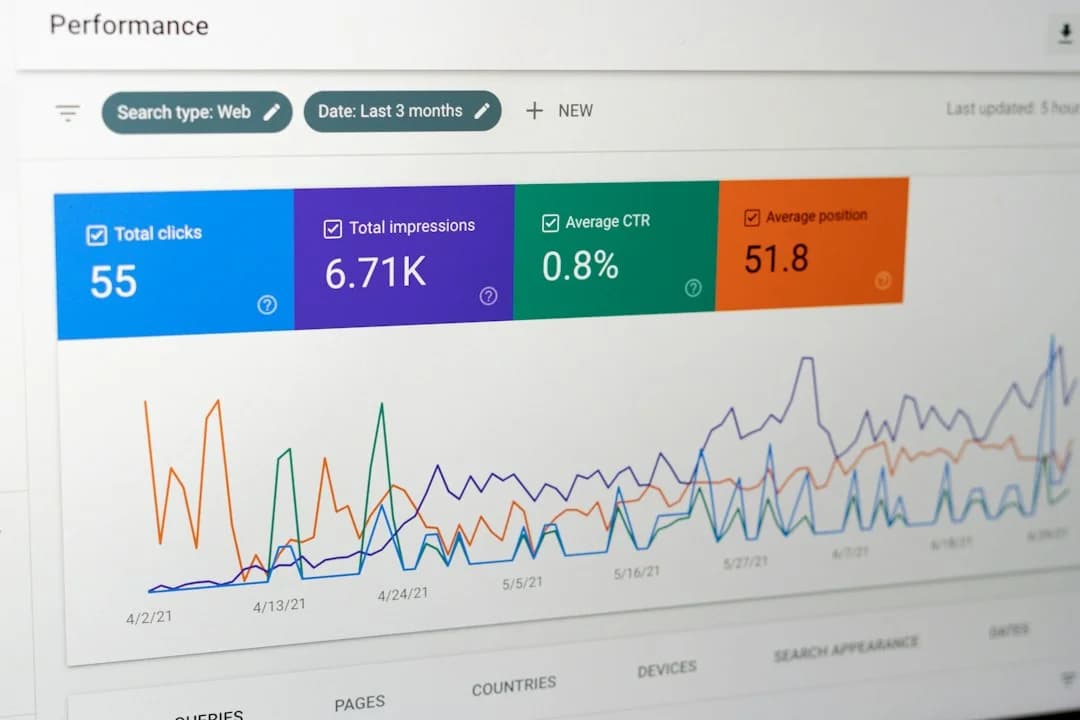
Don’t believe me? In November 2025, Google added a branded queries filter to Search Console that automatically separates branded and unbranded search queries and keywords. AI search needs the same split. It also needs a plan to track both.
In this guide, you’ll learn how to:
- Tell branded and unbranded prompts apart.
- Run a simple tracking routine each week.
- Read your results without fooling yourself.
Let’s start with the basics.
Table of Contents
- What are branded vs. unbranded queries in AI search?
- Why Branded vs. Unbranded Queries Change How You Measure AEO
- How to Run Prompt Tracking & Measure for Branded vs. Unbranded Queries
- How to Interpret Branded vs. Unbranded Results and Share of Visibility
- How HubSpot AEO Scales Prompt Tracking for Branded vs. Unbranded Queries
- Frequently Asked Questions About Branded vs. Unbranded Queries
- Keep track of both shoppers and queries.
A branded query names a brand. That can be your company name, a close variation, a common misspelling, or one of your product names. For example, “Are Nikes good shoes for marathon runners?” is a branded query.
So is “Are Air Force 1s good running shoes?” as they include a Nike product. Branded queries are valuable because they indicate that users are aware of your brand and are using AI to research it specifically.
An unbranded query, on the other hand, names no brand. It describes a category, a problem, or a use case. “What’s the best shoe for marathon runners?” is unbranded. Unbranded queries are valuable in their own right, as appearing in them can expose you to a new audience of potential customers.
These types of queries aren’t new to AI or answer engines. Branded search has always meant people looking for you by name. Google even built the idea into Search Console, where a filter now sorts the two for you.
Queries vs. prompts: What’s the difference?
You’ll notice two words throughout this guide: queries and prompts. They sound alike, but they’re not quite the same.
In traditional search, people type short queries, like “best running shoes” or “Nike shoes.” In AI search, they write longer, chattier prompts, like “Which brand makes the best shoes for running a marathon?”
Here’s how we’ll use them. “Query” is the general idea. “Prompt” is the exact question you track in an answer engine like ChatGPT, Gemini, or Perplexity.
There are also three types of unbranded prompts.
Three Kinds of Unbranded Prompts
A branded prompt is easy to spot. It names a brand. Unbranded prompts take a little more care, because they come in three flavors. Each one matches a different moment in the buying process. The table below puts them next to a branded prompt so you can see the contrast.
Brand-named
“Is HubSpot good for small business email marketing?”
Yes
Category
“What are the best email marketing tools for small businesses?”
Problem
“How do I get more people to open my emails?”
Solution or use case
“Which tools can automate a welcome email series?”
Pro tip: Watch out for prompts that name only a competitor, like “Mailchimp alternatives.” They’re not unbranded, because they name a brand. They’re not yours either. Give them their own label so they don’t skew your numbers later.
If you can sort a prompt into one of these four rows in five seconds, you’re ready for the rest of this guide.
Note: One more bit of vocabulary. We use “AI search” and answer engine optimization (AEO) to mean the same thing as you adapt to this new era of search. And the goal with both is to show up inside AI-written answers.
So, why does this sorting matter so much? Because branded and unbranded prompts behave very differently in AI answers. Mix them, and your results get misleading. Let’s look at why.
Why Branded vs. Unbranded Queries Change How You Measure AEO
Branded and unbranded prompts measure two different aspects of your AEO.
- They answer different questions. Branded prompts show how AI describes you and reveal user intent, while unbranded prompts show whether AI brings you up at all.
- They produce very different results. A brand name in the prompt makes a mention far more likely. Without one, you have to earn it.
They also need different fixes. A weak branded result usually points to messaging or facts. A weak, unbranded result usually indicates how much the rest of the web talks about you. Because of this, branded and unbranded prompts also require different measurement. This is where many teams go wrong.
The Blended-Score Trap
The most common mistake teams make when measuring branded and unbranded queries in AEO is combining both types into a single score. Combining makes your AI visibility look better than it really is, leading to skewed strategy and missed goals.
A branded prompt names you, so the answer almost always mentions you. An unbranded prompt doesn’t, so the engine has to decide whether you belong in the answer. If it does, that’s discovery — the part of AI search that brings in new buyers.
If you combine your branded and unbranded scores, you can end up thinking more new people are discovering your brand than actually are.
Think of a restaurant to illustrate. Regulars walk in and ask what your specials are. New diners ask, “Where should we eat?” If you count both groups in one number, you can’t tell whether new customers are finding you or if regulars are coming in more frequently. AI answers work the same way.
Here’s how that can look with numbers. Say you track 500 answers.
Branded
100
90%
Unbranded
400
20%
Blended
500
170
34%
The blended 34% visibility looks fine, but separately, you see buyers who don’t know you only 20% of the time. Now add 50 more branded prompts. Your blended score climbs. Your discovery doesn’t move at all.
So what should you do instead? To avoid the blended trap, the fix is simple: report the two groups separately, then read them side by side.
It all starts with prompt tracking.
How to Run Prompt Tracking & Measure for Branded vs. Unbranded Queries
So far, we’ve covered what to compare: branded and unbranded results, kept apart. But a score has to come from somewhere. That’s where prompt tracking comes in.
Tracking works best as a routine. We recommend weekly, as AI answers are probabilistic. Ask the same question twice, and you may get two different answers.
SparkToro and Gumshoe.ai tested this and found there was less than a 1-in-100 chance of getting the same list of brands twice on ChatGPT, while getting the same list in the same order was closer to 1-in-1,000.
HubSpot’s own guidance says the same. HubSpot AEO runs tracked prompts daily, and because responses change, you should review multiple days or weeks before judging a trend. Also expect gaps. An engine may not return a usable answer for every prompt on every day.
All that said, think of tracking as two layers: the tool runs prompts daily, and you review the results weekly.
Step-by-Step: Running a Weekly Prompt Tracking Cadence
First, set up your tracking.
- Build and deduplicate your library. Merge prompts that ask the same thing in different words.
- Label every prompt. Record its status (active, paused, or retired), buyer stage, branded or unbranded, and whether it names a competitor.
- Assign an ICP and geography. Each prompt should point to one buyer and one market.
- Start tracking. Let at least a couple of weeks of data build up before you draw conclusions.
Next, establish your weekly tracking cadence.
- Check for gaps. Did any prompts or engines come back empty? Note them so they don’t skew your rates.
- Pull your two visibility rates. Read your results in two separate piles every week. Branded results tell you about positioning. Unbranded results tell you about discovery.
To get your visibility rate, divide the answers that mention you by all the answers in that group.
Visibility Rate = mentions of your brand / total number of answers tracked
In our earlier example, that’s 90/100 = 90% for branded and 80/400 = 20% for unbranded. Compare these rates with the last four weeks, not yesterday.
How to Interpret Branded vs. Unbranded Results and Share of Visibility
With your numbers recorded, it’s time to understand what those numbers are telling you and turn their insights into actionable takeaways.
First, let’s go through some core terms and concepts as defined by HubSpot AEO.
- Brand Visibility: How often your brand is mentioned in answers to the prompts you track. If you’re named in 70 of 100 answers, that’s 70%.
- Prompt coverage: The share of tracked prompts where your brand appears at least once.
- Competitor mentions and share of voice: Your mentions divided by all brand mentions, yours and your rivals’, across the same prompts.
- Citations: The pages and domains engines point to. A source can be cited without naming you, so citations and mentions are separate.
These four numbers will show up in almost every report you write. The trick is comparing them fairly over time.
Raw Counts vs. Comparable Rates
A raw count is a number with no context. “We appeared in 12 prompts” sounds fine. But 12 out of 15 is great, and 12 out of 60 is not. A comparable rate always has a denominator. Use “12 of 60 prompts (20%).” Then you can compare this month with last month, even if your library grew.
Also, don’t fixate on where you appear in a list. The SparkToro study we covered earlier found that order was far less stable than the frequency with which a brand showed up.
Unbranded vs. Branded Ratio
Now let’s put it all together. The table below shows what each side of your data is really telling you.
Question it answers
How does AI describe us when someone asks about us?
Does AI bring us up when no one names us?
Metrics to watch
Brand Visibility, sentiment, competitor mentions
Brand Visibility, prompt coverage, share of voice, citations
A low result means
Weak positioning, or AI has facts wrong
Weak discovery. Rivals own the category.
Where to look next
The answers themselves and the sources behind them
Which third-party sites and content types engines cite
Compare the two types with the branded-to-unbranded ratio.
Ratio = branded visibility rate / unbranded visibility rate
In our example, that’s 90/20 or 4.5 to 1. A high ratio means people find you mostly after they already know you. A falling ratio means discovery is improving.
If someone asks for one headline number, lead with the unbranded rate. It’s the harder one to move, and the better sign that new buyers are finding you. For our example, the blended 34% says, “We’re doing fine.” The split says, “People who know us find us. Strangers find us 2 times in 10.” That second version shows you where to focus.
Here’s a real example from our own work. HubSpot’s team found its awareness-stage visibility was weak. So it launched an FAQ glossary of top-of-funnel terms. When the glossary was cited, brand visibility for awareness-stage prompts rose 35 percentage points. That’s HubSpot’s own result, not a promise. But it shows how unbranded gaps point to specific content to build.
Findings like this only help if they reach the right people in a clear format. That’s what the checklist below is for.
Reporting Checklist: Branded-to-Unbranded Ratio
When analyzing your results every week, do the following:
- Read a sample of answers. Open five to ten captured answers. Who gets named? How are you described? Inspect whether AI describes you accurately and favorably.
- Inspect the citations. Which sites do engines lean on? Do you see third-party pages, such as reviews or listicles? Inspect whether AI brings you up when no one names you, and which sources it relies on.
- Check competitors. Note who shows up where you don’t.
- Record decisions. Write down what you’ll change, who owns it, and when you’ll look again.
Keep your labels in a simple tracking sheet. In HubSpot AEO, you can use prompt groups to organize prompts by topic or brand, and filters to slice the results.
Pro tip: Keep a short “what we changed” log next to your weekly numbers. When visibility moves, you’ll know what to credit.
Use this before you share any report:
- State the date range, engines, and number of answers behind each rate.
- Name the denominator for every percentage (answers or prompts).
- Report branded and unbranded rates separately.
- Show the branded-to-unbranded ratio and its trend over four or more weeks.
- Flag any change to the prompt library since the last report.
- Show competitor share of voice for unbranded prompts.
- List top cited domains and mark which are third-party.
- Note the limits: answers vary, and some runs come back empty.
- End with one decision or action per finding.
How HubSpot AEO Scales Prompt Tracking for Branded vs. Unbranded Queries
A spreadsheet works for 20 prompts. It gets painful when engines return hundreds of answers a month. This is where having an AEO tool comes in handy.
HubSpot AEO tracks the prompts you choose across ChatGPT, Gemini, and Perplexity.
Here’s how it lines up with the workflow in this guide:
Build the library
Suggests prompts from the products and ICPs you enter. You can edit them, add your own, or generate another batch with AI.
Organize prompts
Uses prompt groups to organize by topic or brand. Filters let you slice results by answer engine, buyer’s journey phase, and product or service relevance.
Run prompts
Runs your tracked prompts daily across the supported answer engines.
Review answers
Shows the exact response each engine returned for each prompt.
Measure visibility
Reports Brand Visibility, prompt coverage, and sentiment over time.
Compare competitors
Shows competitor mentions and share of voice for the same prompts.
Study citations
Breaks citations out by top domains, channel, and content type.
Decide what to do
Turns citation patterns into prioritized recommendations.
All of this comes from HubSpot’s own setup and analysis documentation and product page.
In short, HubSpot AEO handles your routine tasks like running daily prompts. That leaves you free to focus on the decisions: which prompts to add, which gaps to close, and what to report.
What we like: You can see the score and the answer behind it, side by side. That makes it easy to double-check a number before you share it.
Pro tip: Branded vs. unbranded isn’t a built-in label in the tool. Put it in your prompt-naming convention and use prompt groups to keep the two sets apart. Then pull your two rates and compare them yourself.
If you use Marketing Hub Professional or Enterprise, you also get CRM-based prompt suggestions, so your starter list reflects your real customers. HubSpot AEO is still in beta, so check the knowledge base for current features and limits.
Ready to see where you stand? Start tracking your branded and unbranded prompts with the HubSpot AEO tool.
Frequently Asked Questions About Branded vs. Unbranded Queries
Still have questions? Here are the ones teams ask most when they start tracking.
How many prompts do I need per buyer-journey stage?
There’s no official number. Start with a handful per stage, enough to see a pattern but few enough to review by hand. Tool limits shape this too. , and Marketing Hub Enterprise allows 50. With 25, you could assign about six to each of the four stages, then split each stage between branded and unbranded.
How often should I refresh my prompt library?
Review results weekly. QA the library monthly. Refresh it each quarter, or sooner if your products, audiences, or competitors change. For ideas on what’s shifting, see our roundup of SEO and AI trends.
Should I include product names in unbranded prompts?
No. In this guide, a product name counts as a brand variation. If a prompt includes one, it’s branded. The same goes for competitor names. Keep unbranded prompts to category, problem, and use-case words only.
How do I handle geography or segment differences?
Write separate prompts for each market or segment, and label each one. Don’t blend them. A buyer in Toronto and a buyer in Texas may get different answers. HubSpot AEO builds prompts from the product and ICP you select, so set those first. Then compare each segment only against its own history.
What if AI engines refuse to answer certain prompts?
Log it as a gap, not a zero. Runs repeat daily, so check whether the problem persists across several days. If an engine keeps refusing, the prompt may be too sensitive or too vague. Rewrite it neutrally, or retire it. In your report, count refused or empty runs separately, and say whether they’re excluded from the denominator. For more on how answers behave in practice, see our AI search experiments.
Keep track of both shoppers and queries.
Let’s jump back to our two shoppers. One asked about Nikes. The other asked for the best running shoe. But both were ready to buy. That’s why your business needs to stay on top of both branded and unbranded queries in AI search.
Now you have what you need to track both. You can tell the two prompt types apart. You know why blending them into one score hides your gaps. And you have a simple routine to follow. So don’t wait.
Start small. Pick a handful of prompts of each type, record your two rates, and watch the branded-to-unbranded ratio over time. Remember that AI answers vary, so look for trends across weeks rather than a single day.
Your regulars already know where to find you. The next customer is still asking questions. Make sure the answer includes you. HubSpot AEO is here to help keep you on track.