Takeaways
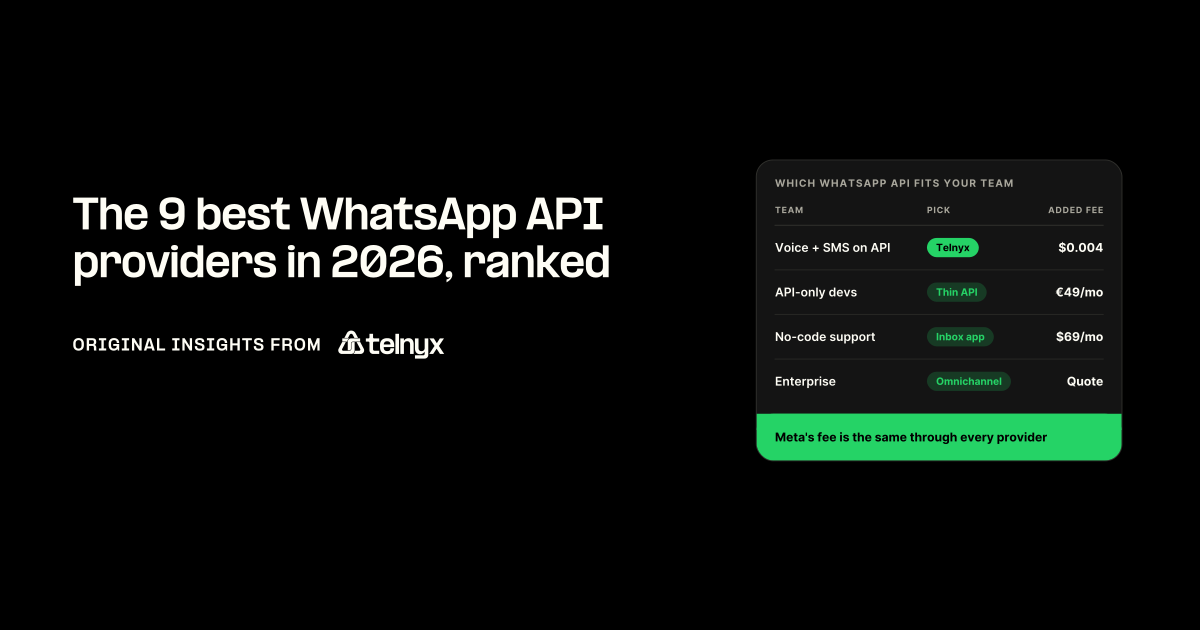
The best WhatsApp API provider depends on who builds and runs it: Telnyx if your voice or SMS already runs on an API (WhatsApp messages and calls on the same number, from $0.004 per message, no monthly subscription), 360dialog for the thinnest API-only layer, respond.io or Wati for support teams that want a no-code inbox, and Infobip for enterprise omnichannel.
- Meta charges the same per-message fee through every provider, so the only price that differs between them is the fee the provider adds on top.
- Shortlist official Meta Business Solution Providers only, because unofficial bulk senders that run on WhatsApp Web get numbers banned.
The best WhatsApp API providers at a glance
Telnyx is the best WhatsApp API provider because its WhatsApp Business API puts WhatsApp messaging and calls on the number, connection and invoice a team already uses for voice and SMS, from $0.004 per message, no monthly subscription. The right pick changes with the team: no-code support teams to respond.io or Wati, API-only buyers to 360dialog, enterprises to Infobip.
Provider fees from each vendor's pricing page, 6 October 2026.
- Telnyx
- Twilio
- Infobip
- 360dialog
- Gupshup
- Bird
- respond.io
- Wati
- AiSensy and Interakt
How we ranked these WhatsApp API providers
All nine are official Meta Business Solution Providers, ranked on four criteria, in order: WhatsApp messaging and calling alongside existing voice and SMS on one number, a published provider fee on top of Meta's, developer access through an API, software development kits (SDKs) and self-serve onboarding, and support for teams without developers. Meta's per-message fee is left out of every price because it is identical through every provider, per Meta's WhatsApp pricing page.
Top 9 WhatsApp API providers reviewed
Each entry lists provider fee, WhatsApp calling, other channels and best fit, then what a team meets at signup, API connection and first send, with a source for each fact.
1. Telnyx for teams that already run voice or SMS on an API
Telnyx ranks first because WhatsApp calls and messages run on one Telnyx number alongside public switched telephone network (PSTN) calling and SMS, with a published starting price and no subscription.
Telnyx's WhatsApp page, October 2026.
- Provider fee: from $0.004 per message, $0.0025 per minute on business-initiated calls plus Meta's per-minute rate, no monthly subscription, Meta fees and platform cost on one invoice.
- WhatsApp calling: yes, inbound and outbound on the same number.
- Other channels: voice, SMS, MMS (picture messaging), RCS (Rich Communication Services), verification, numbers in 130+ countries.
- Best for: API teams already carrying voice or SMS.
Our take: Onboarding is Embedded Signup with your own Meta Business Manager, so admin access and a valid payment method come first (Embedded Signup docs). Calls run on the Voice API, Session Initiation Protocol (SIP) or TeXML (Telnyx's markup for call instructions) connection already in use, with no separate SIP or WebRTC (browser real-time communication) stack. An inbound call lands on a business SIP trunking connection picked from a dropdown, and an outbound call dials [email protected] (business calling docs). Meta caps calls at 2,000 recipients a day and blocks business-initiated calls to US, Canadian, Egyptian, Vietnamese or Nigerian numbers, on every provider. On a virtual number, verify by voice call, since Meta rates SMS one-time passcodes (OTPs) to voice over internet protocol (VoIP) numbers "Not Recommended" and voice OTP "Standard". Messaging is one endpoint, POST /v2/messages/whatsapp, with samples in Python, Node, Go, Java and Ruby (WhatsApp quickstart). An AI Assistant answers inbound WhatsApp voice calls, and Bring Your Own Number (BYON) keeps a number you already own.
Skip it if: you want a ready-made shared team inbox and chatbot builder without developers.
Start WhatsApp on Telnyx for free: toggle calling on and the calling connections are created automatically on your existing number.
2. Twilio for a broad developer ecosystem
Twilio ranks second for its broad body of SDKs and sample code around a WhatsApp API.
Twilio's WhatsApp page, October 2026.
- Provider fee: $0.005 per message in or out, pay as you go, no monthly fee (twilio.com/en-us/whatsapp/pricing).
- WhatsApp calling: yes, $0.005 per minute plus Meta's fee.
- Other channels: SMS, RCS, voice, SIP trunking, email, video, Verify.
- Best for: a broad developer ecosystem.
Our take: The sandbox reaches only people who sent the join code, expires three days after joining and sends at most one message every three seconds (Twilio sandbox docs). One Twilio account holds one WhatsApp Business Account (WABA), so several brands means several accounts (Twilio self sign-up docs). A non-Twilio number must receive Meta's verification code by SMS or voice, so interactive voice response (IVR) or outbound-only lines fail registration (same page). Telnyx vs Twilio compares the two voice APIs.
Skip it if: you run several brands and want them in one account.
3. Infobip for enterprise omnichannel rollouts
Infobip ranks third for rollouts where WhatsApp is one of a dozen channels on a custom plan.
Infobip's WhatsApp page, October 2026.
- Provider fee: no published WhatsApp rate. Infobip charges per message on custom plans set with sales (infobip.com/whatsapp-business/pricing).
- WhatsApp calling: yes, listed, no published call price.
- Other channels: SMS, email, Viber, voice, WebRTC, RCS, video.
- Best for: enterprise omnichannel rollouts.
Our take: The 60-day free trial messages one verified number only, and the shared test sender goes once the free messages run out (Infobip free trial docs). Every account calls the API on its own base URL, xxxxx.api.infobip.com (Infobip base URL docs). WhatsApp calling is an agent-desk feature inside Conversations: an approved call must be placed within 7 days and inbound calls need a waiting strategy (Infobip Conversations docs).
Skip it if: you want a price before you talk to sales.
4. 360dialog for the thinnest API-only layer
360dialog ranks fourth as the thinnest layer over Meta's Cloud API, a flat licence per number with no inbox.
360dialog's WhatsApp page, October 2026.
- Provider fee: EUR 49 per number per month (Regular), EUR 99 Premium, EUR 500 Scale, no per-message markup (360dialog.com/pricing).
- WhatsApp calling: yes per its docs (Cloud API Calling, your own SIP or WebRTC), not on the pricing page.
- Other channels: WhatsApp only.
- Best for: the thinnest API-only layer.
Our take: The sandbox credential comes from sending START to a WhatsApp number and allows 200 messages to one fixed recipient (360dialog sandbox docs). Every cost is per number, including the upgrade from 80 to 1,000 messages a second at EUR 249 per channel per month, offered only after 50,000 unique customers in 7 days (360dialog higher-throughput docs). Card payment of licence invoices adds a 4% fee (360dialog payments docs).
Skip it if: you need any channel besides WhatsApp, or your volume cannot cover a flat licence.
5. Gupshup for India and Southeast Asia
Gupshup ranks fifth as the regional specialist for India and Southeast Asia, with the lowest published per-message fee here.
Gupshup's WhatsApp page, October 2026.
- Provider fee: $0.001 per message, Meta fee billed at actuals, no monthly fee (Gupshup self-serve WhatsApp pricing).
- WhatsApp calling: yes, $0.0001 per second.
- Other channels: WhatsApp, Instagram, SMS, RCS.
- Best for: India and Southeast Asia.
Our take: The sandbox is paid: test sends are charged to your wallet and go out from a shared Indian number (Gupshup sandbox docs). Top-ups run from $10 to $10,000 and credits are non-refundable (Gupshup wallet docs). The send API is Gupshup's own form-encoded format with source, destination and src.name fields, not Meta Cloud API JSON, so Cloud API code does not port as-is (Gupshup session message reference).
Skip it if: your customers are mostly outside the region, or you have Cloud API code to keep.
6. Bird for pairing WhatsApp with email and SMS marketing
Bird ranks sixth for marketing teams that want WhatsApp beside email and SMS campaigns on one usage-based bill.
Bird's WhatsApp page, October 2026.
- Provider fee: $0.005 per US marketing message plus Meta fees, usage-based (bird.com/pricing).
- WhatsApp calling: yes, a product page, no published call price.
- Other channels: email, SMS, Apple Messages, voice, Verify.
- Best for: pairing WhatsApp with email and SMS marketing.
Our take: Bird-managed numbers can send Bird's catalog templates without your own WABA but cannot receive replies (Bird WhatsApp overview docs). A send with too little prepaid balance is accepted, then rejected when Bird tries to charge it, so an HTTP 202 (accepted) response does not mean delivered (Bird billing and usage docs). There is no batch endpoint, and the rate limit is shared across the organisation, so a second API credential adds no capacity (Bird rate limit docs).
Skip it if: you need two-way conversations on a Bird-managed number, or high-volume batch sending.
7. respond.io for a no-code omnichannel inbox
respond.io ranks seventh as the no-code inbox that pulls WhatsApp, Messenger, Instagram and TikTok into one agent view.
respond.io's WhatsApp page, October 2026.
- Provider fee: $79, $159 or $279 per month (Starter, Growth, Advanced, monthly billing), extra users $12 to $24 per month, no markup on WhatsApp fees (respond.io/pricing).
- WhatsApp calling: yes, user-initiated calls free, business call rates on request.
- Other channels: Messenger, Instagram, TikTok, email, VoIP calling.
- Best for: a no-code omnichannel inbox.
Our take: The Developer API is available only on Growth ($159 a month) and above (respond.io help centre, Developer API). WhatsApp calling is in beta and needs a 2,000 business-initiated conversation limit and a $10 minimum balance (respond.io help centre, WhatsApp Business Calling API). Since 3 February 2025 respond.io no longer connects Twilio, 360dialog, Bird or Vonage WhatsApp APIs, so it must be your provider as well as your inbox (respond.io blog, February 2025).
Skip it if: you have a WhatsApp API provider you want to keep, or need the API on Starter.
8. Wati for a fast WhatsApp-only setup
Wati ranks eighth for the quickest WhatsApp-only start, an inbox and broadcast tool on a monthly plan.
Wati's WhatsApp page, October 2026.
- Provider fee: $69, $149 or $349 per month (Growth, Pro, Business, monthly billing, US), extra users $24 to $69 per month, message charges extra (wati.io/pricing).
- WhatsApp calling: yes, WhatsApp Business Calling in its inbox.
- Other channels: Facebook, Instagram, TikTok.
- Best for: a fast WhatsApp-only setup.
Our take: The 7-day trial can only message your own number and cannot submit templates for approval (Wati support, "Explore Wati with a 7-day free trial"). API calls are capped at 10,000 a month on Growth, about 330 a day, with no rollover (Wati support, "Understanding Wati APIs and their usage limits"). sendTemplateMessage is throttled by plan: 30 per 10 seconds on Growth, 60 on Pro, 100 on Business (same article).
Skip it if: you plan to drive WhatsApp from your own systems rather than Wati's inbox.
9. AiSensy and Interakt for small sellers on a budget
AiSensy and Interakt share ninth as the budget tools for small sellers, with plans from free and from $55 a month.
AiSensy and Interakt's home pages, October 2026.
- Provider fee: AiSensy free plan, then INR 1,500 to 45,000 per month. Interakt $55 or $69 per month (Growth, Advanced, US page).
- WhatsApp calling: Interakt yes, on Advanced and customer relationship management (CRM) plans. AiSensy not stated.
- Other channels: AiSensy WhatsApp only. Interakt adds Instagram, RCS, voice.
- Best for: budget option for small sellers.
Our take: AiSensy's API cannot send a template on its own: every send names a campaign created in the dashboard and set Live (AiSensy API reference). AiSensy chatbots and automation stop unless the wallet holds at least INR 10 or $1, and "unlimited" agents are capped at 200 under fair use (aisensy.com/pricing). Interakt's Starter plan has no API access, Growth allows 300 requests a minute and Advanced 600, and WhatsApp calling needs Advanced or the Sales CRM add-on (Interakt resource centre).
Skip it if: you want to send from your own back end without first building a campaign in a dashboard.
Best WhatsApp API provider by use case and region
Three situations change the pick: notifications and one-time passcodes, low volume at a small business, and markets outside the US. Each opens with its pick from the ranking and what Telnyx offers there.
One Verify integration covers WhatsApp, SMS, RCS and voice, so users without WhatsApp still get their code.
Which WhatsApp API provider fits your team? Find the row that matches your developers, your current voice or SMS setup and whether you need an inbox.
Best WhatsApp API for customer notifications and OTPs
Pick: Telnyx. Notifications need no inbox, only a template sent from the system that already knows the order, so the pay-as-you-go provider that already holds your SMS number is the shortest path. Utility templates carry order confirmations, shipping updates and appointment reminders, and the customer sees your verified business name instead of an unknown number. Restaurants run bookings and order-ready pings on the same template path (WhatsApp for restaurants). Meta's WhatsApp messaging limits set how many unique recipients a number can message in 24 hours, so a new number starts in a low tier and grows with quality.
90%+ open rates on WhatsApp utility notifications, Telnyx's published figure for the channel. Source: Telnyx WhatsApp Business API page.
The order-tracking example below, in Python from the Telnyx code examples repository on GitHub and checked against the Telnyx SDK, sends a WhatsApp message on every status change and answers customer replies about the order with a model on Telnyx. These are the lines that pick the text and send it, with the imports, Flask app and environment variables they need. Install the dependencies with pip install flask requests and set TELNYX_API_KEY, WHATSAPP_NUMBER and MESSAGING_PROFILE_ID before running it.
Python
import osimport requestsfrom flask import Flask, jsonify, requestapp = Flask(__name__)TELNYX_API_KEY = os.environ["TELNYX_API_KEY"]WHATSAPP_NUMBER = os.environ["WHATSAPP_NUMBER"]MESSAGING_PROFILE_ID = os.environ["MESSAGING_PROFILE_ID"]orders = {} # order_id -> {"status": ..., "customer_phone": ...}def send_whatsapp(to, text): try: requests.post("https://api.telnyx.com/v2/messages", headers={"Authorization": f"Bearer {TELNYX_API_KEY}", "Content-Type": "application/json"}, json={"from": WHATSAPP_NUMBER, "to": to, "text": text, "messaging_profile_id": MESSAGING_PROFILE_ID, "type": "whatsapp"}, timeout=10) except requests.RequestException as e: app.logger.error("WhatsApp send failed: %s", e)@app.route("/orders/<order_id>/status", methods=["PUT"])def update_status(order_id): order = orders.get(order_id) if not order: return jsonify({"error": "Order not found"}), 404 data = request.get_json() new_status = data.get("status") tracking = data.get("tracking_number") order["status"] = new_status status_messages = { "shipped": f"Your order {order_id} has shipped! Tracking: {tracking or 'pending'}", "out_for_delivery": f"Your order {order_id} is out for delivery today!", "delivered": f"Your order {order_id} has been delivered. Thanks for shopping with us!", "delayed": f"Update on order {order_id}: there's a slight delay. New ETA will be shared soon.", } msg = status_messages.get(new_status, f"Order {order_id} update: {new_status}") send_whatsapp(order.get("customer_phone"), msg) return jsonify({"order_id": order_id, "status": new_status}), 200
One-time passcodes go out on authentication templates through the Telnyx Verify API, which sends a code over WhatsApp, the SMS API, RCS or voice from one integration, so a user without WhatsApp still has a channel for the code. The OTP example in the same Telnyx code examples repository shows the start and check calls.
Affordable WhatsApp API access for small businesses
Pick: Telnyx. Meta's fee is fixed, so "cheap" is decided by the provider fee, and at low volume the cheapest structure is pay-as-you-go with no subscription and no seats, from $0.004 per message. Meta's side helps too: the first 1,000 free-form service replies per business phone number each month cost nothing, then $0.0034 each in the US. A flat licence like 360dialog's pays off only once per-message fees would exceed it. A small e-commerce store in Hong Kong, or anywhere else, that already sends SMS order updates on Telnyx adds WhatsApp on the same number and invoice, and its e-commerce contact center stays on one bill. Teams that want a no-code budget tool instead have AiSensy and Interakt from the ranking.
Note: Provider fees only, Meta's fee excluded. 1,000 messages a month cost $4 on Telnyx and $5 on Twilio, against a flat EUR 49 a month on 360dialog's Regular plan. At 10,000 messages a month, $40 on Telnyx and $50 on Twilio against the same EUR 49.
Best provider for WhatsApp Business API in the US, APAC and the Gulf
Pick: Telnyx in the US and the Gulf, Gupshup as the Asia-Pacific (APAC) specialist. Meta prices every billed message by the recipient's country, and no provider changes that. What does change by region is whether the provider can supply or import a local number and where its support and template approvals are handled. Telnyx supplies local numbers in 130+ countries with telephony points of presence (POPs) worldwide, which is phone-number coverage rather than a WhatsApp country list, and Bring Your Own Number imports an existing WhatsApp number so one number carries WhatsApp, SMS and voice. In the EU, WhatsApp Business in Europe covers the region's consent and data rules. For Kuwait and the rest of the Gulf, the first check is a local or imported number.
Three questions settle a non-US market with any provider:
- Can you give me, or import, a local number in this country?
- Is WhatsApp calling live on that number?
- Are support and template approvals handled in my time zone?
How to choose the best provider to integrate WhatsApp Business API
With a shortlist from the ranking, three criteria decide which one to sign, and a short checklist covers the move from a current provider.
Meta's fee is the same with every provider; only the provider layer changes the bill.
The three criteria that decide your shortlist
- Official Meta access. Check the provider in the Meta partner directory. Red flags for an unofficial provider: it asks you to scan a QR code, promises unlimited sending for a flat fee, says Meta approval is unnecessary, or cannot say who handles template approvals. The free WhatsApp Business App, with 256 contacts per broadcast, is a phone app and offers no API.
- How the provider fee is built. The provider fee is the only comparable price, so ask for the rate card with Meta's fee separated and look for subscription, per-seat, per-number and onboarding fees and any markup. The full breakdown is in WhatsApp Business API cost. On Telnyx the layer is pay as you go, $0.0025 per minute on business-initiated calls, no monthly subscription, with Meta fees and platform cost on a single invoice and automatic volume discounts as volume grows.
- Whether WhatsApp messaging and calling share the number and connection you already run. Ask where a WhatsApp call lands. On Telnyx a WhatsApp-enabled number carries PSTN, SMS, WhatsApp messaging and WhatsApp calls, inbound WhatsApp calls route to the existing SIP, Voice API or TeXML connection, and calling connections are created automatically when calling is toggled on.
What to check before you switch providers
A switch means Meta business verification again under your own Business Manager, a number that is eligible to move, templates re-approved, automations rebuilt against the new API, and a test before cutover. On Telnyx, Embedded Signup from Mission Control handles verification and links the WhatsApp Business Account, Bring Your Own Number imports the existing WhatsApp number, and BYON numbers get the same inbound calling treatment as Telnyx-provisioned numbers.
Switching checklist for a WhatsApp API provider move
FAQ
API access is free through Meta's Cloud API, and Meta charges nothing for messages customers send you or calls they make to you. Most messages you send cost money: Meta bills every delivered template by category and recipient country, and since October 1, 2026 it also bills free-form service replies after the first 1,000 per business phone number each month ($0.0034 each in the US) and utility templates sent inside the 24-hour service window. That fee is the same through every provider. The provider adds its own fee on top; on Telnyx it starts at $0.004 per message with no monthly subscription, and a free signup lets you test before paying.
Yes, through an inbox product such as respond.io from $79 a month or Wati from $69 a month. On Telnyx, onboarding, template submission and the calling toggle run from Mission Control, but sending notifications from your own systems takes a developer.
Yes, where the provider supports WhatsApp Business Calling. On Telnyx, inbound WhatsApp calls route to your existing SIP, Voice API or TeXML connection and outbound calls dial a WhatsApp SIP domain, billed at $0.0025 per minute plus Meta's per-minute rate when your business places the call. Calls customers make to you are free from Meta, and Meta does not offer business-initiated calls to US or Canadian numbers. Meta blocks business-initiated calls to US and Canadian numbers on every provider.
Yes, if the number is eligible to move and the new provider imports it. Telnyx does this with Bring Your Own Number, and the imported number gets the same inbound calling treatment as a Telnyx-provisioned one. Templates need Meta approval again after the move.
No. The nine providers ranked here are all official Meta Business Solution Providers and appear in Meta's partner directory. Tools that run on WhatsApp Web, ask you to scan a QR code or promise unlimited sending for a flat fee are unofficial, and numbers used with them get banned.
Add WhatsApp to the number you already run
Create a free account, link your Meta Business Manager through Embedded Signup in Mission Control, and send your first WhatsApp template from the number that already carries your calls and texts.
Start building for free